
1. Ifihan
The Fender Mustang LTX100 is a 100-watt modeling combo amplifier designed for guitarists seeking versatile tone and performance. This ampAwọn ẹya lifier 25 amp models, 25 studio-quality effects, and 100 preset slots for extensive sound customization. It is equipped with a 12-inch Celestion G12FSD-100 speaker, an integrated color display with a chromatic tuner, Bluetooth audio streaming, and USB-C connectivity for recording and app control. This manual provides essential information for the proper setup, operation, and maintenance of your Mustang LTX100 amplifier.

Figure 1.1: Fender Mustang LTX100 Amplifier with included accessories.
2. Alaye Aabo
Please read and understand all safety instructions before operating your Fender Mustang LTX100 amplifier. Pa ìwé ìtọ́ni yìí mọ́ fún ìtọ́kasí ọjọ́ iwájú.
- IKILO: To reduce the risk of fire or electric shock, do not expose this appliance to rain or moisture. Do not remove the cover. Refer servicing to qualified personnel only.
- IKIRA: Lati dena ijaya ina, maṣe lo pulọọgi yii (polarized) pẹlu okun itẹsiwaju, apo, tabi iṣan miiran ayafi ti awọn abẹfẹlẹ ba le fi sii ni kikun lati yago fun ifihan abẹfẹlẹ.
- IKILO: Ọja yii ni awọn kemikali ti a mọ si Ipinle California lati fa akàn ati awọn abawọn ibimọ tabi ipalara ibisi miiran.
- Rii daju pe amplifier is connected to a grounded power outlet.
- Do not block ventilation openings. Maintain adequate space around the amplifier fun dara air sisan.
- Yago fun gbigbe awọn ampẹ̀rọ ìfọṣọ nitosi awọn orisun ooru gẹgẹbi awọn radiators, awọn iforukọsilẹ ooru, awọn stovu, tabi awọn ẹrọ miiran (pẹlu ampliifiers) ti o gbe ooru jade.
- Dabobo okun agbara lati ma rin lori tabi pin, ni pataki ni awọn pilogi, awọn ohun elo irọrun, ati aaye nibiti wọn ti jade kuro ninu ohun elo naa.
- Yọọ ohun elo yi nigba iji manamana tabi nigba lilo fun igba pipẹ.
3. Eto
3.1 Ṣiṣii ati Gbe
Fara yọ awọn amplifier and all accessories from the packaging. Inspect the unit for any signs of damage. Place the amplifier on a stable, level surface, ensuring adequate space for ventilation.
3.2 Asopọ agbara
- Rii daju pe ampswitch agbara lifier wa ni ipo PA.
- Connect the provided power cord to the INPUT POWER receptacle on the rear panel of the amplifier.
- Plug the other end of the power cord into a suitable grounded AC power outlet.
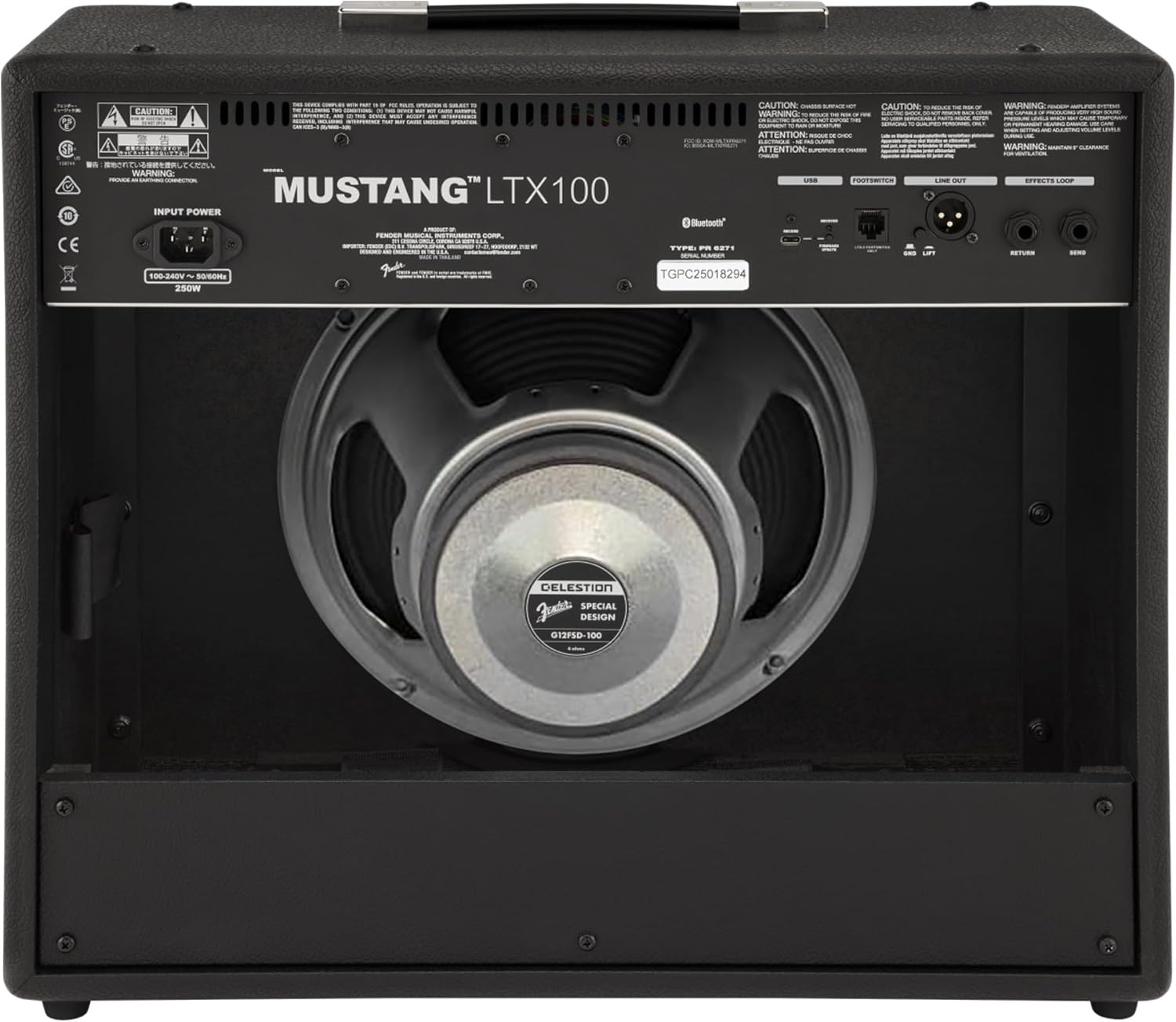
olusin 3.1: Ru Panel Awọn isopọ
3.3 Instrument and Accessory Connections
- Igbewọle Irinse: Connect your guitar using a standard 1/4-inch instrument cable to the INPUT jack on the front panel.
- Iṣawọle Iranlọwọ: For connecting external audio devices (e.g., MP3 player, phone), use a 3.5mm stereo cable to the AUX input on the front panel.
- Agbekọri Ijade: For silent practice, connect headphones to the HEADPHONE OUT jack on the rear panel.
- Laini XLR Jade: For connecting to a PA system or recording interface, use XLR cables to the LINE OUT jacks on the rear panel. A ground lift switch is provided to eliminate hum.
- Yipo Awọn ipa: External effects pedals can be connected via the SEND and RETURN jacks on the rear panel.
- USB-C: Connect to a computer for recording, firmware updates, and Fender Tone 3.0 app control.
4. Awọn ilana Iṣiṣẹ
4.1 Àwọn Ìṣàkóso Pánẹ́lì Ìwájúview

olusin 4.1: Iwaju Panel Iṣakoso
- Fi sii: Àpótí 1/4-inch fún sísopọ̀ gítà rẹ.
- AUX: Ìtẹ̀síwájú sítíréò 3.5mm fún àwọn ẹ̀rọ ohùn ìta.
- Anfani: Controls the input level and amount of overdrive/distortion for the selected amp awoṣe.
- IDAGBASOKE: Adjusts the output level of the selected amp awoṣe.
- TẸRẸ: Ṣe atunṣe idahun igbohunsafẹfẹ-giga.
- LARIN: Ó ń ṣe àtúnṣe ìdáhùn àárín-ìgbà.
- Mimọ: Ó ń ṣe àtúnṣe ìdáhùn ìgbohùn-ìgbó ...
- TITUNTO: Išakoso awọn ìwò o wu iwọn didun ti awọn amplifier.
- Ifihan: Color LCD screen for navigating menus, selecting amp models, effects, and viewing tuner.
- ENCODER KNOB: Used to scroll through menus and adjust parameters on the display. Press to select.
- Pada: Pada si akojọ aṣayan iṣaaju tabi iboju.
- FIPAMỌ: Stores current settings as a preset.
- Akojọ: Accesses the main menu for system settings, global parameters, and more.
- Fọwọ ba: Used for setting delay and modulation effect tempos. Hold to activate the chromatic tuner.
- TAN/PA: Power yipada fun awọn amplifier.
4.2 Agbara Lori ati Isẹ Ipilẹ
- Ensure all connections are secure and the MASTER volume is set to a low level.
- Press the ON/OFF switch to power on the amplifier. The display will illuminate.
- Yan ohun amp model and effect using the encoder knob and display.
- Adjust the GAIN, VOLUME, TREBLE, MIDDLE, and BASS knobs to shape your desired tone.
- Gradually increase the MASTER volume to achieve the desired listening level.
4.3 Lilo Amp Awọn awoṣe ati awọn ipa
The Mustang LTX100 offers 25 distinct amp models and 25 studio-quality effects. Use the encoder knob to browse through the available options on the display. Once an amp model or effect is selected, its parameters can be adjusted using the encoder knob or the dedicated tone knobs (Treble, Middle, Bass) if applicable.
Awọn tito tẹlẹ 4.4
Awọn amplifier comes with 70 factory presets and allows for 100 user-defined presets. To save your custom settings:
- Dial in your desired amp model, effects, and tone settings.
- Tẹ bọtini Fipamọ.
- Use the encoder knob to select a user preset slot.
- Press the encoder knob to confirm and save your preset.
4.5 Bluetooth Audio ṣiṣan
To stream audio from a mobile device:
- Mu Bluetooth ṣiṣẹ lori ẹrọ alagbeka rẹ.
- Lori awọn amplifier, navigate to the Bluetooth menu via the display.
- Select "Pair New Device" and choose "Mustang LTX100" from your device's Bluetooth list.
- Once paired, you can play audio through the amplifier.
4.6 Fender Tone 3.0 App
The Fender Tone 3.0 app (available for iOS and Android) provides wireless control over your amplifier. It allows you to edit, save, and share presets, as well as access additional features. Connect your amplifier to your mobile device via Bluetooth to use the app.
5. Itọju
5.1 Ninu
- Ge asopọ nigbagbogbo ampìfọ́mọ́ láti inú ihò agbára kí ó tó di mímọ́.
- Lo asọ ti o rọ, ti o gbẹ lati nu awọn ita ita.
- Ma ṣe lo abrasive ose, nkanmimu, tabi waxes, bi awọn wọnyi le ba awọn ipari.
- Avoid spraying liquids directly onto the amplifier.
5.2 Ibi ipamọ
- Tọju awọn amplifier in a dry, cool environment, away from direct sunlight and extreme temperatures.
- If storing for an extended period, cover the ampìdènà láti dáàbò bò ó kúrò lọ́wọ́ eruku.
6. Laasigbotitusita
| Isoro | Owun to le Fa | Ojutu |
|---|---|---|
| Ko si agbara | Power cord not connected; Power outlet not active; Amplifier power switch off | Check power cord connection; Test outlet with another device; Ensure power switch is ON |
| Ko si ohun | Instrument cable faulty/disconnected; Guitar volume off; Amplifier volume/master low; Headphones connected | Check/replace instrument cable; Turn up guitar volume; Increase amplifier volume/master; Disconnect headphones |
| Ohun ti o daru | Gain too high; Master volume too high; Faulty cable/instrument | Reduce GAIN; Reduce MASTER volume; Test with different cable/instrument |
| Awọn oran asopọ Bluetooth | Ẹ̀rọ náà kò sí ní ipò ìsopọ̀; Amplifier not discoverable; Interference | Ensure device is in pairing mode; Re-initiate pairing on amplifier; Move closer to amplifier; Restart both devices |
7. Awọn pato
| Ẹya ara ẹrọ | Ẹ̀kúnrẹ́rẹ́ |
|---|---|
| Orukọ awoṣe | Mustang LTX100 |
| Nọmba awoṣe | 2311800000 |
| Ijade agbara | 100 Wattis |
| Agbọrọsọ | 1 x 12″ Celestion G12FSD-100 |
| Amp Awọn awoṣe | 25 |
| Awọn ipa | 25 (distortion, overdrive, compression, modulation, delay, reverb, octave, etc.) |
| Awọn tito tẹlẹ | 70 factory presets + 100 user slots |
| Ifihan | Color LCD with onboard chromatic tuner |
| Asopọmọra | Bluetooth audio, USB-C bidirectional audio |
| Awọn abajade | XLR line out (with ground lift), headphone out |
| Awọn igbewọle | 1/4″ instrument input, 3.5 mm aux input |
| App Support | Fender Tone 3.0 app (iOS/Android) |
| Ikole | Konbo amplifier, rugged build |
| Iwọn Nkan | 26.4 iwon |
| Ọja Mefa | 22.3 x 19.9 x 12.3 inches |
| Ohun elo | Irin |
| Orisun agbara | Okun Itanna |
8. Atilẹyin ọja ati Support
For detailed warranty information, product registration, and technical support, please visit the official Fender website. You can also find FAQs, software updates, and additional resources there.
Official Fender Store: Ile itaja Fender lori Amazon