
1. Ifihan
This manual provides essential information for the safe and efficient operation of your Thomson 43FT2S15 FHD LED Smart TV. Please read this manual thoroughly before using the television and retain it for future reference.
2. Alaye Aabo
Nigbagbogbo tẹle awọn iṣọra aabo ipilẹ nigba lilo ọja yii lati dinku eewu ina, mọnamọna, ati ipalara.
- Ma ṣe fi TV han si ojo tabi ọrinrin.
- Maṣe ṣe idiwọ awọn ṣiṣi eefin.
- Rii daju didasilẹ to dara fun okun agbara.
- Ma ṣe gbe TV sori kẹkẹ ti ko duro, iduro, mẹta, akọmọ, tabi tabili.
- Yọ TV kuro lakoko iji manamana tabi nigbati a ko lo fun igba pipẹ.
- Tọkasi gbogbo iṣẹ si awọn oṣiṣẹ iṣẹ ti o peye.
3. Package Awọn akoonu
Daju pe gbogbo awọn nkan ti a ṣe akojọ rẹ si isalẹ wa ninu package rẹ:
- Thomson 43FT2S15 FHD LED Smart TV
- Adapter agbara
- Isakoṣo latọna jijin
- Afowoyi Olumulo (iwe-ipamọ yii)
- Kaadi atilẹyin ọja

Aworan: Iwaju view of the Thomson 43FT2S15 Smart TV.
4. Eto
4.1 Fifi sori ti ara
The Thomson 43FT2S15 TV is designed for table mounting. Ensure the TV is placed on a stable, flat surface.

Image: Diagram showing the dimensions of the Thomson 43FT2S15 Smart TV. The screen size is 109 cm (43 inches) diagonally, with a width of 95 cm and height of 60 cm (including stand). The depth is 6 cm.
Awọn iwọn (W x H x D): 95 cm x 60 cm x 6 cm (without stand, depth is 6 cm). The screen diagonal is 109 cm (43 inches).
4.2 Awọn ẹrọ Nsopọ
So awọn ẹrọ ita rẹ pọ si awọn ebute oko oju omi ti o yẹ lori TV. Tọkasi aworan atọka ni isalẹ fun awọn ipo ibudo.
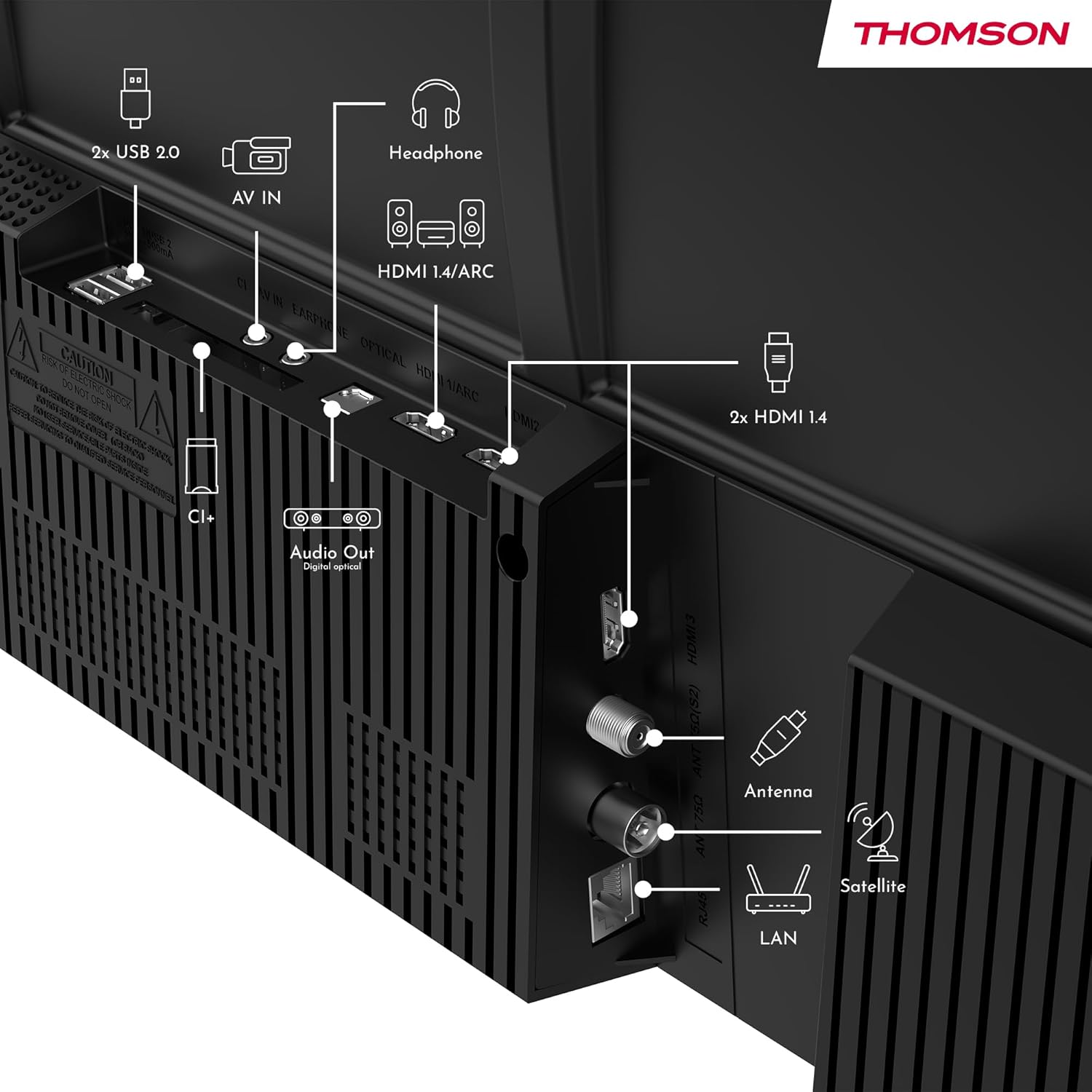
Aworan: Ẹyin view of the Thomson 43FT2S15 Smart TV showing various connection ports. These include 2x USB 2.0, AV IN, Headphone out, HDMI 1.4/ARC, Optical Audio Out, CI+, Antenna (DVB-T2/C), Satellite (DVB-S2), and LAN (Ethernet).
- HDMI: Connect external devices like Blu-ray players, game consoles, or set-top boxes. The TV has 2 HDMI 1.4 ports, one with ARC support.
- USB: For connecting USB storage devices. The TV has 2 USB 2.0 ports.
- Eriali/Satẹlaiti: Connect your terrestrial or satellite antenna for live TV.
- LAN (ayelujara): Fun asopọ intanẹẹti ti a firanṣẹ.
- Wi-Fi: Fun asopọ intanẹẹti alailowaya.
- Bluetooth: Fun sisopọ awọn ẹya ẹrọ alailowaya ibaramu.
- Ohun Jade (Opiti): Fun asopọ si ohun ita ohun eto.
- Agbekọri: Fun sisopọ olokun.
- CI + Iho: For inserting a Conditional Access Module (CAM) for encrypted channels.
5. Awọn ilana Iṣiṣẹ
5.1 Agbara Tan / Pa
Connect the power adapter to the TV and a power outlet. Press the power button on the remote control to turn the TV on or off.
5.2 TiVo OS and Smart Features
Your Thomson Smart TV is powered by TiVo OS, which integrates live TV, streaming applications, and on-demand services into a single, intuitive interface. Personalized recommendations help you discover new content.

Image: The Thomson Smart TV displaying the TiVo OS interface with various streaming apps like Netflix, Canal+, Prime Video, YouTube, and Disney+.
5.3 Iṣakoso ohun
Use the TiVo Voice Control feature to navigate channels, open applications, or search for content across different platforms using voice commands. The remote control includes a microphone for this function.

Image: The Thomson Smart TV remote control highlighting the voice control microphone, backlit buttons, and direct access buttons for streaming services.
5.4 Wireless Display
Mirror content from your smartphone, tablet, or laptop to the TV screen using the Wireless Display function. This allows for easy sharing of videos, photos, and applications.
5.5 Audio and Video Enhancements
- Dolby Audio: Experience enhanced sound quality with Dolby Audio, providing clear dialogue and immersive, multi-dimensional effects.

Image: A Thomson Smart TV displaying content with visual representations of sound waves, indicating the Dolby Audio feature.
- HDR10: Enjoy sharper contrast and lifelike colors with HDR10 technology, revealing details in both bright highlights and deep shadows.

Image: A split-screen comparison showing the difference between SDR (Standard Dynamic Range) and HDR10 (High Dynamic Range) image quality on a Thomson Smart TV, demonstrating improved contrast and color.
5.6 Iṣakoso latọna jijin
The ergonomic remote control features backlit buttons for easy navigation in low light conditions. It also includes direct access buttons for popular streaming services such as Netflix, YouTube, Prime Video, Disney+, and Canal+.
6. Itọju
Lati rii daju igbesi aye gigun ati iṣẹ to dara julọ ti TV rẹ, tẹle awọn itọnisọna itọju wọnyi:
- Ninu iboju: Rọra nu iboju naa pẹlu asọ ti ko ni lint. Fun awọn ami agidi, lo ẹrọ mimọ iboju ti a ṣe apẹrẹ pataki fun awọn TV, ti a lo si asọ, kii ṣe taara si iboju.
- Ninu Igbimọ Ile-igbimọ: Lo aṣọ rírọrùn tí ó gbẹ láti nu àpótí tẹlifíṣọ̀n náà. Má ṣe lo àwọn ohun ìfọmọ́ tàbí àwọn ohun èlò ìfọ́mọ́ra.
- Afẹfẹ: Rii daju pe awọn ṣiṣi atẹgun lori ẹhin TV ko ni idinamọ lati ṣe idiwọ igbona.
- Okun Agbara: Máa ṣàyẹ̀wò okùn iná mànàmáná déédéé fún ìbàjẹ́ èyíkéyìí. Tí ó bá bàjẹ́, kàn sí àwọn òṣìṣẹ́ iṣẹ́ tó péye fún àtúnṣe.
7. Laasigbotitusita
Ti o ba pade awọn ọran pẹlu TV rẹ, tọka si awọn igbesẹ laasigbotitusita ti o wọpọ wọnyi:
- Ko si Agbara:
- Check if the power cord is securely connected to the TV and the power outlet.
- Ensure the power outlet is functioning by plugging in another device.
- Gbiyanju titẹ bọtini agbara lori TV funrararẹ, kii ṣe latọna jijin nikan.
- Ko si Aworan/Ohun:
- Verify that the correct input source is selected (e.g., HDMI 1, Antenna).
- Ṣayẹwo gbogbo awọn asopọ okun laarin TV ati awọn ẹrọ ita.
- Ṣàtúnṣe iwọn didun náà kí o sì rí i dájú pé TV kò pa ohùn mọ́.
- Iṣakoso latọna jijin Ko Ṣiṣẹ:
- Rọpo awọn batiri ni isakoṣo latọna jijin.
- Rii daju pe ko si awọn idena laarin isakoṣo latọna jijin ati sensọ IR ti TV.
- Smart TV Features Not Working (Wi-Fi/Apps):
- Check your internet connection. Restart your router if necessary.
- Go to the TV's network settings to ensure it's connected to Wi-Fi or Ethernet.
- Gbiyanju tun TV naa bẹrẹ.
For more complex issues, please contact customer support or refer to the manufacturer's webojula.
8. Awọn pato
Key technical specifications for the Thomson 43FT2S15 FHD LED Smart TV:
| Ẹya ara ẹrọ | Sipesifikesonu |
|---|---|
| Brand | Thomson |
| Awoṣe | 43FT2S15 |
| Iwon iboju | 43 inches (109 cm) |
| Ifihan ọna ẹrọ | LED |
| Ipinnu | 1920 x 1080 (FHD) |
| Oṣuwọn sọtun | 60 Hz |
| Apakan Ipin | 16:9 |
| Eto isesise | TiVo OS |
| Ohun Technology | Dolby Audio (Dolby Atmos encoding) |
| HDR atilẹyin | HDR10 |
| Asopọmọra | Wi-Fi, Ethernet, Bluetooth, 2x HDMI 1.4 (1x ARC), 2x USB 2.0, Optical Audio Out, AV In, Headphone, CI+ |
| Tuners | DVB-T2/C/S2 (Triple Tuner) |
| Awọn iṣẹ Intanẹẹti atilẹyin | Netflix, YouTube, Prime Video, Disney+, Canal+, Browser |
| Iwọn (Ọja) | 6 x 95 x 60 cm; 6.5 kg |
| Agbara Agbara Kilasi | E |

Image: Energy efficiency label for the Thomson 43FT2S15 Smart TV, showing an energy class of E and energy consumption of 42 kWh/1000h (SDR) and 46 kWh/1000h (HDR).
Fun alaye alaye ọja, tọka si aaye data EPREL: https://eprel.ec.europa.eu/qr/1969521
9. Atilẹyin ọja ati Support
Your Thomson 43FT2S15 TV comes with a warranty. Please refer to the included Warranty Card for specific terms and conditions.
For technical support or service inquiries, please contact the manufacturer:
- Olupese: ṣiṣanwọleview GmbH
- Webojula: www.sisanview.com
- Imeeli: olubasọrọ @ ṣiṣanview.com
- Foonu: + 4318900066
Please have your model number (43FT2S15) and purchase information ready when contacting support.