
1. Ifihan
Thank you for choosing the Thomson 24-inch HD LED Smart TV, model 24HT2S15. This manual provides essential information to help you set up, operate, and maintain your new television. Please read it thoroughly before use and retain it for future reference.

Aworan: Iwaju view of the Thomson 24-inch HD LED Smart TV, showcasing its frameless design and key features like HD resolution and Dolby Audio.
Awọn ẹya pataki:
- TiVo OS with Voice Control: Intuitive interface combining live TV and streaming apps, personalized recommendations, and voice commands.
- Ifihan Alailowaya: Mirror your smartphone, tablet, or laptop screen to the TV.
- Dolby Audio: Enhanced sound experience with improved dialogue, detail, and surround effects.
- HDR10: Sharper contrast and realistic colors for an immersive viewiriri iriri.
- Iṣakoso Latọna Afẹyinti: Easy navigation in low light with direct access buttons for popular streaming services.
- Adjustable Side Feet: Flexible positioning options for the TV.
- Tuner Meta: Integrated tuners for cable, satellite, and antenna reception.
2. Ohun ti o wa ninu Apoti
Lẹhin ṣiṣi silẹ, jọwọ rii daju pe gbogbo awọn nkan wọnyi wa:
- Thomson 24-inch HD LED Smart TV (Model 24HT2S15)
- Isakoṣo latọna jijin
- Adapter agbara
- Itọsọna olumulo
- Kaadi atilẹyin ọja
- Adjustable Side Feet (2x)
If any items are missing or damaged, please contact your retailer or Thomson customer support.
3. Eto
3.1 Ṣiṣii ati Gbe
Carefully remove the TV from its packaging. It is recommended to have two people for this process. Place the TV on a stable, flat surface or mount it on a wall using a compatible VESA mount (not included).
Rii daju pe fentilesonu to ni ayika TV. Ma ṣe dina awọn ṣiṣi atẹgun.
3.2 So Iduro
If you are not wall-mounting the TV, attach the included side feet:
- Fi oju TV naa si ori aṣọ rirọ ati mimọ lati dena ibajẹ iboju naa.
- Sopọ kọọkan imurasilẹ pẹlu awọn ti o baamu dabaru ihò lori isalẹ ti TV.
- Secure the stands using the provided screws. The feet are adjustable from 30 cm to 60 cm distance.

Image: The Thomson 24-inch Smart TV showing its dimensions, including a screen diagonal of 60 cm (24 inches), width of 53 cm, and height of 37 cm with the stand. The adjustable stand feet are also illustrated.
3.3 Nsopọ Peripherals
Connect your external devices to the TV's ports. Refer to the diagram below for port locations.

Aworan: A alaye view of the rear connection panel of the Thomson 24-inch Smart TV, illustrating various ports including 2x USB 2.0, Antenna input, Satellite input, 3x HDMI 1.4 (one with ARC), Service port, Headphone jack, AV IN, Digital Optical Audio Out, and LAN port.
- Agbara: Connect the power adapter to the TV and then to a wall outlet.
- Eriali/Satẹlaiti: Connect your antenna or satellite cable to the respective input.
- HDMI: Use HDMI cables to connect devices like Blu-ray players, game consoles, or set-top boxes. HDMI 1.4/ARC supports Audio Return Channel.
- USB: Insert USB drives for media playback or software updates.
- Lan: So okùn Ethernet pọ fun asopọ intanẹẹti onirin.
- AV NI: Fun awọn ẹrọ agbalagba nipa lilo fidio akojọpọ ati ohun sitẹrio.
- Agbekọri: So awọn agbekọri pọ fun igbọran aladani.
- Digital Optical Audio Out: Connect to an external sound system for digital audio.
3.4 Agbara Ibẹrẹ Lori ati Eto Akoko-akọkọ
- Pulọọgi TV sinu iṣan agbara kan.
- Tẹ bọtini agbara lori isakoṣo latọna jijin tabi TV.
- Follow the on-screen instructions to select your language, country, and perform channel scanning for your triple tuner (cable/satellite/antenna).
- Sopọ̀ mọ́ nẹ́tíwọ́ọ̀kì Wi-Fi rẹ nípa yíyàn án láti inú àkójọ náà kí o sì tẹ ọ̀rọ̀ìpamọ́ náà.
- Complete the TiVo OS setup, including signing in or creating an account.
4. Ṣiṣẹ TV rẹ
4.1 Latọna Iṣakoso Awọn iṣẹ
The backlit remote control provides easy access to all TV functions, even in dim lighting. It includes dedicated buttons for popular streaming services.

Image: The Thomson Smart TV remote control, highlighting its backlit buttons, voice control microphone, and direct access buttons for Netflix, YouTube, Prime Video, Disney+, and Canal+.
- Bọtini agbara: Yi TV si tan/pa.
- Awọn bọtini Nọmba: Yan awọn ikanni taara.
- Paadi lilọ kiri (Soke/isalẹ/osi/ọtun/DARA): Lilọ kiri awọn akojọ aṣayan ko si yan awọn aṣayan.
- Pada/Jade: Pada si iboju ti tẹlẹ tabi jade kuro ni akojọ aṣayan.
- Iwọn didun Soke/Isalẹ: Ṣatunṣe ipele iwọn didun.
- Ikanni Soke/Isalẹ: Yi TV awọn ikanni.
- Pa ẹnu mọ́: Mu ohun na mu tabi mu ohun naa kuro.
- Ile: Access the TiVo OS home screen.
- Bọtini Iṣakoso ohun: Activate voice commands (microphone icon).
- Awọn bọtini Iwọle taara: Launch Netflix, YouTube, Prime Video, Disney+, Canal+ instantly.
4.2 TiVo OS and Smart Features
The TiVo OS provides a unified platform for live TV and streaming content. Explore personalized recommendations and access your favorite apps.

Image: The Thomson Smart TV screen showing various streaming application icons like Netflix, YouTube, Disney+, Prime Video, Plex, DAZN, Canal+, and Pluto TV, indicating integrated smart TV capabilities.
- Wiwọle App: Navigate to the home screen to find and launch pre-installed apps or download new ones from the app store.
- Iṣakoso ohun: Press the voice control button on your remote and speak commands to search for content, launch apps, or control TV functions.
- Ifihan Alailowaya: Use the Wireless Display feature to mirror content from your compatible smartphone, tablet, or laptop directly to your TV screen.

Image: An illustration demonstrating the voice control feature of the Thomson Smart TV, showing a remote control with a microphone icon and examples of voice commands like "Open Netflix" or "Play movies with Tom Hanks."

Image: The Thomson Smart TV displaying content mirrored from a smartphone, illustrating the Wireless Display and Google Cast features for seamless content sharing.
4.3 Aworan ati Ohun Awọn ilọsiwaju
- HDR10: Experience improved contrast, brightness, and color accuracy with HDR10 content. This technology enhances both bright and dark scenes for a more dynamic picture.
- Dolby Audio: Enjoy rich, clear, and powerful sound. Dolby Audio optimizes dialogue, enhances detail, and provides an immersive surround sound experience.

Image: A side-by-side comparison of picture quality, demonstrating the enhanced contrast and color vibrancy of HDR10 on the right compared to standard SDR on the left, with a building and landscape scene.

Image: An illustration depicting sound waves emanating from a TV screen, with the Dolby Audio logo prominently displayed, signifying enhanced audio quality for an immersive viewiriri iriri.
5. Itọju
5.1 Ninu rẹ TV
- Iboju: Rọra nu iboju naa pẹlu asọ ti ko ni lint. Fun awọn ami alagidi, die-die dampen awọn asọ pẹlu omi tabi a specialized iboju regede. Maṣe fun omi sokiri taara sori iboju.
- Igbimọ: Nu àpótí tẹlifíṣọ̀n náà kí o sì fi aṣọ rírọ̀ tí ó gbẹ dúró.
- Isakoṣo latọna jijin: Clean the remote control with a soft, dry cloth.
Iṣọra:
- Yọọ TV nigba gbogbo ṣaaju ṣiṣe mimọ.
- Ma ṣe lo awọn afọmọ abrasive, waxes, tabi awọn nkanmimu.
5.2 Software imudojuiwọn
Your Smart TV may receive software updates to improve performance and add new features. It is recommended to enable automatic updates or check for updates periodically through the TV's settings menu to ensure optimal functionality and security.
6. Laasigbotitusita
Ti o ba pade awọn ọran pẹlu TV rẹ, tọka si awọn iṣoro ti o wọpọ ati awọn ojutu wọnyi:
| Isoro | Owun to le Fa | Ojutu |
|---|---|---|
| Ko si agbara | A ti ge okùn agbára náà; ìṣòro ìjáde agbára | Rii daju pe okun agbara ti sopọ ni aabo. Ṣe idanwo iṣan jade pẹlu ẹrọ miiran. |
| Ko si aworan, ṣugbọn ohun wa | Incorrect input source; faulty cable | Check the input source (e.g., HDMI 1, Antenna). Ensure cables are connected correctly. |
| Ko si ohun, ṣugbọn aworan wa | Ohùn tí a dákẹ́ tàbí tí ó kéré jù; ìṣòro ètò ohùn láti òde | Unmute the TV or increase volume. Check audio settings and external audio connections. |
| Isakoṣo latọna jijin ko ṣiṣẹ | Àwọn bátírì tí ó ti kú; ìdènà; àtúntò kò so pọ̀ | Replace batteries. Remove any obstructions. Re-pair the remote if necessary (refer to TV settings). |
| Ko le sopọ si Wi-Fi | Ọrọigbaniwọle ti ko tọ; oran olulana; TV ju jina lati olulana | Verify Wi-Fi password. Restart your router. Move TV closer or use a wired LAN connection. |
| Àwọn ẹ̀yà ọlọ́gbọ́n kò dáhùn | Network issue; temporary software glitch | Check internet connection. Restart the TV by unplugging it for a minute and plugging it back in. |
If the problem persists after trying these solutions, please contact Thomson customer support.
7. Awọn pato
Detailed technical specifications for the Thomson 24HT2S15 Smart TV:
| Ẹya ara ẹrọ | Ẹ̀kúnrẹ́rẹ́ |
|---|---|
| Brand | Thomson |
| Nọmba awoṣe | 24HT2S15 |
| Iwon iboju | 24 inches (60 cm) |
| Ifihan ọna ẹrọ | LED |
| Ipinnu | 768p (1366 x 768 awọn piksẹli) |
| Oṣuwọn sọtun | 60 Hz |
| Apakan Ipin | 16:9 |
| Asopọmọra Technology | Ethernet, HDMI, USB, Wi-Fi |
| Pataki Awọn ẹya ara ẹrọ | Parental Controls, TiVo OS, Voice Control, HDR10, Dolby Audio |
| Awọn iwọn ọja (pẹlu iduro) | 8P x 53l x 37H cm (approx. 8 x 53 x 37 cm) |
| Iwọn | 3.33 kg |
| Awọn irinše to wa | Power Adapter, User Manual, Warranty Card, Remote Control |
| Awọn ede Atilẹyin | French, English, Italian, Spanish, German |
| Agbara Agbara Kilasi | E |
| EPREL ọja Alaye | https://eprel.ec.europa.eu/qr/1969520 |
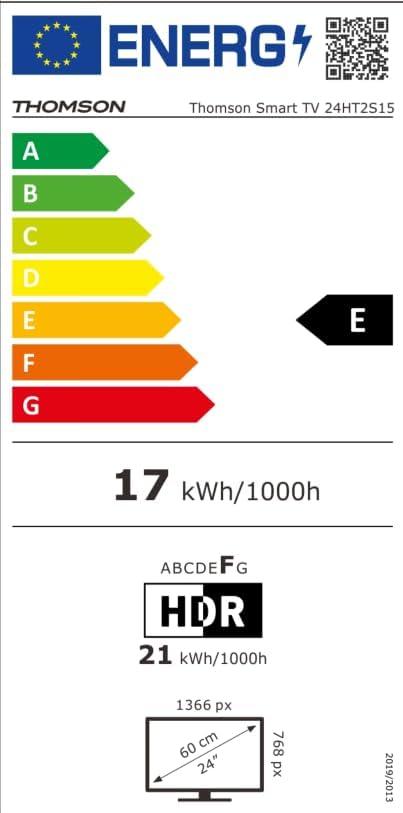
Image: The EU Energy Label for the Thomson Smart TV 24HT2S15, showing an energy efficiency class of E and energy consumption of 17 kWh/1000h for SDR and 21 kWh/1000h for HDR.
8. Atilẹyin ọja ati Support
8.1 atilẹyin ọja Alaye
Thomson products are covered by a 3-year warranty. For detailed information regarding warranty claims, returns, or defective products, please refer to the warranty card included in your package or visit the Thomson support webojula.
For specific information on purchases made via Amazon, consult Amazon's help pages regarding returns and defective products.
8.2 Onibara Support
If you require further assistance or have questions not covered in this manual, please contact Thomson customer support:
- Olupese: ṣiṣanwọleview GmbH
- Imeeli: olubasọrọ @ ṣiṣanview.com
- Webojula: www.sisanview.com
- Tẹlifoonu: + 4318900066
Please have your model number (24HT2S15) and purchase details ready when contacting support.