
Ọrọ Iṣaaju
This manual provides essential information for setting up, operating, maintaining, and troubleshooting your HP 15.6-inch FHD IPS Touchscreen Laptop. Please read this guide thoroughly to ensure optimal performance and longevity of your device. This laptop features an AMD Ryzen 7 7730U processor, 64GB DDR4 RAM, 2.28TB storage (2TB SSD + 288GB Docking Station Set), AMD Radeon Graphics, and runs on Windows 11 Pro.
Ṣeto
Unpacking and Initial Power-On
Carefully remove all components from the packaging. Connect the power adapter to the laptop and a power outlet. Press the power button to turn on the laptop. Follow the on-screen instructions to complete the initial Windows 11 Pro setup.
To wa Awọn ẹya ẹrọ
Your laptop package includes the following accessories:
- 1x 7-in-1 Docking Station with 256GB Storage
- 1x 32GB MicroSD Card with Adapter
- 1x Okun Dátà Irú-C
- 1x 3-in-1 Charging Cable
- 1x Suede Cleaning Cloth
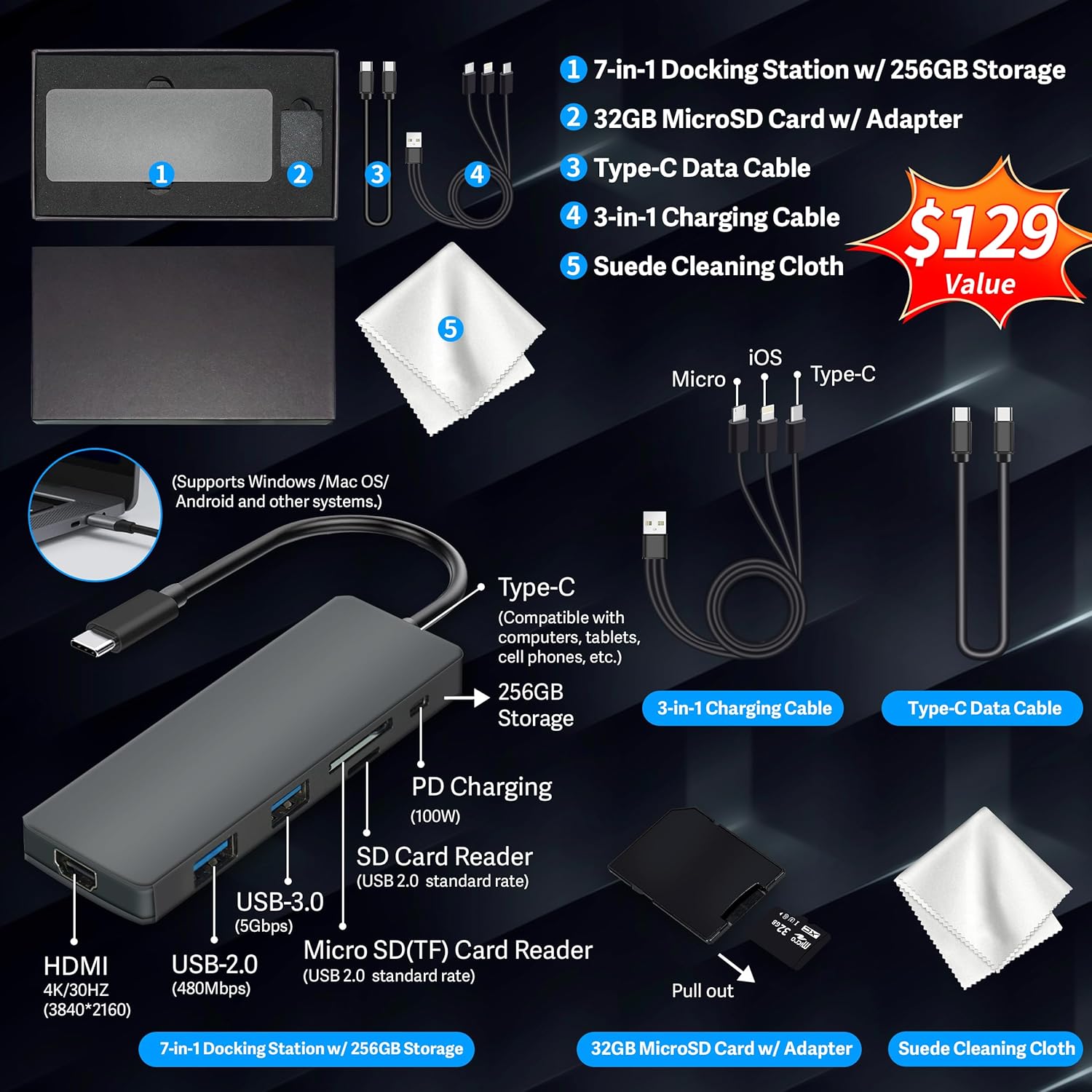
Figure 1: Included accessories, including the 7-in-1 docking station, various cables, and a cleaning cloth.
Ṣiṣẹ Kọǹpútà alágbèéká Rẹ
Ifihan Awọn ẹya ara ẹrọ
The HP 15.6-inch laptop features an FHD IPS touchscreen display with a resolution of 1920 x 1080 pixels and an anti-glare coating. This display provides clear and vibrant visuals from various viewing awọn igun.

Figure 2: The 15.6-inch FHD IPS display offers crisp and vivid details.
Asopọmọra ati Peripherals
Your laptop is equipped with various connectivity options and integrated features to enhance your user experience.
- 720p HD Camera: For video calls and online meetings.
- Wi-Fi 6: Fun asopọ intanẹẹti alailowaya iyara giga.
- Bluetooth: Fun sisopọ awọn agbeegbe alailowaya bii eku, awọn bọtini itẹwe, ati agbekọri.
- Nọmba bọtini foonu: A full numeric keypad is integrated for efficient data entry and calculations.

Figure 3: Key features for staying connected and productive, including the numeric keypad.
The laptop includes multiple ports for connecting external devices:
- Àwọn ibùdó USB Type-A méjì
- 1x ibudo USB Iru-C
- 1x HDMI ibudo
- 1x Headphone/Microphone Combo jack

Figure 4: Multi-port configuration on the laptop for various connections.
Iṣẹ́ àti Iṣẹ́-ṣíṣe púpọ̀
Equipped with an AMD Ryzen 7 7730U processor, 64GB DDR4 RAM, and AMD Radeon Graphics, this laptop is designed for efficient multitasking and demanding applications. The 2.28TB storage (2TB SSD + 288GB Docking Station Set) provides ample space and fast access to your files.

Figure 5: Core specifications for performance and storage.

Figure 6: Laptop demonstrating effortless multitasking with several applications running simultaneously.
The laptop is designed for extended use, offering reliable battery life to support your daily tasks.

Figure 7: The laptop supports continuous work throughout the day with its battery performance.
Itoju
To ensure the longevity and optimal performance of your HP laptop, follow these maintenance guidelines:
- Ninu: Use the provided suede cleaning cloth or a soft, lint-free cloth to clean the screen and exterior. Avoid harsh chemicals.
- Awọn imudojuiwọn sọfitiwia: Regularly update your Windows 11 Pro operating system and drivers to ensure security and performance.
- Itọju Batiri: Yago fun gbigba agbara si batiri ni kikun nigbagbogbo. Fun ibi ipamọ igba pipẹ, gba agbara si batiri si iwọn 50-70%.
- Afẹfẹ: Rii daju pe awọn atẹgun kọǹpútà alágbèéká ko ni idinamọ lati ṣe idiwọ igbona pupọju. Lo kọǹpútà alágbèéká kan lori ilẹ ti o le, alapin.
- Ibi ipamọ: Tọ́jú kọ̀ǹpútà alágbèéká náà sí ibi tí ó tutù tí ó sì gbẹ, tí kò sí ibi tí oòrùn lè tàn dé àti ibi tí ó gbóná janjan.
Laasigbotitusita
Abala yii n ṣalaye awọn ọran ti o wọpọ ti o le ba pade pẹlu kọǹpútà alágbèéká rẹ.
Kọǹpútà alágbèéká Ko Ni Agbara
- Rii daju pe ohun ti nmu badọgba agbara ti sopọ ni aabo si kọǹpútà alágbèéká mejeeji ati iṣan agbara iṣẹ kan.
- Rii daju pe iṣan agbara n ṣiṣẹ nipa pilogi sinu ẹrọ miiran.
- Ti batiri naa ba ti gbẹ patapata, jẹ ki o gba agbara fun o kere ju iṣẹju 15-30 ṣaaju ki o to pinnu lati tan-an.
Screen Remains Blank
- Ṣayẹwo boya kọǹpútà alágbèéká wa ni titan (ina atọka agbara).
- Try connecting an external monitor to see if display output is available.
- Ṣatunṣe imọlẹ iboju nipa lilo awọn bọtini iṣẹ.
Awọn ọrọ Asopọmọra Wi-Fi
- Rii daju pe Wi-Fi ṣiṣẹ ni awọn eto Windows.
- Tun olulana ati modẹmu bẹrẹ.
- Ṣe imudojuiwọn awọn awakọ Wi-Fi rẹ nipasẹ Oluṣakoso Ẹrọ.
- Check for any physical obstructions or interference.
O lọra Performance
- Pa awọn ohun elo ti ko wulo ti nṣiṣẹ ni abẹlẹ.
- Ṣayẹwo Oluṣakoso Iṣẹ-ṣiṣe fun awọn ilana ti n gba Sipiyu giga tabi Ramu.
- Rii daju pe ẹrọ ṣiṣe rẹ ati awọn awakọ ti wa ni imudojuiwọn.
- Ṣiṣẹ́ ìwẹ̀nùmọ́ àti ìfọ́mọ́ra díìkì (fún àwọn HDD, kìí ṣe dandan fún àwọn SSD).
- Ṣayẹwo fun malware tabi awọn ọlọjẹ.
Awọn pato
Below are the detailed technical specifications for your HP 15.6-inch FHD IPS Touchscreen Laptop.

Figure 8: Laptop dimensions and weight for portability.
| Ẹya ara ẹrọ | Ẹ̀kúnrẹ́rẹ́ |
|---|---|
| Brand | HP |
| Orukọ awoṣe | HP 15.6" FHD IPS Touchscreen Laptop |
| Iwon iboju | 15.6 inches |
| Ipinnu Ifihan | Awọn piksẹli 1920 x 1080 (FHD) |
| Ifihan Iru | LED IPS Touchscreen |
| isise | AMD Ryzen 7 7730U (8 Cores, 2 GHz base) |
| Olupilẹṣẹ Graphics | AMD Radeon Graphics (Iṣepọ) |
| Ramu Memory | 64 GB DDR4 (3200 MHz) |
| Ibi ipamọ | 2 TB SSD + 288 GB Docking Station Set (Total 2.28 TB) |
| Eto isesise | Windows 11 Pro |
| Asopọmọra | Wi-Fi 6 (802.11ax), Bluetooth, HDMI, USB |
| Awọn ibudo | 2x USB Type-A, 1x USB Type-C, 1x HDMI, 1x Headphone/Microphone Combo |
| Webkamẹra | Kámẹ́rà HD 720p |
| Keyboard | Full-size with Numeric Keypad |
| Awọn iwọn (L x W x Th) | 14.17" x 9.29" x 0.73" |
| Iwọn Nkan | 3.52 lbs (isunmọ 1.6 kg) |
| Àwọ̀ | Fadaka |
| UPC | 196188514924 |
| ASIN | B0FX2NR2WN |
Alaye atilẹyin ọja
Your HP laptop comes with a manufacturer's warranty. For upgraded components (RAM/SSD), a 1-year warranty is provided by SnowBell. The original 1-year manufacturer warranty applies to all other components of the laptop. Please retain your proof of purchase for warranty claims. For detailed terms and conditions, refer to the warranty documentation included with your product or visit the official HP support webojula.
Atilẹyin
For further assistance, technical support, or service inquiries, please refer to the following resources:
- Atilẹyin Oṣiṣẹ HP Webojula: Ṣabẹwo atilẹyin.hp.com fún àwọn awakọ̀, àwọn ìwé ìtọ́ni, àti àwọn ìtọ́sọ́nà lórí ìṣòro.
- Iranlọwọ Ayelujara: Utilize the built-in Windows 11 Pro help features for software-related questions.
- Contact Retailer: For issues related to upgraded components or purchase, contact SnowBell or your point of purchase.