
Ọrọ Iṣaaju
This manual provides detailed instructions for the safe and efficient operation of your TOOLTOP Silverflo 8586D-III PRO Hot Air Welding and Soldering Station. This 2-in-1 station is designed for SMD and BGA rework, featuring a hot air gun and a soldering iron with dual digital temperature displays and a 10-minute sleep mode.
Alaye Aabo
Jọ̀wọ́ ka gbogbo ìkìlọ̀ àti ìtọ́ni ààbò kí o tó lo ọjà yìí dáadáa. Àìtẹ̀lé àwọn ìtọ́ni wọ̀nyí lè yọrí sí ìkọlù iná mànàmáná, iná, tàbí ìpalára ńlá.
- Always operate the station in a well-ventilated area.
- The soldering iron tip and hot air nozzle reach very high temperatures. Avoid direct contact with skin or flammable materials.
- Wọ ohun elo aabo ti ara ẹni ti o yẹ, pẹlu awọn gilaasi aabo.
- Do not use the station near water or in damp awọn ipo.
- Rí i dájú pé okùn agbára náà kò bàjẹ́, àti pé ó dúró dáadáa.
- Unplug the unit from the power source when not in use or before cleaning/maintenance.
- Jeki kuro ni arọwọto awọn ọmọde.
Package Awọn akoonu
Jẹrisi pe gbogbo awọn ohun kan wa ninu package:
- 1 x Silverflo 8586D-III PRO Hot Air Welding and Soldering Station (main unit)
- 1 x Hot Air Gun
- 1 x Soldering Iron
- 1 x Soldering Iron Stand with Cleaning Sponge
- 3 x Hot Air Nozzles (various sizes)
- 1 x Okun Agbara
- 1 x Itọsọna olumulo (iwe yii)
Ṣeto
- Ṣii silẹ: Ni ifarabalẹ yọ gbogbo awọn paati kuro ninu apoti. Ṣayẹwo fun eyikeyi bibajẹ.
- Ibi: Place the station on a stable, heat-resistant, and non-flammable surface. Ensure adequate ventilation around the unit.
- So Ibon Afẹfẹ Gbona pọ: Plug the hot air gun connector into the designated port on the front panel of the station. Ensure it is securely fastened.
- So So Sopo Irin: Plug the soldering iron connector into its designated port on the front panel. Place the soldering iron in its stand.
- Asopọ agbara: Connect the power cord to the station and then to a grounded electrical outlet.
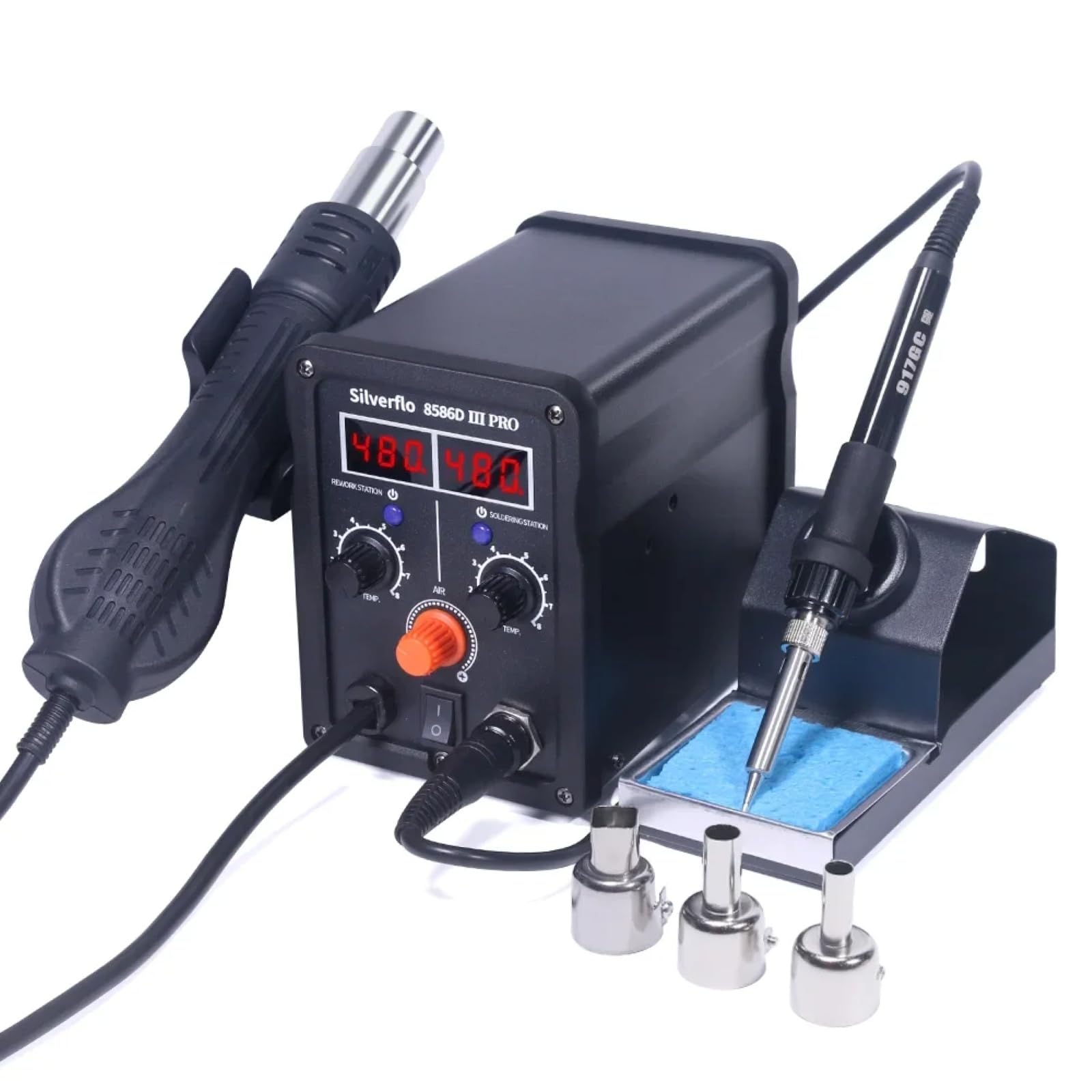
Image: The Silverflo 8586D-III PRO station with its hot air gun and soldering iron connected, ready for use.
Awọn ilana Iṣiṣẹ
Titan / Paa
Locate the main power switch on the front panel of the station. Flip the switch to the "ON" position to power on the unit. The digital displays will illuminate. Flip to "OFF" to power down.
Atunṣe iwọn otutu

Image: The control panel of the station, highlighting the dual digital temperature displays and the separate adjustment knobs for the hot air gun and soldering iron.
- Hot Air Gun: Use the "TEMP" knob under "REWORK STATION" to adjust the hot air temperature. The corresponding digital display will show the set temperature. Use the "AIR" knob to adjust the airflow.
- Irin Tita: Use the "TEMP" knob under "SOLDERING STATION" to adjust the soldering iron temperature. The corresponding digital display will show the set temperature.

Aworan: A alaye view of the 75W soldering iron tip, illustrating its rapid heating capability for efficient work.
Ipo orun
The station features intelligent sleep modes to conserve energy and prolong component life.

Image: An illustration explaining the 10-minute sleep mode for the soldering iron. If no usage or movement is detected for over 10 minutes, the iron enters sleep mode. To reactivate, simply pick up the iron or adjust its temperature knob.
- 10-Minute Sleep Mode (Soldering Iron): If the soldering iron detects no usage or movement for more than 10 minutes, it will automatically enter sleep mode, reducing its temperature to a safe level. To wake it up, simply pick up the soldering iron or adjust its temperature knob.
- Magnetic Induction Sleep (Hot Air Gun): When the hot air gun is placed in its holder, it will automatically cool down and enter standby mode. Picking it up from the holder will cause it to quickly heat up to the preset temperature.
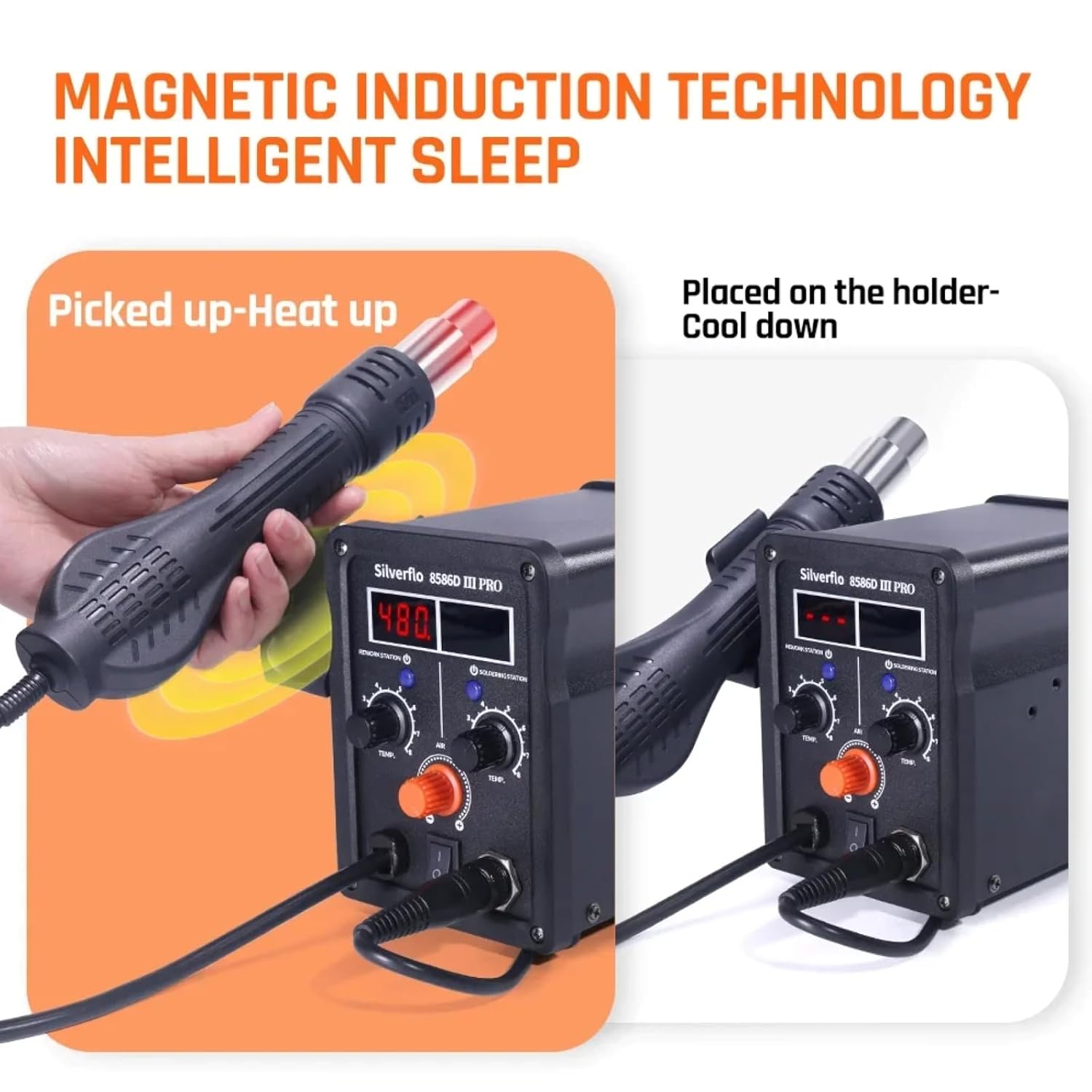
Image: A visual representation of the magnetic induction technology. The hot air gun heats up when picked from its holder and cools down when placed back, ensuring safety and energy efficiency.
Digital otutu odiwọn
The station supports digital temperature calibration for enhanced accuracy. Refer to the specific instructions in the full manual for the calibration procedure, typically involving an external temperature sensor.

Image: The Silverflo 8586D-III PRO station alongside a digital temperature calibration device, illustrating the capability for precise temperature adjustments.
Itoju
- Soldering Iron Tip: Regularly clean the soldering iron tip using the included sponge (dampened with water) or brass wool. Tin the tip with solder after each use to prevent oxidation. Replace tips when they become excessively worn or corroded.
- Hot Air Nozzles: Ensure hot air nozzles are free from debris. Clean them gently if necessary.
- Ninu Ẹka: Disconnect power before cleaning. Wipe the exterior of the station with a soft, dry cloth. Do not use abrasive cleaners or solvents.
- Ibi ipamọ: Tọ́jú ẹ̀rọ náà sí ibi gbígbẹ tí kò ní eruku nígbà tí o kò bá lò ó.
Laasigbotitusita
| Isoro | Owun to le Fa | Ojutu |
|---|---|---|
| Ibusọ ko ni agbara lori. | Ko si ipese agbara; Pa agbara; Okun agbara ti ko tọ. | Ṣàyẹ̀wò ibi tí agbára ń jáde; Rí i dájú pé agbára ń yí padà; Ṣe àyẹ̀wò okùn agbára fún ìbàjẹ́. |
| Soldering iron not heating. | Iron in sleep mode; Loose connection; Faulty heating element. | Pick up iron or adjust temperature; Check iron connection; Contact support if element is faulty. |
| Hot air gun not heating or no airflow. | Gun not picked up from holder; Loose connection; Airflow knob set to minimum. | Pick up gun from holder; Check gun connection; Adjust AIR knob. |
| Inaccurate temperature display. | Needs calibration; Sensor issue. | Perform digital temperature calibration; Contact support if issue persists. |
Awọn pato
| Ẹya ara ẹrọ | Ẹ̀kúnrẹ́rẹ́ |
|---|---|
| Awoṣe | TT-Silverflo 8586D-III |
| Ti won won Agbara | 780W |
| Soldering Iron Power | 75W |
| Iwọn otutu irin ti a fi soldering | 200°C ~ 480°C (392°F ~ 896°F) |
| Hot Air Gun Temperature Range | 100°C ~ 480°C (212°F ~ 896°F) |
| Ifihan Iru | Meji Digital Ifihan |
| Ipo orun | 10-Minute (Soldering Iron), Magnetic Induction (Hot Air Gun) |
| Awọn iwe-ẹri | CE, RoHS |
| Ipese Agbara Voltage | 120VUS, 220VEU, 230VUK, 240VAU (Specific to region) |
Atilẹyin ọja
This TOOLTOP Silverflo 8586D-III PRO Hot Air Welding and Soldering Station comes with a 1-odun atilẹyin ọja from the date of purchase. This warranty covers manufacturing defects and workmanship under normal use. It does not cover damage caused by misuse, accident, unauthorized modification, or improper maintenance. Please retain your proof of purchase for warranty claims.
Atilẹyin
For technical assistance, troubleshooting beyond this manual, or warranty inquiries, please contact TOOLTOP customer support. Refer to the product packaging or the official TOOLTOP webojula fun awọn julọ lọwọlọwọ alaye olubasọrọ.
Webojula: www.tooltop.com
Imeeli: support@tooltop.com