
1. Ifihan
The BLUETTI AORA10 is a compact and lightweight portable power station designed to provide reliable power for various applications, from outdoor adventures to emergency backup. With a 128Wh capacity and 200W AC output (up to 400W in Power Lift mode), it supports multiple devices simultaneously. Its advanced LiFePO4 battery ensures long-lasting performance and safety. This manual provides essential information for safe and efficient use of your AORA10.
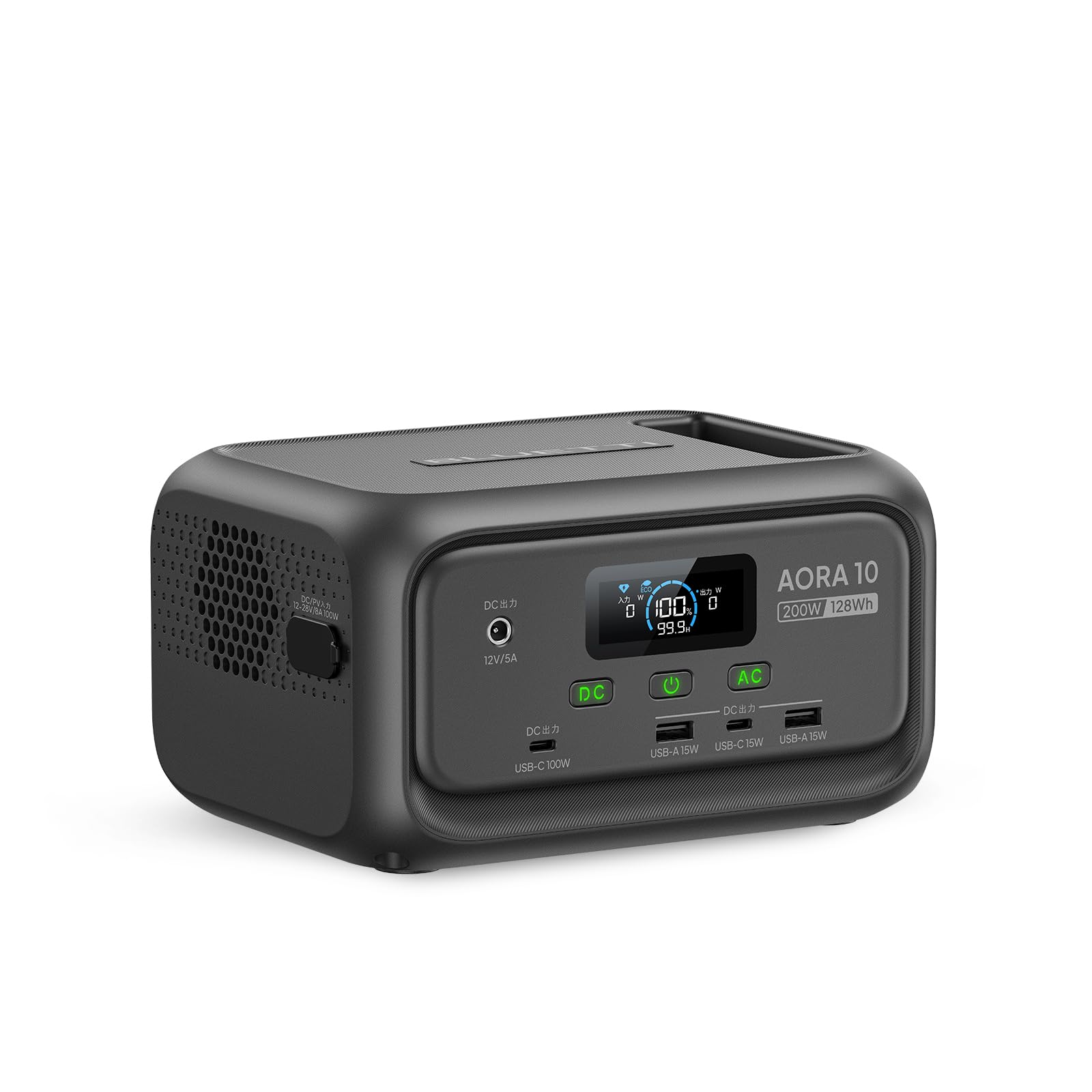
Image: The BLUETTI AORA10 Portable Power Station, a compact and versatile power source.
2. Key Awọn ẹya ara ẹrọ
- Iwapọ ati Apẹrẹ iwuwo fẹẹrẹ: Weighing only 1.8 kg, the AORA10 is highly portable and easy to carry, even for children. Its compact size allows it to fit into bags, making it suitable for travel and emergencies. It is also airline carry-on compatible (please check with your airline for specific regulations).

Image: Two children easily carrying the lightweight BLUETTI AORA10 units, demonstrating its portability.
- Ijade Agbara giga: Provides 200W AC output (up to 400W with Power Lift mode for resistive loads), 100W USB-C Power Delivery (PD), multiple USB-A ports, and a DC5521 port. It can charge up to 6 devices simultaneously.

Image: A couple using two BLUETTI AORA10 units to power their tablet and smartphone, showcasing multi-device charging capability.
- Advanced LiFePO4 Battery: Equipped with a high-quality LiFePO4 battery, offering over 3000 charge cycles and a lifespan of approximately 10 years, maintaining over 80% capacity.
- Imọ-ẹrọ Gbigba agbara iyara: Features BLUETTI's proprietary TurboBoost rapid charging technology, allowing a full charge in approximately 70 minutes. Supports various charging methods including AC, solar panel (up to 100W), and car charger.

Image: Visual representation of the BLUETTI AORA10's diverse charging options, including AC, hybrid, solar panel, and car cigarette lighter charging.
- Iṣẹ Ipese Agbara Ailopin (UPS): Ni iṣẹlẹ ti agbara otage, the UPS function automatically switches to battery power within 10 milliseconds, preventing data loss for connected devices like routers, PCs, and NAS servers.
- Imudara Aabo: Constructed with UL94V-0 certified flame-retardant materials and integrated with the BLUETOPUS AI-BMS (Battery Management System) for comprehensive protection against overcharge, over-discharge, and overheating.
- Imọlẹ LED ti a ṣepọ: Features a built-in LED light with two brightness modes and an SOS function, providing up to 50 hours of continuous illumination for reading, outdoor activities, or emergencies.
- Ohun elo Smart Iṣakoso: Manage and monitor your AORA10 remotely using the dedicated BLUETTI App, offering convenient control over settings and power usage.

Image: Screenshots of the BLUETTI mobile application, demonstrating its interface for battery status, LED control, and operational modes.
3. Eto Itọsọna
3.1 Unboxing ati ayewo
Upon receiving your BLUETTI AORA10, carefully open the packaging and verify that all included components are present:
- BLUETTI AORA10 Portable Power Station Unit
- Okun gbigba agbara AC
- Cigarette Socket Charging Cable
- Afowoyi Olumulo (iwe-ipamọ yii)
Inspect the unit for any signs of damage during transit. If any components are missing or damaged, contact customer support immediately.
3.2 Gbigba agbara akọkọ
Before first use, it is recommended to fully charge your AORA10. You can charge it using one of the following methods:
- Gbigba agbara AC: Connect the AC charging cable to the unit's AC input port and then to a wall outlet. The display will indicate charging status.
- Gbigba agbara Oorun: Connect a compatible solar panel (max 100W, sold separately) to the DC input port. Ensure the solar panel is placed in direct sunlight for optimal charging.
- Gbigba agbara ọkọ ayọkẹlẹ: Use the provided cigarette socket charging cable to charge the unit from your vehicle's 12V outlet.
The unit features TurboBoost technology for rapid charging, reaching a full charge in approximately 70 minutes via AC.
4. Awọn ilana Iṣiṣẹ
4.1 Titan / Pa a
To power on the unit, press and hold the main power button for a few seconds until the display illuminates. To power off, press and hold the main power button again until the display turns off.
4.2 Awọn ẹrọ Nsopọ
The AORA10 offers various output ports:
- Awọn iṣan AC: Plug in devices requiring 100V AC power. Press the AC button to enable/disable AC output.
- USB-C (PD 100W): Connect compatible USB-C devices for fast charging.
- Awọn ibudo USB-A: Connect standard USB devices for charging.
- DC5521 Port: For devices requiring 12V DC power.
Ensure that the total power consumption of connected devices does not exceed the unit's maximum output (200W, or 400W in Power Lift mode for resistive loads).
4.3 Lilo awọn LED Light
Press the LED light button to cycle through brightness modes (low, high) and the SOS flashing mode. Press and hold to turn off the light.
4.4 Iṣakoso Ohun elo BLUETTI
Download the official BLUETTI App from your smartphone's app store. Follow the in-app instructions to connect your AORA10 via Bluetooth. The app allows you to:
- Monitor battery status and power consumption.
- Control AC/DC outputs.
- Adjust LED light settings.
- Ṣe imudojuiwọn famuwia.
Video: An official BLUETTI video demonstrating the AORA10 Portable Power Station in various usage scenarios, including camping and home use, highlighting its versatility and ease of operation.
5. Itọju
5.1 Ninu
Wipe the exterior of the unit with a soft, dry cloth. Do not use abrasive cleaners or solvents. Keep the ventilation openings clear of dust and debris.
5.2 Ibi ipamọ
When storing the AORA10 for extended periods, ensure it is charged to approximately 50-80% capacity. Store it in a cool, dry place away from direct sunlight and extreme temperatures. Recharge the unit every 3-6 months to maintain battery health.
5.3 batiri Itọju
The integrated LiFePO4 battery is designed for long life. To maximize its lifespan, avoid fully discharging the unit frequently and operate it within the recommended temperature range (-20°C to 45°C).
6. Laasigbotitusita
Ẹ̀rọ 6.1 Kò Ṣiṣẹ́
- Ensure the battery is not completely depleted. Try connecting it to a power source.
- Tẹ mọlẹ bọtini agbara akọkọ fun iṣẹju diẹ.
6.2 Ko si abajade lati awọn ibudo
- Check if the specific output (AC, DC, USB) is enabled by pressing its respective button.
- Verify that the connected device is working correctly and its power consumption does not exceed the port's limit or the unit's total output.
- Ensure the unit has sufficient charge.
6.3 Ngba agbara lọra
- For solar charging, ensure the solar panel is in direct sunlight and free from obstructions.
- Check if the charging cable is securely connected and undamaged.
- Environmental temperature can affect charging speed.
6.4 UPS Function Not Working
- Ensure the unit is connected to both an AC input and has devices plugged into its AC output.
- Verify that the UPS function is enabled via the unit's settings or the BLUETTI App.
If you encounter persistent issues not covered here, please refer to the detailed troubleshooting section in the full user manual or contact BLUETTI customer support.
7. Awọn pato
| Ẹya ara ẹrọ | Ẹ̀kúnrẹ́rẹ́ |
|---|---|
| Awoṣe | AORA10 |
| Batiri Iru | LiFePO4 (Lithium Iron Phosphate) |
| Agbara Batiri | 128Wh (20 Ampawọn wakati diẹ) |
| Ijade AC | 100V, 200W (400W Power Lift Mode) |
| USB-C o wu | 1 x PD 100W |
| Ṣiṣejade USB-A | 2 x USB Type A (5 Amperes total) |
| DC Iṣelọpọ | 1 x DC5521 |
| Akoko gbigba agbara (AC) | Approx. 70 minutes (to 100%) |
| Input ti oorun | O pọju 100W |
| Iṣẹ-ṣiṣe UPS | Yes (10ms switchover) |
| Ọna Iṣakoso | Manual buttons, BLUETTI App |
| Awọn iwọn (L x W x H) | 11 cm x 20 cm x 14.6 cm |
| Iwọn | 1.8 kg |
| Awọn iwọn otutu ti nṣiṣẹ | -20°C si 45°C |
| Awọn irinše to wa | AORA10 Unit, AC Charging Cable, Cigarette Socket Cable, User Manual |
| Iṣeduro Lilo | Camping, Home, Business, Emergency |
8. Atilẹyin ọja ati Support
8.1 atilẹyin ọja Alaye
The BLUETTI AORA10 Portable Power Station comes with a 3-odun lopin atilẹyin ọja from the date of purchase. This warranty covers defects in materials and workmanship under normal use. For warranty claims, please retain your proof of purchase.

Image: Icons representing the 3-year warranty and free recycling service offered for the product.
8.2 Onibara Support
For technical assistance, troubleshooting, or warranty inquiries, please contact BLUETTI customer support. Visit the official BLUETTI webojú òpó wẹ́ẹ̀bù fún àwọn àlàyé ìbánisọ̀rọ̀ àti àwọn ohun èlò ìrànlọ́wọ́ tuntun.
8.3 Product Recycling
BLUETTI offers a free recycling service for end-of-life products to ensure environmentally responsible disposal. Please contact customer support for details on how to recycle your unit.