
Cillso H97
Cillso H97 Wireless Earbuds User Manual
Awoṣe: H97
Brand: Cillso
Ọrọ Iṣaaju
Thank you for choosing the Cillso H97 Wireless Earbuds. These earbuds feature advanced Bluetooth 5.4 technology, HiFi stereo sound with deep bass, Environmental Noise Cancelling (ENC) for clear calls, and an IPX7 waterproof rating. Designed for comfort and extended use, they offer up to 40 hours of total playtime with the charging case. This manual provides essential information for setup, operation, maintenance, and troubleshooting to ensure optimal performance.
Ohun ti o wa ninu Apoti
- Cillso H97 Wireless Earbuds (Left and Right)
- Ngba agbara Case
- USB-C Ngba agbara Cable
- Itọsọna olumulo
Ọja Pariview
Familiarize yourself with the components and features of your Cillso H97 Wireless Earbuds.
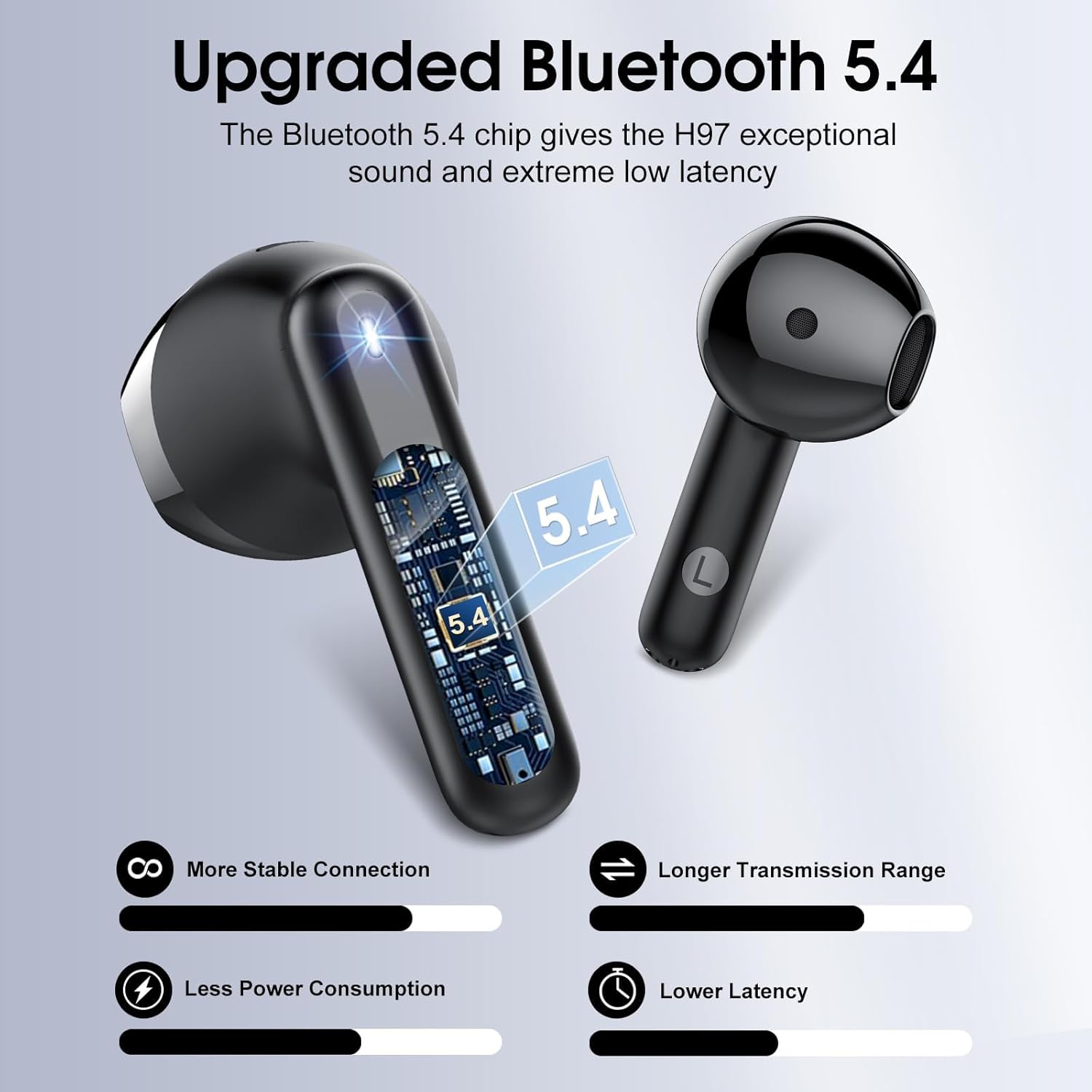
Nọmba 1: Ti abẹnu view ti ohun agbekọri, showcasing the advanced Bluetooth 5.4 chip for stable connection and low latency.
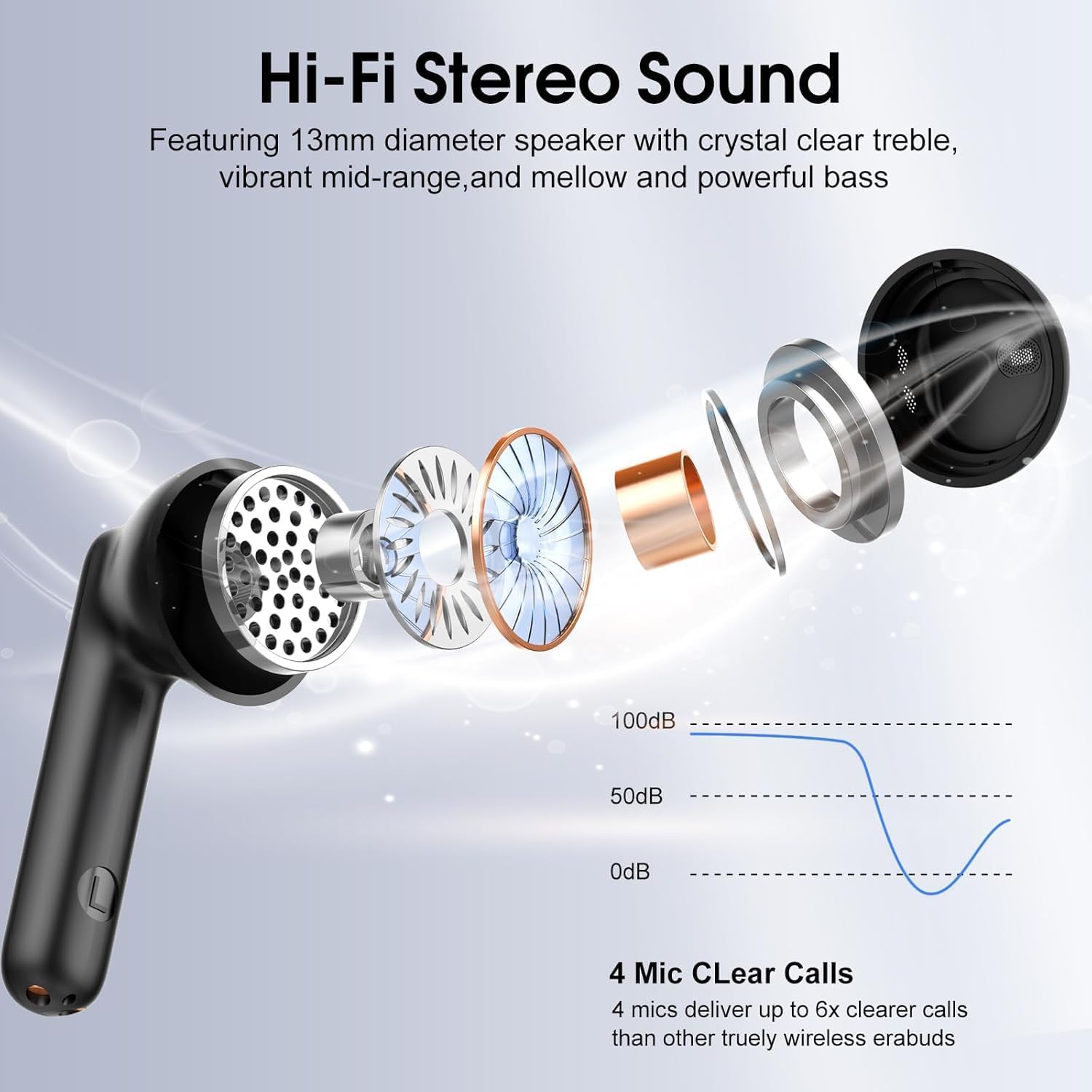
Nọmba 2: Bugbamu view illustrating the 13mm diaphragm drivers responsible for Hi-Fi stereo sound with deep bass and clear highs.

Nọmba 3: The charging case features an independent LED display to show real-time battery levels for both earbuds and the case.

Nọmba 4: Dimensions of the earbuds and charging case, emphasizing their lightweight and portable design. Each earbud weighs 3.5 grams, and the case weighs 32 grams.

Nọmba 5: Pariview of the sensitive touch controls on the earbuds for various functions.

Nọmba 6: The earbuds feature an IPX7 waterproof rating, providing protection against sweat, rain, and splashes.
Ṣeto
1. Gbigba agbara akọkọ
- Ṣaaju lilo akọkọ, gbe awọn agbekọri mejeeji sinu apoti gbigba agbara.
- Connect the USB-C charging cable to the charging port on the case and a power source.
- The LED display on the case will indicate the charging status. A full charge for the case takes approximately 1.5 hours.
- Rí i dájú pé àwọn agbekọri náà ti gba agbára kíkún kí wọ́n tó bẹ̀rẹ̀ lílò ó fún agbára bátírì tó dára jùlọ.
2. Sisopọ pẹlu Ẹrọ kan
- Ṣii apoti gbigba agbara. Awọn agbekọri yoo tan ina laifọwọyi ati tẹ ipo sisopọ pọ sii.
- Lori ẹrọ rẹ (foonuiyara, tabulẹti, kọǹpútà alágbèéká), mu Bluetooth ṣiṣẹ.
- Wa fun available Bluetooth devices and select "H97" from the list.
- Once connected, your device will confirm successful pairing. The earbuds will automatically reconnect to the last paired device when removed from the case and within range (up to 15 meters).
Awọn ilana Iṣiṣẹ
The Cillso H97 earbuds feature sensitive touch controls for easy management of audio playback and calls.
| Iṣe | Išẹ |
|---|---|
| Double tap Left/Right earbud | Mu orin ṣiṣẹ / sinmi |
| One tap Left/Right earbud | Dahun/Pari ipe |
| Long press Right earbud (2s) | Itele orin |
| Long press Left earbud (2s) | Ti tẹlẹ orin |
| One tap Left/Right earbud (during call) | Volume control (specific tap pattern may vary, refer to device settings if needed) |
| Triple tap Left/Right earbud (typically) | Mu Oluranlọwọ Ohun ṣiṣẹ |
Itoju
Ninu
- Mọ awọn afikọti nigbagbogbo ati apoti gbigba agbara pẹlu asọ ti o gbẹ, asọ ti ko ni lint.
- Maṣe lo awọn afọmọ abrasive, ọti-lile, tabi awọn nkan ti kemikali.
- Rí i dájú pé àwọn olùbáṣepọ̀ gbígbóná lórí àwọn ètí àti àpótí náà mọ́ tónítóní kí wọ́n lè gba agbára dáadáa.
Ibi ipamọ
- Nigbati o ko ba si ni lilo, tọju awọn afikọti sinu apoti gbigba agbara wọn lati daabobo wọn ki o jẹ ki wọn gba agbara.
- Tọju ni itura, aye gbigbẹ kuro ni iwọn otutu ti o ga julọ ati oorun taara.
Omi Resistance
- The earbuds are IPX7 waterproof, meaning they are protected against temporary immersion in water up to 1 meter for 30 minutes.
- This rating protects against sweat, rain, and splashes. However, it is not recommended to swim or shower with the earbuds.
- Rii daju pe awọn agbekọri ti gbẹ ṣaaju gbigbe wọn pada si apoti gbigba agbara lati yago fun ibajẹ.
Laasigbotitusita
Àwọn etí ìgbọ́rọ̀ kò sopọ̀ tàbí sopọ̀ mọ́ra
- Ensure both earbuds are charged and removed from the charging case.
- Pa a lẹhinna tan Bluetooth lori ẹrọ rẹ.
- Delete "H97" from your device's Bluetooth list and attempt to pair again.
- Try resetting the earbuds (refer to specific reset instructions if available in a separate quick start guide, or place them back in the case and close for 10 seconds, then reopen).
Agbekọri agbekọri kan ṣoṣo ti n ṣiṣẹ
- Rii daju pe awọn agbekọri mejeeji ti gba agbara.
- Place both earbuds back into the charging case, close the lid, wait a few seconds, then open the lid and remove them simultaneously.
- Tí ìṣòro náà bá ń bá a lọ, gbìyànjú láti tún àwọn ètí ìgbọ́rọ̀ náà ṣe kí o sì tún so wọ́n pọ̀.
Awọn ọran gbigba agbara
- Check that the USB-C cable is securely connected to both the charging case and the power source.
- Rii daju pe awọn olubasọrọ gbigba agbara lori awọn agbekọri ati inu ọran naa jẹ mimọ ati laisi idoti.
- Gbiyanju lilo okun USB-C ti o yatọ tabi ohun ti nmu badọgba agbara.
Didara ohun ko dara
- Rii daju pe awọn agbekọri ti joko daradara ni awọn eti rẹ.
- Check the audio source and volume levels on your connected device.
- Move closer to your connected device to reduce potential interference.
- Clean any earwax or debris from the earbud speaker grilles.
Awọn pato
| Ẹya ara ẹrọ | Ẹ̀kúnrẹ́rẹ́ |
|---|---|
| Orukọ awoṣe | H97 |
| Ẹya Bluetooth | 5.4 |
| Bluetooth Ibiti | Titi de awọn mita 15 (49 ẹsẹ) |
| Audio Driver Iwon | 13mm Yiyi Driver |
| Idahun Igbohunsafẹfẹ | 20Hz - 20kHz |
| Ariwo Iṣakoso | Ifagile Noise ayika (ENC) |
| Igbesi aye batiri (Earbuds) | Titi di wakati 8 lori idiyele kan |
| Lapapọ akoko ere (pẹlu Ọran Gbigba agbara) | Titi di wakati 40 |
| Akoko gbigba agbara (Ila) | Isunmọ. Wakati 1.5 (USB-C) |
| Omi Resistance Ipele | IPX7 |
| Iwuwo Earbud | 3.5 giramu (kọọkan) |
| Gbigba agbara Case iwuwo | 32 giramu |
| Iṣakoso Iru | Iṣakoso ifọwọkan |
| Awọn ẹrọ ibaramu | iOS 9.0+/Android 5.0+ and Bluetooth 4.0+ devices |
Atilẹyin ọja ati Support
Cillso products are designed for reliability and performance. For warranty information, technical support, or any questions regarding your H97 Wireless Earbuds, please refer to the warranty card included in your packaging or contact Cillso customer service through the retailer where you purchased the product.
Jọwọ ṣe idaduro ẹri rira rẹ fun eyikeyi awọn ibeere atilẹyin ọja.
Ask a question about this manual
Ask about setup, troubleshooting, compatibility, parts, safety, or missing instructions. Manuals+ will review the question and use this page’s manual context to help answer it.