
Ọrọ Iṣaaju
Thank you for choosing the Pemacom T37 Magnetic Solar Backup Camera. This portable and easy-to-install camera is designed to enhance your reversing safety with its high-definition night vision and waterproof capabilities. This manual provides essential information for the proper setup, operation, and maintenance of your device.
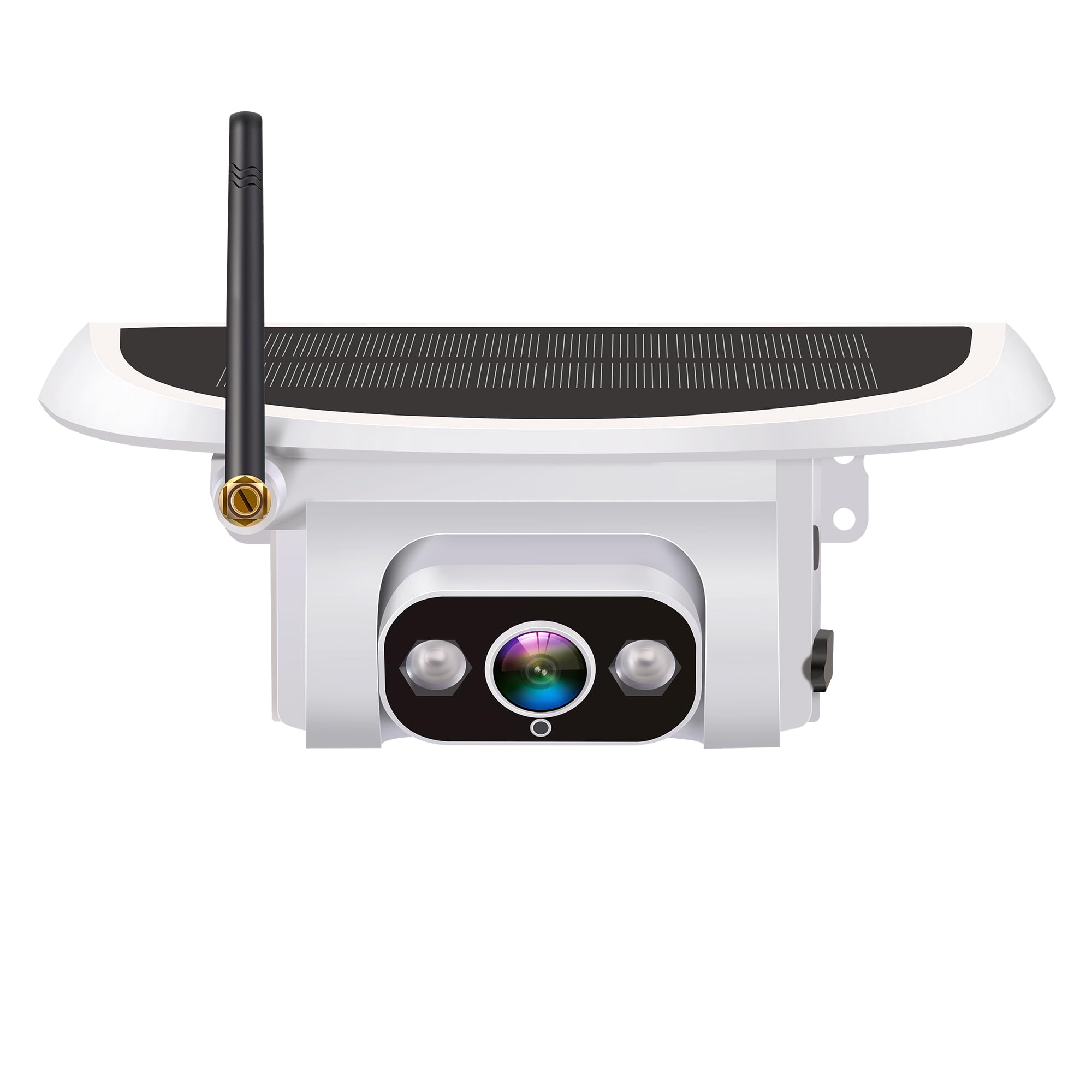
Image: The Pemacom T37 Magnetic Solar Backup Camera, featuring a solar panel on top, a camera lens with LED lights on the front, an antenna on the left side, and a USB-C charging port on the right.
Ọja Awọn ẹya ara ẹrọ
- Fifi sori ni kiakia: Features a magnetic mount for easy, 1-minute installation without the need for complex wiring. The magnetic base is wrapped in soft rubber to prevent scratching vehicle paint.
- Gbigba agbara Rọ: Equipped with a solar panel for continuous charging and a USB-C port for alternative power input.
- High-Definition Night Vision: Provides clear reversing assistance in low light or at night, enhancing safety.
- Robust Optics: Utilizes 6 full HD spherical glass lens groups, an F1.2 large aperture, and a 170° wide-angle view fun okeerẹ agbegbe.
- Ikole ti o tọ: Made from ABS + PC metal raw materials, designed to operate reliably in temperatures ranging from -22°F to 176°F (-30°C to 80°C).
- Apẹrẹ ti ko ni omi: Meets IP69 waterproof standards, ensuring performance in various weather conditions.
Package Awọn akoonu
The Pemacom T37 Magnetic Solar Backup Camera package typically includes:
- Pemacom T37 Solar Backup Camera
- USB-C Ngba agbara Cable
- Afowoyi Olumulo (iwe-ipamọ yii)
- Note: Additional accessories may vary.
Ṣeto
- Gbigba agbara akọkọ: Before first use, fully charge the camera using the provided USB-C cable. Connect the cable to the camera's charging port (DC-5V-2A TYPE-C) and a suitable USB power adapter. The camera also charges via its integrated solar panel when exposed to sunlight.
- Gbigbe Kamẹra: Identify a suitable metallic surface on your vehicle for mounting. The camera's magnetic base will securely attach. Ensure the camera has a clear view of the area behind your vehicle. The soft rubber coating on the magnetic base protects your vehicle's paint.
- Agbara Tan: Locate the power button on the camera (usually near the charging port). Press and hold the button for a few seconds until the indicator light illuminates, indicating the camera is powered on.
- Pairing with Display (if applicable): If your camera is part of a Pemacom LK9 System, follow the instructions provided with your display unit to pair the camera. Typically, this involves selecting a pairing option on the display and activating pairing mode on the camera.
Awọn ilana Iṣiṣẹ
- Activating the Camera: Once mounted and powered on, the camera will typically activate automatically when your vehicle is put into reverse, provided it is correctly paired with your display system.
- Iran Alẹ: The camera features automatic night vision. In low-light conditions, the camera will automatically switch to night vision mode, utilizing its powerful illumination to provide a clear image on your display.
- Abojuto: Use the live feed from the camera on your display to safely maneuver your vehicle in reverse. Pay attention to the 170° wide-angle view for comprehensive awareness of your surroundings.
- Agbara Pa: To conserve battery, you can manually power off the camera by pressing and holding the power button until the indicator light turns off. The camera will also power off automatically after a period of inactivity or when the vehicle is no longer in reverse (depending on system integration).
Itoju
- Cleaning the Lens and Solar Panel: Máa fọ lẹ́ńsì kámẹ́rà àti pánẹ́ẹ̀lì oòrùn déédéé pẹ̀lú aṣọ rírọ̀, damp cloth to ensure optimal image quality and charging efficiency. Avoid abrasive cleaners.
- Itọju Batiri: While the camera features solar charging, ensure it receives sufficient sunlight or is periodically charged via USB-C, especially during prolonged periods of low light or heavy use, to maintain battery health.
- Magnetic Mount Inspection: Periodically check the magnetic mount for secure attachment and ensure the rubber coating is intact to protect your vehicle's paint.
- Ibi ipamọ: If storing the camera for an extended period, ensure it is fully charged and stored in a cool, dry place.
Laasigbotitusita
| Isoro | Owun to le Fa | Ojutu |
|---|---|---|
| Ko si aworan lori ifihan | Camera not powered on; Not paired; Low battery; Obstruction. | Ensure camera is powered on. Re-pair with display unit. Charge the camera. Check for obstructions. |
| Didara aworan ti ko dara | Dirty lens; Low light (night vision not active); Interference. | Clean the camera lens. Ensure sufficient light or check night vision activation. Reduce potential interference sources. |
| Kamẹra ko gba agbara | Insufficient sunlight; USB-C cable/adapter fault; Charging port issue. | Ensure solar panel is exposed to direct sunlight. Try charging with USB-C. Use a different USB-C cable or adapter. |
| Camera falls off vehicle | Unsuitable mounting surface; Excessive vibration; Demagnetization. | Ensure mounting surface is flat and metallic. Avoid mounting on highly vibrating parts. The magnetic base is designed for durability, but inspect for damage. |
Awọn pato
| Brand | Pemacom |
| Nọmba awoṣe | T37 |
| Olupese | Pemacom |
| Ọja Mefa | 15.24 x 15.24 x 21.59 cm; 845g |
| Iru fifi sori ẹrọ | Ìdúró ojú ilẹ̀ (Agbára tí ó ṣeé gbára lé) |
| Awọn ẹrọ ibaramu | Tablet (Note: Refers to display unit compatibility, not camera usage) |
| Awọn batiri To wa | Yes (3 Lithium Ion batteries) |
| Batiri gbigba agbara | Bẹẹni |
| Mabomire Rating | IP69 |
| Awọn iwọn otutu ti nṣiṣẹ | -22°F si 176°F (-30°C si 80°C) |
| Igun gbooro | 170° |
Atilẹyin ọja ati Support
For warranty information or technical support, please refer to the documentation provided at the time of purchase or contact your retailer. You may also visit the official Pemacom webaaye fun iranlọwọ siwaju sii.