
SANSUI W12
SANSUI W12 AI Afọwọkọ Olumulo Earbuds Itumọ
Awoṣe: W12 | Brand: SANSUI
1. Ifihan
The SANSUI W12 AI Translation Earbuds are designed to facilitate real-time language translation, high-definition calls, and immersive audio experiences. Featuring advanced Bluetooth 6.0 technology and an open-ear design, these earbuds offer comfort and functionality for various daily activities, including travel, business, and learning.

Image: SANSUI W12 AI Translation Earbuds and their compact charging case.
Video: A detailed physical display of the SANSUI W12 AI Translation Earbuds, showcasing apẹrẹ ati awọn ẹya ara ẹrọ wọn.
2. Ohun ti o wa ninu Apoti
Upon unboxing your SANSUI W12 AI Translation Earbuds, you should find the following items:
- Awọn Agbekọti Itumọ SANSUI W12 AI (Osi ati otun)
- Ngba agbara Case
- USB-C Ngba agbara Cable
- W12 olumulo Afowoyi
- SANSUI AI Smart App User Guide

Aworan: Gbogbo awọn nkan to wa ninu apoti ọja SANSUI W12.
3. Eto
3.1. App Download ati fifi sori
The SANSUI AI Smart App is essential for utilizing the full translation capabilities of your earbuds. You can download it via QR code or by searching in your device's app store.
- Ṣayẹwo koodu QR: Locate the QR code on the product packaging or in the included user guide. Use your phone's built-in QR code scanner to scan it. This will direct you to a download page.
- Select Your System: On the download page, select your operating system (Android or iOS).
- Ṣe igbasilẹ lati Ile itaja App: You will be redirected to the Google Play Store (for Android) or the Apple App Store (for iOS). Download and install the "SANSUI" app.
- Direct Search: Alternatively, open your device's app store (Google Play Store or Apple App Store) and search for "SANSUI" to find and install the app directly.
Video: Instructions for downloading and connecting the SANSUI App on Android devices.
Video: Tutorial for downloading the SANSUI AI Smart App on iOS devices.
3.2. Sisopọ Bluetooth
Follow these steps to pair your SANSUI W12 earbuds with your smartphone:
- Rii daju pe Bluetooth ti ṣiṣẹ lori foonuiyara rẹ.
- Ṣii apoti gbigba agbara ki o yọ awọn agbekọri mejeeji kuro. Wọn yoo tẹ ipo sisopọ wọle laifọwọyi.
- Lórí fóònù rẹ, lọ sí ètò Bluetooth kí o sì wá àwọn ẹ̀rọ tó wà.
- Select "SANSUI W12" from the list of available devices to connect.
- Once connected, open the SANSUI AI Smart App. In the app, click the "+" sign to search for and connect to your earbuds within the application.

Image: The SANSUI AI Smart App interface, displaying EQ settings and device connection status.
4. Awọn ilana Iṣiṣẹ
4.1. Itumọ Akoko-gidi
The SANSUI W12 earbuds support over 100 languages for real-time translation through the AI Smart App.
- Open the SANSUI AI Smart App and navigate to the AI function window.
- Select your desired translation mode (e.g., Voice Translation, Text Translation, Simultaneous Interpretation, Conversation Translation).
- Yan orisun ati awọn ede ibi-afẹde fun itumọ.
- Press the record button or follow the on-screen prompts to begin the translation conversation.

Image: Demonstrates various scenarios where the earbuds facilitate communication, such as learning, travel, and business meetings.
Fidio: Ipariview of the SANSUI W12 AI Translation Earbuds model experience, highlighting its features in use.
4.2. Sisisẹsẹhin ohun ati Awọn ipe
The earbuds provide immersive 8D surround sound and clear communication with dual microphones and advanced noise cancellation.
- Sisisẹsẹhin orin: Enjoy high-fidelity audio for music. The AI Smart App allows for customizable sound effects and EQ settings.
- Awọn ipe Itumọ Giga: The dual microphones and noise cancellation ensure clear voice transmission during calls.
- Gbigbasilẹ Ipade Smart: Utilize the smart meeting recording feature for transcribing conversations.

Image: A user wearing the earbuds, with icons representing key functionalities: Music, Audio control, Calls, Smart meeting transcription, AI models, and Translation.
4.3. Apẹrẹ Ergonomic ati Itunu
The SANSUI W12 features an open-ear design with TPEE ear hooks for comfort and stability.
- Apẹrẹ Eti-Ṣi: Allows for ambient sound awareness, enhancing safety during activities like cycling or jogging.
- Ibamu to ni aabo: TPEE elastic ear hooks prevent the earbuds from falling out during physical activity.
- Awọn gilaasi-Ọrẹ: The slim ear hooks are designed to be comfortable for users who wear glasses.

Image: A visual comparison of open-ear versus in-ear earbud designs, emphasizing the comfortable and secure fit of the SANSUI W12.

Image: A person wearing the SANSUI W12 earbuds comfortably with eyeglasses, showcasing the ergonomic design for glasses wearers.
5. Itọju
Lati rii daju igbesi aye gigun ati iṣẹ aipe ti SANSUI W12 AI Earbuds Itumọ rẹ, tẹle awọn itọnisọna itọju wọnyi:
- Ninu: Gently wipe the earbuds and charging case with a soft, dry cloth. Avoid using abrasive materials or harsh chemicals.
- Omi Resistance: The earbuds feature a nano-coating for water resistance, protecting against sweat and light rain. However, they are not designed for submersion in water. Avoid prolonged exposure to moisture.
- Gbigba agbara: Use the provided USB-C cable for charging. Ensure the charging ports are clean and dry before connecting.
- Ibi ipamọ: Tọju awọn agbekọri naa sinu apoti gbigba agbara wọn nigbati ko si ni lilo lati daabobo wọn ati jẹ ki wọn gba agbara. Tọju ni itura, ibi gbigbẹ kuro lati awọn iwọn otutu to gaju.
6. Laasigbotitusita
If you encounter issues with your SANSUI W12 earbuds, refer to the following common solutions:
- Earbuds Not Connecting to Phone:
- Rii daju pe Bluetooth ti ṣiṣẹ lori foonu rẹ.
- Rí i dájú pé àwọn ètí ìró náà ti gba agbára, wọ́n sì ti yọ kúrò nínú àpótí ìgbówó.
- Gbagbe ẹrọ inu awọn eto Bluetooth ti foonu rẹ ki o gbiyanju lati so pọ lẹẹkansii.
- Restart your phone and the earbuds.
- Awọn ọran Gbigbasilẹ App:
- Jẹrisi asopọ intanẹẹti rẹ.
- Rí i dájú pé ẹ̀rọ rẹ ń ṣiṣẹ́ ní àkókò tuntun.
- Clear the cache of your app store (Google Play Store or Apple App Store).
- If scanning the QR code doesn't work, try searching for "SANSUI" directly in the app store.
- Translation Inaccuracies or Lag:
- Ensure a stable internet connection for optimal real-time translation.
- Sọ kedere ati ni iyara iwọntunwọnsi.
- Check the selected languages in the app to ensure they are correct.
- Update the SANSUI AI Smart App to the latest version.
- Didara Ohun Ko dara:
- Ensure the earbuds are properly positioned on your ears.
- Adjust the EQ settings within the SANSUI AI Smart App.
- Nu eyikeyi idoti kuro lati awọn agbohunsoke agbekọri.
7. Awọn pato
| Ẹya ara ẹrọ | Ẹ̀kúnrẹ́rẹ́ |
|---|---|
| Orukọ awoṣe | W12 |
| Brand | SANSUI |
| Asopọmọra Technology | Ailokun (Bluetooth 6.0) |
| Bluetooth Ibiti | 15 Mita |
| Igbesi aye batiri (Earbuds) | Titi di wakati 8 fun idiyele kan |
| Lapapọ Igbesi aye Batiri (pẹlu Ọran) | Awọn wakati 42 |
| Akoko gbigba agbara | 1.5 Hours (Type-C) |
| Audio Driver Iwon | 14.2 millimeters |
| Ariwo Iṣakoso | Ti nṣiṣe lọwọ Noise Ifagile |
| Omi Resistance Ipele | Water Resistant (Nano-coating) |
| Ìwúwo Nkan (Earbuds) | 8.3g fun agbekọri |
| Iṣakoso Iru | App Control / Touch Control / Volume Control |
| Awọn ẹrọ ibaramu | Cellphones, Gaming Consoles, Laptops, Tablets, Telephones |
| Pataki Awọn ẹya ara ẹrọ | Integrated Equalizer, Noise Cancellation, Surround Sound, Touch Control, Volume Control, AI Translation, Smart Meeting Recording |

Image: Technical diagram highlighting the Bluetooth 6.0 technology and 14.2mm dynamic driver for superior audio performance.
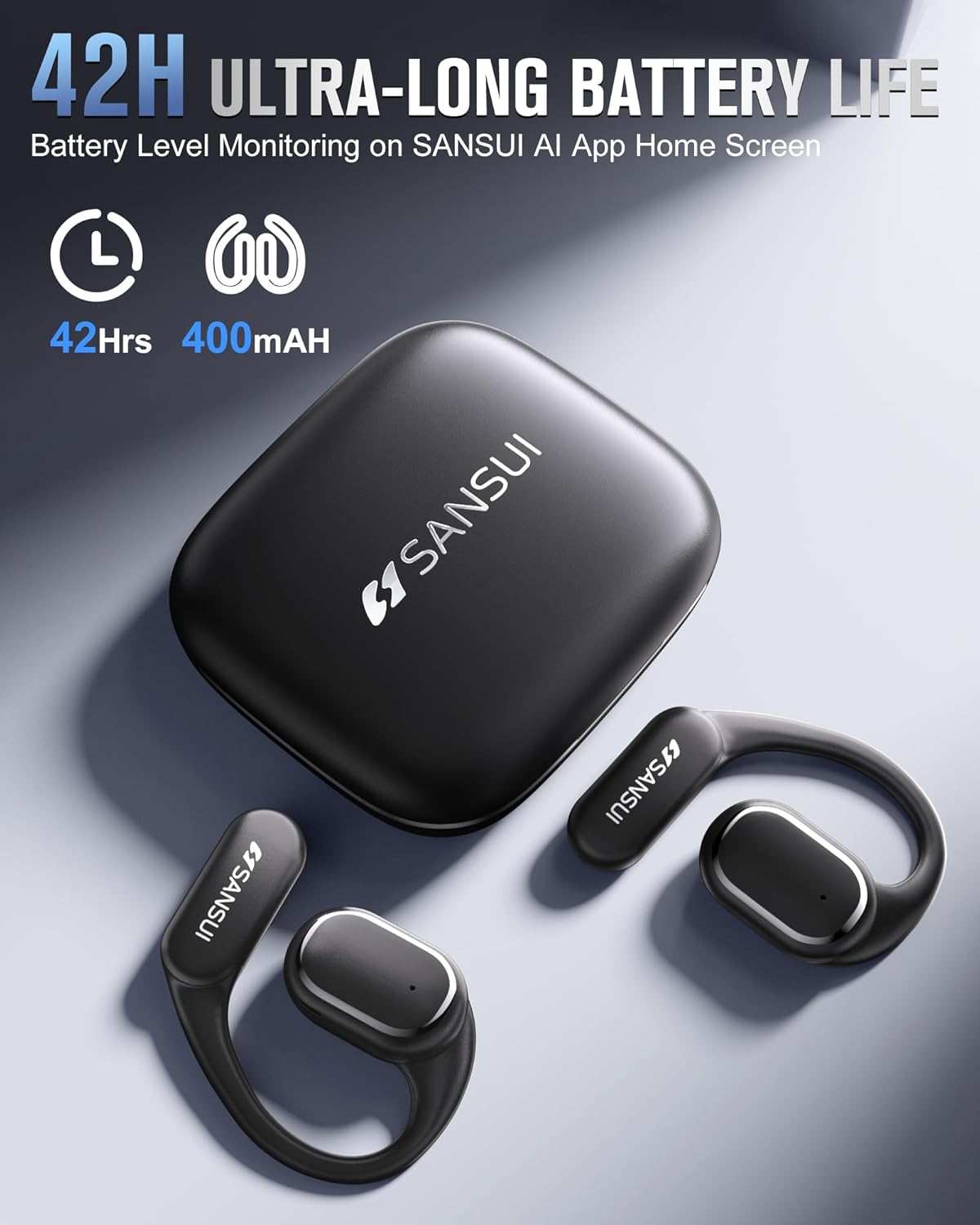
Image: The SANSUI W12 earbuds and charging case, illustrating the 42-hour ultra-long battery life.
8. Atilẹyin ọja ati Support
SANSUI is committed to providing quality products and customer satisfaction. For any inquiries or support needs, please refer to the following:
- Atilẹyin ọja: The product comes with a standard manufacturer's warranty. Please refer to the warranty card included in your packaging for specific terms and conditions.
- Atilẹyin Onibara: For technical assistance, troubleshooting, or general inquiries, please visit the official SANSUI website or contact their customer service. Contact information can be found in the user manual or on the SANSUI AI Smart App.
- Awọn Eto Idaabobo: Extended protection plans are available for purchase separately to cover your device beyond the standard warranty period.
Ask a question about this manual
Ask about setup, troubleshooting, compatibility, parts, safety, or missing instructions. Manuals+ will review the question and use this page’s manual context to help answer it.