
1. Ifihan
The Reflexion HIF2082DAB is a versatile retro-style music system designed to combine nostalgic aesthetics with modern audio technology. This unit integrates a turntable, CD player, DAB+/FM radio, USB playback and recording capabilities, and Bluetooth 5.3 connectivity. It is equipped with external speakers to deliver clear and powerful sound, making it a comprehensive audio solution for various environments.
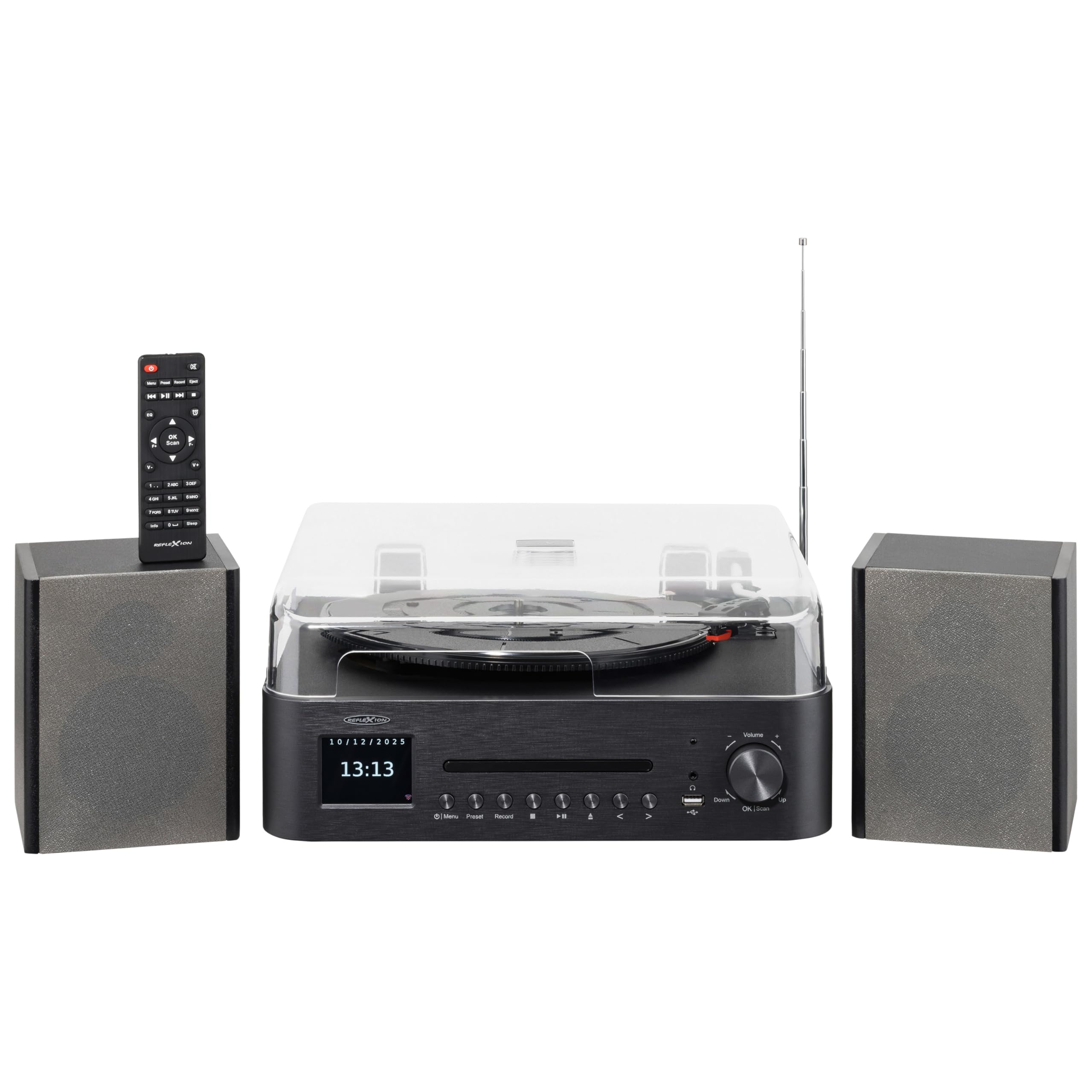
Image 1.1: The Reflexion HIF2082DAB Retro Turntable with included external speakers.
2. Awọn ilana aabo
- Ka gbogbo awọn ilana ni pẹkipẹki ṣaaju ṣiṣe ẹrọ naa.
- Jeki awọn Afowoyi fun ojo iwaju itọkasi.
- Ma ṣe fi ẹrọ naa han si ojo tabi ọrinrin lati yago fun ina tabi mọnamọna.
- Rii daju pe fentilesonu to dara; maṣe dina eyikeyi awọn ṣiṣi atẹgun.
- Gbe ẹyọ naa sori iduro, dada alapin.
- Lo awọn asomọ/awọn ẹya ara ẹrọ ti olupese pato.
- Yọọ kuro lakoko iji manamana tabi nigbati a ko lo fun igba pipẹ.
- Tọkasi gbogbo iṣẹ si awọn oṣiṣẹ iṣẹ ti o peye.
3. Package Awọn akoonu
Jọwọ ṣayẹwo pe gbogbo awọn nkan ti a ṣe akojọ rẹ si isalẹ wa ninu package rẹ:
- 1 x Reflexion HIF2082DAB Main Unit
- 2 x Sitẹrio Agbọrọsọ
- 1 x Okun Agbara
- 1 x Remote Control (2 AAA batteries not included)
- 1 x Ilana itọnisọna

Image 3.1: Included remote control and power cable.
4. Ọja Ipariview
4.1 Iwaju Panel ati idari
The front panel features the main display, control buttons for various functions, and the CD tray. The volume knob and USB port are also located here for easy access.
4.2 Top Panel (Turntable)
The top panel houses the semi-automatic turntable, including the platter, tonearm, and stylus. A protective dust cover is also provided.

Aworan 4.1: Isunmọ view of the turntable with auto-stop and tonearm return features highlighted.
4.3 Ru Panel Awọn isopọ
The rear panel includes connections for the external speakers, Line Out for connecting to an external amplifier, and Aux In for connecting external audio sources.

Image 4.2: Rear panel showing speaker terminals, Line Out, Aux In, and power input.
5. Eto
5.1 Ṣiṣii ati Gbe
- Ni ifarabalẹ yọ gbogbo awọn paati kuro ninu apoti.
- Place the main unit and speakers on a stable, level surface, ensuring adequate ventilation around the unit.
- Keep the unit away from direct sunlight, heat sources, and moisture.
5.2 Nsopọ awọn Agbọrọsọ
- Connect the included stereo speakers to the speaker terminals on the rear of the main unit. Ensure correct polarity (red to red, black to black).
5.3 Asopọ agbara
- Insert the power cable into the AC input on the rear of the unit.
- Plug the other end of the power cable into a suitable wall outlet (AC 100-240V).
5.4 Ni ibẹrẹ Oṣo
- Upon first power-on, the unit may prompt you to select a language and set the time/date. Follow the on-screen instructions using the navigation buttons and OK/Scan button.
6. Awọn ilana Iṣiṣẹ
6.1 Iṣẹ́ Àtúnṣe Tẹ́ẹ̀lì
- Iyara yiyan: Choose the appropriate speed (33, 45, or 78 RPM) using the speed selector switch.
- Ṣiṣe igbasilẹ kan: Place a record on the platter. Remove the stylus protector. Gently lift the tonearm using the cueing lever and position it over the desired track. Lower the tonearm slowly onto the record.
- Iṣẹ Iduro Aifọwọyi: The turntable features an auto-stop function that automatically stops the platter when a record finishes playing. The tonearm will also return to its rest position.
6.2 CD Player
- Press the CD mode button.
- Press the Eject button to open the CD tray. Place a CD (audio CD or MP3 CD) with the label side up.
- Press Eject again to close the tray. Playback will begin automatically.
- Use the Skip/Search buttons to navigate tracks and Play/Pause for playback control.
6.3 DAB+/FM Radio
- Press the DAB+ or FM mode button.
- Ṣiṣayẹwo Aifọwọyi: For DAB+, the unit will automatically scan for available stations. For FM, press and hold the OK/Scan button to perform an auto scan.
- Itọsọna Afowoyi: Use the navigation buttons to manually tune to a frequency.
- Awọn tito tẹlẹ: Save your favorite stations by pressing and holding the Preset button, then selecting a preset number. Recall saved stations by pressing the Preset button and selecting the desired number.
6.4 Bluetooth Asopọmọra
- Press the Bluetooth mode button. The display will show "Pairing" or similar.
- Mu Bluetooth ṣiṣẹ lori ẹrọ alagbeka rẹ (foonuiyara, tabulẹti, ati bẹbẹ lọ).
- Wa fun "Reflexion HIF2082DAB" in your device's Bluetooth list and select it to pair.
- Once paired, you can stream audio from your device to the HIF2082DAB.
6.5 USB Sisisẹsẹhin ati Gbigbasilẹ
- Sisisẹsẹhin USB: Insert a USB flash drive (up to 32GB, FAT format) containing MP3 files into the USB port. Press the USB mode button. The unit will automatically detect and play MP3 files.
- USB Recording (from Vinyl): While playing a vinyl record, press the Record button. The unit will begin recording the audio directly to the connected USB drive as an MP3 file. Press Record again to stop.
6.6 Aago Itaniji ati Aago Orun
- Itaniji: The unit features two adjustable alarms. Access the alarm settings through the menu to set wake-up times and desired audio sources (e.g., radio, CD).
- Akoko oorun: Set the sleep timer (up to 90 minutes) to automatically turn off the unit after a specified duration. This is useful for falling asleep to music.
7. Itọju
7.1 Ninu Unit
- Mu ese kuro pẹlu asọ ti o gbẹ. Ma ṣe lo abrasive ose tabi epo.
- For the dust cover, use a soft, slightly damp asọ, lẹhinna gbẹ daradara.
7.2 Stylus Itọju
- Regularly clean the stylus using a soft brush, brushing gently from back to front.
- Replace the stylus when sound quality deteriorates or after approximately 300-500 hours of use to prevent damage to your records.
8. Laasigbotitusita
| Isoro | Owun to le Fa | Ojutu |
|---|---|---|
| Ko si agbara | Okun agbara ko sopọ; Agbara iṣan ti ko tọ | Ensure power cable is securely connected; Try a different outlet |
| Ko si ohun | Volume too low; Speakers not connected; Incorrect input mode | Increase volume; Check speaker connections; Select correct source mode |
| Turntable ko nyi | Speed selector incorrect; Auto-stop engaged | Check speed setting; Ensure tonearm is over the record |
| Gbigba redio ti ko dara | Eriali ko tesiwaju; Ifihan agbara | Fully extend the telescopic antenna; Reposition the unit for better reception |
| Sisopọ Bluetooth kuna | Ẹrọ ti o jinna pupọ; Bluetooth ko sise lori ẹrọ; Kuro ko si ni ipo sisopọ | Move device closer; Enable Bluetooth; Ensure unit is in pairing mode |
9. Awọn pato
- Brand: Reflexion
- Awoṣe: HIF2082DAB
- Àwọ̀: Dudu
- Awọn iwọn (L x W x H): 32.9 x 37.1 x 16 cm (12.95 x 14.61 x 6.3 inches)
- Iwọn Ọja: 6.5 kilogram (14.33 lbs)
- Imọ ọna ẹrọ Bluetooth: Bẹẹni
- Nọmba ti Agbọrọsọ: 2 (External Stereo Speakers)
- Max Speaker Power: 2 x 160 W (Peak Power)
- Awọn Iyara Yiyi: 33, 45, 78 RPM
- Ifihan: 2.8" Color TFT Display
- Ibamu USB: Up to 32GB, FAT format (for MP3 playback and recording)
- Redio: DAB+, FM
- Awọn ẹya afikun: CD Player (MP3/Audiobook compatible), USB Recording, Remote Control, Dual Alarms, Sleep Timer, Auto-Stop with Tonearm Return, Line Out, Aux In.
10. Atilẹyin ọja ati Support
For warranty information and customer support, please refer to the warranty card included in your package or contact your local Reflexion dealer or service center. Keep your proof of purchase for any warranty claims.
For further assistance, you may also visit the official Reflexion website or consult the contact information provided in the original product documentation.