
1. Ifihan
The darkFlash C280 is an E-ATX full-tower PC gaming case designed for high-performance builds. It features a 270° panoramic tempered glass display, offering an unobstructed view of internal components. This case supports a wide range of motherboard formats, including reverse/back-connect motherboards, and provides extensive cooling flexibility with support for up to 10 fans and 360mm radiator configurations. Its builder-friendly design includes tool-free access and efficient cable management options.
2. Package Awọn akoonu
Please verify all components are present upon unboxing:
- darkFlash C280 PC Case (Black)
- Ohun èlò ìbáṣepọ̀ (àwọn skru, ìdènà, àwọn okùn waya)
- Itọsọna olumulo
- ARGB Fan Controller & Remote (if included with specific model variant)
- Magnetic Dust Filters (pre-installed)
Fidio: Pariview of the darkFlash C280 E-ATX PC Gaming Case, demonstrating its features and design.
3. Awọn pato
| Ẹya ara ẹrọ | Ẹ̀kúnrẹ́rẹ́ |
|---|---|
| Orukọ awoṣe | C280 Black |
| Iru Irú | Ile-iṣọ kikun |
| Modaboudu Ibamu | E-ATX, ATX, Micro ATX, Mini ITX (including reverse/back-connect motherboards) |
| Awọn iwọn (LxWxH) | 443 x 277 x 426mm (17.44 x 10.91 x 16.77 inches) |
| Ohun elo | 0.7mm SPCC Steel, Plastic, Tempered Glass |
| Àtìlẹ́yìn Gígùn GPU | Ti o de 420mm |
| Atilẹyin Giga Itutu Sipiyu | Ti o de 155mm |
| PSU Length Support | Ti o de 240mm |
| Fan Support | Up to 10x 120mm or 4x 140mm fans |
| Radiator Support | Up to 360mm configurations |
| Wakọ Bays | 3x SSD + 2x HDD |
| I/O Ports | USB 3.0 x1, USB 2.0 x2, HD Audio/Mic, Power/Reset (Optional USB-C) |

Image: Internal layout diagram illustrating motherboard, CPU cooler, and GPU length compatibility.
4. Eto ati fifi sori
4.1. Panel Yiyọ
The darkFlash C280 features tool-free side panels for easy access. Gently pull the tempered glass side panel from the top edge to detach it. Repeat for the steel side panel if necessary. Exercise caution when handling tempered glass.

Image: Illustration of removing the tempered glass side panel for internal access.
4.2. Modaboudu fifi sori
Install your E-ATX, ATX, Micro ATX, or Mini ITX motherboard onto the pre-installed standoffs. Secure the motherboard with the provided screws. Ensure proper alignment with the I/O shield.
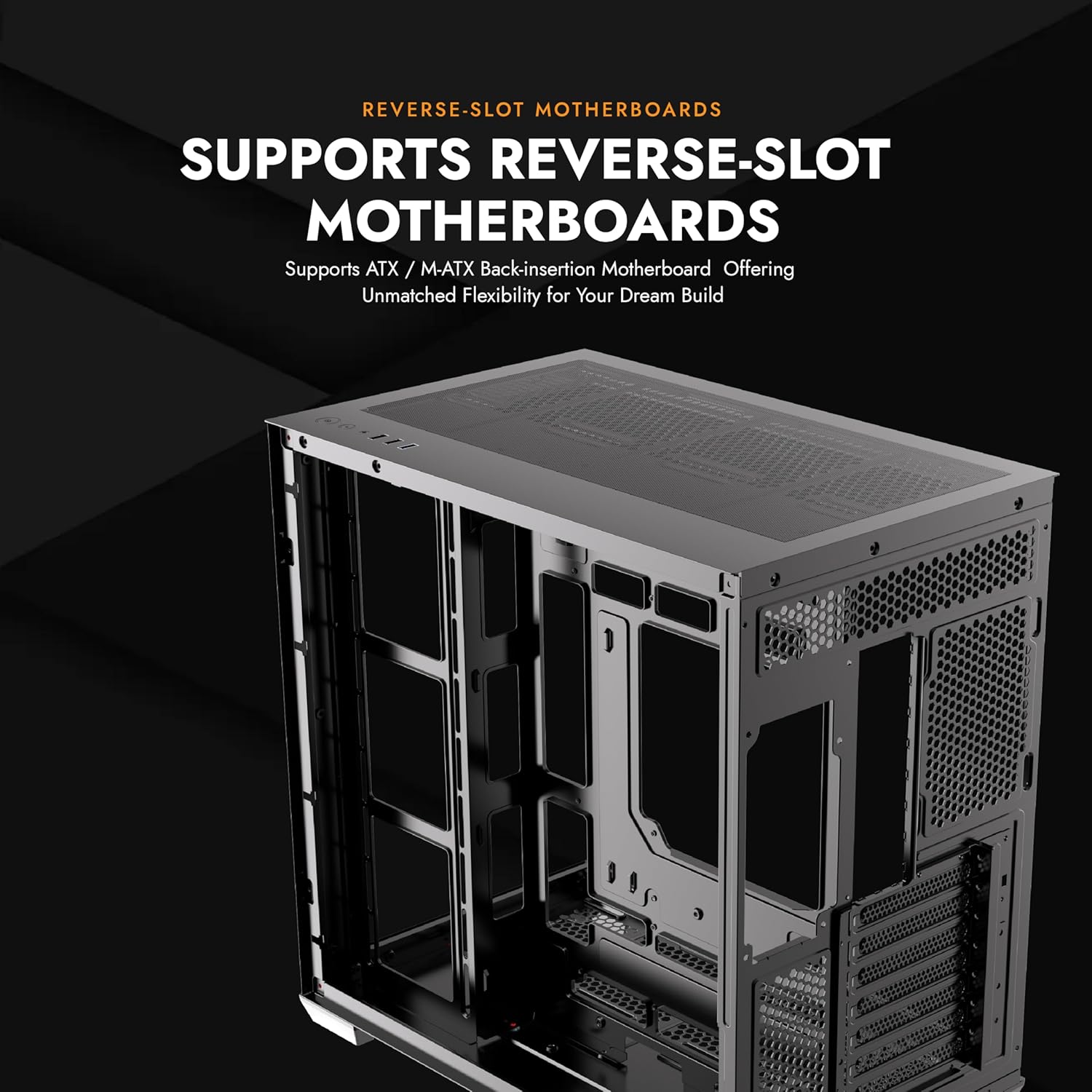
Image: Motherboard installation area within the C280 chassis.
4.3. Fi sori ẹrọ paati
- Kaadi eya aworan (GPU): Install your GPU into the appropriate PCIe slot. The case supports GPUs up to 420mm in length. Vertical GPU mounting is supported, but may require a separate bracket (not included).
- Olutọju Sipiyu: Fi ẹ̀rọ itutu CPU rẹ sori ẹrọ. Apo naa gba awọn ohun elo itutu CPU ti o ga to 155mm.
- Ẹka Ipese Agbara (PSU): Install the PSU in the designated bottom mount area. The case supports PSUs up to 240mm.
- Awọn awakọ ipamọ: Utilize the 3x SSD and 2x HDD drive mounts.

Image: Vertical GPU mounting option in the C280 case.
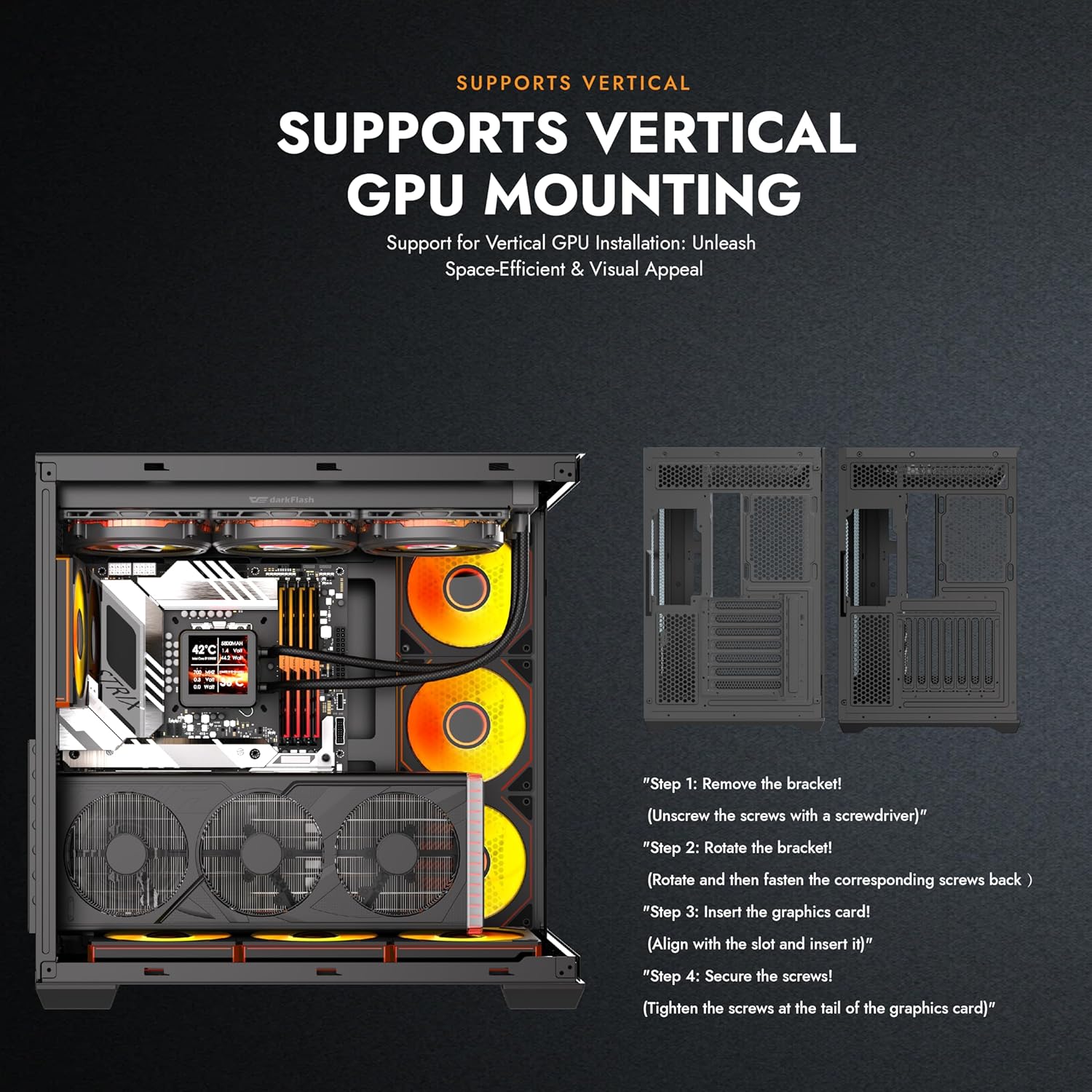
Image: Multifunction bracket for SSD and HDD installation.
4.4. Itutu eto sori
The C280 offers extensive cooling options:
- Awọn ololufẹ: Supports up to 10x 120mm or 4x 140mm fans.
- Awọn rediosi: Compatible with 360mm radiator configurations.

Aworan: Exploded view demonstrating the modular cooling architecture and airflow paths.
4.5. Iṣakoso USB
Lo awọn ample space behind the motherboard tray and the provided cable ties to route and secure cables for a clean build and optimized airflow. The reverse connection motherboard compatibility further aids in cable routing by moving I/O and power connections to the rear.
5. Awọn ilana Iṣiṣẹ
Once all components are installed and connected, close the side panels. Connect your peripherals, monitor, and power cable to the PSU. Press the power button on the top I/O panel to start your system.
5.1. Front I/O Panel
- Bọtini agbara: Tan-an/pa eto naa.
- Bọtini atunto: Tun eto naa bẹrẹ.
- HD Audio/Mic Jacks: Fún sísopọ̀ àwọn agbekọri àti makirofóònù.
- Awọn ibudo USB 3.0 (x1): Gbigbe data iyara to gaju.
- Awọn ibudo USB 2.0 (x2): Standard data transfer.
- USB-C Port (Optional): For compatible devices, offering convenient connectivity.

Image: Top I/O panel with power, reset, audio, and USB ports.
6. Itọju
6.1. Ìmọ́tótó Àlẹ̀mọ́ Eruku
The darkFlash C280 is equipped with dual quick-release dust filters located on the top and bottom of the case. Regularly clean these filters to maintain optimal airflow and prevent dust buildup inside your system.
- Fi pẹ̀lẹ́pẹ̀lẹ́ yọ àwọn àlẹ̀mọ́ eruku oofa náà kúrò.
- Clean the filters using compressed air or by rinsing with water (ensure they are completely dry before re-installation).
- Re-attach the magnetic filters to their respective positions.
Image: Magnetic dust filter for easy removal and cleaning.
7. Laasigbotitusita
- Ètò kò ṣiṣẹ́:
- Rii daju pe PSU ti sopọ daradara si iṣan ogiri ati iyipada agbara lori PSU wa ni ipo 'ON'.
- Verify all power cables (24-pin ATX, CPU, GPU) are securely connected to the motherboard and components.
- Check that the front panel power switch cable is correctly connected to the motherboard's header.
- Poor airflow/High temperatures:
- Rí i dájú pé gbogbo àwọn afẹ́fẹ́ tí a fi sori ẹrọ ń yípo dáadáa.
- Clean the dust filters regularly (refer to Section 6.1).
- Verify proper fan orientation for optimal intake and exhaust.
- Check for any obstructions to airflow within the case.
- Tempered glass panel difficult to remove/install:
- Apply gentle, even pressure when removing or installing. Avoid excessive force.
- Ensure the case is on a flat, stable surface when handling glass panels.
8. Atilẹyin ọja ati Support
darkFlash products are manufactured to the highest quality standards. For specific warranty details, please refer to the warranty card included with your product or visit the official darkFlash website. For technical support or inquiries, please contact darkFlash customer service through their official channels.
Osise Webojula: www.darkflash.com
Itaja Amazon: darkFlash Official Store