
Ọrọ Iṣaaju
Thank you for choosing the Eureka J15 Max Ultra Self-Emptying Robot Vacuum Combo. This all-in-one device is designed to provide a comprehensive cleaning solution for your home, combining powerful vacuuming with efficient mopping capabilities. It features an 8-in-1 functional base for hands-free maintenance, advanced navigation, and intelligent obstacle avoidance.
This manual provides essential information for setting up, operating, maintaining, and troubleshooting your robot vacuum. Please read it thoroughly before first use to ensure optimal performance and longevity of your device.
The Eureka J15 Max Ultra Robot Vacuum and Mop with its accompanying self-emptying base station.
Ṣeto
1. Unboxing ati Placement
Carefully remove all components from the packaging. Place the self-emptying base station on a hard, flat surface against a wall, ensuring there is adequate clear space around it (at least 0.5 meters on both sides and 1.5 meters in front) for the robot to dock easily. Plug the base station into a power outlet.

The all-in-one base station for the Eureka J15 Max Ultra, ready for setup.
2. Gbigba agbara akọkọ
Place the robot vacuum onto the charging contacts of the base station. Ensure it is properly aligned and charging. The indicator lights on the robot and base station will confirm charging status. Fully charge the robot before its first use.
3. App Asopọ
Download the Eureka robot app from your mobile device's app store. Follow the in-app instructions to connect your J15 Max Ultra to your home Wi-Fi network. This app allows for advanced control, scheduling, and monitoring of cleaning tasks.
Awọn ilana Iṣiṣẹ
1. First Run and Mapping
For the first cleaning cycle, allow the robot to fully map your home. Clear any obstacles that might hinder its movement. The IntelliView AI-Powered Obstacle Avoidance system will help it navigate, but initial mapping benefits from a clear path.

The J15 Max Ultra utilizes its dual vision system for intelligent navigation and obstacle avoidance.
2. Ninu awọn ipo
The J15 Max Ultra offers various cleaning modes accessible via the app:
- Igbale Nikan: Fun awọn idoti gbigbẹ lori gbogbo awọn iru ilẹ.
- Mop Nikan: For hard floors requiring wet cleaning.
- Igbale & Mop: Simultaneous cleaning for mixed floor types.
- Ipo Kapeeti-Akọkọ: Prioritizes vacuuming carpets with raised mops before mopping hard floors.
- Pet Area Deep Cleaning: Boosts suction and cleaning frequency in designated pet zones.

The Flex-Arm mop extends to clean edges and corners effectively.
3. Smart Awọn ẹya ara ẹrọ
- Flex-Arm Mop: Automatically extends the mop and side brush for edge-to-edge cleaning.
- Intelligent Mop Lifting: Mops automatically lift by 0.47 inches when detecting carpets to prevent dampṣii.
- IntelliView AI Dirt Detection: Adjusts cleaning strategy based on dry or wet messes.
- Iṣakoso ohun: Compatible with Alexa, Google Assistant, and Siri for hands-free operation.
- Real-time Camera: Monitor your home and interact with pets remotely via the app.

The Eureka robot app integrates with Alexa, Google Assistant, and Siri for convenient voice control.
Itoju
The J15 Max Ultra features an advanced 8-in-1 functional base designed to minimize manual maintenance for up to 75 days.
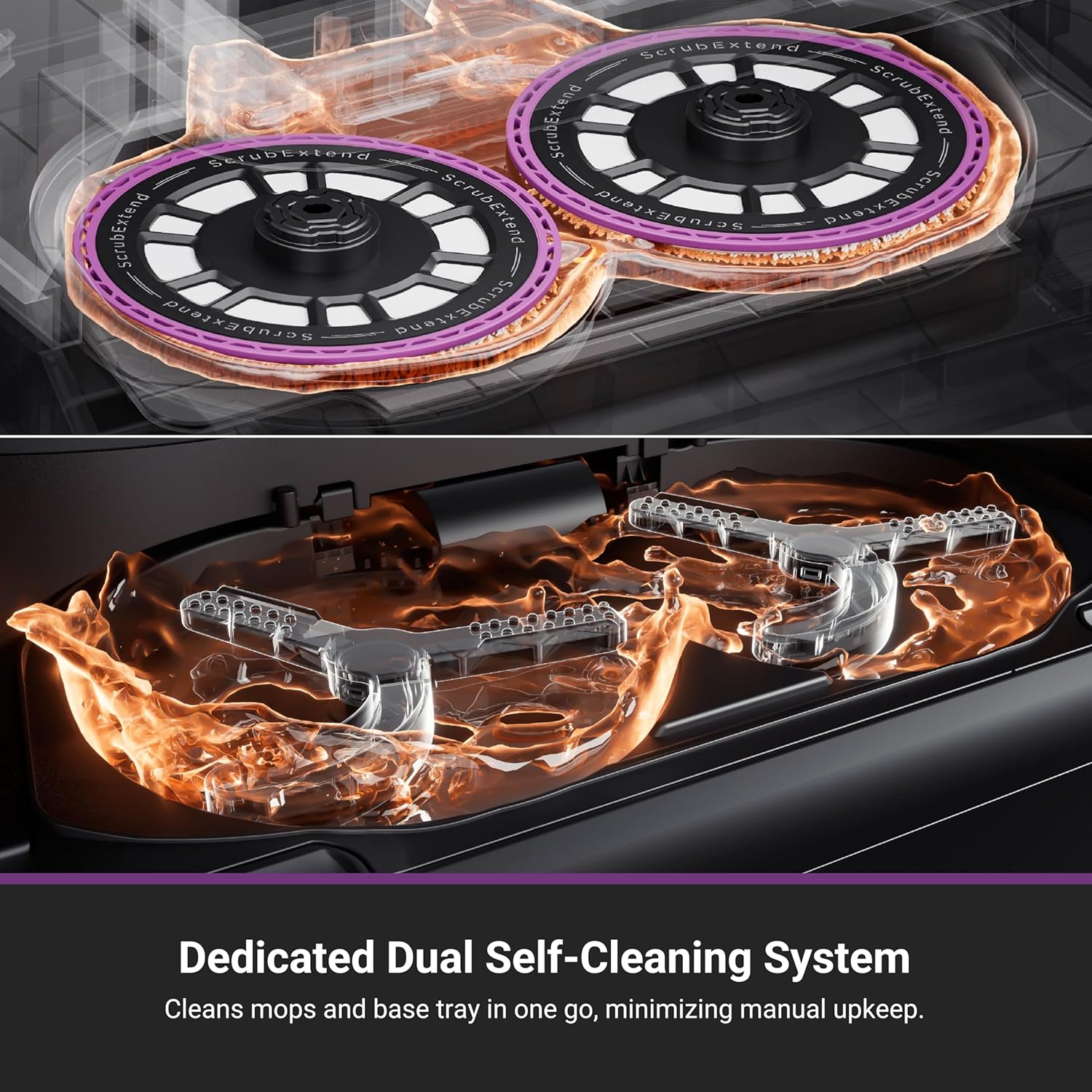
1. Dual Self-Cleaning System
- Fífọ omi gbígbóná: After each cleaning cycle, the mop pads are washed with 176°F hot water to effectively remove grime and stains.
- Hot Air Mop Drying: Mops are dried with 131°F heated air to prevent mold, mildew, and odors.
- Base Tray Self-Cleaning: A built-in scraper in the base station removes residue and collects waste, ensuring the tray remains clean.
- Automatic Dust Emptying: The robot automatically empties collected debris into a 3L dust bag in the base station, providing up to 75 days of hands-free dust disposal.
- Atunkun Omi Aifọwọyi: The base station automatically refills the robot's water tank with clean water.

Illustration of the 176°F hot water mop washing and 131°F hot air drying process.
2. Ìtọ́jú Fọ́rọ́
- Anti-Tangle Technology: The main and side brushes are designed with anti-tangle features to reduce hair entanglement, especially useful for pet owners.
- Ayẹwo igbagbogbo: Periodically check the main brush, side brush, and filter for any accumulated debris or hair. Clean as needed using the provided cleaning tool.

The J15 Max Ultra features tangle-free brush technology to minimize hair wrapping.
Laasigbotitusita
If you encounter any issues with your Eureka J15 Max Ultra, please refer to the following general troubleshooting tips:
- Robot ko gba agbara: Ensure the robot is correctly docked and the base station is powered on. Clean the charging contacts on both the robot and the base station.
- Iṣe mimọ ti ko dara: Check if the dustbin is full, the brushes are tangled, or the filter is clogged. Clean or replace components as necessary.
- Robot di tabi lilọ kiri lainidi: Clear any obstacles in its path. Clean the sensors on the robot. Restart the robot and allow it to remap if needed.
- Awọn oran Asopọmọra App: Ensure your Wi-Fi network is stable and the robot is within range. Restart your router, the robot, and your mobile device.
- Mop not cleaning effectively: Ensure the clean water tank is filled and the dirty water tank is empty. Check if the mop pads are properly attached and clean.
Fun alaye diẹ sii laasigbotitusita tabi awọn ọran itẹramọṣẹ, jọwọ kan si atilẹyin alabara.
Awọn pato
| Ẹya ara ẹrọ | Ẹ̀kúnrẹ́rẹ́ |
|---|---|
| Brand | Eureka |
| Orukọ awoṣe | J15 Max Ultra Robot Vacuum and Mop with Self Emptying Base |
| Dada iṣeduro | Tile, Hard floors, Carpet |
| Pataki Awọn ẹya ara ẹrọ | Flex-Arm, Intelligent Mop Lifting, Obstacle Avoidance, Self-Emptying, Self-Refilling |
| Àwọ̀ | Dudu |
| Adarí Iru | Iṣakoso ohun elo, Iṣakoso bọtini, Iṣakoso ohun |
| Àlẹmọ Iru | Katiriji |
| Igbesi aye batiri | 360 iṣẹju |
| Batiri Iru | Litiumu Iwon |
| Agbara (Apo eruku) | 4 lita |
| Orisun agbara | Agbara Batiri |
| Awọn Iwọn Nkan (L x W x H) | 15.55"L x 18.03"W x 18.3"H |
| Awọn irinše to wa | Floor Brush, Instruction Guide, Mop Pad, Side Brush, Vacuum Bag |
| Agbara afamora | 22,000 Pa |
Alaye atilẹyin ọja
The Eureka J15 Max Ultra comes with the following manufacturer's warranty:
- Batiri: Atilẹyin ọdun kan.
- Vacuum Cleaner (main unit): Atilẹyin ọja ọdun meji.
Please retain your proof of purchase for warranty claims. For full terms and conditions, refer to the warranty card included with your product or visit the official Eureka webojula.
Onibara Support
If you require assistance, have questions, or need to report an issue, please contact Eureka customer service:
- Foonu: 1-800-282-2886
- Lori ayelujara: Visit the official Eureka webojú òpó wẹ́ẹ̀bù fún àwọn ìbéèrè tó ń fa ìbéèrè, àwọn ohun èlò ìrànlọ́wọ́, àti àwọn fọ́ọ̀mù ìbánisọ̀rọ̀.
When contacting support, please have your product model number (J15 Max Ultra) and proof of purchase readily available.