
1. Ifihan
O ṣeun fun riraasing the ULTIMEA Aura A60 U2621 7.1ch Dolby Atmos Soundbar System. This manual provides essential information for setting up, operating, and maintaining your new sound system. Please read this manual thoroughly before use to ensure proper functionality and to maximize your audio experience.

Figure 1.1: Immersive audio experience with the ULTIMEA Aura A60 system.
2. Alaye Aabo
To reduce the risk of electric shock, fire, or damage to your device, please observe the following safety precautions:
- Ma ṣe fi ohun elo yii han si ojo tabi ọrinrin.
- Ma ṣe gbe awọn nkan ti o kun fun awọn olomi, gẹgẹbi awọn vases, sori ẹrọ naa.
- Rii daju pe fentilesonu to dara. Ma ṣe dina eyikeyi awọn ṣiṣi atẹgun.
- Maṣe fi sori ẹrọ nitosi awọn orisun ooru gẹgẹbi awọn imooru, awọn iforukọsilẹ ooru, awọn adiro, tabi awọn ohun elo miiran (pẹlu ampliifiers) ti o gbe ooru jade.
- Dabobo okun agbara lati ma rin lori tabi pin, ni pataki ni awọn pilogi, awọn ohun elo irọrun, ati aaye nibiti wọn ti jade kuro ninu ohun elo naa.
- Lo awọn asomọ/awọn ẹya ara ẹrọ ti olupese pato.
- Yọọ ohun elo yi nigba iji manamana tabi nigba lilo fun igba pipẹ.
- Tọkasi gbogbo iṣẹ si awọn oṣiṣẹ iṣẹ ti o peye.
3. Package Awọn akoonu
Jọwọ ṣayẹwo pe gbogbo awọn nkan wa ati ni ipo to dara:
- ULTIMEA Aura A60 Soundbar
- Wireless Subwoofer (4-inch, BassMX Technology)
- 4 x Surround Speakers (2 front, 2 rear)
- Isakoṣo latọna jijin
- Okun HDMI
- Power Adapter/Cables
- Afowoyi Olumulo (iwe-ipamọ yii)
4. Ọja Ipariview
The ULTIMEA Aura A60 U2621 is a 7.1ch Dolby Atmos soundbar system designed to deliver an immersive home theater audio experience. It features a main soundbar unit, a powerful wireless subwoofer with BassMX technology, and four surround speakers.
4.1 Ẹ̀rọ Ohun Orin Àkọ́kọ́
The main soundbar unit houses 3 main channels for clear dialogue and primary audio. It serves as the central hub for all audio connections.

Figure 4.1: Main soundbar unit with front surround speakers.
4.2 Subwoofer Alailowaya
The dedicated 4-inch wireless subwoofer incorporates BassMX technology to enhance low frequencies, providing deep and resonant bass for a more impactful audio experience.

Figure 4.2: Wireless subwoofer with BassMX technology.
4.3 Kakiri Agbọrọsọ
The system includes four surround speakers: two front and two rear. The rear speakers connect wirelessly to the soundbar, minimizing cable clutter and allowing flexible placement to create an expansive acoustic space.

Figure 4.3: Diagram of 7.1ch sound distribution.
4.4 Input / o wu Ports
The soundbar features multiple input options for versatile connectivity:
- HDMI eARC: For high-quality audio transmission and seamless TV integration.
- Ojú: Ìbáṣepọ̀ ohùn oní-nọ́ńbà.
- AUX: Afọwọṣe iwe ohun.
- USB: Fun ṣiṣiṣẹsẹhin media.
- Bluetooth: Wireless audio streaming.

Figure 4.4: Rear panel connections, including HDMI eARC.
5. Eto
5.1 Ibi ti ara
Fífi àwọn ẹ̀yà ara ètò ohùn rẹ sí ipò tó dára jùlọ ṣe pàtàkì fún ìrírí ohùn tó dára jùlọ.
- Pẹpẹ ohun: Fi ohun èlò orin sí àárín gbùngbùn ìsàlẹ̀ tẹlifíṣọ̀n rẹ. Rí i dájú pé kò dí i lọ́wọ́.
- Subwoofers: Position the wireless subwoofer on the floor near the soundbar. Experiment with placement to find the best bass response for your room.
- Front Surround Speakers: Place the two wired front surround speakers to the left and right of your TV, ideally at ear level when seated.
- Awọn Agbọrọsọ Yika Tẹhin: Position the two wireless rear surround speakers behind your primary listening position, to the left and right. These speakers will automatically connect wirelessly to the soundbar once powered on.

Figure 5.1: Recommended speaker placement for Dolby Atmos.
5.2 Awọn isopọ
Follow these steps to connect your soundbar system:
- Asopọ agbara: Connect the power cables to the soundbar, subwoofer, and surround speakers, then plug them into a power outlet.
- HDMI eARC (A ṣeduro): Connect one end of the provided HDMI cable to the HDMI eARC port on your soundbar and the other end to the HDMI eARC/ARC port on your TV. This connection supports Dolby Atmos and allows for TV remote control of the soundbar.
- Ìsopọ̀ Opitika (Iyanran): If your TV does not have an HDMI eARC/ARC port, connect an optical cable (not included) from your TV's optical output to the OPTICAL input on the soundbar.
- AUX Connection (Alternative): For analog audio sources, connect a 3.5mm AUX cable (not included) from your device's audio output to the AUX input on the soundbar.
- Asopọ USB: Insert a USB drive into the USB port on the soundbar for direct media playback.
- Mimuuṣiṣẹpọ Bluetooth: To connect a Bluetooth device, select the Bluetooth input on the soundbar. On your device, search for 'ULTIMEA Aura A60' and pair.
6. Awọn ilana Iṣiṣẹ
6.1 Agbara Tan / Pa
Tẹ bọtini agbara lori ọpa ohun tabi iṣakoso latọna jijin lati tan tabi pa eto naa.
6.2 Aṣayan titẹ sii
Use the 'Input' button on the remote control or the soundbar to cycle through available input sources: HDMI eARC, Optical, AUX, USB, and Bluetooth.

Figure 6.1: Remote control for easy operation.
6.3 Iṣakoso iwọn didun
Adjust the master volume using the 'Volume Up' and 'Volume Down' buttons on the remote control or the soundbar. You can also adjust subwoofer and surround speaker levels independently.
6.4 Sound Modes and EQ Presets
The Aura A60 offers various sound modes and EQ presets to optimize audio for different content and preferences.
- Àwọn Ìgbékalẹ̀ Pàtàkì: Select from 6 specialized modes: Movie, Music, Voice, Sports, Game, and Night.
- Awọn tito tẹlẹ EQ: Access 121 professional EQ presets for genres like Bass, Pop, Classical, and Rock via the ULTIMEA app.

Figure 6.2: 121 preset EQ matrix for customized audio.
6.5 App Iṣakoso
Download the ULTIMEA app to your smartphone for advanced control and customization options, including a 10-band EQ and access to all EQ presets.
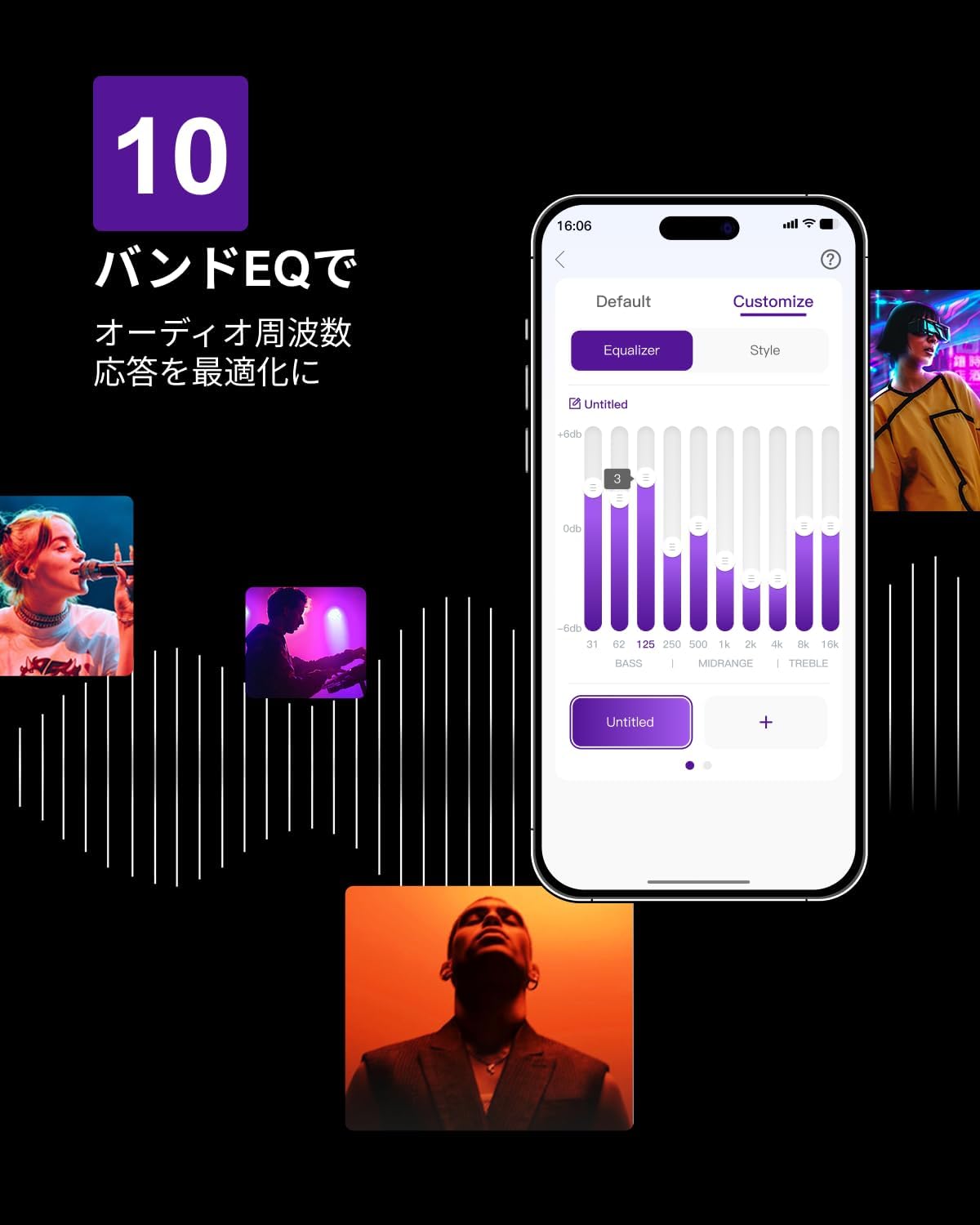
Figure 6.3: ULTIMEA mobile application interface.
7. Itọju
To ensure the longevity and optimal performance of your ULTIMEA Aura A60 soundbar system, follow these simple maintenance guidelines:
- Ninu: Use a soft, dry cloth to wipe the surfaces of the soundbar, subwoofer, and speakers. Do not use liquid cleaners or abrasive materials, as they may damage the finish.
- Afẹfẹ: Ensure that all ventilation openings remain clear and unobstructed to prevent overheating.
- Ibi ipamọ: If storing the system for an extended period, disconnect it from power and store it in a cool, dry place away from direct sunlight and extreme temperatures.
8. Laasigbotitusita
Ti o ba pade awọn ọran pẹlu ẹrọ ohun elo ohun rẹ, tọka si awọn iṣoro ti o wọpọ ati awọn ojutu wọnyi:
| Isoro | Owun to le Fa | Ojutu |
|---|---|---|
| Ko si ohun lati bar ohun. | A ti yan titẹ sii ti ko tọ, iwọn didun kere ju, awọn okun waya ko sopọ mọ daradara. | Verify the correct input source. Increase volume. Check all cable connections (HDMI, Optical, AUX). Ensure the soundbar is powered on. |
| No sound from subwoofer/surround speakers. | Subwoofer/speakers not paired or powered on, volume too low. | Ensure subwoofer and surround speakers are powered on. They should automatically pair. If not, refer to the pairing instructions in the full manual (if available) or contact support. Increase their individual volume levels. |
| Daru tabi ko dara ohun didara. | Incorrect audio settings, poor source quality, interference. | Adjust EQ settings or try different sound modes. Ensure the audio source is high quality. Check for nearby electronic devices causing interference. |
| Awọn oran asopọ Bluetooth. | Device out of range, not in pairing mode, interference. | Ensure the soundbar is in Bluetooth pairing mode. Move your device closer to the soundbar. Disconnect and re-pair the device. |
If the problem persists after trying these solutions, please contact ULTIMEA customer support.
9. Awọn pato
| Ẹya ara ẹrọ | Ẹ̀kúnrẹ́rẹ́ |
|---|---|
| Brand | ULTIMEA |
| Orukọ awoṣe | Aura A60 |
| Nọmba awoṣe | U2621 |
| Agbọrọsọ Iru | Soundbar with 7.1ch Surround Sound |
| Ohun Technology | Dolby Atmos, BassMX Technology |
| Asopọmọra | HDMI eARC, Bluetooth, Optical, AUX, USB |
| Subwoofer | 4-inch Wired Subwoofer (integrated BassMX) |
| Agbegbe Agbọrọsọ | 4 (2 wired front, 2 wireless rear) |
| Iṣakoso | Remote Control, ULTIMEA App |
| Àwọ̀ | Dudu |
| Iwọn (D x W x H) | 9 cm x 40 cm x 7 cm (Soundbar, approximate) |
| Ilu isenbale | China |
10. Atilẹyin ọja ati Support
ULTIMEA is committed to providing high-quality products and customer satisfaction. Your Aura A60 U2621 soundbar system comes with comprehensive support.
10.1 atilẹyin ọja Alaye
Specific warranty details may vary by region. Please refer to the warranty card included with your product or visit the official ULTIMEA webAaye fun awọn ofin ati ipo atilẹyin ọja ti o ni imudojuiwọn julọ.
10.2 Onibara Support
For any questions, technical assistance, or troubleshooting not covered in this manual, please contact our dedicated support team:
- 365-Day Support: Our expert staff is available year-round to assist you.
- Iwiregbe Live: Instant responses are available via live chat on our webojula.
- Pada: We offer a 30-day return policy with free shipping for your peace of mind.

365-Day Expert Support

Instant Live Chat

Awọn ipadabọ Ọfẹ 30-ọjọ
Fun iranlọwọ siwaju sii, jọwọ ṣabẹwo si ULTIMEA Brand Store.