Ọrọ Iṣaaju
Thank you for choosing the Generic K54 Wireless Earbuds. These earbuds are designed to provide a superior audio experience with HD decoding technology, deep bass, and stereo surround sound. Featuring a convenient digital display for battery levels and an ergonomic design for comfortable wear, the K54 earbuds offer seamless Bluetooth connectivity for various devices. Please read this manual carefully to ensure proper use and optimal performance of your new earbuds.
Package Awọn akoonu
Jọwọ ṣayẹwo package fun awọn nkan wọnyi:
- K54 Wireless Earbuds (Left and Right)
- Ngba agbara Case
- USB Iru-C Ngba agbara USB
- Itọsọna olumulo
- Multiple sizes of ear tips (typically included for comfortable fit)
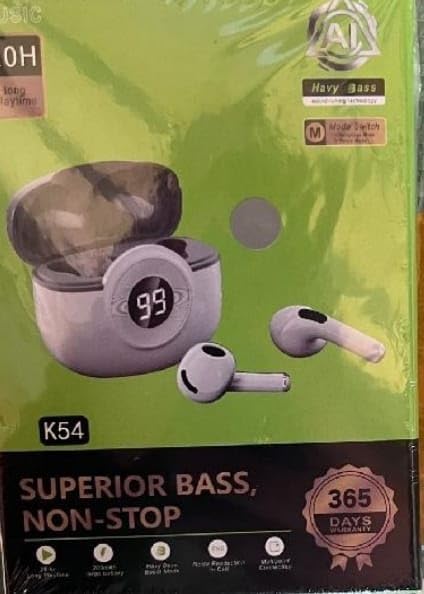
Image: The K54 Wireless Earbuds packaging, displaying the earbuds, charging case, and key features like 'Superior Bass' and '365 Days Warranty'.
Ṣeto
1. Ngba agbara si Earbuds ati Ọran
Ṣaaju lilo akọkọ, gba agbara ni kikun awọn agbekọri ati apoti gbigba agbara.
- Gbe awọn agbekọri sinu apoti gbigba agbara. Rii daju pe wọn joko ni deede.
- Connect the USB Type-C charging cable to the charging port on the case and the other end to a USB power adapter (not included) or a computer's USB port.
- Ifihan oni-nọmba lori apoti gbigba agbara yoo fihan ipin ogorun batiri naatage, indicating charging status. The earbuds will also show a charging indicator (usually a light) while charging.
- Akoko gbigba agbara jẹ isunmọ awọn wakati 1.5 fun idiyele ni kikun.
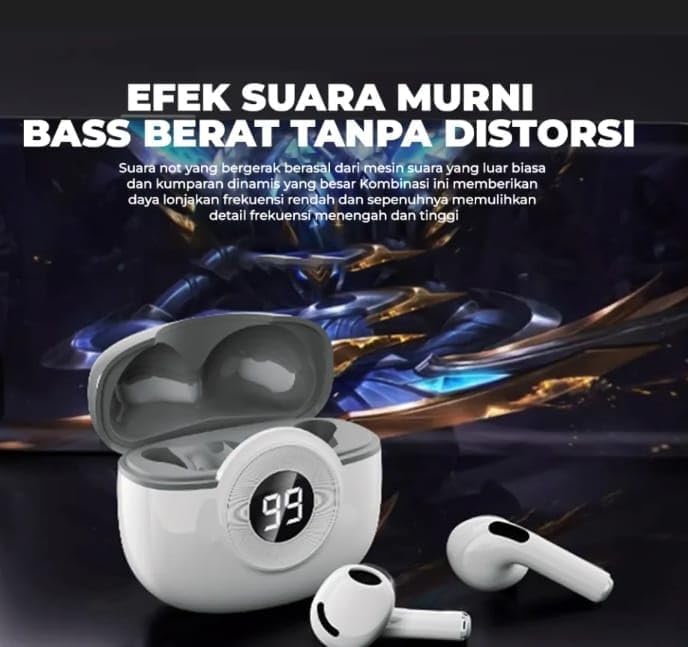
Image: The K54 Wireless Earbuds resting in their charging case. The case features a digital LED display showing '99', indicating a full battery charge. The earbuds are white.
2. Sisopọ pẹlu Ẹrọ kan
Follow these steps to pair your K54 Wireless Earbuds with your smartphone or other Bluetooth-enabled device:
- Rii daju pe awọn agbekọri ti gba agbara.
- Ṣí àpótí ìgbara. Àwọn agbekọri náà yóò wọ inú ipò ìsopọ̀ láìfọwọ́sí (tí àwọn ìmọ́lẹ̀ tó ń tàn lórí àwọn agbekọri náà fi hàn).
- Lori ẹrọ rẹ, lọ si awọn eto Bluetooth ki o tan-an Bluetooth.
- Wa fun available devices. You should see "K54" or a similar name appear in the list.
- Select "K54" to connect. Once connected, the earbuds will indicate successful pairing (e.g., a voice prompt or steady light).
- Awọn agbekọri naa yoo tun sopọ laifọwọyi si ẹrọ ti o so pọ to kẹhin nigbati o ba jade ninu ọran naa, ti o ba mu Bluetooth ṣiṣẹ lori ẹrọ naa.
Awọn ilana Iṣiṣẹ
Wọ awọn Earbuds
Gently insert the earbuds into your ears. Adjust them for a comfortable and secure fit. The ergonomic design is intended for stable wear during various activities.
Awọn iṣakoso ifọwọkan
The K54 earbuds feature touch controls for easy management of music and calls. Specific functions may vary slightly depending on your device and operating system.
| Iṣe | Išẹ |
|---|---|
| Tẹ ẹyọkan (osi/ọtun) | Mu orin ṣiṣẹ/Danuduro, Dahun/Pari ipe |
| Tẹ ni kia kia lẹẹmeji (Ẹkọ Atẹti ọtun) | Next Track |
| Tẹ ni kia kia lẹẹmeji (Agbohun Akọkọ osi) | Ti tẹlẹ Track |
| Tẹ lẹẹmẹta (Osi/Ọtun) | Muu Iranlọwọ ohun ṣiṣẹ (Siri, Iranlọwọ Google) |
| Long Press (Left/Right, 2 seconds) | Kọ ipe ti nwọle |
| Long Press (Left/Right, 3 seconds) | Tan-an / Paa (nigbati kii ṣe ọran) |
Itoju
Proper maintenance ensures the longevity and optimal performance of your K54 Wireless Earbuds.
- Ninu: Regularly clean the earbuds and charging case with a soft, dry, lint-free cloth. Do not use abrasive cleaners or immerse in water.
- Ibi ipamọ: Nigbati o ko ba si ni lilo, tọju awọn afikọti sinu apoti gbigba agbara wọn lati daabobo wọn ki o jẹ ki wọn gba agbara.
- Yago fun awọn ipo to gaju: Do not expose the earbuds to extreme temperatures, humidity, or direct sunlight. The earbuds are ko omi sooro.
- Gbigba agbara: Lo okùn USB Type-C ti a pese nikan fun gbigba agbara.
Laasigbotitusita
If you encounter issues with your K54 Wireless Earbuds, please refer to the following common solutions:
- Awọn agbekọri ti ko so pọ:
- Rii daju pe awọn agbekọri mejeeji ti gba agbara.
- Paa ati tan Bluetooth ẹrọ rẹ.
- Forget "K54" from your device's Bluetooth list and try pairing again.
- Gbe awọn agbekọri pada sinu ọran naa, pa ideri naa, duro fun iṣẹju-aaya diẹ, lẹhinna ṣii lati tun tẹ ipo isọpọ sii.
- Agbekọri agbekọri kan ṣoṣo ti n ṣiṣẹ:
- Rii daju pe awọn agbekọri mejeeji ti gba agbara.
- Place both earbuds back into the charging case, close the lid, then take them out together.
- Try resetting the earbuds (refer to specific reset instructions if available, otherwise, a full charge and re-pairing often resolves this).
- Ko si ohun tabi iwọn kekere:
- Ṣayẹwo ipele iwọn didun lori ẹrọ rẹ mejeeji ati awọn agbekọri.
- Rii daju pe awọn agbekọri ti sopọ daradara si ẹrọ rẹ.
- Nu eyikeyi idoti kuro lati apapo agbọrọsọ agbekọri.
- Apo gbigba agbara ko gba agbara:
- Rí i dájú pé okùn USB Type-C so mọ́ àpótí àti orísun agbára dáadáa.
- Gbiyanju ibudo USB ti o yatọ tabi ohun ti nmu badọgba agbara.
Awọn pato
| Ẹya ara ẹrọ | Ẹ̀kúnrẹ́rẹ́ |
|---|---|
| Nọmba awoṣe | K54 |
| Asopọmọra | Alailowaya, Bluetooth |
| Ẹya Bluetooth | 5.0 |
| Gbigbe Eti | Ninu Eti |
| Ọna Iṣakoso | Bọtini Titari, Fọwọkan |
| Akoko gbigba agbara | O fẹrẹ to awọn wakati 1.5 |
| Iwọn Nkan | 45 giramu |
| Ohun elo | Ṣiṣu |
| Àwọ̀ | Funfun |
| Omi Resistance Ipele | Ko Omi Resistant |
| Pataki Awọn ẹya ara ẹrọ | Digital Display, HD Decoding, LED Battery Indicator, Superior Bass, Surround Sound |
| Ipalara | 32 ohms |
| Idahun Igbohunsafẹfẹ | 20 Hz (Note: This value typically represents the lower limit of a frequency range) |
| Ifamọ | 98 dB |
| Gbigba agbara Port | USB Type-C (for charging case) |
Alaye atilẹyin ọja
The Generic K54 Wireless Earbuds come with a manufacturer's limited warranty. Please refer to the terms and conditions provided at the time of purchase for full details.
- Akoko atilẹyin ọja: 6 months limited warranty (as per product specifications).
- This warranty covers manufacturing defects. It does not cover damage caused by misuse, accidents, unauthorized modifications, or normal wear and tear.
- Jọwọ ṣe idaduro ẹri rira rẹ fun awọn iṣeduro atilẹyin ọja.
Onibara Support
For further assistance, technical support, or warranty inquiries, please contact your retailer or the manufacturer's customer service. Contact information is typically available on the product packaging or the retailer's webojula.
Note: As this is a generic product, specific manufacturer contact details are not provided here.


