
1. Ifihan
This user manual provides comprehensive instructions for the installation, operation, and maintenance of your Polarlander B5350 Car Stereo. Please read this manual thoroughly before using the product to ensure proper functionality and to prevent damage. Keep this manual for future reference.
2. Alaye Aabo
- Aabo awakọ: Always prioritize safe driving. Do not operate the system in a way that distracts you from the road.
- Fifi sori: Professional installation is recommended. Ensure all wiring is correctly connected to prevent short circuits or damage.
- Ibi ti ina elekitiriki ti nwa: Connect the unit to a 9-30V DC power supply. Incorrect voltage le fa ibajẹ.
- Iwọn otutu: Operate the unit within the specified temperature range of -20℃ to 60℃.
- Ọrinrin: Pa ẹrọ kuro lati omi ati ọrinrin pupọ.
3. Package Awọn akoonu
Jẹrisi pe gbogbo awọn ohun kan wa ninu package:
- Main Unit (Car Stereo)
- Waterproof Power Cord
- Fixed Mounting Bracket Set (Hardware bracket + Sunshade)
- MINI-USB to USB2.0 Cable
- Afowoyi Olumulo (iwe-ipamọ yii)

Image 3.1: Contents of the Polarlander B5350 package, including the main unit, power cord, mounting bracket, and USB cable.
4. Ọja Ipariview
The Polarlander B5350 is a double DIN car stereo featuring a 5.0-inch touchscreen display with 800x480 resolution. It supports wireless CarPlay and Android Auto, Bluetooth 5.0, and various media playback options.
4.1 Iwaju Panel ati Ifihan
The front panel features the 5.0-inch touchscreen, which is the primary interface for controlling the unit. The display provides access to various functions including navigation, media playback, and phone calls.

Aworan 4.1: Examples of the user interface display, showing various application icons and menu layouts.
4.2 Side and Rear Connections
The unit includes several ports for connectivity and expansion:
- Jack agbekari: Fún ìgbọ́ ohùn àdáni.
- Iho Kaadi TF: For media playback from a TransFlash (MicroSD) card.
- MINI to USB Interface: For connecting USB devices or the provided MINI-USB to USB2.0 cable.
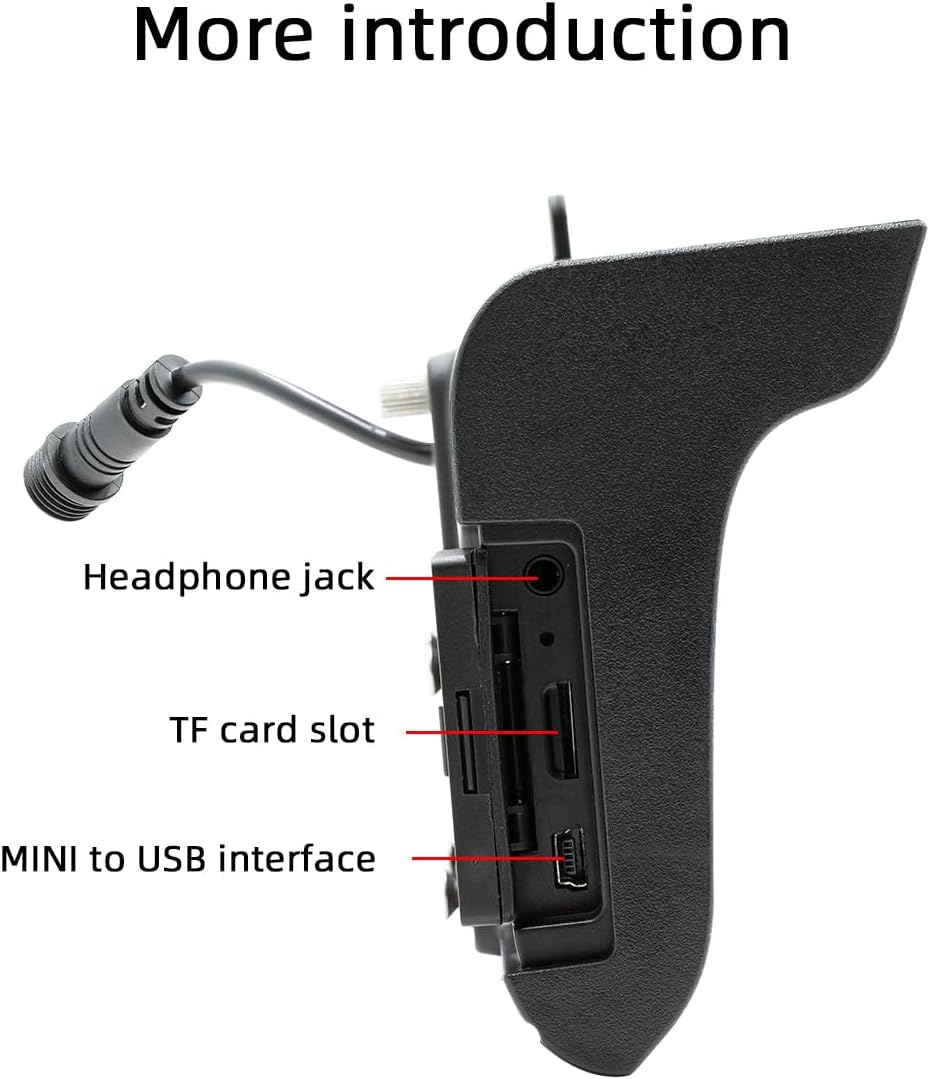
Aworan 4.2: Apa view illustrating the headphone jack, TF card slot, and MINI to USB interface.
The rear of the unit houses a built-in 1W speaker and mounting points for the bracket.

Aworan 4.3: Ẹyin view of the unit, highlighting the built-in 1W speaker.
5. fifi sori
This unit is designed for double DIN installation. Due to the complexity of vehicle wiring and dashboard configurations, professional installation is highly recommended. Incorrect installation can lead to vehicle damage or malfunction of the stereo unit.
5.1 General Installation Steps (Consult a professional)
- Ge asopọ batiri ọkọ lati yago fun awọn kukuru itanna.
- Remove the existing car stereo or dashboard trim to access the double DIN slot.
- Connect the wiring harness from the vehicle to the stereo's power and speaker connections. Ensure correct polarity.
- Connect any additional inputs/outputs such as the reversing camera, AUX-in, or RCA audio outputs.
- Mount the stereo securely into the double DIN slot using the provided mounting bracket set.
- So batiri ọkọ naa pọ mọ ki o si ṣe idanwo iṣẹ ẹrọ naa.
- Tún so àwọn ohun èlò ìdábùú náà pọ̀.
Note: The waterproof power cord should be routed carefully to avoid damage and ensure proper sealing.
6. Ni ibẹrẹ Oṣo
6.1 Titan / Pa a
The unit will power on automatically when the vehicle's ignition is turned on. To power off, turn off the vehicle's ignition.
6.2 Ede Eto
Upon first use, you may be prompted to select your preferred language. Navigate through the on-screen menu to select from English, Chinese, Spanish, Portuguese, Russian, German, French, Polish, Turkish, Arabic, Hebrew, Italian, Czech, Japanese, or Korean.
7. Awọn ilana Iṣiṣẹ
7.1 Lilọ kiri Iboju ifọwọkan
The 5-inch touchscreen is the primary control interface. Tap icons to open applications, swipe to navigate menus, and use pinch-to-zoom gestures where applicable (e.g., in navigation apps).
7.2 Iṣakoso kẹkẹ idari
If your vehicle supports steering wheel controls, connect the appropriate wires during installation. The unit supports programmable steering wheel controls, allowing you to map functions like volume, track skip, and mode selection to your vehicle's buttons.
7.3 Seven-Color Key Backlights
The unit features adjustable seven-color key backlights. Access the settings menu to customize the backlight color to match your vehicle's interior lighting or your personal preference.
8. Asopọmọra
8.1 Bluetooth 5.0
The unit features Bluetooth 5.0 for wireless audio streaming and hands-free calling. The default Bluetooth name is "SWL-BT".
- Mu Bluetooth ṣiṣẹ lori foonu alagbeka rẹ.
- On the car stereo, navigate to the Bluetooth menu.
- Wa fun available devices on your phone and select "SWL-BT".
- Jẹrisi koodu sisopọ ti o ba ṣetan.
The unit supports connecting to two Bluetooth devices simultaneously, such as a mobile phone and a Bluetooth earphone.

Image 8.1: Illustration of the dual Bluetooth connection capability, powered by a Bluetooth 5.0 chip.
8.2 Wireless & Wired CarPlay / Android Auto
Connect your smartphone to access functions like navigation, phone calls, messages, and music directly on the car stereo display. Both wired and wireless connections are supported.

Image 8.2: Display showing the CarPlay and Android Auto interfaces, demonstrating mobile phone function integration.
8.2.1 Asopọ Alailowaya
For wireless CarPlay or Android Auto, ensure your phone's Wi-Fi and Bluetooth are enabled. Follow the on-screen prompts on the car stereo to pair your device wirelessly.
8.2.2 Asopọ Onirin
Connect your smartphone to the unit's USB port using a compatible USB cable. The system will automatically detect and launch CarPlay or Android Auto.
9. Media Sisisẹsẹhin
The Polarlander B5350 supports multiple methods for media playback:
- Bluetooth (BT) Playback: Stream audio wirelessly from your paired smartphone.
- Sisisẹsẹhin Kaadi TF: Insert a TF (MicroSD) card into the designated slot to play audio and video files.
- Sisisẹsẹhin USB: Connect a USB flash drive to the USB port for audio and video file Sisisẹsẹhin.
- AX-in: Connect external audio devices via the auxiliary input.
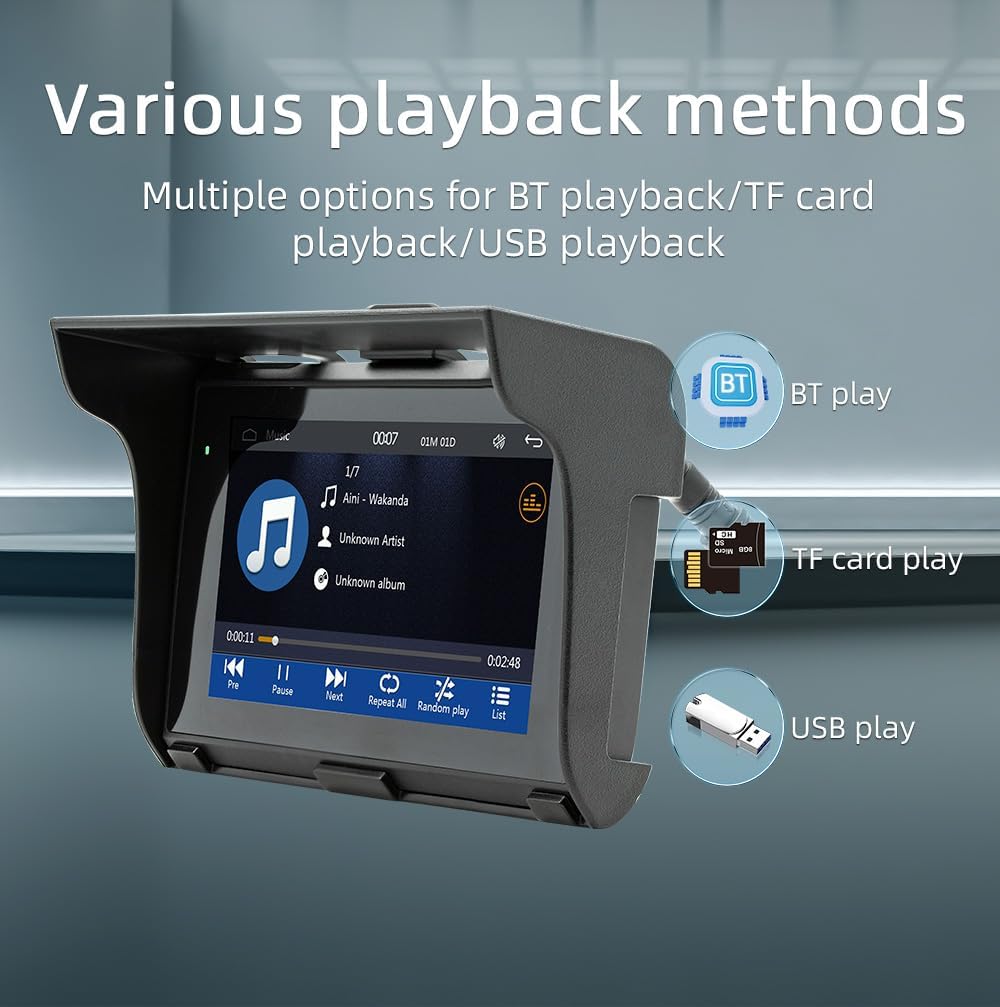
Image 9.1: Visual representation of the various media playback methods available: Bluetooth, TF card, and USB.
9.1 Awọn ọna kika Media atilẹyin
- Awọn ọna kika ohun: MP3, AAC, APE, OGG, M4A, RA, WAV
- Awọn ọna kika fidio: H263, H264, H265, DIVX HD, AVI, FLV, MKV, MPEG, MP4, WMV9, VC, ASF, TS, QT
- Awọn ọna kika aworan: JPEG, PNG, BMP, GIF, TIFF
10. Iṣẹ́ Rédíò Àárọ̀/FM
The unit includes an AM/FM radio receiver. To access the radio function, select the "Radio" icon from the main menu.
- Ṣiṣayẹwo: Use the scan function to automatically search for and save available radio stations.
- Itọsọna Afowoyi: Manually tune to specific frequencies using the on-screen controls.
- Awọn tito tẹlẹ: Fipamọ́ àwọn ibùdó ayanfẹ́ rẹ sí àwọn bọ́tìnì tí a ti ṣètò tẹ́lẹ̀ fún wíwọlé kíákíá.
The radio allows you to stay updated with real-time traffic, news broadcasts, and weather forecasts.
11. Driving Recorder Function (Optional)
The Polarlander B5350 supports an optional car driving recorder. When connected, the unit can display and record your driving dynamics, providing additional security and peace of mind.

Image 11.1: The car stereo displaying footage from an optional driving recorder camera.
Note: The driving recorder camera is an optional accessory and is not included in the standard package.
12. Laasigbotitusita
| Isoro | Owun to le Fa | Ojutu |
|---|---|---|
| Ẹka ko ni agbara lori. | No power connection or incorrect wiring. | Check power cables and fuse. Ensure correct 9-30V DC supply. |
| Ko si ohun. | Volume too low, mute activated, or speaker wiring issue. | Increase volume, check mute status, verify speaker connections. |
| Asopọ Bluetooth kuna. | Bluetooth not enabled on phone/unit, or device out of range. | Ensure Bluetooth is active on both devices. Move phone closer to unit. Re-pair device. |
| CarPlay/Android Auto kò sopọ̀ mọ́ ara wọn. | Incorrect cable, phone settings, or app issues. | Use a certified USB cable. Check phone settings for CarPlay/Android Auto. Restart phone and unit. |
| Iboju ifọwọkan ko dahun. | System freeze or temporary software issue. | Restart the unit (turn off/on ignition). If issue persists, consult support. |
13. Awọn pato
| Ẹya ara ẹrọ | Ẹ̀kúnrẹ́rẹ́ |
|---|---|
| Ọja Iru | Car Stereo (Double Din) |
| Iwọn Ifihan | 5.0 inches |
| Ipinnu Ifihan | 800x480 |
| Agbara Ijade | Agbohunsoke 1W ti a ṣe sinu |
| Ṣiṣẹ Voltage | 9 ~ 30V DC |
| Awọn iwọn otutu ti nṣiṣẹ | -20 ℃ si 60 ℃ |
| Ẹya Bluetooth | 5.0 (Default name: SWL-BT) |
| Nṣiṣẹ Memory | 1Gbit DRAM |
| Awọn ọna kika Audio atilẹyin | MP3, AAC, APE, OGG, M4A, RA, WAV |
| Awọn ọna kika fidio atilẹyin | H263, H264, H265, DIVX HD, AVI, FLV, MKV, MPEG, MP4, WMV9, VC, ASF, TS, QT |
| Awọn ọna kika Aworan ti a ṣe atilẹyin | JPEG, PNG, BMP, GIF, TIFF |
| Input/Ojade | SD Card, USB, AUX-in, RCA Audio output, Reversing camera input |
| Olupese Apá Number | B5350 |
14. Itọju
- Nu Ifihan naa di mimọ: Lo asọ rirọ, ti ko ni lint lati mu rọra nu iboju ifọwọkan. Ma ṣe lo abrasive ose tabi epo.
- Isọsọ gbogboogbo: Jẹ́ kí ẹ̀rọ náà wà ní ìpamọ́ kúrò nínú eruku àti ìdọ̀tí. Lo búrọ́ọ̀ṣì rírọ̀ tàbí afẹ́fẹ́ tí a fi ìfúnpọ̀ ṣe fún àwọn ibi tí ó ṣòro láti dé.
- Awọn Isopọ USB: Máa ṣàyẹ̀wò gbogbo àwọn ìsopọ̀ okùn láti rí i dájú pé wọ́n wà ní ààbò.
15. Atilẹyin ọja ati Support
Fun alaye atilẹyin ọja ati atilẹyin imọ-ẹrọ, jọwọ tọka si iwe ti a pese ni akoko rira tabi kan si alagbata rẹ. Jeki ẹri rira rẹ fun eyikeyi awọn ibeere atilẹyin ọja.
For further assistance, visit the official Polarlander webojula tabi kan si wọn onibara iṣẹ Eka.