
Ọrọ Iṣaaju
The LIGHTSPEED Zulu 4 ANR Aviation Headset is designed to provide pilots with enhanced comfort, clear communication, and reliable performance. This manual outlines the features, setup, operation, and maintenance procedures to ensure optimal use of your headset.

Image: The LIGHTSPEED Zulu 4 ANR Aviation Headset, featuring its over-ear design and microphone.
Awọn ẹya pataki pẹlu:
- Asopọmọra Bluetooth meji: Allows simultaneous connection to two devices for cell phone communication, stereo music streaming, and aviation app alerts.
- Kekere-Profile Itunu: Weighing approximately 14.9 ounces, the headset features a stainless-steel headband designed for comfortable weight distribution and reduced side pressure.
- FrameFit™ Ear Seals: Tapered foam ear seals are engineered to provide a better seal around eyewear frames, enhancing comfort and clarity.
- Clear Communications: Enhanced upstream audio reduces up to 90% of background noise from outgoing transmissions via Bluetooth. The Dual Aperture Disc microphone offers superior noise cancellation, and user-adjustable mic gain balances voices in multi-headset environments.
- Iduroṣinṣin: Constructed with stainless steel and magnesium, and cables built around a Kevlar core, the Zulu 4 is designed for demanding aviation environments.
Ohun ti o wa ninu Apoti
Upon unboxing your LIGHTSPEED Zulu 4 headset, verify that all components are present:
- LIGHTSPEED Zulu 4 ANR Aviation Headset
- Headset Cable (Panel Power 6-Pin Plug)
- Àwọn ìrọ̀rí etí (tí a ti fi sori ẹrọ tẹ́lẹ̀)
- Orí (tí a ti fi sori ẹrọ tẹlẹ)
- Ọran Idaabobo

Image: The protective carrying case included with the Lightspeed Zulu 4 headset.
Ṣeto
Before using your Zulu 4 headset, ensure it is properly connected and configured.
Connecting to Aircraft Power (Panel Power 6-Pin Plug)
- Locate the 6-pin Lemo connector on your aircraft's audio panel.
- Align the headset's 6-pin plug with the aircraft's receptacle.
- Gently push the plug into the receptacle until it clicks securely into place. This connection provides power to the headset and integrates it with the aircraft's intercom system.
Asopọ Bluetooth
The Zulu 4 features dual Bluetooth connectivity, allowing two devices to be paired simultaneously.
- Rii daju pe agbekari rẹ ti wa ni titan.
- Activate Bluetooth on your mobile device (e.g., smartphone, tablet).
- On the headset's control module, press and hold the Bluetooth button until the indicator light flashes, indicating pairing mode.
- On your device, select "Zulu4_XXXX" (where XXXX is a unique identifier) from the list of available Bluetooth devices.
- Once connected, the indicator light on the control module will change to a steady blue.
- Repeat the process for a second device if desired.

Image: The Lightspeed Zulu 4 headset showing the microphone boom extended and earcups.
Awọn ilana Iṣiṣẹ
Wọ Agbekọri
Place the headset on your head so that the ear seals fully enclose your ears. Adjust the headband for a comfortable, secure fit. The FrameFit™ ear seals are designed to accommodate eyeglasses or sunglasses without compromising the acoustic seal.

Aworan: Iwaju view of the Lightspeed Zulu 4 headset, highlighting the earcups and adjustable headband.
Atunse Gbohungbohun
Position the Dual Aperture Disc microphone approximately 1/4 inch from your lips. The flexible boom allows for precise placement to optimize voice clarity and noise cancellation. Use the user-adjustable mic gain on the control module to balance your voice in a multi-headset environment.
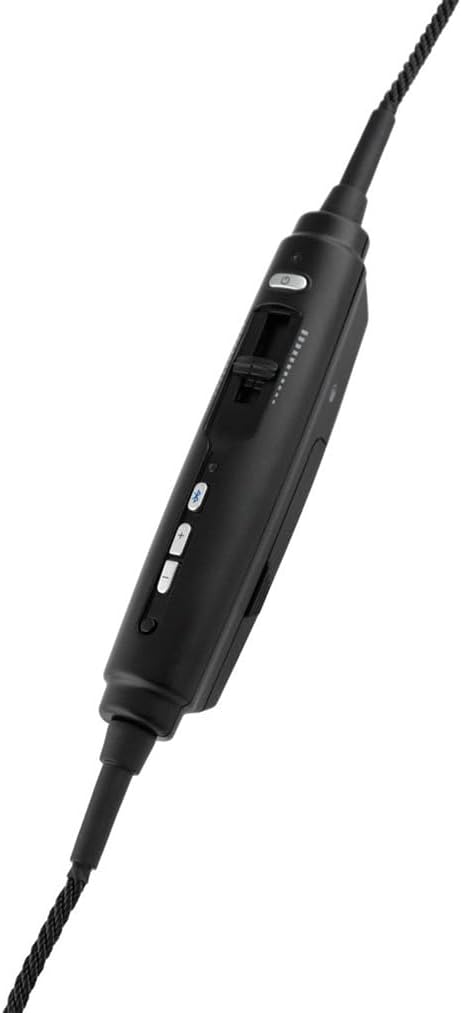
Image: The in-line control module of the Lightspeed Zulu 4 headset, featuring buttons for volume, Bluetooth, and a mic gain slider.
Idinku Ariwo Nṣiṣẹ (ANR)
The Active Noise Reduction (ANR) system automatically engages when the headset receives power from the aircraft's 6-pin Lemo connector, providing a quieter listening environment.
Lilo ohun Bluetooth
Once paired, you can stream audio from your connected devices. The headset prioritizes intercom and radio communications, automatically muting or lowering Bluetooth audio during critical transmissions.
Itoju
Proper maintenance ensures the longevity and performance of your Zulu 4 headset.
- Ninu: Lo asọ, damp cloth to clean the exterior surfaces. Avoid harsh chemicals or abrasive materials.
- Ear Seals: Periodically inspect ear seals for wear and tear. Replace them if they become cracked or lose their cushioning to maintain optimal comfort and ANR performance.
- Itọju USB: Avoid sharp bends or excessive pulling on the cables. Store the headset in its protective case when not in use to prevent damage to the cables and connectors.
- Ibi ipamọ: Tọ́jú agbekọri naa si ibi ti o tutu ati gbigbẹ, kuro ni oorun taara ati iwọn otutu ti o ga julọ.
Laasigbotitusita
If you encounter issues with your Zulu 4 headset, consider the following common solutions:
- Kò sí Ohùn/Ohùn Lẹ́ẹ̀kan síi:
- Ensure the 6-pin Lemo plug is fully seated in the aircraft's receptacle.
- Check the volume controls on the headset and the aircraft's audio panel.
- Verify the aircraft's intercom system is functioning correctly.
- Awọn oran Asopọmọra Bluetooth:
- Rii daju pe Bluetooth ti ṣiṣẹ lori ẹrọ rẹ ati pe agbekari wa ni ipo sisopọ pọ.
- Gbiyanju yiyo ati tun so pọ ẹrọ naa.
- Rii daju pe ko si awọn ẹrọ miiran ti n ṣe idiwọ asopọ Bluetooth.
- Poor Microphone Clarity:
- Adjust the microphone position to be 1/4 inch from your lips.
- Check the mic gain setting on the control module.
- Ensure the microphone windscreen is clean and properly installed.
For further assistance, please refer to the official LIGHTSPEED Aviation webaaye tabi kan si atilẹyin alabara wọn.
Awọn pato
| Brand | IMOLE |
| Orukọ awoṣe | Zulu 4 - Panel Power |
| Nọmba awoṣe | 40615 |
| Àwọ̀ | Dudu |
| Gbigbe Eti | Lori Eti |
| Fọọmù ifosiwewe | Lori Eti |
| Ipalara | 295 ohms |
| Asopọmọra Technology | Bluetooth |
| Jack agbekọri | LEMO 6-pin |
| Ariwo Iṣakoso | Ti nṣiṣe lọwọ Noise Ifagile |
| Idahun Igbohunsafẹfẹ | 20 Hz - 20,000 Hz |
| Audio Driver Type | Planar oofa Driver |
| Ohun elo apade | Foomu, Irin Alagbara |
| Iwọn Nkan | 14.9 iwon |
| Awọn ẹrọ ibaramu | iPad, iPhone |
| Afikun Awọn ẹya ara ẹrọ | Dual Aperture Disc Microphone, Dual Bluetooth, FrameFit Ear Seals, Front Row Center Stereo Cross-feed Technology, Noise Cancellation |
Ọja Pariview Fidio
Fidio: Ọja osise ti pariview of the LIGHTSPEED Zulu 4 ANR Aviation Headset, demonstrating its features and benefits.
Atilẹyin ọja ati Support
The LIGHTSPEED Zulu 4 ANR Aviation Headset is backed by a 7-Odun Atilẹyin ọja Limited covering materials and workmanship. For detailed warranty information, technical support, or service requests, please visit the official LIGHTSPEED Aviation webaaye tabi kan si awọn ile-iṣẹ iṣẹ ti a fun ni aṣẹ.
Official LIGHTSPEED Aviation Webojula: lightspeedaviation.com