
Awọn Itọsọna Aabo pataki
Please read these instructions carefully before operating the unit and retain them for future reference. Adhere to all warnings and instructions provided.
- Omi ati Ọrinrin: Maṣe lo ohun elo yii nitosi omi.
- Ninu: Mọ pẹlu asọ gbigbẹ nikan.
- Afẹfẹ: Ma ṣe dina eyikeyi awọn ṣiṣi atẹgun. Fi sori ẹrọ ni ibamu pẹlu awọn ilana ti olupese.
- Ooru: Maṣe fi sori ẹrọ nitosi awọn orisun ooru gẹgẹbi awọn imooru, awọn iforukọsilẹ ooru, awọn adiro, tabi awọn ohun elo miiran (pẹlu ampliifiers) ti o gbe ooru jade.
- Okun Agbara: Dabobo okun agbara lati ma rin lori tabi pin, ni pataki ni awọn pilogi, awọn ohun elo irọrun, ati aaye nibiti wọn ti jade kuro ninu ohun elo naa.
- Awọn asomọ/Awọn ẹya ẹrọ: Lo awọn asomọ/awọn ẹya ara ẹrọ ti a sọ pato nipasẹ olupese.
- Ṣiṣẹ: Tọkasi gbogbo iṣẹ si awọn oṣiṣẹ iṣẹ ti o peye. Iṣẹ nilo nigbati ohun elo ba ti bajẹ ni ọna eyikeyi, gẹgẹbi okun ipese agbara tabi plug ti bajẹ, omi ti ta silẹ tabi awọn nkan ti ṣubu sinu ẹrọ, ohun elo naa ti farahan si ojo tabi ọrinrin, ko ṣiṣẹ deede. , tabi ti lọ silẹ.
Ọja Pariview
The Supersonic SC-726BT is a portable audio system featuring a top-loading CD player, AM/FM radio, Bluetooth connectivity, and an auxiliary input. It is designed for versatile audio playback at home or on the go.
Awọn ẹya pataki:
- Top-Loading CD Player (CD/CD-R/CD-RW compatible)
- AM/FM Radio Tuner
- Asopọ Alailowaya Bluetooth
- 3.5mm AUX Input
- LED Track Display
- Awọn Agbọrọsọ Sitẹrio ti a ṣe sinu
- Programmable Memory for CD Tracks
- Repeat Playback Modes
- Ese Gbe Gbamu
- AC/DC Power Options
Awọn iṣakoso ati Awọn ẹya:
Familiarize yourself with the various controls and ports on your unit.
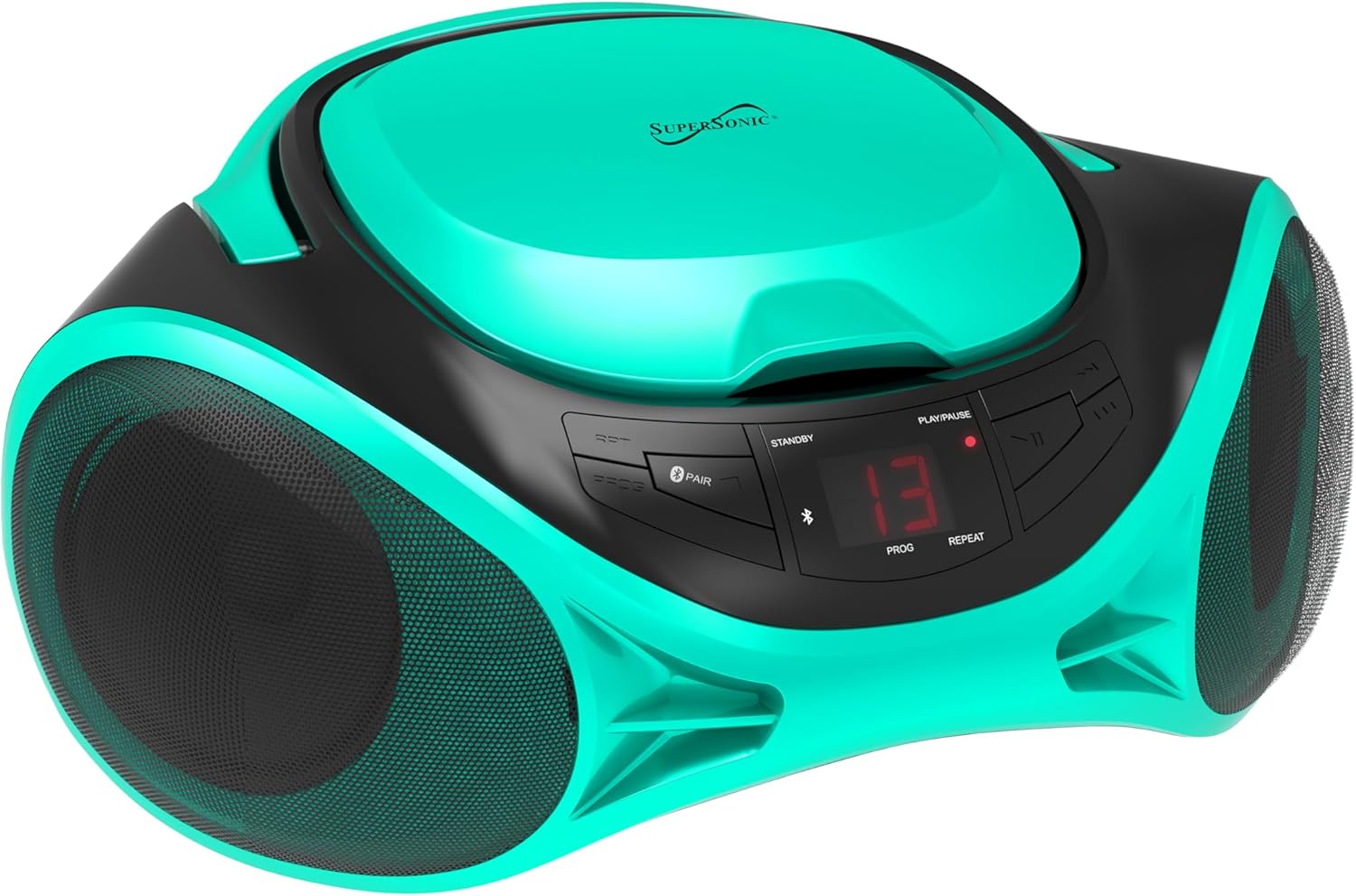
Aworan: Iwaju view of the SC-726BT unit, highlighting the central control panel with buttons for playback, mode selection, and the LED display, flanked by two speaker grilles.
- Bọtini agbara: Yipada ẹyọ naa tan tabi pa.
- Bọtini Ipo: Switches between CD, AM/FM Radio, Bluetooth, and AUX modes.
- Bọ́tìnnì Ṣíṣe/Sánu duro: Ó bẹ̀rẹ̀ tàbí ó dá ìṣíṣẹ́ CD dúró.
- Bọtini Duro: Da duro desackback.
- Fò/Wá àwọn bọ́tìnì (◀◀ / ▶▶): Skips tracks on CD or searches within a track.
- Bọtini Eto: Used to program CD playback order.
- Tun Bọtini: Cycles through repeat modes (e.g., repeat one, repeat all).
- Bọtini Bọtini Bluetooth: Ti bẹrẹ sisopọ Bluetooth.
- Bọtini Iwọn didun: Ṣe atunṣe ipele iṣelọpọ ohun.
- Knob Tuntun: Tunes radio frequencies in AM/FM mode.
- Yiyipada band AM/FM: Yan laarin awọn igbohunsafefe redio AM ati FM.
- Eriali telescopic: Fun gbigba redio FM.
- AUX NI Jack: Ìtẹ̀síwájú 3.5mm fún àwọn ẹ̀rọ ohùn ìta.
- Input Agbara AC: Sopọ si okun agbara AC.
- Abala Batiri: Holds C-size batteries for portable use.
Ṣeto
Agbara Unit
The SC-726BT can be powered by either AC household current or DC batteries.
Agbara AC:
- Rii daju pe ẹrọ naa wa ni pipa.
- Connect the supplied AC power cord to the AC power input jack on the back of the unit.
- Plug the other end of the AC power cord into a standard AC wall outlet (120V ~ 60Hz).
Agbara Batiri DC:
For portable use, the unit requires 6 x 'C' size batteries (not included).
- Rí i dájú pé ẹ̀rọ náà ti pa àti pé a ti ge ẹ̀rọ náà kúrò nínú agbára AC.
- Ṣii ideri aporo batiri ti o wa ni isalẹ ẹya naa.
- Fi awọn batiri iwọn 'C' mẹfa sii, ki o si kiyesi polarity ti o tọ (+/-) gẹgẹ bi a ti fihan ninu yara naa.
- Pa ideri batiri naa ni aabo.

Aworan: Ẹyin view of the SC-726BT unit, displaying the AC power input port and the telescopic FM antenna in its retracted position.
Atunṣe Antenna
For optimal radio reception:
- Gbigbawọle FM: Fully extend the telescopic antenna. Adjust its position and angle for the best signal.
- Gbigba AM: The unit has a built-in AM antenna. Rotate the entire unit for the best AM reception.
Awọn ilana Iṣiṣẹ
Gbogbogbo Isẹ
- Tẹ awọn Agbara bọtini lati tan ẹrọ naa.
- Tẹ awọn Ipo button repeatedly to select your desired function: CD, AM/FM Radio, Bluetooth, or AUX.
- Ṣatunṣe awọn Iwọn didun Iwọn sí ipele ìgbọ́ran tí o fẹ́.
- Tẹ awọn Agbara bọtini lẹẹkansi lati pa awọn kuro.
CD Sisisẹsẹhin
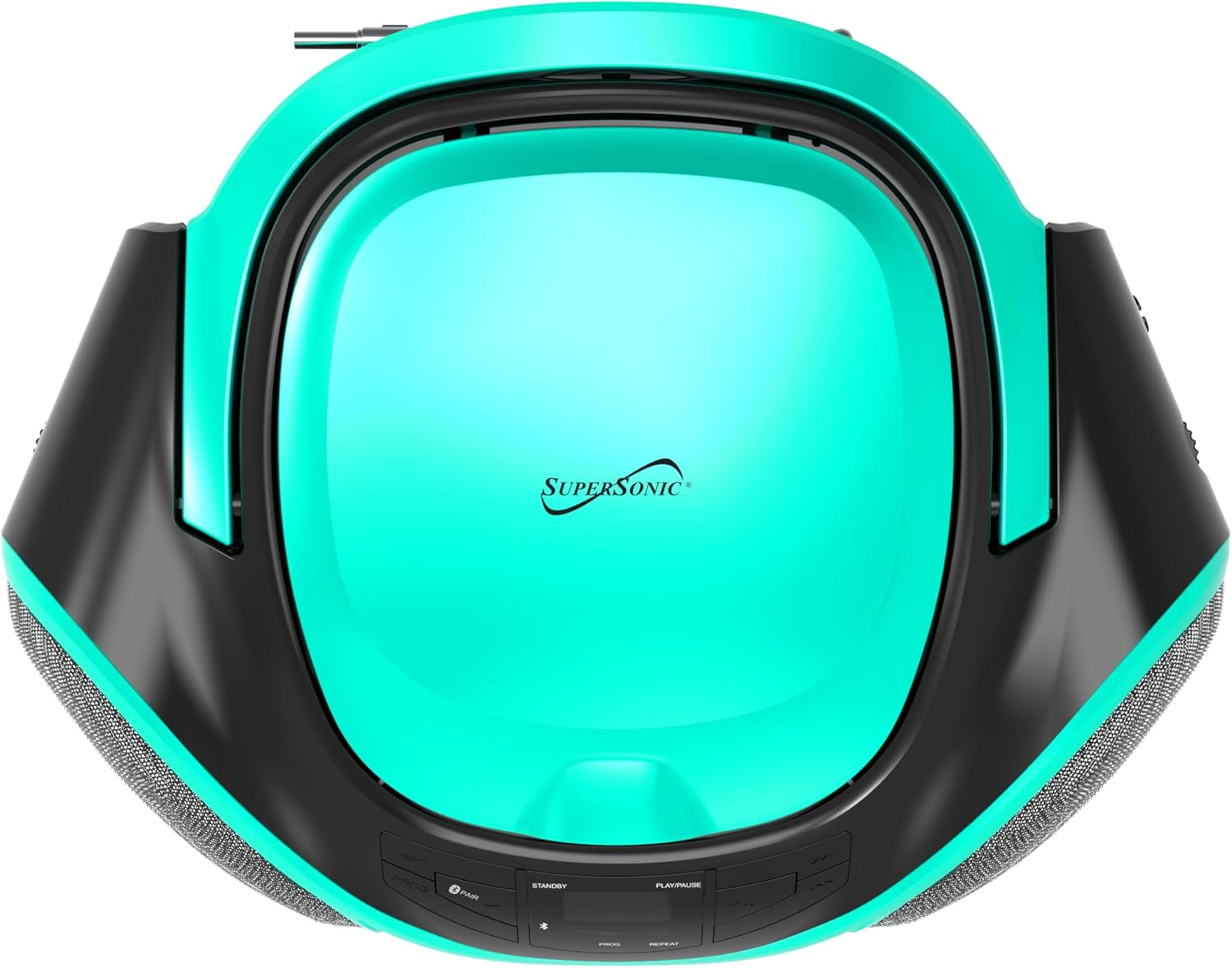
Aworan: Oke-isalẹ view of the SC-726BT, showing the circular top-loading CD compartment with the Supersonic logo.
- Tẹ awọn Ipo bọ́tìnì láti yan ipò CD. Ìfihàn LED náà yóò fi "CD" hàn.
- Ṣí ideri yàrá CD náà nípa gbígbé e sókè pẹ̀lú ìrọ̀rùn.
- Place a CD (CD/CD-R/CD-RW) onto the spindle with the label side facing up.
- Ti ideri CD naa mu daradara titi ti yoo fi tẹ.
- The unit will read the CD, and the total number of tracks will be displayed.
- Tẹ awọn Ṣiṣẹ / Sinmi button (▶/██) to start playback. The current track number will be displayed.
- Lati da ṣiṣiṣẹsẹhin duro, tẹ awọn Ṣiṣẹ / Sinmi bọtini. Tẹ lẹẹkansi lati bẹrẹ pada.
- Lati da ṣiṣiṣẹsẹhin duro, tẹ awọn Duro bọtini (■).
- Lati fo si orin atẹle, tẹ bọtini naa Rekọja Siwaju button (▶▶).
- Lati fo si orin ti tẹlẹ, tẹ awọn Foo sẹhin button (◀◀).
- To search rapidly within a track, press and hold the Rekọja Siwaju or Foo sẹhin button during playback. Release to resume normal playback.
Ṣiṣẹ eto:
You can program up to 20 tracks to play in a specific order.
- Ni ipo idaduro CD, tẹ bọtini naa Eto bọ́tìnì náà. "P01" yóò tàn lórí ìbòjú náà.
- Lo awọn Rekọja Siwaju or Foo sẹhin buttons to select the desired track number for the first program slot.
- Tẹ awọn Eto button again to confirm the selection. "P02" will flash.
- Tun awọn igbesẹ 2 ati 3 ṣe lati ṣeto awọn orin afikun.
- Lẹ́yìn tí o bá ti ṣètò gbogbo orin tí o fẹ́, tẹ bọtini náà Ṣiṣẹ / Sinmi bọtini lati bẹrẹ si iṣiṣẹjade ti a ti ṣeto.
- To clear the program, press the Duro bọtini lemeji.
Repeat Modes:
Nígbà tí a bá ń ṣe CD, tẹ Tun bọtini lati yiyi nipasẹ awọn ipo wọnyi:
- Tun Ọkan: Tun orin ti o wa lọwọlọwọ ṣe.
- Tun Gbogbo: Repeats all tracks on the CD.
- Tun Paa: Disables repeat function.
AM/FM Redio Isẹ
- Tẹ awọn Ipo bọtini lati yan Ipo Redio.
- Gbe awọn Ìyípadà Ẹ̀rọ AM/FM to select either AM or FM band.
- Fa eriali telescopic fun gbigba FM. Fun AM, yi kuro fun gbigba ti o dara julọ.
- Yiyi awọn Tunṣe Knob láti yan ibùdó rédíò tí o fẹ́.
Bluetooth Isẹ
- Tẹ awọn Ipo button to select Bluetooth mode. The LED display will show "BT" and flash, indicating it is in pairing mode.
- Mu Bluetooth ṣiṣẹ lori ẹrọ ita rẹ (fun apẹẹrẹ, foonuiyara, tabulẹti).
- Wa fun Bluetooth devices and select "SC-726BT" from the list.
- Once paired, the "BT" indicator on the display will stop flashing and remain solid.
- You can now play audio from your Bluetooth device through the SC-726BT. Control playback (play/pause, skip) from your connected device.
AUX Input Isẹ
- Connect one end of a 3.5mm audio cable (not included) to the AUX IN jack on the SC-726BT.
- So ìpẹ̀kun kejì okùn ohùn náà mọ́ èdìdì agbekọri tàbí àbájáde ohùn ẹ̀rọ ohùn ìta rẹ (fún àpẹẹrẹ, ẹ̀rọ orin MP3, fóònù alágbèéká).
- Tẹ awọn Ipo button to select AUX mode. The LED display will show "AUX".
- Start playback on your external device. The audio will be played through the SC-726BT speakers.
- Satunṣe iwọn didun nipa lilo awọn Iwọn didun Iwọn on the SC-726BT and/or your external device.
Itoju
Ninu Unit
- Yọọ kuro nigbagbogbo lati orisun agbara ṣaaju ṣiṣe mimọ.
- Lo asọ ti o rọ, ti o gbẹ lati nu awọn ita ita.
- Ma ṣe lo abrasive Cleaners, waxes, tabi epo bi wọn ṣe le ba ipari jẹ.
- For the CD lens, use a specialized CD lens cleaner disc (not included) or a soft, lint-free cloth specifically designed for optical lenses.
Ibi ipamọ
- Ti ẹyọ naa ko ba ni lo fun akoko ti o gbooro sii, yọ awọn batiri kuro lati yago fun jijo ati ipata.
- Tọju ẹyọ naa ni itura, aye gbigbẹ, kuro lati orun taara ati awọn iwọn otutu to gaju.
Laasigbotitusita
Review the following common issues and their solutions before seeking service.
| Isoro | Owun to le Fa | Ojutu |
|---|---|---|
| Ko si agbara | Okun AC ko ni asopọ; Awọn batiri ti dinku tabi fi sii lọna ti ko tọ. | Ensure AC cord is securely plugged in. Replace batteries or check polarity. |
| Ko si ohun | Volume too low; Incorrect mode selected; AUX cable loose. | Increase volume. Press Mode button to select correct source. Reconnect AUX cable. |
| CD ko dun | CD fi sii ti ko tọ; CD jẹ idọti tabi họ; CD kompaktimenti ko ni pipade. | Insert CD with label side up. Clean CD with a soft cloth. Close compartment firmly. Try another CD. |
| Gbigba redio ti ko dara | Antenna not extended/adjusted; Unit position. | Extend and adjust FM telescopic antenna. Rotate unit for better AM reception. |
| Bluetooth ko sopọ | Unit not in pairing mode; Device Bluetooth off; Out of range. | Ensure unit is in Bluetooth mode and "BT" is flashing. Enable Bluetooth on your device. Move device closer to the unit. |
Awọn pato
| Brand | Supersonic |
| Orukọ awoṣe | SC-726BT |
| Asopọmọra Technology | Bluetooth, 3.5mm Jack (AUX) |
| Media kika Iru | Audio CD (CD, CD-R, CD-RW) |
| Atilẹyin Audio kika | MP3 |
| Orisun agbara | AC Power Cord (included), 6 x 'C' Batteries (not included) |
| Awọn agbọrọsọ | Built-in Stereo (2 x 1.5W RMS) |
| Iwọn Nkan | 3.1 iwon |
| Awọn iwọn (Itosi.) | Not specified in data, compact portable design |
Alaye atilẹyin ọja
This Supersonic SC-726BT unit comes with a 90-ọjọ atilẹyin ọja lati ọjọ ti o ra. Atilẹyin ọja yi ni wiwa awọn abawọn iṣelọpọ ninu awọn ohun elo ati iṣẹ ṣiṣe labẹ lilo deede.
The warranty does not cover damage caused by misuse, accident, unauthorized modifications, or normal wear and tear. Please retain your proof of purchase for warranty claims.
Onibara Support
If you encounter any issues not covered in the troubleshooting section or require further assistance, please contact Supersonic customer support. Refer to the product packaging or the official Supersonic webojula fun awọn julọ lọwọlọwọ alaye olubasọrọ.