
Ọrọ Iṣaaju
Thank you for choosing the Reshow Cassette Player 12. This portable device allows you to enjoy your favorite cassette tapes and convert them into digital files. This manual provides essential information for the safe and efficient use of your new cassette player.
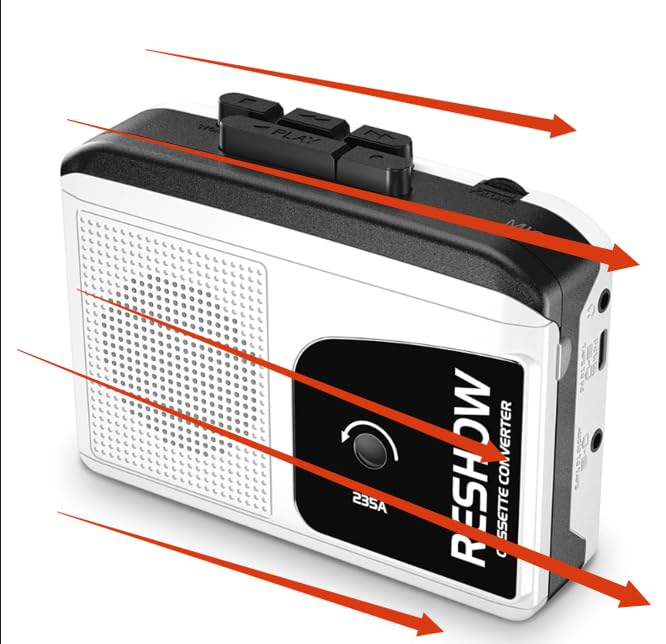
Image: Reshow Cassette Player 12
Package Awọn akoonu
- Reshow Cassette Player 12
- Okun USB-C
- Afowoyi Olumulo (iwe-ipamọ yii)
Ṣeto
Agbara ẹrọ naa
The Reshow Cassette Player 12 can be powered via the included USB-C cable or by batteries (not included).
- Agbara USB-C: Connect the USB-C cable to the player's USB-C port and the other end to a compatible USB power adapter (not included) or a computer's USB port.
- Agbara Batiri: Open the battery compartment (location not specified in data, typically on the back or side) and insert the required batteries, ensuring correct polarity.
Inserting a Cassette Tape
- Locate the cassette compartment door.
- Gently open the compartment door.
- Insert your cassette tape with the open edge facing the player's head mechanism.
- Close the compartment door until it clicks securely.
Awọn ilana Iṣiṣẹ
Ti ndun a Cassette
- Ensure the cassette player is powered on and a tape is inserted.
- Tẹ awọn ERE bọtini lati bẹrẹ ṣiṣiṣẹsẹhin.
- Adjust the volume using the volume control dial (location not specified, typically on the side).
- Lati da ṣiṣiṣẹsẹhin duro, tẹ awọn DURO bọtini.
- Lo awọn Siwaju Siwaju ati TUNTUN awọn bọtini lati lilö kiri nipasẹ teepu.
Using the Built-in Speaker and Headphone Jack
- Agbọrọsọ ti a ṣe sinu: Audio will play automatically through the integrated speaker when no headphones are connected.
- Jack agbekari: Connect standard 3.5mm headphones (not included) to the headphone jack for private listening. Connecting headphones will automatically mute the built-in speaker.
Converting Cassettes to Digital Files (MP3)
The Reshow Cassette Player 12 can convert your analog tapes to digital files using a computer and appropriate software (not included).
- Connect the cassette player to your computer using the supplied USB-C cable.
- Your computer should recognize the device as an audio input.
- Open your preferred audio recording software (e.g., Audacity, available separately).
- Configure the software to record from the USB audio input device.
- Start playback on the cassette player and begin recording in your software.
- Once recording is complete, stop playback and recording, then save your digital file (e.g., MP3 format).
Itoju
Ninu Ẹrọ
- Mu ese ita ti ẹrọ orin pẹlu asọ ti o gbẹ.
- Ma ṣe lo awọn olutọpa omi tabi awọn ohun elo abrasive.
- Periodically clean the tape head and pinch roller with a cotton swab lightly dampened with isopropyl alcohol to ensure optimal sound quality and tape longevity.
Ibi ipamọ
Store the cassette player in a cool, dry place away from direct sunlight and extreme temperatures when not in use.
Laasigbotitusita
| Isoro | Owun to le Fa | Ojutu |
|---|---|---|
| Ẹrọ orin ko tan-an. | Ko si agbara tabi awọn batiri kekere. | Check USB-C connection or replace batteries. |
| Ko si ohun nigba šišẹsẹhin. | Volume too low, headphones connected, or tape issue. | Increase volume, disconnect headphones, or check tape for damage. |
| Didara ohun ti ko dara. | Dirty tape head or worn tape. | Clean the tape head (see Maintenance). Try a different tape. |
| Tape gets stuck or chewed. | Damaged tape or dirty pinch roller. | Do not use damaged tapes. Clean the pinch roller (see Maintenance). |
| Cannot convert to digital. | Incorrect software settings or cable issue. | Ensure USB-C cable is properly connected. Verify audio input settings in your recording software. |
Awọn pato
- Awoṣe: Cassette Player 12
- Olupese: Atunse
- Orisun Agbara: USB-C or Batteries (type not specified, typically AA or AAA)
- Ijade ohun: Built-in speaker, 3.5mm headphone jack
- Asopọmọra: USB-C for power and digital conversion
- Awọn iwọn idii: 7.52 x 4.49 x 1.81 inches
- Ìwọ̀n Nkan: 10.8 iwon
- ASIN: B0GCF4WMZ6
- Akọkọ Wa: Oṣu kejila ọjọ 24, ọdun 2025
Atilẹyin ọja ati Support
Information regarding product warranty and customer support was not provided in the available data. Please refer to the product packaging or the manufacturer's official webAaye fun awọn alaye.