
1. Ifihan
Thank you for choosing the DATOUBOSS 48V 6000W Pure Sine Wave Hybrid Solar Inverter. This manual provides essential information for the safe and efficient installation, operation, and maintenance of your inverter. Please read this manual thoroughly before installation and keep it for future reference. This inverter is designed for off-grid solar systems, reliably converting 48V DC to 230V/50Hz pure sine wave AC, suitable for sensitive electronic equipment.
2. Awọn ilana aabo
Please observe the following safety precautions during installation, operation, and maintenance of the inverter:
- Oṣiṣẹ ti o peye: Fifi sori ẹrọ ati itọju yẹ ki o ṣe nipasẹ oṣiṣẹ ti o peye nikan.
- Ge Agbara: Always disconnect all power sources (PV array, battery, utility grid) before performing any wiring or maintenance.
- Ilẹ-ilẹ ti o tọ: Rí i dájú pé ẹ̀rọ inverter náà ti gúnlẹ̀ dáadáa láti dènà ìkọlù iná mànàmáná.
- Afẹfẹ: Install the inverter in a well-ventilated area to prevent overheating.
- Awọn ipo Ayika: Avoid exposure to rain, snow, or excessive dust. The inverter features integrated lightning and water protection, but proper installation environment is crucial.
- Aabo Batiri: Work with batteries carefully. Wear eye protection and remove jewelry. Do not short-circuit battery terminals.
- Ko si Itupalẹ: Maṣe gbiyanju lati ṣajọpọ tabi tun ẹrọ oluyipada naa funrararẹ. Tọkasi awọn oṣiṣẹ iṣẹ ti o peye.
The inverter includes a comprehensive safety system with protection against overload, overvoltage, short circuit, and overheating. It also supports Battery Management System (BMS) to prevent overcharge and deep discharge, extending battery life.
3. Ọja Ipariview
3.1 Key Awọn ẹya ara ẹrọ
- Ijade Sine Wave Pure: Provides stable, grid-quality AC power for sensitive electronics.
- Olùdarí Àkójọpọ̀ Àkójọpọ̀ MPPT: 120A MPPT controller for efficient solar charging.
- High PV Input Capability: Supports PV arrays up to 8000W with a maximum open circuit voltage ti 500V DC.
- Iṣẹ́ Rọrùn: Can operate with or without batteries.
- Aabo ti o ni kikun: Built-in surge, lightning, and waterproofing protection.
- Ifihan LCD: Clear display for real-time system status, voltage, power, and battery information.
- Ibamu gbooro: Compatible with 48V lead-acid (sealed, AGM, Gel, flooded) and lithium batteries.
- Awọn ọna Iwapọ: Multiple selectable charging and output priority modes.
3.2 Inverter Components and Interfaces

olusin 1: Iwaju view of the DATOUBOSS Hybrid Solar Inverter highlighting key technical parameters.
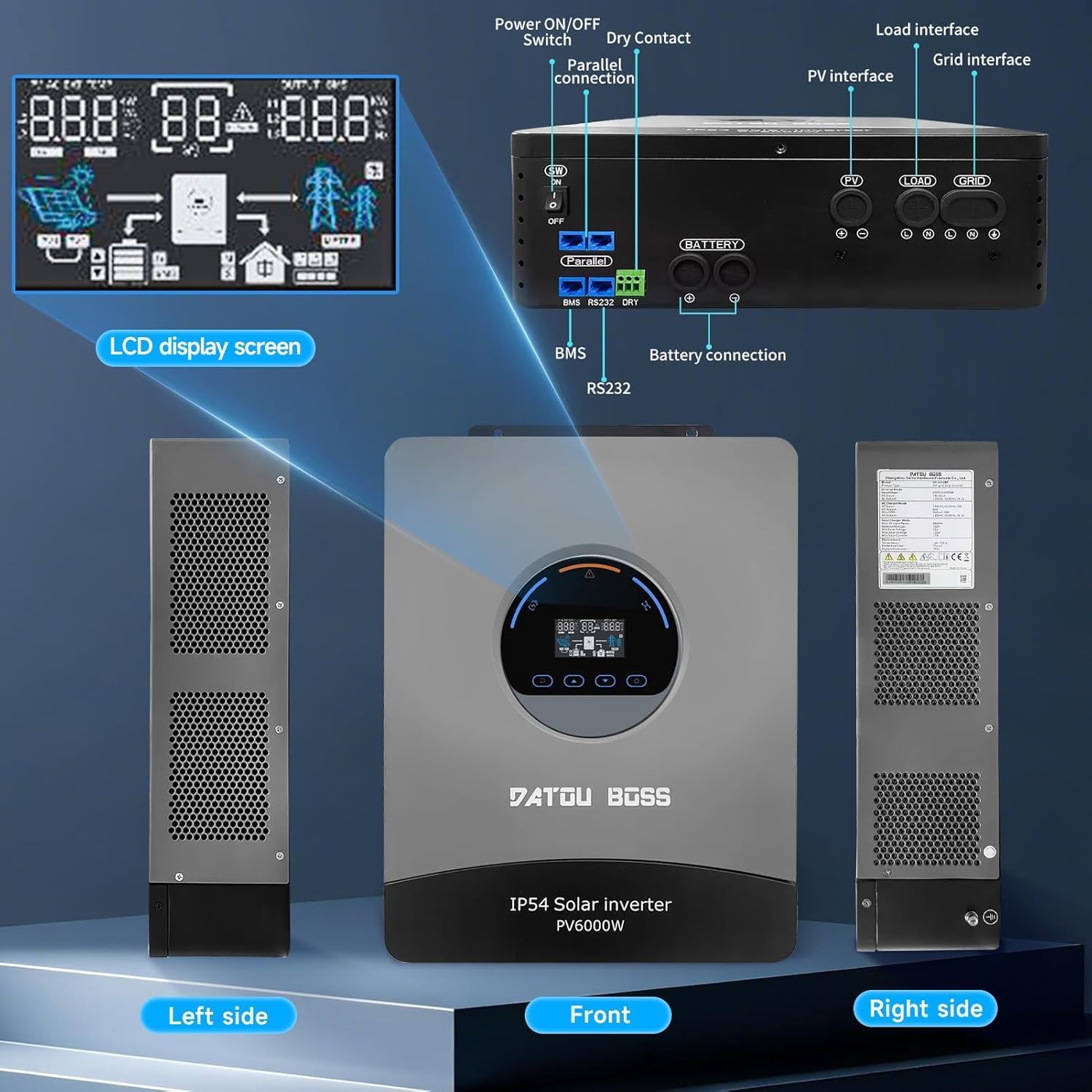
Olusin 2: Pariview of the inverter's physical layout, including the LCD display, power switch, parallel connection ports, dry contact, PV interface, load interface, grid interface, BMS, RS232, and battery connection terminals.
4. Fifi sori ẹrọ ati Oṣo
4.1 Kini ni Apoti
Ni ṣiṣi silẹ, rii daju pe gbogbo awọn nkan wa ati pe ko bajẹ:
- 1 x DATOUBOSS 48V 6000W Hybrid Solar Inverter
- Afowoyi Olumulo (iwe-ipamọ yii)
- Awọn ẹya ẹrọ iṣagbesori (ti o ba wulo)
4.2 Iṣagbesori ẹrọ oluyipada
- Choose a suitable mounting location that is dry, well-ventilated, and protected from direct sunlight and moisture.
- Ensure sufficient clearance around the inverter for proper airflow and heat dissipation.
- Mount the inverter vertically on a sturdy surface using appropriate fasteners.
4.3 Àwọn Ìtọ́sọ́nà Ìsopọ̀
Follow these steps for connecting the inverter. Refer to Figure 2 for port locations.
- Asopọ batiri: Connect the 48V battery bank to the battery terminals. Ensure correct polarity (+ to + and - to -).
- PV Array Asopọ: Connect the solar panel array to the PV input terminals. Observe maximum voltage ati lọwọlọwọ-wonsi.
- AC Input (Grid) Connection: Connect the utility grid power to the AC input terminals.
- AC Output (Load) Connection: Connect your AC loads (appliances) to the AC output terminals.
- Ilẹ: Connect the inverter's grounding terminal to a reliable earth ground.
- Awọn ibudo Ibaraẹnisọrọ: Connect BMS, RS232, or parallel communication cables if applicable for your system configuration.
Iṣẹ Batiri ọfẹ: This inverter supports operation without a battery. In grid-tied or PV-only modes, loads can be powered directly from the grid or solar panels, offering flexible installation options.
5. Awọn ilana Iṣiṣẹ
Ifihan LCD 5.1
The inverter features a clear LCD screen that provides real-time information about the system's operation. You can monitor:
- Input ati wu voltage
- Lilo agbara
- Ipo batiri (voltage, charge level)
- System operational status
- Error codes for quick troubleshooting
5.2 Awọn ọna ṣiṣe
The inverter offers versatile charging and output priority modes to suit different energy management needs:
Charging Modes (Selectable)
- Iyanju Oorun: Solar power is prioritized for charging the battery.
- Àkọ́kọ́ Ohun Èlò: Utility grid power is prioritized for charging the battery.
- Solar and Utility Hybrid: Utilizes both solar and utility power for charging.
- Oorun Nikan: Only solar power is used for charging.
Output Modes (Adjustable)
- Àkọ́kọ́ PV: Solar power is prioritized to supply loads.
- Àkọ́kọ́ Àkójọpọ̀: Utility grid power is prioritized to supply loads.
- Àkọ́kọ́ Inverter: Inverter (battery/PV) power is prioritized to supply loads, switching to grid only when necessary.
6. Itọju
Itọju deedee ṣe idaniloju pe igba pipẹ ati iṣẹ ti o dara julọ ti inverter rẹ:
- Mimọ: Jẹ́ kí inverter náà mọ́ tónítóní kí ó má sì sí eruku àti ìdọ̀tí. Lo aṣọ gbígbẹ fún fífọ.
- Afẹfẹ: Rii daju pe awọn ṣiṣi afẹfẹ ko ni dina.
- Awọn ayẹwo Asopọmọra: Lokọọkan ṣayẹwo gbogbo awọn asopọ itanna fun wiwọ ati awọn ami ti ibajẹ.
- Iduroṣinṣin USB: Inspect cables for any damage or wear.
- Ṣayẹwo Ayika: Rii daju pe ayika fifi sori ẹrọ wa laarin iwọn otutu pato ati awọn sakani ọriniinitutu.
7. Laasigbotitusita
The LCD display will show error codes to assist in diagnosing issues. Refer to the table below for common problems and their solutions. For persistent issues or error codes not listed, please contact customer support.
| Isoro | Owun to le Fa | Ojutu |
|---|---|---|
| Oluyipada ko titan | No battery power, PV input too low, or AC input missing. | Check battery connections and charge level. Verify PV array output. Ensure AC input is present. |
| Ko si AC jade | Overload, short circuit, or inverter fault. | Reduce load. Check for short circuits in wiring. Restart inverter. |
| Batiri ko ngba agbara | PV input issue, charger fault, or battery connection problem. | Check PV array connections and output. Verify charging mode settings. Inspect battery cables. |
| Ikilọ igbona pupọ | Blocked ventilation or excessive ambient temperature. | Ensure clear airflow around the inverter. Relocate to a cooler environment if necessary. |
8. Imọ ni pato
The following table details the technical parameters of the DATOUBOSS 48V 6000W Hybrid Solar Inverter:

Figure 3: Detailed technical parameters for the DATOUBOSS Hybrid Solar Inverter.
| Paramita | Iye |
|---|---|
| Awoṣe | DT-4860BF-A-EU |
| Ti won won Agbara | 6000W |
| DC Input Voltage | 48V |
| AC wu Voltage | 230V AC |
| AC o wu Igbohunsafẹfẹ | 50 Hz |
| Fọọmu igbi | Wave Sine Sure |
| O pọju. PV Input Power | 8000W |
| O pọju. PV Ṣii Circuit Voltage | 500V DC |
| Rated PV Input Current | 27A |
| MPPT Charge Controller Current | 120A |
| Idaabobo Ingress | IP54 |
| Awọn iwọn otutu ti nṣiṣẹ | -10°C si 55°C |
| Ibamu Batiri Orisi | 48V Lead-acid (sealed, AGM, Gel, flooded), Lithium |
| UPC | 740684063723 |
9. Atilẹyin ọja ati Support
DATOUBOSS is committed to providing high-quality products and customer satisfaction.
- Atilẹyin ọja: Ọja yi wa pẹlu kan 24-osu atilẹyin ọja lati ọjọ ti o ra.
- Pada: Ti a nse a 30-day unconditional return guarantee.
- Atilẹyin Onibara: For any questions, technical assistance, or warranty claims, please contact our Atilẹyin alabara 7x24.

Figure 4: DATOUBOSS customer service and warranty information.


