
1. Ifihan
This manual provides essential information for setting up, operating, maintaining, and troubleshooting your REDMI Note 15 Pro 5G smartphone. Please read this guide thoroughly to ensure optimal performance and longevity of your device.
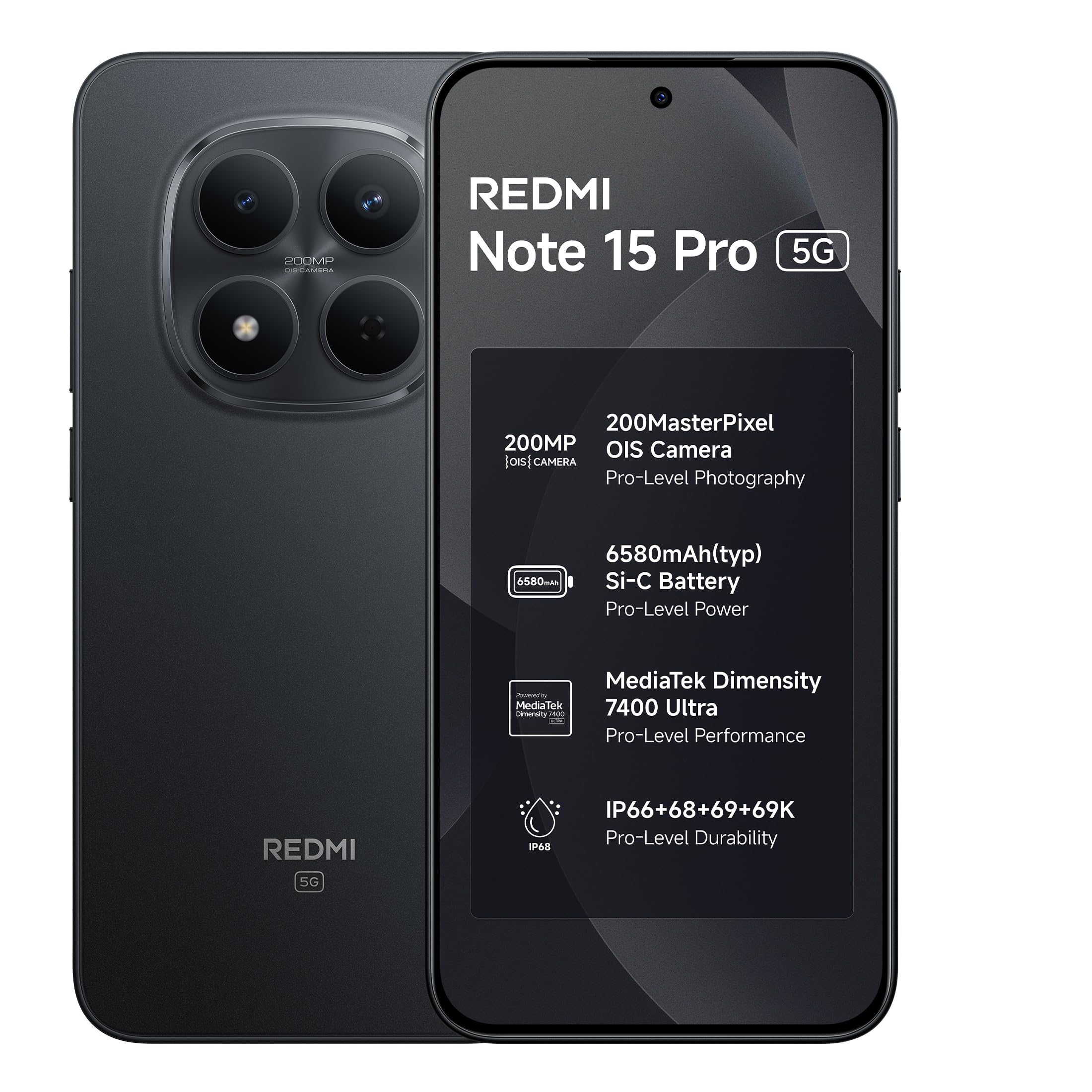
Image: REDMI Note 15 Pro 5G in Carbon Black.
2. Ohun ti o wa ninu Apoti
Upon unboxing your REDMI Note 15 Pro 5G, verify that all the following items are present:
- REDMI Note 15 Pro 5G Smartphone
- Ṣaja
- USB Iru-C USB
- Ọpa Kọ SIM
- Kaadi atilẹyin ọja
- Itọsọna olumulo (iwe yii)
- Ọran Idaabobo
3. Eto
3.1. Fifi sori kaadi SIM
- Wa atẹ kaadi SIM ni ẹgbẹ ẹrọ rẹ.
- Insert the provided SIM eject tool into the small hole next to the tray and press gently until the tray pops out.
- Place your Nano-SIM card(s) and/or microSD card (if applicable) into the tray with the gold contacts facing down, ensuring they are correctly aligned.
- Fi iṣọra Titari atẹ naa pada sinu iho titi ti yoo fi fọ pẹlu ara foonu naa.
3.2. Agbara akọkọ Lori ati iṣeto ni ipilẹ
- Press and hold the Power button until the REDMI logo appears.
- Tẹle awọn ilana loju iboju lati yan ede rẹ, agbegbe, ati sopọ si nẹtiwọki Wi-Fi kan.
- Wọle pẹlu akọọlẹ Google rẹ tabi ṣẹda tuntun lati wọle si awọn iṣẹ Google ati Play itaja.
- Set up your screen lock (PIN, pattern, password, fingerprint, or face unlock) for security.
- Transfer data from your old device if prompted, or set up as a new device.
4. Ṣiṣẹ ẹrọ rẹ
4.1. Ifihan Awọn ẹya ara ẹrọ
Your REDMI Note 15 Pro 5G features a 6.83-inch 1.5K CrystalRes AMOLED display with a peak brightness of 3200 nits, offering vivid visuals and excellent outdoor visibility. It supports a 120Hz adaptive refresh rate for smooth scrolling and interactions, and includes Eye Protect 2.0 with Triple TÜV Certifications for reduced eye strain.

Image: The 1.5K AMOLED display of the REDMI Note 15 Pro 5G.

Image: Visual representation of the 120Hz adaptive refresh rate.

Image: Eye comfort features for extended use.
4.2. Lilo kamẹra
The device is equipped with an advanced 200MP OIS camera featuring a 4th Gen HPE sensor. It supports 4K video recording and in-sensor 2x/4x zoom. The AI ultra-clear engine enhances photo and video quality.

Image: The 200MP OIS camera system.
4.3. Iṣakoso batiri
The REDMI Note 15 Pro 5G is powered by a 6580mAh Si-carbon battery, designed for extended usage. It supports 45W Turbo charging for quick power-ups and 18W reverse charging. The battery is rated for 1600 lifecycles, retaining health for 4-5 years.

Image: Long-lasting 6580mAh battery with fast charging.
4.4. Connectivity and Performance
The device supports 5G cellular technology and is unlocked for all carriers. It is powered by the MediaTek Dimensity 7400-Ultra processor, ensuring smooth multitasking and responsive performance. The Vapour Chamber cooling system helps maintain temperature stability.

Image: MediaTek Dimensity 7400-Ultra processor.
4.5. Software Features (HyperOS & AI Tools)
The REDMI Note 15 Pro 5G runs on Android 15 with Xiaomi HyperOS 2, offering a seamless and intelligent cross-device experience. It includes smart tools like Circle to Search and Gemini AI assistance.

Image: Xiaomi HyperOS 2 with AI features like Circle to Search and Gemini AI.
4.6. Ohun
Experience exceptional sound quality with symmetric stereo speakers featuring Dolby Atmos, delivering louder sound, clearer dialogue, and richer audio.

Image: Symmetric stereo speakers with Dolby Atmos.
5. Itọju
5.1. Ninu Rẹ Device
To clean your REDMI Note 15 Pro 5G, use a soft, lint-free cloth. Avoid abrasive materials, solvents, or aerosol sprays. For stubborn smudges, slightly dampfi omi bò aṣọ náà. Rí i dájú pé ọrinrin kò wọ inú àwọn èbúté.
5.2. Software imudojuiwọn
Ṣayẹwo nigbagbogbo fun ati fi awọn imudojuiwọn sọfitiwia sori ẹrọ lati rii daju pe ẹrọ rẹ ni awọn ẹya tuntun, awọn abulẹ aabo, ati awọn ilọsiwaju iṣẹ. Lọ si Ètò > Nípa fóònù > Ẹ̀yà MIUI lati ṣayẹwo fun awọn imudojuiwọn.
6. Laasigbotitusita
6.1. Awọn ọrọ ti o wọpọ
- Ẹrọ ti ko tan: Rii daju pe batiri ti gba agbara. Sopọ si ṣaja fun o kere ju awọn iṣẹju 15, lẹhinna gbiyanju lati mu agbara ṣiṣẹ lẹẹkansi.
- Awọn ohun elo kọlu tabi didi: Close background apps, clear app cache (Settings > Apps > [App Name] > Storage > Clear cache), or restart the device.
- Igbesi aye batiri ti ko dara: Reduce screen brightness, disable unnecessary features (GPS, Bluetooth, Wi-Fi when not in use), or check for power-intensive apps in battery settings.
- Awọn iṣoro Asopọmọra Nẹtiwọọki: Toggle Airplane Mode on and off, restart your device, or check with your service provider.
6.2. Agbara ati Idaabobo
The REDMI Note 15 Pro 5G features Corning Gorilla Glass Victus 2 for enhanced drop resistance and IP66/IP68/IP69/IP69K protection against water and dust. It also incorporates a Titan Structure internal reinforcement.

Image: Durability features including Gorilla Glass Victus 2 and IP69K protection.
7. Awọn pato
| Ẹya ara ẹrọ | Sipesifikesonu |
|---|---|
| Brand | Redmi |
| Awoṣe | Akiyesi 15 Pro 5G |
| Eto isesise | Android 15, Xiaomi HyperOS |
| isise | MediaTek Dimensity 7400-Ultra |
| Àgbo | 8 GB |
| Ibi ipamọ inu | 128 GB |
| Iwọn Ifihan | 6.83 inches |
| Ifihan Iru | AMOLED, 1.5K CrystalRes, 3200 nits peak brightness, 120Hz Adaptive Refresh Rate |
| Kamẹra ẹhin | 200 MP pẹlu OIS |
| Ipinnu Yaworan fidio | 4K |
| Agbara Batiri | 6580 mAh |
| Gbigba agbara | 45W Turbo Charge, 18W Reverse Charging |
| Omi Resistance Ipele | IP66/IP68/IP69/IP69K |
| Awọn iwọn | 16.4 x 7.8 x 0.8 centimeters |
| Iwọn | 210 giramu |
| Asopọmọra Iru | USB Iru C |
| Cellular Technology | 5G |
8. Atilẹyin ọja ati Support
8.1. atilẹyin ọja Information
Your REDMI Note 15 Pro 5G comes with a 1-odun olupese atilẹyin ọja fun ẹrọ lati ọjọ ti o ra. Awọn ẹya ẹrọ inu apoti, pẹlu awọn batiri, ni aabo nipasẹ a 6-osu olupese atilẹyin ọja lati ọjọ ti o ra.
8.2. Manufacturer and Importer
- Olupese: DBG Technology (India) Pvt Ltd, PLOT NO-2, BAWAL, SECTOR-8, Rewari, Haryana, 123501.
- Olukowọle: Xiaomi Technology India Private Limited, Building Orchid. Block E, Embassy Tech Village, Marathahalli Outer Ring Road, Devarabisanahalli, Bengaluru 560103.
8.3. Support and Repair
For technical assistance or repair services, please contact Redmi customer support. Redmi aims for industry-leading repair turnaround times, with 52% of issues resolved within 4 hours.

Image: Redmi support and repair statistics.
9. Additional Services
Your REDMI Note 15 Pro 5G may come with access to various digital services. Scan the QR code below for details on available subscriptions and benefits.
Image: QR code for subscription benefits.