
1. Ifihan ati Loriview
This manual provides essential instructions for setting up, operating, maintaining, and troubleshooting your iiyama SENSE INFINITY SENSE-15FH127-i7-UH1X-M laptop. This high-performance notebook features a 15.6-inch Full HD anti-glare display, an Intel Core i7-12650H processor, 16GB of DDR4 RAM, and a 1TB NVMe SSD, running on Windows 11 Home.
Please read this manual thoroughly before using your new laptop to ensure proper operation and to maximize its lifespan.

olusin 1.1: Iwaju view of the iiyama SENSE INFINITY laptop with the screen open.
2. Eto
2.1 Unboxing ati Ibẹrẹ ayewo
Ni ifarabalẹ yọ gbogbo awọn paati kuro ninu apoti. Jẹrisi pe awọn nkan wọnyi wa pẹlu:
- iiyama SENSE INFINITY Laptop
- AC Adapter Set (AC adapter and power cord)
- Various Manuals
- Kaadi atilẹyin ọja
Inspect the laptop and accessories for any signs of damage. If any items are missing or damaged, contact your retailer immediately.
2.2 Nsopọ agbara Adapter
Before first use, ensure the laptop battery is fully charged. Connect the AC adapter to the power input port on the laptop and then plug the power cord into a wall outlet.

olusin 2.1: Apa view illustrating the power input port and other external terminals.
2.3 Ni ibẹrẹ Boot ati Windows Oṣo
Tẹ bọtini agbara lati tan kọǹpútà alágbèéká. Tẹle awọn ilana loju iboju lati pari ilana iṣeto ile Windows 11. Eyi pẹlu yiyan agbegbe rẹ, ede, sisopọ si nẹtiwọọki kan, ati ṣiṣẹda akọọlẹ olumulo kan.

Figure 2.2: Laptop displaying the Windows 11 operating system interface.
3. Awọn ilana Iṣiṣẹ
3.1 Agbara Tan / Paa ati Ipo oorun
- Agbara Tan: Tẹ bọtini agbara ti o wa lori dekini keyboard.
- Agbara Pa: Tẹ bọtini Bẹrẹ ni Windows, lẹhinna yan Agbara> Tiipa.
- Ipo orun: Pa ideri kọǹpútà alágbèéká kan tabi yan Agbara > Orun lati inu akojọ aṣayan Bẹrẹ.
3.2 Lilo Keyboard ati Touchpad
The laptop features a Japanese keyboard layout and a multi-touch compatible touchpad. Refer to the Windows operating system documentation for specific gestures and keyboard shortcuts.
3.3 Nsopọ Awọn ẹrọ ita
Kọǹpútà alágbèéká rẹ ti ni ipese pẹlu awọn ebute oko oju omi pupọ fun sisopọ awọn ẹrọ ita:
- Awọn ibudo USB: 2x USB 3.1 (Type-C), 1x USB 3.0, 1x USB 2.0 for connecting peripherals like mice, keyboards, and external storage.
- Àfihàn àwọn àbájáde: 1x HDMI, 1x Mini DisplayPort for connecting external monitors or projectors.
- Awọn Jacks Audio: 1x Headphone/Speaker Output, 1x Microphone Input for audio devices.
- Oluka kaadi Micro SD: Insert a micro SD card to access stored data.
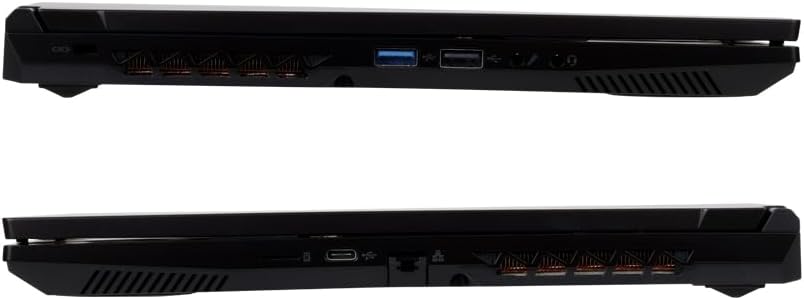
Nọmba 3.1: Alaye view of the laptop's external ports on both sides.
3.4 Network Asopọmọra
- Wi-Fi: The laptop supports Wi-Fi 6E (IEEE802.11 ax/ac/n/g/b/a). To connect, click the network icon in the taskbar, select your desired Wi-Fi network, and enter the password if prompted.
- LAN Wired: Connect an Ethernet cable to the 1000BASE-T LAN port for a stable wired network connection.
- Bluetooth: The laptop includes Bluetooth 5 for connecting wireless peripherals such as headphones or speakers.
4. Itọju
4.1 Ninu Kọǹpútà alágbèéká
- Iboju: Lo asọ asọ, ti ko ni lint die-die dampened pẹlu omi tabi a iboju regede. Ma ṣe fun sokiri omi taara sori iboju.
- Ẹnjini ati Keyboard: Lo asọ asọ ti o gbẹ. Fun idoti alagidi, die-die damp cloth can be used, ensuring no liquid enters the ports or vents.
- Awọn isanwo: Lorekore lo afẹfẹ fisinuirindigbindigbin lati ko eruku kuro lati awọn atẹgun itutu agbaiye lati ṣetọju ṣiṣan ti o dara julọ.
4.2 batiri Itọju
Lati pẹ igbesi aye batiri:
- Yago fun gbigba agbara si batiri ni kikun nigbagbogbo.
- Má ṣe fi kọ̀ǹpútà alágbèéká náà sí ojú otútù tó le gan-an.
- If storing the laptop for an extended period, charge the battery to approximately 50-60% before turning it off.
4.3 Software imudojuiwọn
Regularly update your Windows operating system and drivers to ensure optimal performance, security, and compatibility. Windows Update can be accessed via the Settings menu.
5. Laasigbotitusita
This section addresses common issues you might encounter. For more complex problems, refer to the official iiyama support webojula tabi olubasọrọ onibara iṣẹ.
5.1 Ko si Agbara / Kọǹpútà alágbèéká Ko Titan
- Rii daju pe ohun ti nmu badọgba AC ti sopọ ni aabo si kọnputa mejeeji ati iṣan agbara iṣẹ kan.
- Ṣayẹwo boya iṣan agbara n ṣiṣẹ nipa sisọ sinu ẹrọ miiran.
- Ti batiri naa ba ti gbẹ patapata, o le gba agbara iṣẹju diẹ ṣaaju ki kọǹpútà alágbèéká le ṣiṣẹ.
5.2 Ifihan oran
- Iboju òfo: Try pressing the function key combination (e.g., Fn + F5 or F7, depending on the model) to toggle the display output.
- Abojuto Ita Ko Ṣeri: Ensure the cable is securely connected. Try restarting the laptop.
5.3 Network Asopọmọra isoro
- Wi-Fi: Verify that Wi-Fi is enabled in Windows settings. Restart your router and modem.
- LAN Wired: Check the Ethernet cable connection. Ensure your network adapter drivers are up to date.
5.4 o lọra Performance
- Pa awọn ohun elo ti ko wulo ti nṣiṣẹ ni abẹlẹ.
- Ensure your operating system and drivers are updated.
- Ṣayẹwo fun malware tabi awọn ọlọjẹ nipa lilo sọfitiwia antivirus olokiki.
- Ensure adequate free space on your 1TB SSD.
6. Awọn pato
The following table details the technical specifications of the iiyama SENSE INFINITY SENSE-15FH127-i7-UH1X-M laptop:
| Ẹya ara ẹrọ | Sipesifikesonu |
|---|---|
| Brand | iyama |
| Nọmba awoṣe | SENSE-15FH127-i7-UH1X-M |
| Eto isesise | Windows 11 Ile |
| Iwon iboju | 15.6 inches |
| Ipinnu abinibi | HD ni kikun (1920x1080 awọn piksẹli) |
| Ifihan Iru | Anti-glare Color LCD |
| Sipiyu Awoṣe | Intel Core i7-12650H Processor |
| Sipiyu Iyara | Titi di 4.70GHz |
| Awọn aworan | Awọn aworan Intel UHD (Idapọ) |
| Installed RAM Memory | 16GB DDR4-3200 S.O.DIMM (8GBx2) |
| Iho iranti | 2 |
| Ibi ipamọ | 1TB NVMe M.2 SSD (PCIe 4.0x4) |
| Wakọ Optical | Ko ni ipese |
| Oluka kaadi | Micro SD Kaadi Reader |
| Ohun | High Definition Audio subsystem, Built-in Stereo Speakers, Built-in Microphone |
| Webkamẹra | 1 Milionu awọn piksẹli |
| Onirin lan | 1000BASE-T LAN Port |
| Alailowaya Asopọmọra | Wi-Fi 6E (IEEE802.11 ax/ac/n/g/b/a), Bluetooth 5 |
| Keyboard | Japanese Keyboard |
| Ntokasi Device | Multi-touch compatible Touchpad |
| Ita Ports | Headphone/Speaker Output x1, Microphone Input x1, USB 3.1 (Type-C) x2, USB 3.0 x1, USB 2.0 x1, HDMI x1, Mini DisplayPort x1 |
| TPM | TPM2.0 compatible |
| Battery Life (Video Playback) | Approx. 4.3 hours (JEITA3.0) |
| Igbesi aye Batiri (Laise) | Approx. 6.0 hours (JEITA3.0) |
| Iwọn | Approx. 2.03 kg (including battery) |
| Awọn iwọn (WxDxH) | Approx. 360mm x 240mm x 27.7mm (including rubber feet) |
7. Atilẹyin ọja ati Support
7.1 Standard Warranty
This iiyama SENSE INFINITY laptop comes with a standard 1-odun atilẹyin ọja lati ọjọ ti o ra. Jọwọ ṣe idaduro ẹri rira rẹ ati kaadi atilẹyin ọja fun eyikeyi awọn ibeere atilẹyin ọja.
The warranty covers manufacturing defects and hardware failures under normal use. It does not cover damage caused by misuse, accidents, unauthorized modifications, or natural disasters.
7.2 Imọ Support
For technical assistance, driver downloads, or further troubleshooting, please refer to the official iiyama support website. You can also find contact information for customer service on your warranty card or the official product page.
When contacting support, please have your laptop's model number (SENSE-15FH127-i7-UH1X-M) and serial number ready.