
1. Ifihan
This manual provides comprehensive instructions for the DATOUBOSS 11KW Hybrid Solar Inverter and 48V 628Ah LiFePO4 Battery integrated system. This all-in-one unit combines a powerful hybrid inverter with a high-capacity lithium iron phosphate battery, designed for efficient home energy storage, off-grid solar installations, and emergency power supply. Please read this manual thoroughly before installation and operation to ensure safe and optimal performance.
2. Ọja Ipariview
The DATOUBOSS integrated system is an all-in-one solution for energy storage, eliminating the need for separate inverter and battery purchases, and simplifying wiring and communication. It features a mobile pulley system at its base for easy relocation.
Awọn ẹya pataki:
- Integrated Hybrid Inverter and LiFePO4 Battery: Combines a 48V 11000W hybrid inverter with a 48V 628Ah LiFePO4 battery (32.15 kWh capacity).
- Ètò Ìṣàkóso Bátìrì Tó Tẹ̀síwájú (BMS): Built-in BMS protects against overcharge, over-discharge, overcurrent, short circuit, over-temperature, and under-temperature, ensuring battery longevity and safety.
- Color Touch LCD Screen: Intuitive interface for monitoring power information, identifying issues, and accessing detailed solutions for error codes.
- Gbigbe Rọrun: Equipped with 360° swivel casters for effortless movement.
- Awọn ibudo Ibaraẹnisọrọ: Supports RS232 and RS485 communication for system integration.
Idanimọ eroja:
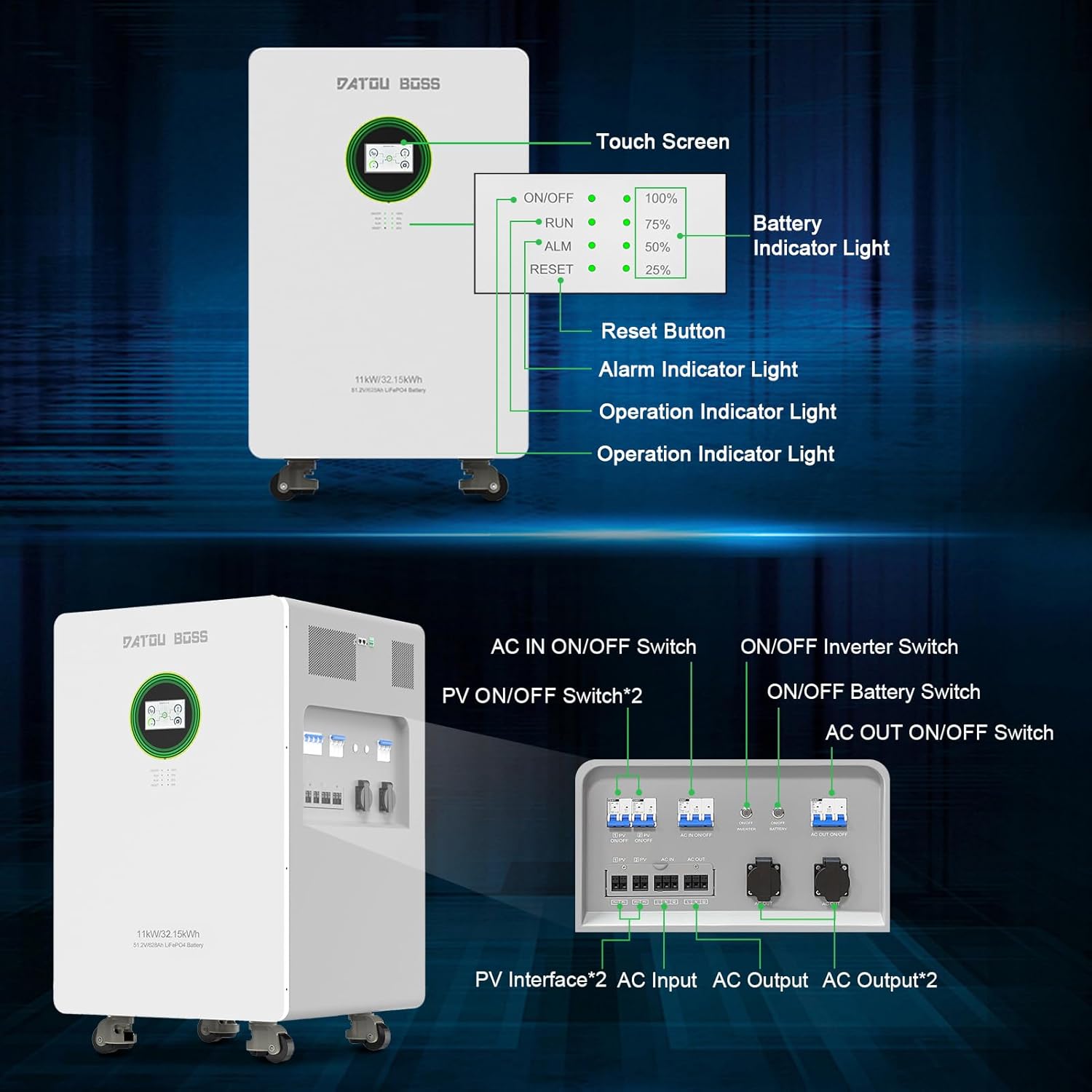

3. Eto ati fifi sori
Proper installation is crucial for the safe and efficient operation of your DATOUBOSS system. It is highly recommended that installation be performed by a qualified professional electrician.
3.1 Unpacking ati ayewo
Before installation, carefully inspect the equipment for any signs of damage during transit. Ensure the packaging is intact. The package should contain the integrated home energy storage system and a user manual.
3.2 Location and Environment
- Install in a clean, dry environment, free from dangerous, flammable, or corrosive chemicals/vapors.
- Ambient temperature for optimal operation should be between 0°C and 55°C.
- Avoid installing near heat sources such as radiators or stoves.
- Ensure no children or pets are present in the immediate vicinity of the installation.
- Do not install the unit on flammable building materials.
- If wall-mounting, ensure it is installed vertically on a solid wall.
- Maintain adequate clearance around the unit for heat dissipation and filter removal.
- Install the unit at eye level for easy readability of the LCD display.
3.3 Awọn irinṣẹ ti a beere
- Phillips dabaru
- Torque wrench
- Rivet pliers (of appropriate size)
- Insulated tools and safety devices compliant with local electrical regulations.
3.4 Electrical Awọn isopọ
All electrical connections must be performed by qualified personnel. Ensure all wiring is properly grounded, twisted, tightened, and secured.
- Connect the battery using appropriate cables and terminals that match the battery pack's safety current and installation requirements.
- Ensure all circuit breakers are correctly installed to maintain solar power supply stability.

4. Awọn ilana Iṣiṣẹ
4.1 Turning the System On/Off
To power on the device, first press the Battery ON/OFF switch, then the Inverter ON/OFF switch. The display will illuminate.

4.2 LCD Touchscreen Interface
The DATOUBOSS system features a color touch LCD screen for easy and intuitive operation. It allows you to monitor power information, system status, and navigate through various settings.


5. Itọju
5.1 Itọju Gbogbogbo
- Regularly inspect the unit for any visible damage or loose connections.
- Keep the unit clean and free from dust. Use a dry cloth for cleaning. Do not use spray cleaners, liquids, aerosols, or solvents that may damage the unit's finish.
- Rii daju pe fentilesonu to dara ni ayika ẹyọ naa lati ṣe idiwọ igbona.
5.2 batiri Itọju
- Maintain the battery within its specified operating temperature range for stable performance and extended lifespan.
- The integrated BMS continuously monitors the battery's operational status and prevents it from operating beyond its design limits.
6. Laasigbotitusita
The LCD screen provides warning and error codes to help identify and resolve issues. Refer to the detailed solutions provided in the full product manual for specific error codes.
Awọn oran ti o wọpọ ati Awọn ojutu:
- System Not Turning On: Ensure both the Battery ON/OFF and Inverter ON/OFF switches are engaged. Check all power connections.
- No Solar Input: Verify PV ON/OFF switches are on. Check solar panel connections and ensure sufficient sunlight.
- Igbóná púpọ̀: Ensure adequate ventilation around the unit. Check ambient temperature.
- Awọn koodu aṣiṣe: Consult the comprehensive manual for specific error code meanings and troubleshooting steps. If the issue persists, contact customer support.
7. Awọn pato
| Ẹya ara ẹrọ | Sipesifikesonu |
|---|---|
| Awoṣe ọja | JC-1132 |
| Batiri Iru | LiFePO4 Battery 628 Ah |
| Agbara Batiri | 32.15 kWh |
| Awọn iwọn (L × W × H) | 580 x 580 x 937 mm |
| Iwọn | 239 kg |
| Oruko Voltage | 51.2 V |
| Lifespan at 25°C | 8000 cycles, 70% (SOH) |
| Lifespan at 45°C | 3000 cycles, 70% (SOH) |
| Ipo gbigba agbara PV | MPPT |
| O pọju agbara Input PV | 2 * 7500 W |
| MPPT Àtòjọ Ibiti | 90-500 VDC |
| Ti o dara ju Voltage | 360-430 VDC |
| Iwọn titẹ sii PV ti o pọju Voltage | 500 VDC |
| O pọju Input PV Lọwọlọwọ | 18 A |
| Maximum PV Charge Current | 150 A |
| O pọju agbara AC Lọwọlọwọ | 150 A |
| O pọju Sisọ lọwọlọwọ | 150 A |
| Fọọmu titẹ sii | L+N+PE |
| Iṣagbewọle ipin Voltage | 220/230/240 VAC |
| Voltage Ibiti | 90-280 VAC 3V (normal mode), 170-280 VAC 3V (UPS mode) |
| Iwọn Igbohunsafẹfẹ | 50/60 Hz (adaptive) |
| Battery Inverter Rated Power | 11000 W |
| PV Inverter Rated Power | 12000 W |
| O wujade Voltage | 220/230/240 VAC ±5% |
| Igbohunsafẹfẹ Ijade | 50/60 Hz ± 0.1% |
| Fọọmu igbi | Wave Sine Sure |
| Àkókò Ìyípadà (a lè ṣàtúnṣe) | Computer equipment: 10 ms, Home appliances: 20 ms |
| Agbara ti o ga julọ | 22000 VA |
| Agbara Gbigbe Ju (Ipo Batiri) | 1s with 105-160% load; 2s with 120-200% load; 400ms with >200% load |
| Iboju LCD | Displays operating modes, charge/input/output, etc. |
| Awọn iwọn otutu ti nṣiṣẹ | -10 si 50 °C |
| Relative Humidity (working environment) | 20% si 95% (ti kii ṣe itọlẹ) |
| Ibi ipamọ otutu | -15 si 60 °C |
| Giga | Max 1000 m without derating. Above 1000 m, power reduction required up to 4000 m (See IEC 62040). |
| Ariwo Ipele | <50dB |
8. Awọn Itọsọna Aabo ati Awọn Ikilọ
Read, understand, and follow all instructions and applicable documentation carefully before using or installing this product. Keep all manuals and documentation in a safe place for future reference.

- Always wear appropriate safety gear and use insulated tools during installation and maintenance.
- Installation must be carried out by qualified professionals in compliance with local and national electrical regulations.
- Rii daju pe eto ti wa ni ipilẹ daradara.
- Install the battery in a suitable position for the electronic device and maintain a safe operating temperature.
- Clean the battery with a suitable cleaner (e.g., dry cloth). Do not use spray cleaners, liquids, aerosols, or solvents that may damage the unit.
- Rii daju pe gbogbo awọn fasteners ti wa ni wiwọ daradara.
- Do not incinerate, crush, or puncture the battery.
- Do not place the battery in dangerous or flammable environments where it could contact corrosive chemicals or vapors.
- Do not store or install this product near radiators, heat collectors, or in areas exposed to prolonged overheating.
- Ma ṣe rì ọja naa sinu awọn olomi.
- Risk of fire, explosion, or burns: In case of electrical odors or overheating, immediately disconnect the circuit breaker and contact the fire department.
- Keep away from damaged batteries and any liquid (electrolyte) or flammable gas leaks. In case of inhalation, evacuate the area and consult a doctor.
- In case of battery contact with eyes or skin, rinse the affected area with running water for 15 minutes and consult a doctor.
- Ni ọran ti ina: Do not use water! Use only dry powder extinguishers. If possible, move the battery to a safe location before it ignites.
9. Atilẹyin ọja ati Support
DATOUBOSS guarantees the quality of its products and offers a 5-year warranty on this multifunction device. We provide professional 24-hour customer service.
Atilẹyin Onibara:
- For any product-related questions, please do not hesitate to contact us.
- If you require the manual in a different language, please contact us via the Amazon backend, and we will provide an electronic version as soon as possible.
- Our friendly and patient customer assistance team is available to help.