
1. Ọja Ipariview
The Edifier W280NB Pro are neckband wireless headphones designed for immersive audio experiences with advanced features. They offer hybrid active noise cancellation, Hi-Res Audio support with LDAC, and a durable, comfortable design suitable for various activities.

Image: Edifier W280NB Pro headphones with key features highlighted.
Awọn ẹya pataki:
- Deep Hybrid Active Noise Cancellation: Up to -45dB noise reduction with 4 selectable modes (High ANC, Medium ANC, Ambient Aware, Wind Reduction).
- Studio-Quality Hi-Res Audio: 10mm dynamic drivers with titanium-coated composite diaphragms, supporting LDAC codec and Hi-Res Audio Wireless certification (20Hz-40KHz frequency response).
- Long-Lasting Battery & Fast Charging: Up to 23 hours of playback (ANC off), 14 hours (ANC on). 15 minutes of charging provides 5 hours of playtime. Full charge in 1.5 hours.
- Stable Bluetooth 5.4 Connection: Ensures stable transmission, low power consumption, and multipoint connection for seamless device switching.
- All-Day Comfort & Secure Fit: Lightweight, flexible neckband with skin-friendly material and multiple sizes of ear wings for a secure fit. Magnetic earbuds for tangle-free storage.
- Durable & Clear Calls: IP55 dust and water resistance. Built-in AI noise-canceling microphones for clear communication in noisy environments.
2. Eto Itọsọna
2.1 Package Awọn akoonu
Before use, please ensure all items are present in the package:
- Edifier W280NB Pro Neckband Wireless Headphones
- USB-C Ngba agbara Cable
- Multiple sizes of ear tips and ear wings
- Afowoyi Olumulo (iwe-ipamọ yii)
2.2 Ngba agbara si awọn Agbekọri
Charge the headphones fully before first use to ensure optimal battery performance.
- Connect the provided USB-C charging cable to the charging port on the neckband.
- So opin okun miiran pọ si ohun ti nmu badọgba agbara USB (kii ṣe pẹlu) tabi ibudo USB ti kọnputa kan.
- The indicator light will show charging status (refer to the LED indicator section for details).
- A full charge takes approximately 1.5 hours. A 15-minute quick charge provides approximately 5 hours of playback.

Image: Visual representation of battery life (23 hours ANC off, 14 hours ANC on) and fast charging (15 mins = 5 hours).
2.3 Fitting the Headphones
Proper fit is crucial for comfort, sound quality, and effective noise cancellation.
- Select the ear tips and ear wings that best fit your ears. Experiment with different sizes for the most secure and comfortable seal.
- Fi ẹ̀gbà ọrùn sí ọrùn rẹ.
- Insert the earbuds into your ear canals and adjust the ear wings to sit snugly in your outer ear for stability.

Image: Diagram showing various ear tip and ear wing sizes for a secure and comfortable fit.
2.4 Sisopọ Bluetooth
Pair your Edifier W280NB Pro headphones with your device via Bluetooth.
- Rii daju pe awọn agbekọri ti gba agbara ati agbara si pipa.
- Press and hold the multi-function button (usually the power button) until the indicator light flashes rapidly (e.g., blue and red alternately), indicating pairing mode.
- Lori ẹrọ rẹ (foonuiyara, tabulẹti, kọǹpútà alágbèéká), mu Bluetooth ṣiṣẹ ki o wa awọn ẹrọ to wa.
- Select "Edifier W280NB Pro" from the list of found devices.
- Once connected, the indicator light will typically show a steady blue light or flash slowly.
Asopọmọra Multipoint:
The W280NB Pro supports multipoint connection, allowing you to connect to two Bluetooth devices simultaneously.
- Pa awọn agbekọri pọ pẹlu ẹrọ akọkọ bi a ti salaye loke.
- Mu Bluetooth ṣiṣẹ lori ẹrọ akọkọ.
- Fi awọn agbekọri pada si ipo sisopọ pọ ki o so pọ pẹlu ẹrọ keji.
- Re-enable Bluetooth on the first device. The headphones should now be connected to both devices, allowing seamless switching.

Image: Illustration of Bluetooth 5.4 technology for stable transmission and multipoint connection.
3. Awọn ilana Iṣiṣẹ
3.1 Agbara Tan / Pa
- Agbara Tan: Press and hold the multi-function button for approximately 3 seconds until the indicator light illuminates.
- Agbara Pa: Press and hold the multi-function button for approximately 5 seconds until the indicator light turns off.
3.2 Awọn iṣakoso bọtini
The Edifier W280NB Pro features intuitive button controls on the neckband for easy management of music, calls, and noise cancellation modes.

Image: Diagram illustrating the functions of each button on the neckband for calls, music playback, and mode switching.
| Iṣe | Išẹ |
|---|---|
| Multi-function Button (Power) | Press and hold 3s: Power On Press and hold 5s: Power Off Press and hold (pairing mode): Enter Bluetooth pairing Single press (during call): Answer/End Call Double press (during call): Reject Call |
| Iwọn didun soke (+) | Single press: Increase Volume Press and hold: Next Track |
| Iwọn didun isalẹ (-) | Single press: Decrease Volume Press and hold: Previous Track |
| Bọtini Muu ṣiṣẹ/Daduro | Single press: Play/Pause Music |
| Bọtini Ipo ANC | Single press: Cycle through ANC modes (High ANC, Medium ANC, Ambient Aware, Wind Reduction, ANC Off) |
3.3 Ti nṣiṣe lọwọ Noise ifagile (ANC) Awọn ipo
The W280NB Pro offers four distinct noise cancellation modes to adapt to your environment.

Image: Visual guide to the four ANC modes and their typical use cases.
- High ANC: Provides maximum noise reduction, ideal for very noisy environments like airplanes or subways.
- Medium ANC: Offers a balanced level of noise cancellation, suitable for offices or cafes.
- Ambient Mọ: Allows you to hear your surroundings while still enjoying your audio, useful for urban environments or when needing to be aware of announcements.
- Idinku Afẹfẹ: Ni pato ṣe apẹrẹ lati dinku ariwo afẹfẹ lakoko awọn iṣẹ ita gbangba.
3.4 Ṣiṣe ati gbigba awọn ipe
The headphones feature AI noise-canceling microphones for clear call quality.
- Idahun Ipe: Nikan tẹ bọtini iṣẹ-ọpọlọpọ.
- Ipe Ipari: Nikan tẹ bọtini iṣẹ-ọpọlọpọ.
- Kọ Ipe: Tẹ bọtini iṣẹ-ọpọlọpọ lẹẹmeji.

Image: A person using the headphones for a call, highlighting the AI-enhanced clear call feature.
3.5 Edifier So App
For advanced settings and customization, download the Edifier Connect app from your device's app store. The app allows you to:
- Tun lorukọ ẹrọ rẹ.
- Personalize ANC levels.
- Fine-tune audio with preset EQs or custom EQs.
- Locate lost headphones.
4. Itọju
4.1 Ninu
The W280NB Pro headphones are IP55 rated for dust and water resistance, but proper cleaning helps maintain their condition.
- Wipe the neckband and earbuds with a soft, dry, lint-free cloth.
- For ear tips, gently remove them and clean with a damp aṣọ àti ọṣẹ díẹ̀ tí ó bá pọndandan. Rí i dájú pé wọ́n gbẹ pátápátá kí o tó tún so wọ́n pọ̀ mọ́ ara wọn.
- Avoid using harsh chemicals, abrasive materials, or submerging the headphones in water.
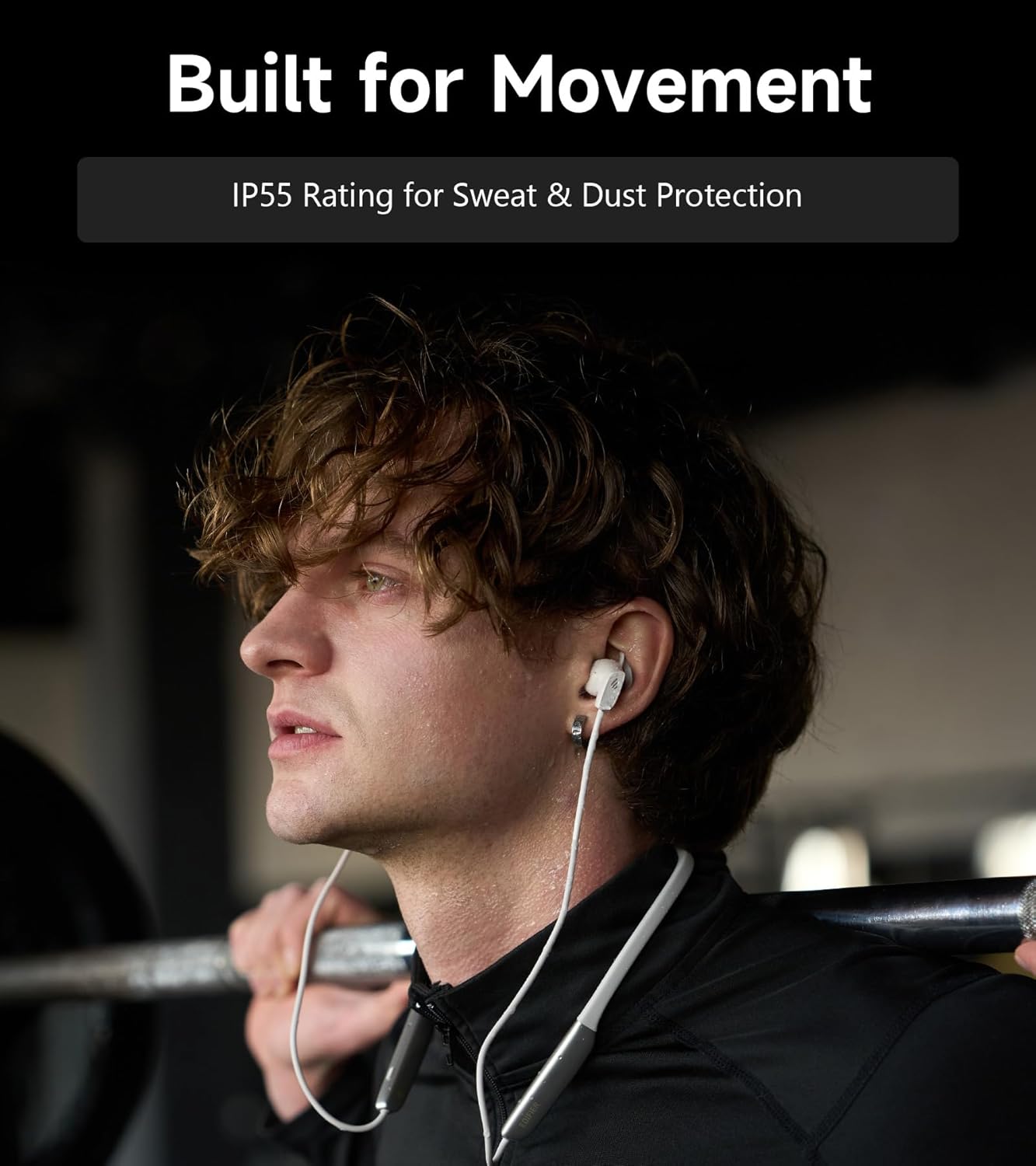
Image: A person wearing the headphones during a workout, illustrating the IP55 sweat and dust protection.
4.2 Ibi ipamọ
When not in use, store your headphones properly to prevent damage.
- The earbuds are magnetic, allowing them to snap together for tangle-free storage around your neck or in a bag.
- Tọju ni itura, aye gbigbẹ kuro lati orun taara ati awọn iwọn otutu to gaju.
4.3 batiri Itọju
- Yago fun gbigba agbara si batiri ni kikun nigbagbogbo.
- Gba agbara sori agbekọri nigbagbogbo, paapaa ti a ko ba lo fun igba pipẹ, lati ṣetọju ilera batiri.
5. Laasigbotitusita
If you encounter issues with your Edifier W280NB Pro headphones, refer to the following common problems and solutions.
| Isoro | Owun to le Fa | Ojutu |
|---|---|---|
| Awọn agbekọri ko ṣiṣẹ. | Batiri kekere. | Gba agbara si awọn agbekọri ni kikun. |
| Ko le so pọ pẹlu ẹrọ. | Awọn agbekọri ko si ni ipo sisopọ. Bluetooth disabled on device. Ẹrọ ti o jinna si awọn agbekọri. | Ensure headphones are in pairing mode (flashing indicator). Mu Bluetooth ṣiṣẹ lori ẹrọ rẹ. Move device closer to headphones (within 10 meters). Try resetting the headphones (refer to manual for specific reset procedure if available, or power cycle). |
| Ko si ohun tabi iwọn kekere. | Volume too low on headphones or device. Awọn agbekọri ko sopọ. Ijade ohun ti ko tọ ti a yan lori ẹrọ. | Increase volume on both headphones and device. Ensure headphones are successfully paired and connected. Check your device's audio settings to ensure output is set to Edifier W280NB Pro. |
| Didara ohun ti ko dara. | Isopọ Bluetooth ti ko dara. Improper ear tip fit. Dídára orísun ohùn. | Sún mọ́ ẹ̀rọ tí a so pọ̀. Ensure ear tips provide a secure seal. Gbiyanju orisun ohun ti o yatọ tabi file. |
| Active Noise Cancellation not effective. | Improper ear tip fit. Incorrect ANC mode selected. Extreme noise conditions. | Ensure ear tips provide a secure seal. Cycle through ANC modes to select the most appropriate one. ANC works best for low-frequency, constant noise. |
| Gbohungbohun ko ṣiṣẹ lakoko awọn ipe. | Headphones not selected as input device. Gbohungbohun ti dakẹ lori ẹrọ naa. | Check your device's call settings to ensure Edifier W280NB Pro is selected for microphone input. Ensure microphone is not muted on your device. |
6. Awọn pato
Detailed technical specifications for the Edifier W280NB Pro Neckband Wireless Headphones.
| Ẹya ara ẹrọ | Ẹ̀kúnrẹ́rẹ́ |
|---|---|
| Brand | Atunṣe |
| Orukọ awoṣe | W280NB Pro |
| Àwọ̀ | Dudu |
| Gbigbe Eti | Ninu Eti |
| Fọọmù ifosiwewe | Okùn ọrun |
| Ipalara | 24 ohms |
| Ariwo Iṣakoso | Ti nṣiṣe lọwọ Noise Ifagile |
| Iwọn Igbohunsafẹfẹ | 20Hz-40KHz |
| Audio Driver Type | Dynamic Driver (10mm with Titanium-Coated Diaphragm) |
| Asopọmọra Technology | Ailokun (Bluetooth) |
| Ẹya Bluetooth | 5.4 |
| Bluetooth Ibiti | 10 Mita (ẹsẹ 33) |
| Battery Average Life (Playback) | Wákàtí 23 (ANC ti ku), Wákàtí 14 (ANC ti wa ni tan) |
| Igba agbara Batiri | Awọn wakati 1.5 |
| Omi Resistance Ipele | IP55 (Dust & Waterproof) |
| Awọn ẹrọ ibaramu | Foonuiyara, Awọn tabulẹti, Kọǹpútà alágbèéká, Awọn Agbọrọsọ Smart |
| Ohun elo | Silicone (Enclosure) |
| UPC | 628430220005 |
7. atilẹyin ọja Information
The Edifier W280NB Pro Neckband Wireless Headphones come with a 1 Odun olupese atilẹyin ọja.
Atilẹyin ọja yii bo awọn abawọn ninu awọn ohun elo ati iṣẹ-ṣiṣe labẹ lilo deede. Ko bo ibajẹ ti o fa nipasẹ ilokulo, ijamba, awọn iyipada ti a ko fun ni aṣẹ, tabi ibajẹ deede. Jọwọ pa ẹri rira rẹ mọ fun awọn ibeere atilẹyin ọja.
8. Onibara Support
For further assistance, technical support, or warranty inquiries, please contact Edifier customer service.
- Webojula: Visit the official Edifier webaaye fun awọn FAQ, awọn orisun atilẹyin, ati alaye olubasọrọ.
- Imeeli/foonu: Refer to the Edifier website or your product packaging for specific contact details in your region.