
1. Ifihan
Thank you for choosing the AIYIMA S4000 Active Bookshelf Speakers. These speakers are designed to deliver high-fidelity audio with versatile connectivity options, suitable for various applications including home entertainment, PC audio, and professional studio monitoring. Please read this manual thoroughly before use to ensure proper setup and operation.
2. Awọn ilana aabo
Láti dènà iná, ìkọlù iná mànàmáná, tàbí ìbàjẹ́ ọjà, jọ̀wọ́ tẹ̀lé àwọn ìlànà ààbò wọ̀nyí:
- Ma ṣe fi ohun elo yii han si ojo tabi ọrinrin.
- Ma ṣe gbe awọn nkan ti o kun fun awọn olomi, gẹgẹbi awọn ikoko, lori ohun elo naa.
- Rii daju pe fentilesonu to dara. Ma ṣe dina eyikeyi awọn ṣiṣi atẹgun.
- Maṣe fi sori ẹrọ nitosi awọn orisun ooru gẹgẹbi awọn imooru, awọn iforukọsilẹ ooru, awọn adiro, tabi awọn ohun elo miiran (pẹlu ampliifiers) ti o gbe ooru jade.
- Dabobo okun agbara lati ma rin tabi fun pọ, ni pataki ni awọn ifibọ, awọn apo itọju, ati aaye ti wọn jade kuro ninu ohun elo.
- Lo awọn asomọ/awọn ẹya ara ẹrọ ti olupese pato.
- Yọọ ohun elo yi nigba iji manamana tabi nigba lilo fun igba pipẹ.
- Tọkasi gbogbo iṣẹ si awọn oṣiṣẹ iṣẹ ti o peye. Iṣẹ iṣẹ nilo nigbati ohun elo ba ti bajẹ ni ọna eyikeyi.
3. Package Awọn akoonu
Jọwọ ṣayẹwo pe gbogbo awọn nkan wa ninu apoti:
- AIYIMA S4000 Studio Monitors (2 units)
- RCA Audio USB
- XLR Audio Cable
- Afowoyi Olumulo (iwe-ipamọ yii)
- Magnetic Grilles (2 units)
- Rubber Feet (8 units)
- Okun agbara
- Wireless IR Remote Control
4. Ọja Ipariview
4.1 Igbimọ iwaju
The front panel features the horn-loaded tweeter and the 4-inch woofer, along with a multi-function rotary control for volume and input selection.

Aworan: Iwaju ati ẹhin view of the AIYIMA S4000 speakers. The front shows the tweeter and woofer, while the rear displays all input/output ports and controls.
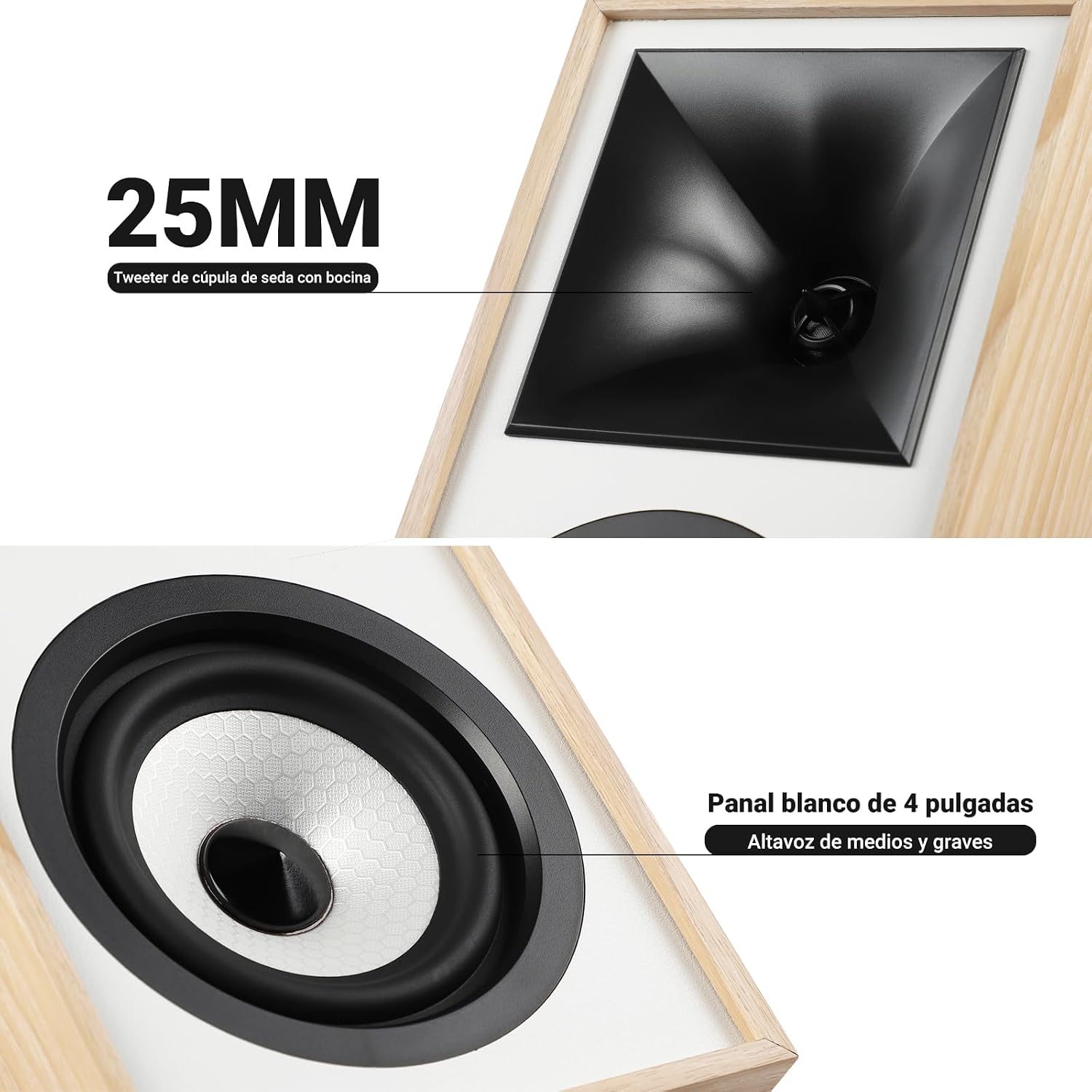
Aworan: Isunmọ view of the 25mm horn-loaded silk dome tweeter and the 4-inch white cone woofer on the AIYIMA S4000 speaker.
The S4000 incorporates a 1.25-inch horn-loaded tweeter for enhanced vocal clarity and a 4-inch woofer for deep bass. The cabinet is constructed from 15mm high-density MDF to reduce resonance and distortion.
4.2 ru Panel
The rear panel houses all connectivity ports and additional controls.
Aworan: Alaye view of the rear panel of the AIYIMA S4000 speaker, showing the volume, treble, and bass knobs, RCA and XLR inputs, SUB OUT, power switch, and power input.
- Volume/Input Selector: Rotary knob for volume adjustment and input source selection (Bluetooth, RCA, XLR).
- Iṣakoso Treble: Knob to adjust high frequencies.
- Iṣakoso Bass: Knob to adjust low frequencies.
- Iṣawọle RCA: For connecting devices via RCA cables.
- Iṣawọle XLR: Professional balanced input for mixers, audio interfaces, etc.
- ṢE ṢE ṢE: Àbájáde fún sísopọ̀ subwoofer tó ń ṣiṣẹ́ láti òde.
- Agbara Yi pada: To turn the speakers on or off.
- Input Agbara AC: For connecting the power cable (AC 100V-240V).
- SPK-L OUT: Output to connect the passive left speaker.
5. Eto
5.1 Agbọrọsọ Placement
For optimal sound quality, place the speakers on a stable surface, such as a bookshelf or speaker stands. Position them at ear level and equidistant from your listening position. Ensure there is adequate space behind the speakers for the L-shaped bass reflex port to function effectively.

Image: AIYIMA S4000 speakers positioned on a wooden cabinet, demonstrating a typical home setup with a turntable.
5.2 Nsopọ Awọn orisun ohun
The S4000 offers multiple input options:
- Iṣawọle RCA: Connect your audio source (e.g., CD player, TV, PC) to the RCA ports on the rear panel using the provided RCA cable.
- Iṣawọle XLR: For professional audio equipment like mixers or audio interfaces, use XLR cables to connect to the balanced XLR inputs. This input is resistant to interference.
- Bluetooth 5.0: For wireless connection, refer to section 6.4 for Bluetooth pairing instructions.

Image: AIYIMA S4000 speaker shown connected to a laptop and electronic keyboard, highlighting the professional balanced input capabilities.
5.3 Connecting an External Subwoofer (SUB OUT)
To enhance bass performance, you can connect an active subwoofer to the SUB OUT port on the rear panel. The system will automatically adjust the crossover frequency, converting your setup into a 2.1 audio system.

Image: AIYIMA S4000 speakers set up with a television and an external subwoofer, illustrating the SUB OUT functionality for a 2.1 home cinema experience.
5.4 Asopọ agbara
Connect the provided power cable to the AC Power Input on the rear panel of the active speaker, then plug it into a wall outlet (AC 100V-240V). Connect the active speaker to the passive speaker using the SPK-L OUT port.
6. Awọn ilana Iṣiṣẹ
6.1 Agbara Tan / Pa
Flip the Power Switch on the rear panel to the "ON" position to turn on the speakers. Flip it to "OFF" to power them down.
6.2 Volume Control and Input Selection
The multi-function rotary control on the front panel adjusts the volume. Press the knob to cycle through input sources: Bluetooth (BT), RCA, and XLR. The current input will be indicated by an LED.
6.3 Ṣíṣe àtúnṣe sí Bass àti Treble
Use the independent Bass and Treble knobs on the rear panel to fine-tune the sound according to your preference and audio source. Adjustments range from -6dB to +6dB.
6.4 Sisopọ Bluetooth
- Turn on the speakers and select Bluetooth input using the front panel knob or remote control. The Bluetooth indicator light will flash.
- On your device (smartphone, tablet, computer), enable Bluetooth and search for "AIYIMA S4000".
- Select "AIYIMA S4000" to pair. Once connected, the Bluetooth indicator light will stop flashing and remain solid.
- You can now play audio wirelessly from your device.

Image: AIYIMA S4000 speaker in a room setting, illustrating its Bluetooth 5.0 connectivity for wireless audio streaming.
6.5 Latọna Iṣakoso Lilo
The included wireless IR remote control allows you to adjust volume, select input modes, and control playback (play/pause, next/previous track for Bluetooth) from up to 20 meters away without requiring line-of-sight.

Image: Composite image showing the AIYIMA S4000 speakers, a close-up of the 15mm MDF cabinet construction, an internal view of the L-shaped bass reflex port, and the wireless remote control.
7. Itọju
- Ninu: Use a soft, dry cloth to clean the speaker cabinets. Do not use liquid cleaners or abrasive materials.
- Ibi ipamọ: Ti o ba tọju awọn agbohunsoke fun akoko ti o gbooro sii, ge asopọ wọn lati agbara ki o fi wọn pamọ si ibi ti o tutu, ibi gbigbẹ, ni pataki ninu apoti atilẹba wọn.
- Grilles: The magnetic grilles can be removed for cleaning or for a different aesthetic. Handle them gently to avoid damage.
8. Laasigbotitusita
| Isoro | Owun to le Fa | Ojutu |
|---|---|---|
| Ko si ohun |
|
|
| Ohun ti o daru |
|
|
| Awọn oran asopọ Bluetooth |
|
|
| Isakoṣo latọna jijin ko ṣiṣẹ |
|
|
If the problem persists, please contact AIYIMA customer support.
9. Awọn pato

Image: Diagram showing the dimensions of the AIYIMA S4000 speakers: 280mm (11.02 inches) height, 185mm (7.28 inches) depth, and 145mm (5.70 inches) width.
| Ẹya ara ẹrọ | Sipesifikesonu |
|---|---|
| Orukọ awoṣe | S4000 |
| Brand | AIYIMA |
| Agbọrọsọ Iru | Bookshelf, Active, 2-way, Surround Sound |
| Awọn ikanni ohun | 2.1 (with SUB OUT) |
| O pọju o wu Power | 80 Watts RMS (2x40W RMS: 2x25W Bass/Mid, 2x15W Treble) |
| Idahun Igbohunsafẹfẹ | 45 Hz - 20 kHz |
| Iwọn Iwọn Woofer | 4 inches |
| Iruwe Tweeter | 1.25-inch Horn-loaded Silk Dome |
| Asopọmọra Technology | Bluetooth 5.0, RCA, XLR |
| Bluetooth Ibiti | Up to 20 meters (wireless remote also 20m) |
| Ọna Iṣakoso | Touch (front knob), Remote Control |
| Ohun elo minisita | 15mm High-density MDF |
| Orisun agbara | AC 100V-240V (Power Cable) |
| Awọn iwọn Ọja (D x W x H) | 18.5 x 14.5 x 28 cm (7.28 x 5.70 x 11.02 inches) |
| Iwọn Ọja | 6.9 kg (meji) |
| Àwọ̀ | Brown (wood finish) |
| Niyanju Lilo | Home Entertainment, PC Audio, Recording Studios, Home Cinema |
10. Atilẹyin ọja ati Support
AIYIMA products come with a standard manufacturer's warranty. For detailed warranty information, please refer to the warranty card included in your package or visit the official AIYIMA webojula.
For technical support, troubleshooting assistance, or service inquiries, please contact AIYIMA customer support through their official channels. Please have your product model number (S4000) and purchase information ready when contacting support.
Olupese: AIYIMA