
1. Ifihan
Thank you for choosing the Cillso GTR3 Fitness Smart Watch. This manual provides essential information for the proper setup, operation, and maintenance of your device. Please read it thoroughly to ensure optimal performance and a complete understanding of all features.
2. Package Awọn akoonu
Daju pe gbogbo awọn nkan wa ninu apo rẹ:
- 1 x Cillso GTR3 Smart Watch
- 1 x Okun Ngba agbara Oofa
- 1 x Detailed User Manual (this document)
3. Eto Itọsọna
3.1 Ngba agbara si Smart Watch
Before first use, fully charge your Cillso GTR3 Smart Watch. Connect the magnetic charging cable to the charging points on the back of the watch and plug the USB end into a standard USB power adapter (not included).

Image: The Cillso GTR3 Smart Watch connected to its magnetic charging cable, indicating a 350 mAh battery and 3ATM waterproof rating.
A full charge typically takes approximately 2 hours. The watch has a standby time of up to 45 days and can last up to 10 days with heavy usage.
3.2 App Gbigba lati ayelujara ati Sisopọ
To unlock the full functionality of your smart watch, download the "Runmefit" application on your smartphone.
- Ṣe igbasilẹ ohun elo naa: Wa fun "Runmefit" in your smartphone's app store (compatible with iOS 12.0+ and Android 7.0+).
- Mu Bluetooth ṣiṣẹ: Tan Bluetooth lori foonuiyara rẹ.
- Open Runmefit App: Launch the app and follow the on-screen instructions to search for your device. Select "GTR3" from the list of available devices.
- Jẹrisi Isopọpọ: Jẹrisi ibeere isopọmọ lori foonu rẹ ati aago ọlọgbọn naa.

Image: Visual guide demonstrating the steps to download the "Runmefit" app, enable Bluetooth, and connect the GTR3 smart watch.
3.3 Enabling Bluetooth Call Function
For Bluetooth calling functionality, an additional connection is required:
- Ensure the watch is successfully bound to the "Runmefit" app.
- Lọ si awọn eto Bluetooth ti foonuiyara rẹ.
- Find and select "GTR3" (or a similar identifier) in the list of available devices and click to bind. This creates a separate audio connection.
- Once connected, you can use the watch to answer and make calls.
4. Awọn ilana Iṣiṣẹ
4.1 Ipilẹ Lilọ kiri
The Cillso GTR3 features a 1.46-inch AMOLED Ultra-HD full touchscreen display. Swipe across the screen to navigate through menus and functions. Use the physical buttons for quick access or to return to the home screen.

Image: The 1.46-inch AMOLED display of the GTR3 Smart Watch showcasing different customizable watch faces.
4.2 Abojuto Ilera
The watch continuously monitors various health metrics:
- Oṣuwọn Ọkàn: Ó ń tọ́pasẹ̀ ìlù ọkàn rẹ ní gbogbo ìgbà. View real-time data and historical trends in the Runmefit app.
- Atẹgun ẹjẹ (SpO2): Monitors blood oxygen levels to help ensure vital signs stay within a healthy range.
- Abojuto oorun: Automatically tracks sleep patterns, including deep sleep, light sleep, and awake times, providing insights into sleep quality.
- Abojuto Wahala: Analyzes stress levels throughout the day.
- Olurannileti Yiyilo Ẹjẹ: Provides reminders for women's health tracking when configured in the app.

Aworan: Pariview of the GTR3's 24/7 health tracking capabilities, including heart rate, SpO2, body energy, and sleep monitoring.

Aworan: Alaye view of the heart rate monitoring feature on the GTR3 Smart Watch and its companion app.

Image: The GTR3 Smart Watch showing continuous blood oxygen monitoring, with data also visible in the app.

Image: The GTR3 Smart Watch's sleep monitoring interface, showing duration of deep sleep, light sleep, and awake periods.
4.3 idaraya Awọn ipo
The GTR3 supports over 110 sports modes, including walking, running, cycling, soccer, and hiking. Select your desired activity to track specific metrics such as steps, distance, calories burned, and exercise duration.

Image: The GTR3 Smart Watch highlighting its 110+ sports modes and detailed tracking of steps, calories, heart rate, blood oxygen, and stress.
4.4 Bluetooth Npe ati Awọn iwifunni
Once the Bluetooth call function is enabled (see Section 3.3), you can answer, reject, or make calls directly from your watch. The watch also displays notifications from your smartphone, including messages and app alerts.
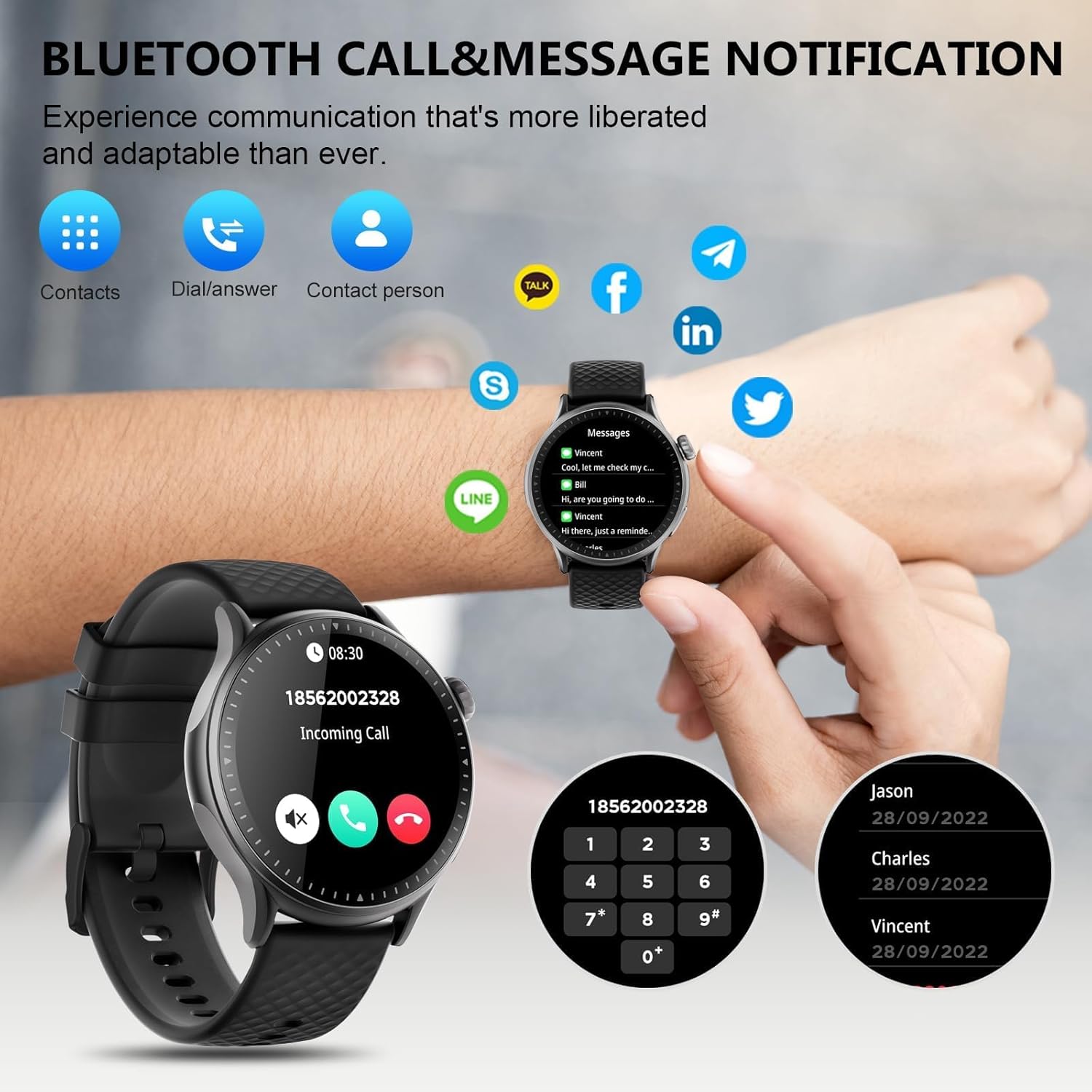
Image: The GTR3 Smart Watch displaying an incoming call and various message notification icons from social media and communication apps.
4.5 AI Voice Iranlọwọ
The built-in AI assistant allows for hands-free control. Use voice commands to check the weather, control music playback on your phone, set alarms, and more.

Image: The GTR3 Smart Watch's AI Voice Assistant interface, illustrating how to use voice commands for tasks like checking weather or setting alarms.
4.6 Afikun Awọn iṣẹ
The Cillso GTR3 offers a range of other useful features:
- Asọtẹlẹ oju ojo
- Wa foonu
- Stopwatch & Timer
- Ẹrọ iṣiro
- Aago itaniji
- Latọna kamẹra Iṣakoso
- Music Control (for your phone's music player)
- Awọn adaṣe Mimi

Image: The GTR3 Smart Watch's app menu, showcasing icons for various functions including Find Phone, Weather, Calculator, Remote Camera Shutter, Breathing Exercises, Women's Health, and Alarm Clock.
4.7 Customizing Watch oju
Personalize your watch with a variety of watch faces. The "Runmefit" app offers over 200 watch faces to choose from. You can also upload your favorite photos to create custom watch faces.
5. Itọju
5.1 Waterproofing
The Cillso GTR3 has a 3ATM waterproof rating, meaning it is resistant to splashes, rain, and sweat. It is suitable for daily use and can withstand brief immersion in water. However, it is kii ṣe recommended for hot showers, saunas, diving, or high-speed water sports, as steam or high water pressure can compromise the seals.
5.2 Itọju ati Itọju
Lati ṣetọju irisi aago rẹ ati iṣẹ ṣiṣe:
- Nu iboju naa ki o si fi okùn mu nigbagbogbo pẹlu asọ rirọ, damp asọ.
- Yẹra fun lilo awọn kẹmika ti o lewu, awọn olutọpa abrasive, tabi awọn nkanmimu.
- Rii daju pe awọn olubasọrọ gbigba agbara jẹ mimọ ati ki o gbẹ ṣaaju gbigba agbara.
- Yago fun ṣiṣafihan aago si awọn iwọn otutu to gaju tabi imọlẹ orun taara fun awọn akoko gigun.
5.3 Batiri Longevity
To maximize battery life, avoid fully discharging the watch frequently. Charge it when the battery level is low, and disconnect it once fully charged.
6. Laasigbotitusita
If you encounter issues with your Cillso GTR3 Smart Watch, refer to the following common problems and solutions:
| Isoro | Owun to le Solusan |
|---|---|
| Watch not connecting to phone via Bluetooth. | Ensure Bluetooth is enabled on your phone. Restart both the watch and phone. Make sure the "Runmefit" app is open and running in the background. Check if the watch is already paired with another device. |
| Iṣẹ ipe Bluetooth ko ṣiṣẹ. | Verify that the watch is connected via Bluetooth in mejeeji the "Runmefit" app and your phone's native Bluetooth settings (as a separate audio device). |
| Notifications or calls only vibrate, no sound. | Check the sound settings on your watch and in the "Runmefit" app. Ensure the watch's speaker volume is not muted or set too low. Note that the speaker volume may be limited in noisy environments. |
| Inaccurate step count or health data. | Ensure the watch is worn snugly on your wrist. Calibrate the watch in the "Runmefit" app if available. Keep the app connected to sync data regularly. |
| Weather information not updating. | Ensure your phone's location services are enabled and the "Runmefit" app has permission to access your location. The app must be connected and running in the background to sync weather data. |
| Watch disconnects frequently. | Maintain close proximity between your watch and smartphone. Avoid obstacles that may interfere with the Bluetooth signal. Ensure the "Runmefit" app is not being closed by your phone's power-saving features. |
| Cannot customize watch faces. | Ensure the watch is connected to the "Runmefit" app. Follow the app's instructions for selecting or uploading watch faces. Some watches may have limitations on the number of custom faces stored simultaneously. |
7. Awọn pato
| Ẹya ara ẹrọ | Ẹ̀kúnrẹ́rẹ́ |
|---|---|
| Orukọ awoṣe | GTR3 |
| Brand | Cillso |
| Ifihan Iru | AMOLED |
| Iwon iboju | 1.46 inches |
| Ipinnu | 1.46" AMOLED Ultra-HD |
| Eto isesise | iOS 12.0+ ati Android 7.0+ |
| Agbara Ibi ipamọ Iranti | 128 MB |
| Asopọmọra Technology | Bluetooth |
| Alailowaya Ibaraẹnisọrọ Alailowaya | Bluetooth |
| Agbara Batiri | 350 mAh (approximate, based on image) |
| Batiri Apapọ Life | Up to 10 days (heavy usage), 45 days (standby) |
| Omi Resistance Ipele | 3ATM (30 Meters) |
| Metiriki Tiwon | Heart Rate, Sleep Duration, Blood Oxygen Monitor |
| Pataki Awọn ẹya ara ẹrọ | 24/7 Activity Tracker, Heart Rate Monitor, Sleep Monitor, AI Voice Control, Message Notifications, Answer/Make Call, AMOLED Touchscreen, Cycle Tracking, Alarm Clock, Blood Oxygen Monitor, 110+ Sport Modes, Music Control, Distance Record/Pedometer/Calories, Distance Tracker |
| Band elo Iru | Silicone, Rubber, or Fluoroelastomer |
| GPS | GPS Nipasẹ Foonuiyara |
| Awọn olugbo afojusun | Unisex Agbalagba |
8. atilẹyin ọja Information
The Cillso GTR3 Smart Watch comes with a 1-Odun Standard atilẹyin ọja from the date of purchase. This warranty covers manufacturing defects and malfunctions under normal use. It does not cover damage caused by misuse, accidents, unauthorized modifications, or failure to follow the instructions in this manual.
Jọwọ ṣe idaduro ẹri rira rẹ fun awọn iṣeduro atilẹyin ọja.
9. Onibara Support
For further assistance, technical support, or warranty inquiries, please refer to the contact information provided with your purchase or visit the official Cillso website. Ensure you have your product model (GTR3) and proof of purchase ready when contacting support.