
Ọrọ Iṣaaju
O ṣeun fun riraasing the Aiwa 14-inch Portable Media Player Travel Kit. This device is designed to provide versatile entertainment on the go, allowing you to enjoy DVDs, CDs, and other media without relying on internet connectivity. This manual provides essential information for setting up, operating, and maintaining your portable media player.
Alaye Aabo
Jọwọ ka gbogbo awọn ilana aabo ni pẹkipẹki ṣaaju lilo ọja yii. Jeki iwe afọwọkọ yii fun itọkasi ọjọ iwaju.
- Ma ṣe fi ẹrọ naa han si ojo, ọrinrin, tabi awọn iwọn otutu to gaju.
- Yago fun gbigbe ẹrọ naa si nitosi awọn orisun ooru tabi ni imọlẹ orun taara.
- Use only the provided power adapters (AC/DC and car adapter) to charge the device.
- Ma ṣe gbiyanju lati tunto tabi yi ẹrọ naa pada. Tọkasi gbogbo iṣẹ si oṣiṣẹ oṣiṣẹ.
- Handle discs carefully to prevent scratches or damage.
- Rii daju pe fentilesonu to dara nigbati o nṣiṣẹ ẹrọ naa.
Package Awọn akoonu
Daju pe gbogbo awọn nkan wa ninu apo rẹ:
- Aiwa 14-inch Portable Media Player (Main Unit)
- Isakoṣo latọna jijin
- Awọn agbekọri ti a firanṣẹ
- Apo Gbigbe Idaabobo
- AC / DC Power Adapter
- Car Power Adapter (12V)
- Itọsọna olumulo
Ọja Pariview
Familiarize yourself with the components and controls of your portable media player.
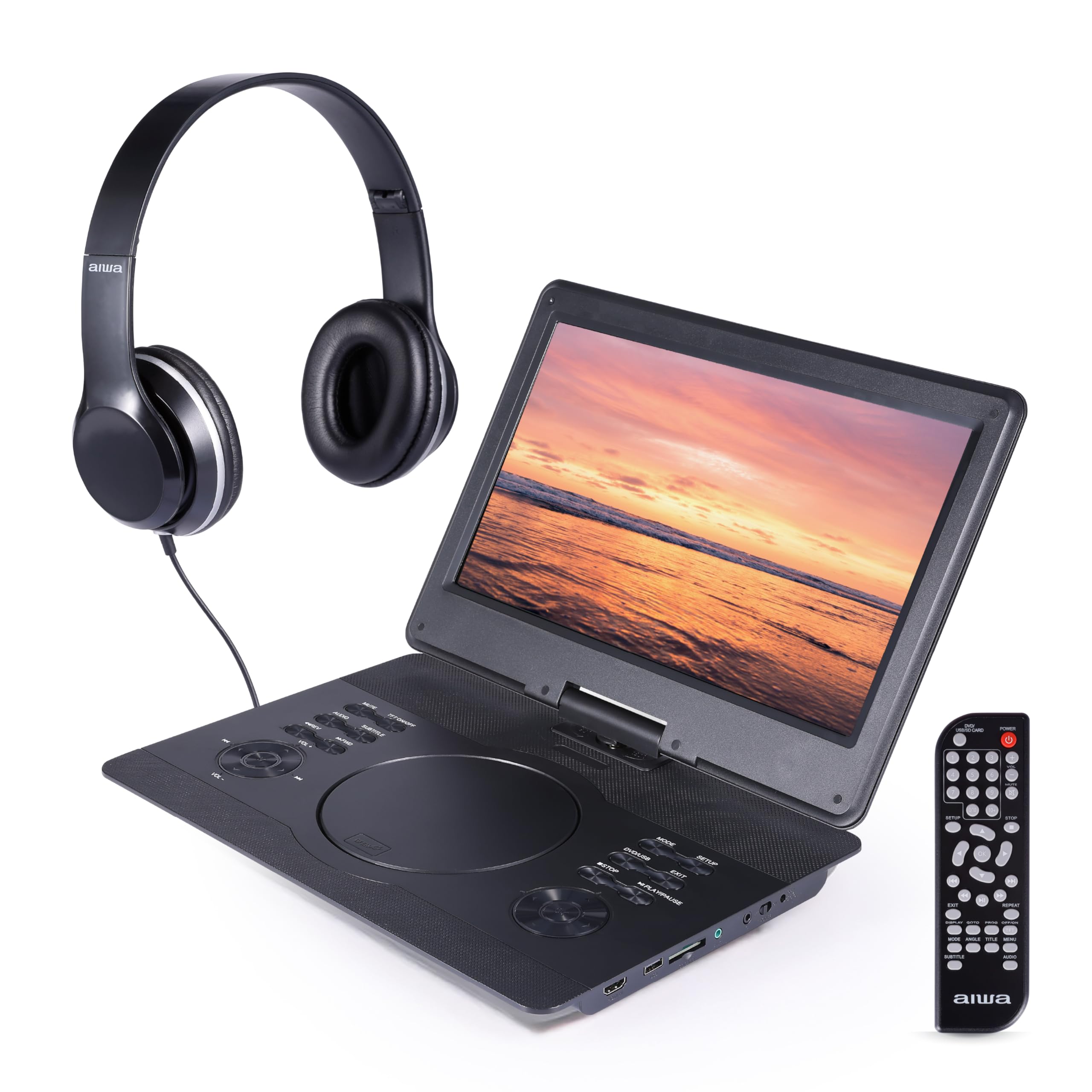
Nọmba 1: Iwaju view of the Aiwa Portable Media Player with included remote control.

Nọmba 2: Apa view showing the open disc tray and headphone connection.
Awọn ẹya ara ẹrọ akọkọ:
- 14-inch Swiveling LCD Screen: Pese rọ viewing angles and can fold flat.
- Atẹtẹ Disiki: Fún fífi DVD àti CD sí i.
- Awọn bọtini Iṣakoso: Play/Pause, Stop, Skip, Volume, Menu, Setup, Mode, etc.
- Awọn Agbọrọsọ Sitẹrio ti a ṣe sinu: Fún ìgbọ́hùnsí ohùn láìsí agbekọrí.
- Input HDMI: Connect external devices like gaming consoles or streaming sticks.
- Ibudo USB: For playing media from USB flash drives.
- Iho kaadi SD: For playing media from SD memory cards.
- Jack agbekari: Fun ikọkọ gbigbọ.
- Iṣagbewọle agbara: For connecting AC/DC or car adapters.

Nọmba 3: The screen can swivel and fold flat for compact use.
Ṣeto
1. Ngba agbara si Batiri naa
- Connect the AC/DC power adapter to the DC IN port on the player and then to a wall outlet.
- Ina ifihan agbara yoo tan imọlẹ. Gbigba agbara ni kikun maa n gba wakati mẹrin si mẹfa.
- Alternatively, use the car power adapter to charge the device in a vehicle.
2. Agbara lori / Paa
- Lati tan -an, tẹ mọlẹ AGBARA bọtini lori kuro tabi isakoṣo latọna jijin.
- Lati fi agbara si pipa, tẹ mọlẹ AGBARA bọtini lẹẹkansi.
3. Nsopọ Awọn agbekọri
- Plug the included wired headphones into the AGBORI jack on the side of the player.
- The built-in speakers will automatically mute when headphones are connected.
4. Using the Carrying Bag

Nọmba 4: The included carrying bag for transport and protection.
- Place the media player and its accessories into the protective carrying bag for safe transport.
Ṣiṣẹ
1. Disc Playback (DVD/CD)
- Ṣii ideri atẹ disiki naa.
- Carefully place a DVD or CD onto the spindle with the label side facing up.
- Close the disc tray cover firmly.
- The player will automatically detect the disc and begin playback or display the disc menu.
- Use the control buttons on the unit or remote (Play/Pause, Stop, Skip, Menu, etc.) to navigate and control playback.
2. USB / SD Kaadi Sisisẹsẹhin
- Fi kọnputa filasi USB sinu ibudo USB tabi kaadi SD kan sinu iho kaadi SD.
- Tẹ awọn MODE button on the unit or remote to select USB or SD mode.
- Lilö kiri nipasẹ rẹ files using the directional buttons and press ERE / Tẹ to select and play media.
3. Input HDMI
- Connect an external device (e.g., gaming console, streaming stick) to the HDMI-IN port on the player using an HDMI cable (not included).
- Tẹ awọn MODE button on the unit or remote to select HDMI input.
- The player's screen will display the content from the connected HDMI device.
4. Ṣíṣe àtúnṣe ibojú

Nọmba 5: The screen can be swiveled and tilted for optimal viewing.
- The screen can swivel up to 180 degrees and tilt for various viewing awọn igun.
- It can also be folded flat against the base unit, transforming the device into a tablet-like form factor.
5. Iṣakoso iwọn didun
- Satunṣe iwọn didun nipa lilo awọn VOL+ ati VOL- buttons on the unit or the remote control.
Itoju
Ninu Ẹrọ
- Wipe the screen and exterior surfaces with a soft, dry, lint-free cloth.
- Fun awọn ami alagidi, die-die dampen asọ pẹlu omi tabi a ìwọnba, ti kii-abrasive regede.
- Do not use harsh chemicals or abrasive materials, as they may damage the finish.
- Keep the disc tray and ports free of dust and debris.
Ibi ipamọ
- When not in use, store the player in its protective carrying bag in a cool, dry place.
- Yẹra fún títọ́jú rẹ̀ sí àwọn ibi tí ó ní iwọ̀n otútù tàbí ọriniinitutu gíga.
Laasigbotitusita
Ti o ba pade awọn ọran, tọka si awọn iṣoro ti o wọpọ ati awọn ojutu wọnyi:
| Isoro | Owun to le Fa | Ojutu |
|---|---|---|
| Ko si agbara | Battery depleted; Power adapter not connected or faulty. | Charge the battery using the AC/DC or car adapter. Ensure connections are secure. |
| Dísíkì kò ṣiṣẹ́ / àṣìṣe "Kò sí Dísíkì" | Dísìkì tí a fi sínú rẹ̀ ní ọ̀nà tí kò tọ́; Dísìkì náà dọ̀tí tàbí ó ti gé; Ìrísí dísìkì náà kò báramu. | Ensure disc is inserted label-side up. Clean the disc. Try a different disc. Verify disc is DVD/CD/VCD format. |
| Ko si ohun | Iwọn ti o kere ju; Awọn agbekọri ti a ti sopọ; Mu iṣẹ dakẹ ṣiṣẹ. | Increase volume. Disconnect headphones if using speakers. Check if mute is active on remote. |
| Didara aworan ti ko dara | Disc quality; Screen viewing angle; Low resolution content. | Ensure disc is clean and undamaged. Adjust screen angle. Note that native resolution is 800x480. |
| Isakoṣo latọna jijin ko ṣiṣẹ | Batteries depleted; Obstruction between remote and player; Remote sensor blocked. | Replace remote batteries. Ensure clear line of sight to the player's IR sensor. |
Awọn pato
| Ẹya ara ẹrọ | Ẹ̀kúnrẹ́rẹ́ |
|---|---|
| Brand | Aiwa |
| Nọmba awoṣe | AI7017-BLK-T37-6 |
| Iwon iboju | 14 inches |
| Ifihan Iru | LCD |
| Ipinnu abinibi | 800x480 |
| Media Iru Atilẹyin | DVD, CD, CD-R, DVD-R, VCD, USB, SD Card |
| Asopọmọra | HDMI Input, USB Port, SD Card Slot, Headphone Jack |
| Ohun | Built-in Stereo Speakers, Headphone Output |
| Orisun agbara | Rechargeable Battery, AC/DC Adapter, Car Adapter (12V) |
| UPC | 021331134455 |
Alaye atilẹyin ọja
This product is covered by a limited manufacturer's warranty. Please refer to the warranty card included in your package or contact customer support for details regarding warranty terms and conditions.
Onibara Support
For technical assistance, troubleshooting, or warranty inquiries, please contact Aiwa customer support. Contact information can typically be found on the product packaging or the official Aiwa webojula.