
1. Ifihan
This manual provides detailed instructions for the vivo T5X 5G smartphone. It covers essential information regarding device setup, operation, maintenance, and troubleshooting to ensure optimal performance and user experience.
The vivo T5X 5G is equipped with a 7200mAh battery, a Dimensity 7400-Turbo processor, a 6.76-inch HD+ display, a 50MP dual rear camera, and a 32MP front camera.

olusin 1: An loriview of the vivo T5X 5G smartphone highlighting key features such as its 5G capability, 1Mn+ Antutu Score, 7200 mAh battery, IP68/IP69+ dust and water resistance, and OriginOS.

Figure 2: The vivo T5X 5G smartphone available in Cyber Green and Star Silver color options.
2. Ohun ti o wa ninu Apoti
Daju pe gbogbo awọn nkan wa ninu apoti ọja:
- vivo T5X 5G Smartphone
- USB Iru-C USB
- Adapter agbara
- SIM Ejector Ọpa
- Itọsọna Ibẹrẹ Yara (Itọnisọna yii)
- Àpótí Ààbò (ó lè yàtọ̀ síra láti agbègbè kan sí agbègbè mìíràn)
3. Device Ìfilélẹ
Familiarize yourself with the physical components and buttons of your vivo T5X 5G smartphone.
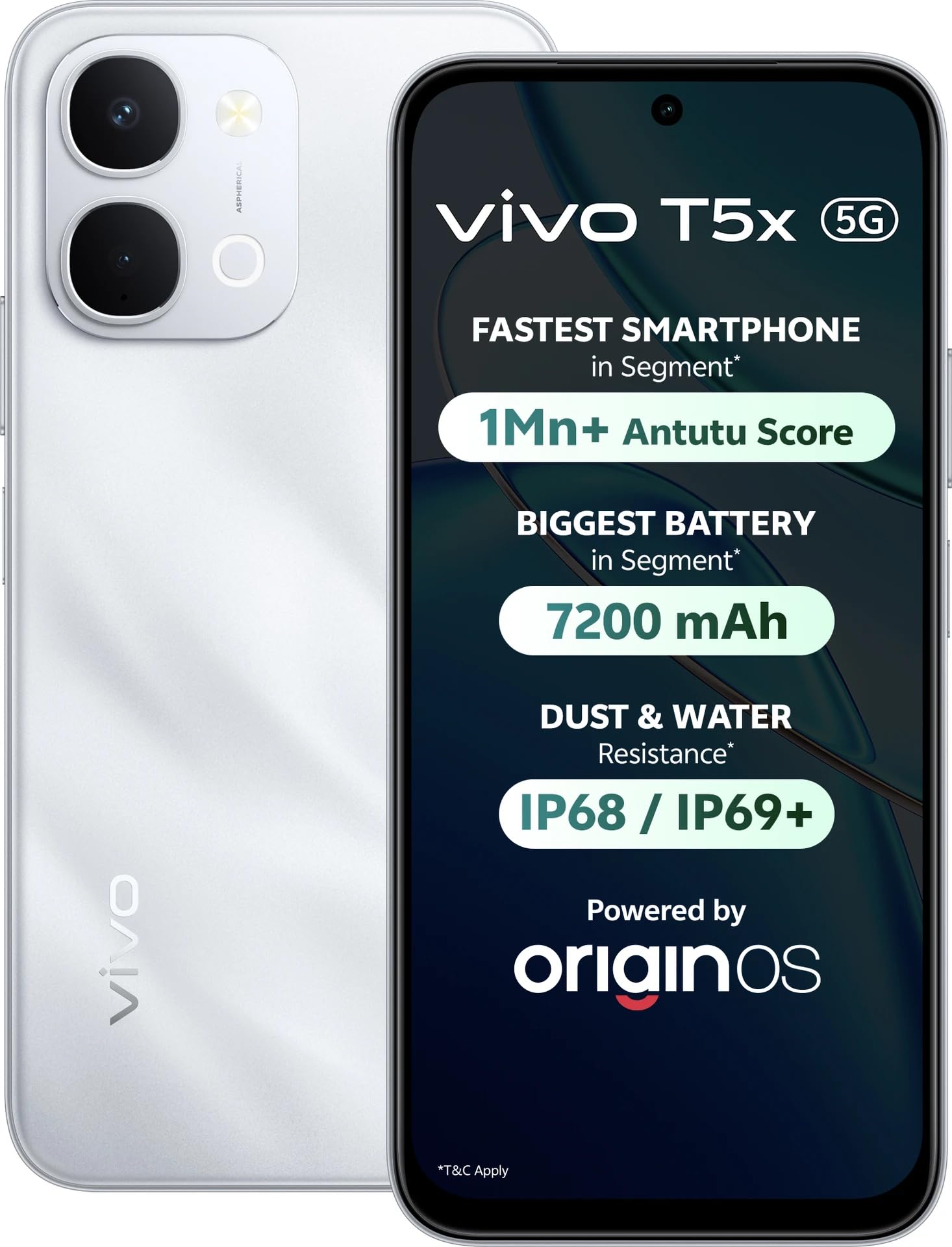
olusin 3: Iwaju ati ki o ru view of the vivo T5X 5G smartphone, illustrating the display, camera module, and side buttons.
- Kamẹra iwaju: Fun selfies ati awọn ipe fidio.
- Ifihan: 6.76-inch HD+ touchscreen.
- Awọn bọtini iwọn didun: Ṣàtúnṣe iwọn didun media ati iwọn didun ohun orin.
- Bọtini agbara: Tan/pa, tii/ṣii iboju.
- Atẹ kaadi SIM: Holds Nano-SIM cards and microSD card.
- Ibudo Iru-C USB: Fun gbigba agbara ati gbigbe data.
- Agbọrọsọ: Ijade ohun.
- Modulu Kamẹra Tẹhin: Includes 50MP main camera and other sensors.
- Filaṣi: Provides illumination for photos and acts as a flashlight.
4. Eto
4.1. Fifi Kaadi SIM ati Kaadi Ibi ipamọ sori ẹrọ
The vivo T5X 5G supports dual SIM cards. Follow these steps to install your SIM card(s) and an optional microSD card for expanded storage.
- Wa atẹ kaadi SIM ni ẹgbẹ ti ẹrọ naa.
- Fi ohun èlò SIM ejector sínú ihò kékeré tó wà lórí atẹ náà láti ṣí i.
- Place your Nano-SIM card(s) into the designated slots. Ensure the gold contacts face downwards.
- If using a microSD card, place it into the dedicated slot.
- Fi iṣọra tẹ atẹ naa pada sinu ẹrọ naa titi ti o fi tẹ sinu aaye.
4.2. Agbara akọkọ Lori ati Awọn Eto Ipilẹ
- Tẹ mọlẹ Bọtini agbara until the vivo logo appears.
- Tẹle awọn itọnisọna loju iboju lati yan ede rẹ, agbegbe, ati sopọ si nẹtiwọki Wi-Fi kan.
- Wọle pẹlu akọọlẹ Google rẹ tabi ṣẹda tuntun kan.
- Complete the setup process by agreeing to terms and conditions and setting up security features like fingerprint or face unlock.
4.3. Ngba agbara ẹrọ
Before first use, fully charge your vivo T5X 5G. Use the provided USB Type-C cable and power adapter.
- So okun USB Iru-C pọ si ibudo gbigba agbara ni isalẹ foonu naa.
- So opin keji okun naa mọ adapter agbara, lẹhinna so adapter naa mọ ibudo agbara kan.
- Atọka gbigba agbara yoo han loju iboju.
The device features a 7200mAh battery with support for fast charging.

Figure 4: Diagram illustrating the internal structure of the vivo T5X 5G, highlighting its 7200mAh battery, reverse charging capability, Super Battery Saver mode, and 6 years of battery health.
5. Awọn ilana Iṣiṣẹ
5.1. Awọn iṣẹ ipilẹ
Ṣiṣe awọn ipe: Open the Phone app, enter the number, and tap the call icon. For dual SIM, select the preferred SIM.
Fifiranṣẹ Awọn ifiranṣẹ: Open the Messages app, tap 'Start chat', enter recipient and message, then send.
Asopọmọra Intanẹẹti: Sopọ si Wi-Fi nipasẹ Eto> Nẹtiwọọki & intanẹẹti> Wi-Fi, or enable mobile data via Eto > Nẹtiwọọki & intanẹẹti > Nẹtiwọọki alagbeka.
5.2. Isẹ kamẹra
The vivo T5X 5G features a 50MP dual rear camera and a 32MP front camera.
- Ṣii awọn Ohun elo kamẹra.
- Yipada laarin awọn kamẹra iwaju ati ẹhin nipa lilo aami yi pada kamẹra.
- Select desired modes such as Photo, Portrait, Video, or Pro.
- Tẹ bọtini tiipa lati ya awọn fọto tabi bẹrẹ/da gbigbasilẹ fidio duro.
5.3. Iṣakoso batiri
The 7200mAh battery provides extended usage. Utilize features like Super Battery Saver to prolong battery life. The device also supports gbigba agbara pada, allowing it to charge other devices.
5.4. Išẹ ati ere
Agbara nipasẹ awọn MediaTek Dimensity 7400-Turbo processor, the vivo T5X 5G offers smooth performance. For an enhanced gaming experience, the device includes 4D Game Vibration for immersive haptic feedback, Ultra Game Ipo for enhanced stability, and Game Voice Changer awọn ẹya ara ẹrọ.

olusin 5: Isunmọ view of the MediaTek Dimensity 7400-Turbo processor, highlighting its 10% overall performance upgrade and 15% AI performance boost, along with UFS 3.1 fast performance.

Figure 6: Images demonstrating the vivo T5X 5G's gaming capabilities, including 4D Game Vibration for immersive haptic feedback, Ultra Game Mode for enhanced stability, and Game Voice Changer.
5.5. Ifihan
Awọn Ìfihàn HD+ 6.76-inch provides a clear and immersive viewing experience. Adjust display settings such as brightness and color temperature in the Eto akojọ aṣayan.
5.6. Àwọn Ẹ̀yà Ara Tí Ó Lè Dípẹ́
The vivo T5X 5G is designed with IP68 and IP69+ dust and water resistance, offering protection against environmental elements. It also holds Military-Grade Certification for enhanced durability, tested against drops and shocks.

Figure 7: Illustration of the vivo T5X 5G demonstrating its IP68 and IP69+ dust and water resistance, featuring one-tap water ejection, wet hand touch, corrosion-proof port, and moisture detection.

Figure 8: The vivo T5X 5G with a graphic indicating Military-Grade Certification (SGS 5-Star Premium Performance) for drop resistance, dust resistance, shock resistance, water resistance, and usage in extreme temperatures.
6. Itọju
6.1. Ninu Rẹ Device
Lo aṣọ rirọ, ti ko ni awọ lati nu iboju ati ara foonu rẹ. Yẹra fun lilo awọn kemikali lile tabi awọn ohun elo ti o npa. Fun awọn idoti lile, fi diẹ silẹ.ampen the cloth with water, then wipe gently.
6.2. Software imudojuiwọn
Regularly check for and install software updates to ensure your device has the latest features, security patches, and performance improvements. To check for updates, go to Eto> Eto> Imudojuiwọn eto.
7. Laasigbotitusita
If you encounter issues with your vivo T5X 5G, refer to the following common solutions:
- Ẹrọ ko ṣiṣẹ lori: Rii daju pe batiri ti gba agbara. So ṣaja pọ ki o duro fun iṣẹju diẹ ṣaaju igbiyanju lati tan-an lẹẹkansi. Ti ko ba dahun, gbiyanju fi agbara mu tun bẹrẹ nipa didimu bọtini Agbara fun akoko ti o gbooro sii (fun apẹẹrẹ, awọn aaya 10-15).
- Awọn ohun elo kọlu tabi didi: Close the app and reopen it. If the issue persists, clear the app's cache (via Eto> Awọn ohun elo> [Orukọ Ohun elo]> Ibi ipamọ> Ko kaṣe kuro) or restart the phone.
- Ifihan nẹtiwọki ti ko dara: Check your SIM card installation. Move to an area with better network coverage. Restart the device. Verify that mobile data is enabled in settings if using cellular network.
- Batiri mimu yarayara: Reduce screen brightness, close unused apps running in the background, disable unnecessary features like GPS or Bluetooth when not in use. Review battery usage statistics in Eto > Batiri lati ṣe idanimọ awọn ohun elo ti ebi npa agbara.
- Iboju ifọwọkan ko dahun: Restart the device. If the issue persists after restarting, contact customer support for further assistance.
8. Awọn pato
| Ẹya ara ẹrọ | Ẹ̀kúnrẹ́rẹ́ |
|---|---|
| Brand | vivo |
| Awoṣe | T5X 5G |
| Eto isesise | Android |
| isise | Mediatek Dimensity 7400-Turbo (2.6 GHz) |
| Àgbo | 6 GB |
| Ibi ipamọ inu | 128 GB |
| Iwọn Ifihan | 6.76 Inṣi HD+ |
| Ipinnu Kamẹra ti o kẹhin | 50 MP |
| Ipinnu Kamẹra iwaju | 32 MP |
| Agbara Batiri | 7200 mAh |
| Asopọmọra | 5G, Dual SIM, USB Type C |
| Omi Resistance Ipele | IP68/IP69+ Water Resistant |
| Iwọn Nkan | 230 giramu |
| Awọn iwọn (L x W x H) | 16.8 x 7.7 x 0.9 centimeters |
9. Atilẹyin ọja ati Support
9.1. atilẹyin ọja Information
The vivo T5X 5G comes with a 1 Odun atilẹyin ọja Láti ọjọ́ tí o ti ra ọjà náà. Jọ̀wọ́ pa ẹ̀rí ìrajà rẹ mọ́ fún àwọn ẹ̀tọ́ àtìlẹ́yìn. Àtìlẹ́yìn náà bo àwọn àbùkù iṣẹ́-ọnà ṣùgbọ́n ó sábà máa ń yọ àwọn ìbàjẹ́ tí ìlòkulò, ìjàǹbá, tàbí àtúnṣe tí a kò fún ní àṣẹ kúrò.
9.2. Olupese Olubasọrọ Alaye
For further assistance, technical support, or warranty claims, please contact:
Olupese: VIVO
Packer Contact Information: Vivo Mobile India Private Limited PLOT NO 8, SECTOR 24, YAMUNA EXPRESSWAY AREA, GAUTAM BUDDHA NAGAR, UP INDIA-201310
You may also visit the official vivo support website for FAQs and service center locations.