
1. Ifihan
Thank you for choosing the Contixo F15 Astro Mini Drone. This compact and lightweight drone is designed for beginners and experienced pilots alike, featuring a 720P HD camera, live video display, optical flow hover, and easy-to-use controls. Please read this manual thoroughly before operating the drone to ensure safe and optimal performance.
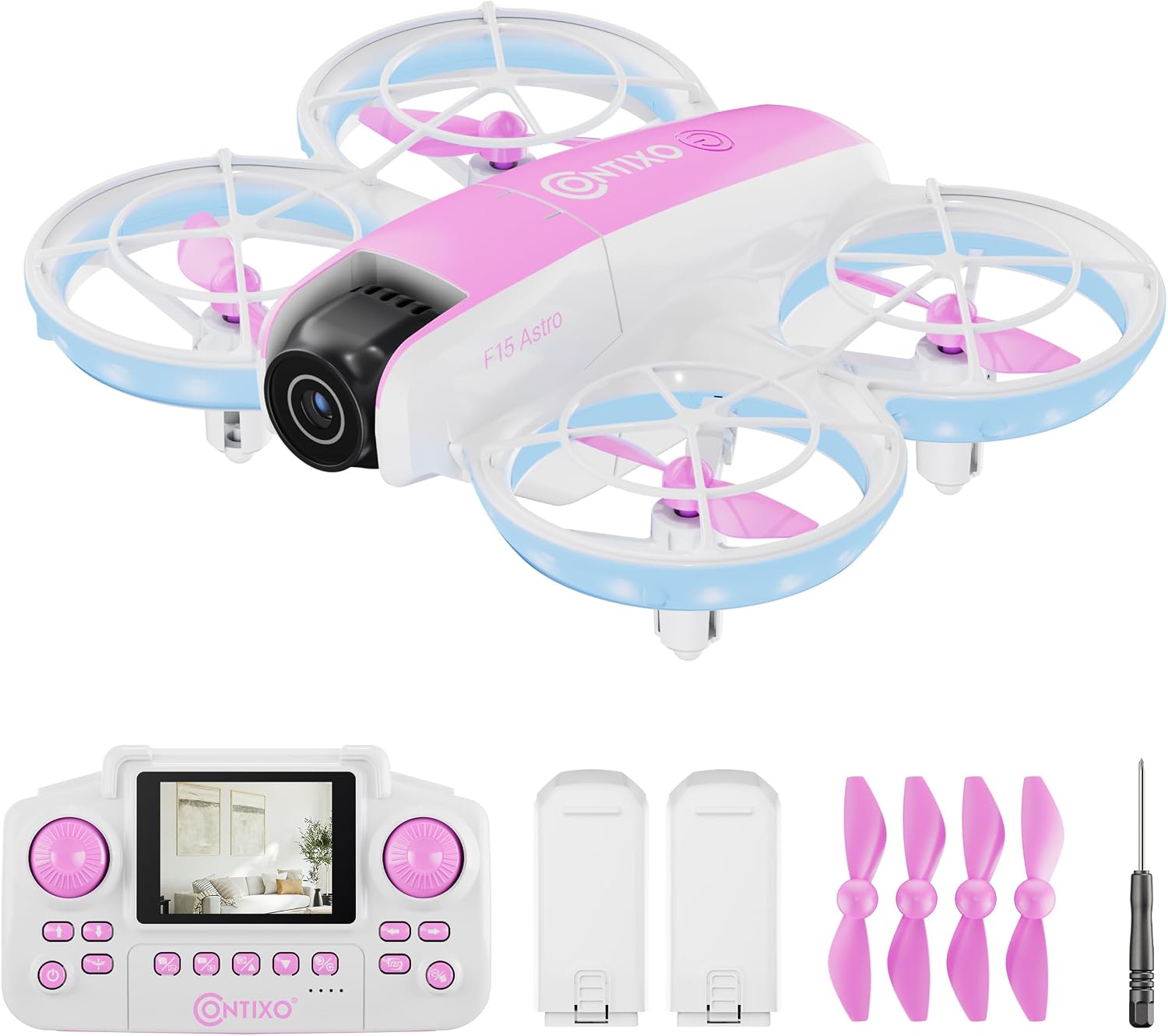
Image: The Contixo F15 Astro Mini Drone, showcasing apẹrẹ kekere rẹ ati ina LED rẹ.
2. Awọn Itọsọna Aabo
- Máa lo drone náà ní àwọn ibi tí ó ṣí sílẹ̀, tí ó mọ́ kedere, tí ó jìnnà sí àwọn ènìyàn, ẹranko, àti àwọn ìdènà.
- Do not fly near airports, restricted airspace, or power lines.
- Ensure the drone's battery and remote control batteries are fully charged before each flight.
- Ṣe abojuto awọn ọmọde lakoko iṣẹ drone.
- Yẹra fún fífò nígbà tí afẹ́fẹ́ bá ń fẹ́ tàbí nígbà tí ojú ọjọ́ kò bá dára.
- Do not touch the propellers while they are spinning.
3. Package Awọn akoonu
Daju pe gbogbo awọn nkan wa ninu apo rẹ:
- 1x F15 Astro Mini Drone
- 1x Remote Controller with 2.4" Screen
- 2x Drone Batteries
- 4x Spare Propellers
- 1x Screwdriver
- 1x USB Ngba agbara USB

Image: All components included in the Contixo F15 Astro Mini Drone package.
4. Drone Components Overview
Ọdun 4.1 Drone
- Awọn olusona Propeller: Provide protection for propellers and enhance safety.
- Awọn oniroyin: Ṣe agbejade fun ofurufu.
- 720P HD Kamẹra: Captures photos and videos, with adjustable tilt.
- Awọn imọlẹ LED: Indicate drone status and provide visibility.
- Abala Batiri: Houses the drone's rechargeable battery.

Image: The Contixo F15 Astro Mini Drone highlighting its protected propeller design.
4.2 Alabojuto latọna jijin
- Iboju 2.4": Displays live video feed from the drone's camera.
- Joystick osi: Awọn iṣakoso giga (oke/isalẹ) ati yiyi (osi/ọtun).
- Joystick Ọtun: Awọn iṣakoso siwaju / sẹhin ati osi / ọtun ronu.
- One-Key Takeoff/Landing Button: Pilẹṣẹ laifọwọyi takeoff tabi ibalẹ.
- 360° Flip Button: Activates aerial stunt mode.
- Àwọn bọ́tìnì fọ́tò/fídíò: Capture images or start/stop video recording.

Image: The Contixo F15 Astro remote control with its integrated 2.4-inch screen for live video display.
5. Eto
5.1 Gbigba agbara batiri drone
- Yọ batiri drone kuro ninu drone naa.
- Connect the USB charging cable to the battery and a USB power source (e.g., computer, USB wall adapter).
- The indicator light on the charging cable will show charging status (refer to cable instructions for specific light patterns).
- Charging typically takes approximately 60-90 minutes.

Image: The Contixo F15 Astro Mini Drone and its two included rechargeable batteries.
5.2 Fifi Batiri Drone sori ẹrọ
- Rii daju pe drone ti wa ni pipa.
- Carefully insert the fully charged battery into the battery compartment on the drone's underside.
- Ṣe aabo ideri batiri naa.
5.3 Fifi awọn batiri Iṣakoso latọna jijin
- Ṣii yara batiri ni ẹhin isakoṣo latọna jijin.
- Insert 3 AAA batteries (not included) according to the polarity markings.
- Pa yara batiri naa ni aabo.
5.4 Pairing Drone and Remote
- Gbe drone sori pẹpẹ kan, ipele ipele.
- Power on the drone. The drone's LED lights will flash.
- Agbara lori isakoṣo latọna jijin.
- Push the left joystick up to its maximum position, then pull it down to its minimum position. The drone's LED lights will stop flashing and remain solid, indicating successful pairing.
5.5 Gyro Calibration
- After pairing, ensure the drone is still on a flat, level surface.
- Simultaneously push both joysticks down and to the bottom-right corner.
- The drone's LED lights will flash rapidly and then become solid, indicating successful calibration.
Video: A detailed guide on how to use the Contixo F15 Astro Drone, covering setup and basic operations.
6. Ṣiṣẹ Drone
6.1 Ọkan-Kọtini Takeoff ati ibalẹ
- Bo kuro: After pairing and calibration, press the One-Key Takeoff/Landing button. The drone will automatically ascend and hover at a stable altitude.
- Ibalẹ: During flight, press the One-Key Takeoff/Landing button again. The drone will slowly descend and land automatically.

Image: Visual representation of the one-touch takeoff and landing feature of the F15 Astro drone.
6.2 Ipilẹ ofurufu idari
- Joystick Òsì (Throttle/Yaw):
- Push up/down: Increase/decrease altitude.
- Push left/right: Rotate drone left/right.
- Right Joystick (Forward/Backward/Sideways):
- Push up/down: Fly forward/backward.
- Push left/right: Fly left/right (strafe).
6.3 Optical Flow Hover
The F15 Astro drone features Optical Flow Hover technology, which uses a downward-facing camera to detect patterns on the ground and maintain a stable position. This feature helps the drone hover steadily, making it easier to control, especially for beginners.
6.4 360° Stunts
To perform a 360° flip:
- Ensure the drone is flying at a sufficient height (at least 2-3 meters).
- Press the 360° Flip button on the remote control.
- Immediately push the right joystick in the desired direction (forward, backward, left, or right) to execute the flip.

Image: The Contixo F15 Astro Mini Drone performing a 360-degree flip.
6.5 Camera Operation (720P HD)
The drone is equipped with a 720P HD camera that can capture photos and videos. The camera angle can be manually adjusted before flight.
- Fidio Live: The 2.4" screen on the remote control provides a real-time live video feed from the drone's camera.
- Mu Awọn fọto: Press the Photo button on the remote control to capture a still image.
- Fidio Gbigbasilẹ: Press the Video button once to start recording, and press it again to stop recording.

Image: The 720P HD camera of the F15 Astro drone, featuring an adjustable angle.
Video: A demonstration of the Contixo F15 Astro Drone's features and flight capabilities.
7. Itọju
7.1 Ninu
- Use a soft, dry cloth to clean the drone and remote control.
- Do not use water or cleaning solvents, as they may damage the electronics.
7.2 Propeller Rirọpo
If a propeller is damaged, replace it with a spare propeller from the package. Use the included screwdriver to carefully remove the screw holding the damaged propeller and install the new one, ensuring it is securely fastened.
7.3 batiri Itọju
- Tọju awọn batiri ni itura, ibi gbigbẹ.
- Maṣe gba agbara ju tabi awọn batiri ti njade lọ.
- If the drone will not be used for an extended period, remove the batteries from both the drone and the remote control.
8. Laasigbotitusita
| Isoro | Owun to le Fa | Ojutu |
|---|---|---|
| Drone ko dahun si latọna jijin. | Not paired or low battery. | Ensure drone and remote are powered on and paired correctly. Check battery levels. |
| Drone drifts nigba flight. | Gyro not calibrated. | Perform gyro calibration on a flat surface. |
| Poor video quality or no live feed. | Weak signal or camera issue. | Ensure drone is within range. Check for obstructions. Restart drone and remote. |
| Àwọn propeller kò yípo. | Obstruction or damage. | Check for hair or debris around propellers. Replace damaged propellers. |
9. Awọn pato
- Brand: Contixo
- Orukọ awoṣe: F15 Astro
- Kamẹra: 720P HD, Adjustable Angle
- Remote Screen: 2.4 inches
- Agbara Batiri: 580 mAh (Litiumu polima)
- Awọn iwọn ọja: 10"L x 7"W x 2"H
- Awọn ẹya ara ẹrọ ofurufu: Optical Flow Hover, One-Key Takeoff/Landing, 360° Stunts
10. Atilẹyin ọja ati Support
For warranty information, technical support, or any questions regarding your Contixo F15 Astro Mini Drone, please refer to the contact information provided on the product packaging or visit the official Contixo webojula. Tọju iwe-ẹri rira rẹ fun awọn ẹtọ atilẹyin ọja.
Fídíò: Ìṣáájú lóríview of the Contixo F15 Astro Drone, highlighting its key features.