
Ọrọ Iṣaaju
This manual provides detailed instructions for the operation and maintenance of your RadioShack Portable CD Player Boombox. Please read this manual thoroughly before using the device to ensure proper function and to maximize your listening experience. This boombox combines classic CD playback with modern connectivity options including Bluetooth, FM radio, USB, and AUX input.
Ohun ti o wa ninu Apoti

Figure 1: Box Contents. This image displays the items included with your purchase: the boombox unit, AC power cord, remote control, and telescopic antenna.
- 1x RadioShack Portable CD Player Boombox Unit
- 1x Okun Agbara AC
- 1x Isakoṣo latọna jijin
- 1x Telescopic Antenna (pre-attached)
- 1x Itọsọna olumulo (iwe yii)
Note: 4 C batteries are required for portable operation and are not included.
Ọja Pariview ati Awọn ẹya ara ẹrọ
The RadioShack Portable CD Player Boombox offers multiple audio playback options and user-friendly controls.

Àwòrán 2: Àwọn Ohun Pàtàkì. This diagram highlights the boombox's main functionalities including Bluetooth 5.0, various CD formats, USB MP3 playback, FM radio, AUX input, and playback modes.
- Sisisẹsẹhin CD: Supports CD, CD-R, CD-RW, and CD-MP3 formats.
- Asopọmọra Bluetooth: Gba ohùn láilọ́wọ́ láti ọ̀dọ̀ àwọn ẹ̀rọ tó bá ara wọn mu.
- Redio FM: Built-in tuner with telescopic antenna and 18 preset stations.
- Sisisẹsẹhin USB: Mu MP3 ṣiṣẹ files taara lati a USB drive.
- Iṣawọle AUX: Connect external audio devices via a 3.5mm cable.
- Awọn ọna Sisisẹsẹhin: Includes random, repeat, and program play functions.
- Isakoṣo latọna jijin: Fun iṣẹ ti o rọrun lati ọna jijin.
Ṣeto
1. Agbara ẹrọ naa

Figure 3: Power Options. The boombox can be powered by the included AC cord or by 4 C batteries for portable use.
Your boombox can be powered in two ways:
- Agbara AC: Connect the included AC power cord to the AC input jack on the back of the boombox and then plug it into a standard wall outlet (110V-240V).
- Agbara Batiri: For portable use, open the battery compartment on the bottom of the unit and insert 4 "C" size batteries (not included), ensuring correct polarity (+/-). Close the compartment securely.
2. Antenna Setup (FM Radio)
For optimal FM radio reception, fully extend the telescopic antenna located on the back of the unit. Adjust its position for the best signal.
Awọn ilana Iṣiṣẹ
Gbogbogbo Awọn iṣakoso
- Bọtini agbara (⏻): Tẹ lati tan-an tabi PA kuro.
- Bọtini Iwọn didun: Yiyi lọna aago lati mu iwọn didun pọ si, ni idakeji aago lati dinku.
- Function (FUNC) Button: Press to cycle through playback modes: CD, Bluetooth, FM, USB, AUX.
- Ṣiṣẹ/Daduro (⏸/⏸) Bọtini: Bẹrẹ tabi da duro sẹhin duro.
- Duro (⏹) Bọtini: Duro ṣiṣiṣẹsẹhin.
- Skip/Search (⏮ / ⏭) Awọn bọtini: Press briefly to skip tracks. Press and hold to search within a track.
CD Sisisẹsẹhin
- Ṣii ideri iyẹwu CD.
- Place a CD (CD, CD-R, CD-RW, or CD-MP3) onto the spindle with the label side facing up.
- Pa ideri CD kuro ni aabo.
- Tẹ awọn FUNC button until "CD" mode is selected.
- The CD will begin playing automatically. If not, press the Ṣiṣẹ / Sinmi bọtini.
Asopọ Bluetooth

Figure 4: Bluetooth Streaming. Easily stream audio from your smartphone or tablet to the boombox.
- Tẹ awọn FUNC button until "BT" (Bluetooth) mode is selected. The display will show "BT" and flash, indicating it's in pairing mode.
- On your Bluetooth-enabled device (smartphone, tablet), go to its Bluetooth settings and search for available devices.
- Select "RadioShack Boombox" from the list.
- Once paired, the "BT" indicator on the boombox display will stop flashing and remain solid.
- You can now play audio from your device through the boombox.
FM Radio isẹ

Figure 5: FM Presets and Programmed Playback. Use the SCAN button to automatically save FM stations and REP/PROG for custom playback sequences.
- Tẹ awọn FUNC button until "FM" mode is selected.
- Auto Scan and Save Presets: Tẹ mọlẹ SCAN button (often combined with Play/Pause). The radio will automatically scan for and save up to 18 available FM stations.
- Itọsọna Afowoyi: Ni soki tẹ awọn Rekọja/Ṣawari awọn bọtini (⏮ / ⏭) to fine-tune the frequency.
- Yiyan awọn tito tẹlẹ: Ni soki tẹ awọn PROG button (often combined with Repeat) to cycle through saved preset stations.
USB Sisisẹsẹhin
- Fi kọnputa filasi USB ti o ni MP3 sii files sinu USB ibudo.
- Tẹ awọn FUNC button until "USB" mode is selected.
- The boombox will automatically detect and begin playing MP3 files lati USB drive.
- Lo awọn Ṣiṣẹ / Sinmi, Duro, ati Rekọja/Ṣawari awọn bọtini lati ṣakoso ṣiṣiṣẹsẹhin.
Apọju AX
- So opin kan ti okun ohun 3.5mm kan (ko si ninu rẹ) mọ jaketi AUX IN lori boombox.
- So ìpẹ̀kun kejì okùn náà mọ́ èdìdì agbekọri tàbí ìjáde ohùn ti ẹ̀rọ ohùn ìta rẹ (fún àpẹẹrẹ, ẹ̀rọ orin MP3, fóònù alágbèéká).
- Tẹ awọn FUNC button until "AUX" mode is selected.
- Ṣakoso ṣiṣiṣẹsẹhin ati iwọn didun lati ẹrọ ohun afetigbọ ita rẹ.
Latọna Iṣakoso Lilo
The included remote control allows for convenient operation of most functions from a distance. Ensure the remote has working batteries (typically 2x AAA, not included) and point it towards the front of the boombox.
- Agbara: Tan ẹyọ kuro / PA.
- FUNC: Select input mode (CD, BT, FM, USB, AUX).
- Iwọn didun +/-: Ṣatunṣe ipele iwọn didun.
- Play/Pause, Stop, Skip/Search: Iṣakoso ṣiṣiṣẹsẹhin.
- REP/PROG: Access repeat and program functions.
- YII: Auto-scan FM stations.
- EQ/SLEEP: Adjust equalizer settings or set sleep timer (refer to specific remote markings for details).
Playback Modes (CD/USB)
- Repeat (REP): Tẹ awọn REP button (on unit or remote) to cycle through repeat modes:
- Repeat One: Repeats the current track.
- Repeat All: Repeats all tracks on the CD/USB.
- Repeat Folder (for MP3 CDs/USB): Repeats all tracks in the current folder.
- Program (PROG): Allows you to program a specific order of tracks for CD or USB playback.
- In CD or USB mode, with playback stopped, press the PROG bọtini.
- Lo awọn Rekọja/Ṣawari buttons to select your desired track.
- Tẹ PROG again to confirm and add the track to the program list.
- Repeat steps 2-3 to add more tracks.
- Tẹ Ṣiṣẹ / Sinmi láti bẹ̀rẹ̀ sí í ṣe eré tí a ti ṣètò.
- Random/Shuffle: Some models may have a dedicated shuffle button (often labeled "RDM" or "SHUF") or it may be part of the REP/PROG cycle. This plays tracks in a random order.
Itoju
- Ninu: Use a soft, dry cloth to clean the exterior of the boombox. Do not use abrasive cleaners or solvents. For the CD lens, use a specialized CD lens cleaner disc.
- Ibi ipamọ: When not in use for extended periods, remove batteries to prevent leakage. Store the unit in a cool, dry place away from direct sunlight and extreme temperatures.
- Rirọpo Batiri: Replace all 4 "C" batteries simultaneously when they are depleted. Do not mix old and new batteries or different types of batteries.
- Itọju CD: Mú àwọn CD náà ní etí wọn. Jẹ́ kí wọ́n mọ́ tónítóní, kí wọ́n má sì ní ìfọ́. Tọ́jú wọn sí àpò wọn nígbà tí wọn kò bá lò wọ́n.
Laasigbotitusita
| Isoro | Owun to le Fa | Ojutu |
|---|---|---|
| Ko si agbara | Okun AC ko ni asopọ; Awọn batiri ti dinku tabi fi sii lọna ti ko tọ. | Rí i dájú pé okùn AC ti so mọ́ ara rẹ̀ dáadáa. Fi àwọn tuntun rọ́pò àwọn bátìrì, kí o sì ṣàyẹ̀wò polarity. |
| Ko si ohun | Volume too low; Incorrect input mode; Headphones connected. | Increase volume. Press FUNC to select correct mode. Disconnect headphones. |
| CD fo tabi ko dun | CD dirty or scratched; CD inserted incorrectly; CD compartment not closed. | Clean CD. Reinsert CD correctly. Close lid firmly. Try another CD. |
| Bluetooth ko so pọ | Boombox not in BT mode; Device too far; Device already paired to another unit. | Ensure boombox is in BT mode and flashing. Move device closer. Disconnect from other devices. |
| Gbigba FM ti ko dara | Eriali ko gbooro tabi ni ipo ti o tọ; Agbegbe ifihan agbara ti ko lagbara. | Fa ni kikun ati ṣatunṣe eriali telescopic. Gbiyanju gbigbe ẹyọ naa lọ si ipo ọtọtọ. |
| USB ko dun | A ko fi awakọ USB sii ni ọna ti o tọ; Files not MP3 format; USB drive corrupted. | Reinsert USB drive. Ensure fileÀwọn s jẹ́ MP3. Gbìyànjú kọ̀ǹpútà USB mìíràn. |
Awọn pato
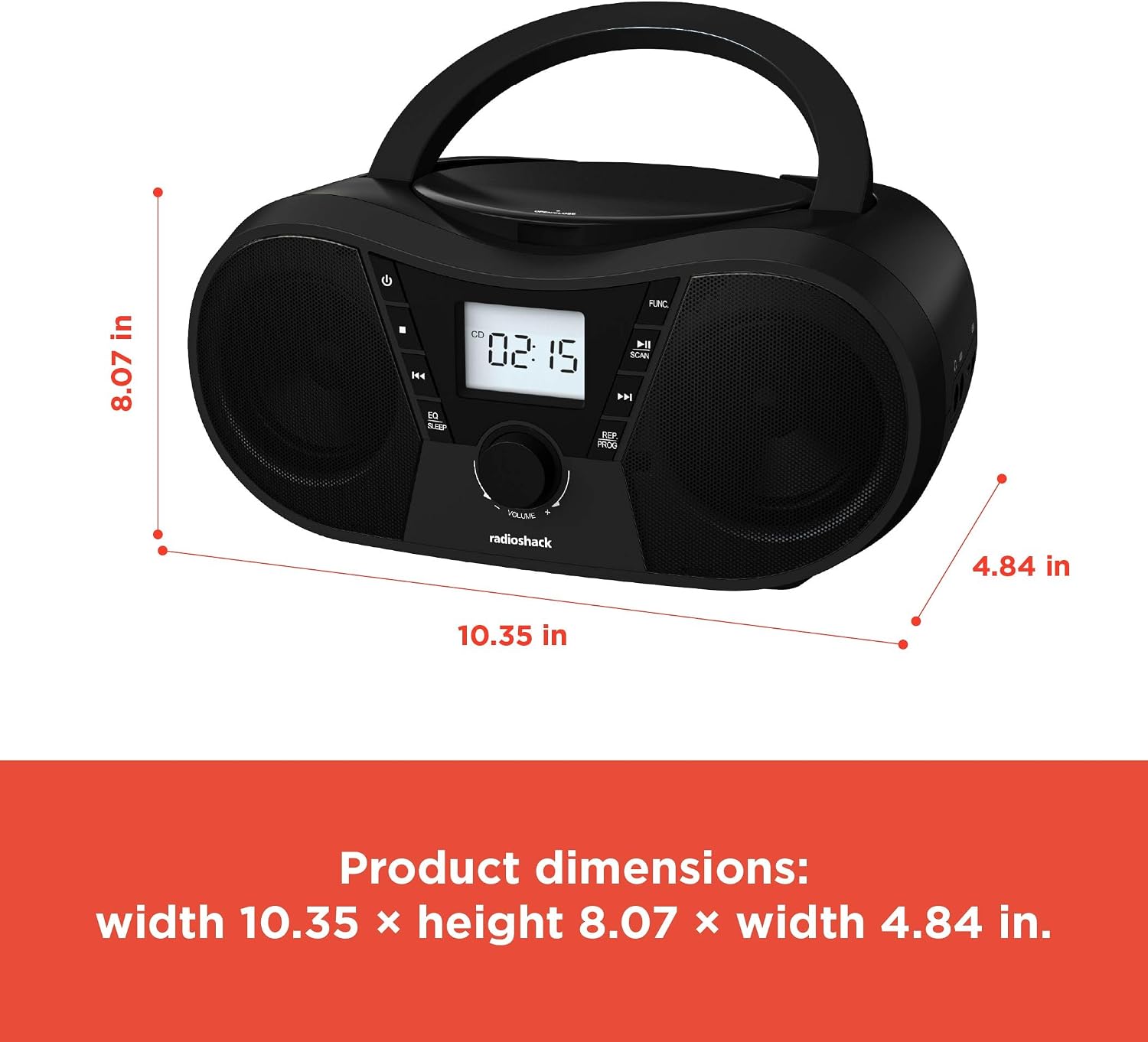
Ṣe nọmba 6: Awọn Iwọn Ọja. The boombox measures approximately 10.35 inches wide, 8.07 inches high, and 4.84 inches deep.
| Ẹya ara ẹrọ | Ẹ̀kúnrẹ́rẹ́ |
|---|---|
| Nọmba awoṣe | 1402010 |
| Orisun agbara | AC 110V-240V ~ 50/60Hz or 4 x "C" Batteries (DC 6V) |
| Media atilẹyin | CD, CD-R, CD-RW, CD-MP3, USB (MP3), Bluetooth, FM Radio, AUX Input |
| Ẹya Bluetooth | 5.0 (Compatible) |
| Iwọn Igbohunsafẹfẹ FM | 87.5 - 108 MHz |
| Ipo Ijade Ohun | Sitẹrio |
| Nọmba awọn Agbọrọsọ | 2 (Built-in Stereo Speakers) |
| Wattage | 10 watt |
| Idahun Igbohunsafẹfẹ | 20 Hz - 20000 Hz |
| Awọn iwọn (W x H x D) | Isunmọ 10.35 x 8.07 x 4.84 inches |
| Àwọ̀ | Dudu |
Atilẹyin ọja ati Support
This RadioShack Portable CD Player Boombox (Model 1402010) comes with a 1-Odun Atilẹyin ọja Limited lati ọjọ ti o ra. Atilẹyin ọja yi ni wiwa awọn abawọn iṣelọpọ ninu awọn ohun elo ati iṣẹ ṣiṣe labẹ lilo deede.
For warranty claims, technical support, or customer service inquiries, please contact RadioShack customer support through their official webaaye tabi alaye olubasọrọ ti a pese pẹlu iwe rira rẹ.
Jọwọ ṣe idaduro ẹri rira rẹ fun awọn idi atilẹyin ọja.
