
Ọrọ Iṣaaju
The VENLAB VCT03P is an all-in-one electrical circuit diagnosis tool designed to simplify electrical work for homeowners, DIY enthusiasts, and professionals. This device combines a circuit breaker finder, GFCI outlet tester, and non-contact voltage (NCV) tester into a single, portable unit. Its innovative nesting design ensures both the transmitter and receiver are kept together, enhancing portability and reducing the risk of loss. The VCT03P is engineered for fast, reliable troubleshooting and accurate identification of circuit breakers, outlet wiring faults, and GFCI protection status.
Alaye Aabo
Always prioritize safety when working with electricity. Failure to follow these safety guidelines may result in electric shock, fire, or personal injury.
- Ka ati loye gbogbo awọn ilana ṣaaju lilo ẹrọ naa.
- Má ṣe lo ẹ̀rọ náà tí ó bá dà bíi pé ó ti bàjẹ́ tàbí tí kò bá ṣiṣẹ́ dáadáa.
- Rii daju pe iṣẹ voltage of the circuit is within the device's specified range (90-130V AC).
- Máa gbà pé àwọn iyika náà wà láàyè títí tí a ó fi rí i dájú pé ó yàtọ̀ sí èyí.
- Use the Non-Contact Voltage (NCV) test function to detect live voltage sources without direct contact, adding an extra layer of safety.
- Ma ṣe gbiyanju lati ṣi tabi yi ẹrọ naa pada. Ko si awọn ẹya ti olumulo-iṣẹ ninu.
- Pa ẹrọ naa kuro ninu omi ati ọrinrin.
- Consult a qualified electrician for any complex electrical issues or repairs.
Package Awọn akoonu
The VENLAB VCT03P kit includes the following components:
- 1 x Circuit Breaker Finder Receiver
- 1 x GFCI Outlet Tester Transmitter
- 1 x 3-prong to 2-prong Adapter
- 1 x Light Socket Adapter
- 1 x Alligator Clip Adapter
- 2 x AAA batiri
- 1 x Durable Carrying Case
- 1 x Itọsọna olumulo

Image: Complete VENLAB VCT03P kit contents, including the receiver, transmitter, 3-to-2 prong adapter, light socket adapter, alligator clip adapter, batteries, carrying case, and user manual.
Ọja Awọn ẹya ara ẹrọ
- Gbogbo-ni-Iṣẹ-ṣiṣe: Locates circuit breakers, tests GFCI outlets, and performs non-contact voltage erin.
- LCD Display with Clear Alerts: The receiver features a large dual-color backlit screen displaying signal strength and scanning modes. LED indicators and an audible beep provide clear confirmation.
- Ina Filaṣi ti a dapọ: A built-in flashlight on the receiver illuminates dark panels or tight spaces for improved visibility.
- GFCI Outlet Tester: The transmitter detects 7 common wiring faults (e.g., open ground, reverse polarity) and includes an automatic GFCI trip test.
- Non-Olubasọrọ VoltagIdanwo e (NCV): Detects live voltage sources without direct contact, enhancing user safety.
- Nesting Design: The transmitter and receiver can be nested together for compact storage and improved portability.
- Apo Ohun elo Ipilẹṣẹ: Includes 3-prong to 2-prong adapter, light socket adapter, and alligator clip adapter for broad compatibility.
Ṣeto
- Fifi sori batiri: The receiver requires 2 AAA batteries. Open the battery compartment on the back of the receiver, insert the included AAA batteries, ensuring correct polarity (+/-), and close the compartment securely.
- Ṣiṣepọ Ẹka naa: The transmitter and receiver are designed to nest together for storage. To use, separate the two units.
- Isopọ Adapter: Depending on your testing needs, connect the appropriate adapter (3-prong to 2-prong, light socket, or alligator clip) to the transmitter. Ensure a secure connection.
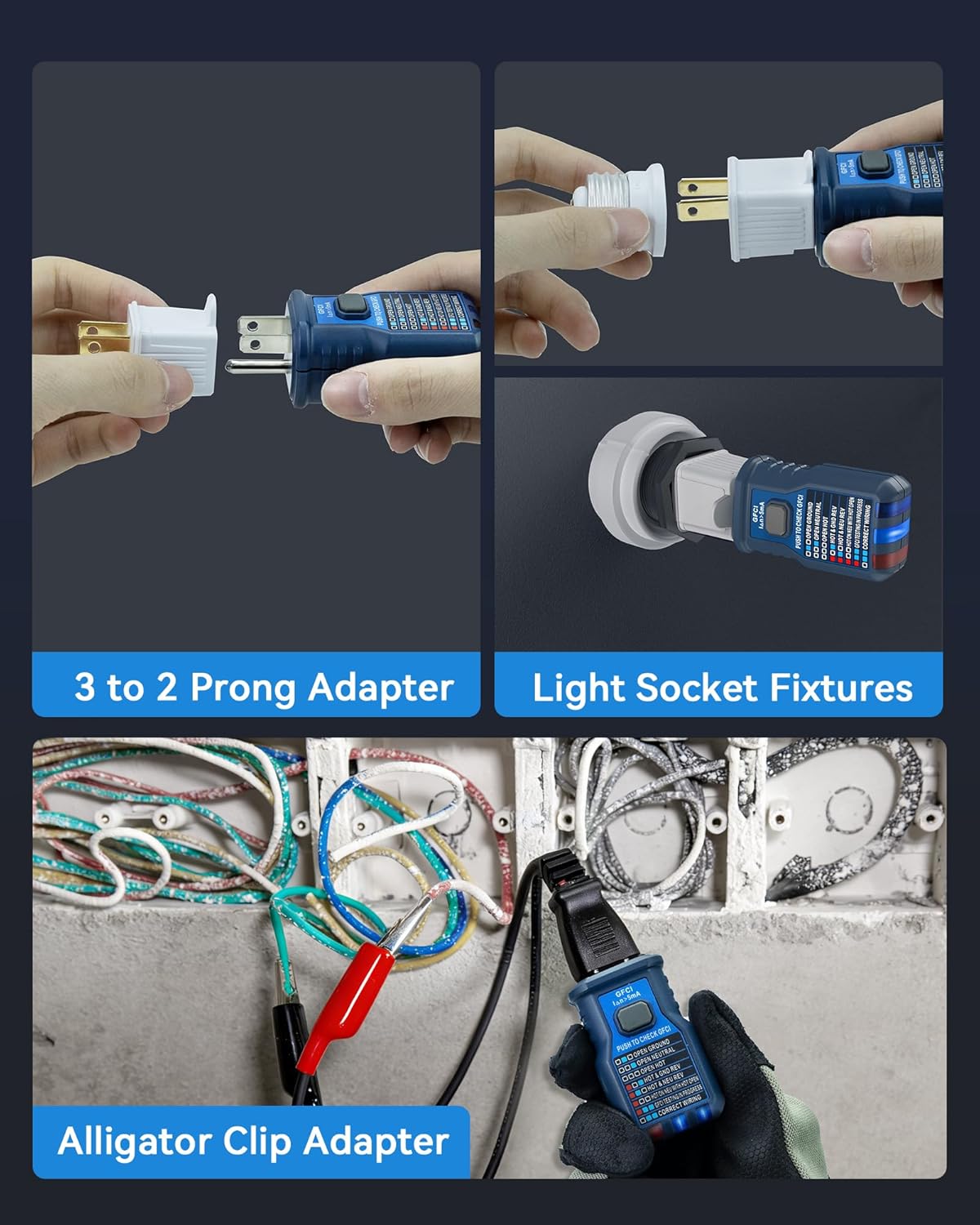
Image: The transmitter and receiver are designed to nest together for compact storage, making them easy to transport in the included carrying case.
Awọn ilana Iṣiṣẹ
1. Circuit Breaker Finding
- Insert Transmitter: Plug the transmitter into the electrical outlet or fixture you wish to trace. Use the appropriate adapter (3-prong to 2-prong, light socket, or alligator clips) if necessary. Ensure the outlet or fixture is live.
- First Scan (Learning Phase): Go to your circuit breaker panel. Press the 'Reset' button on the receiver. Slowly scan all circuit breakers once, moving the receiver flat against each breaker. During this first scan, ignore all sound and visual signals. This step allows the device to 'learn' the unique signal characteristics of your electrical panel.
- Second Scan (Identification Phase): Scan all circuit breakers again, moving the receiver slowly and flat against each breaker. The receiver's LCD screen will show signal strength, and a red light will illuminate with a continuous beep when the correct circuit breaker is located.

Image: The receiver scanning a circuit breaker panel to precisely locate the correct breaker, with the transmitter plugged into an outlet.

Image: Visual guide for the two-step scanning process: the first scan to learn signal strengths and the second scan to accurately identify the correct circuit breaker.
Video: Circuit Breaker Finder Demonstration
Video: This video demonstrates the process of using a circuit breaker finder to identify the correct breaker in an electrical panel. It shows the transmitter plugged into an outlet and the receiver being used to scan the breakers.
2. GFCI Outlet Testing
- Agbekalẹ Sopọ: Insert the transmitter directly into a standard 3-prong outlet.
- Observe Wiring Indicators: The LED indicators on the transmitter will light up to show the wiring condition. Refer to the legend on the transmitter for fault identification (e.g., Open Ground, Open Neutral, Reverse Polarity).
- Idanwo Irin-ajo GFCI: For GFCI protected outlets, press the "PUSH TO CHECK GFCI" button on the transmitter. A functioning GFCI outlet should trip, cutting power to the outlet. Reset the GFCI outlet after testing.

Image: The GFCI Outlet Tester transmitter displaying various wiring condition indicators and the dedicated GFCI test button.
3. Non-olubasọrọ Voltage (NCV) Idanwo
- Activate NCV Mode: Press the 'FUNC' button on the receiver to cycle through modes until the NCV indicator is active on the LCD screen.
- Ṣe Idanwo: Place the NCV sensing area (tip of the receiver) near a wire, outlet, or electrical component.
- Observe Alerts: Ti o ba gbe AC voltage is detected, the receiver will provide visual (flashing LED) and audible (beeping) alerts. The intensity of the alerts may vary with voltagagbára àti ìsúnmọ́ra.

Image: The receiver performing a Non-Contact Voltage (NCV) test on an electrical wire, with the NCV sensing area detecting live voltage.
Itoju
- Rirọpo Batiri: The receiver is powered by 2 AAA batteries. When the low battery indicator appears on the LCD screen, replace both batteries with new ones. Ensure correct polarity.
- Ninu: Wipe the device with a dry, soft cloth. Do not use abrasive cleaners, solvents, or immerse the device in water.
- Ibi ipamọ: Store the VENLAB VCT03P in its durable carrying case in a dry, cool environment, away from direct sunlight and extreme temperatures, when not in use.
Laasigbotitusita
| Isoro | Owun to le Fa | Ojutu |
|---|---|---|
| Ẹrọ ko tan | Awọn batiri kekere tabi okú; fifi sori batiri ti ko tọ. | Ropo awọn batiri pẹlu titun AAA batiri, aridaju ti o tọ polarity. |
| Inaccurate breaker detection | Receiver not held flat against breaker; scanning too quickly; signal interference. | Ensure the receiver is held flat against each breaker during both scans. Perform scans slowly and deliberately. Reset the receiver and try again. |
| No signal from transmitter | Transmitter not fully inserted; outlet is not live; faulty outlet. | Ensure the transmitter is fully inserted into a live outlet. Test the outlet with another known working device. |
| GFCI test not tripping | Outlet is not GFCI protected; faulty GFCI mechanism. | Confirm the outlet is indeed GFCI protected. If it is and still doesn't trip, the GFCI mechanism may be faulty and require inspection by a qualified electrician. |
Awọn pato
- Awoṣe: VCT03P
- Awọn ọna Voltage: 90-130V AC
- Orisun Agbara: 2 x AAA batteries (for receiver)
- Awọn iwọn: 21.01 x 10.9 x 5.41 cm (Parcel Dimensions)
- Ìwúwo: 340 g (Parcel Weight)
- Atilẹyin ọja: ọdun meji 3
- Olupese: VENLAB
Atilẹyin ọja ati Support
This VENLAB VCT03P Circuit Breaker Finder comes with a 3-odun atilẹyin ọja lati ọjọ ti o ra, ibora awọn abawọn ninu awọn ohun elo ati iṣẹ-ṣiṣe labẹ lilo deede.
For technical assistance, troubleshooting, or to make a warranty claim, please contact VENLAB customer service. Please have your purchase receipt and product model number (VCT03P) available when contacting support.


