
1. Ifihan
The GOOLOO DS600 is a professional OBD2 diagnostic scanner designed for comprehensive vehicle system analysis. This device provides advanced diagnostic capabilities for a wide range of vehicles, offering essential functions for both automotive enthusiasts and professional technicians. It features a user-friendly interface and robust hardware for reliable performance.
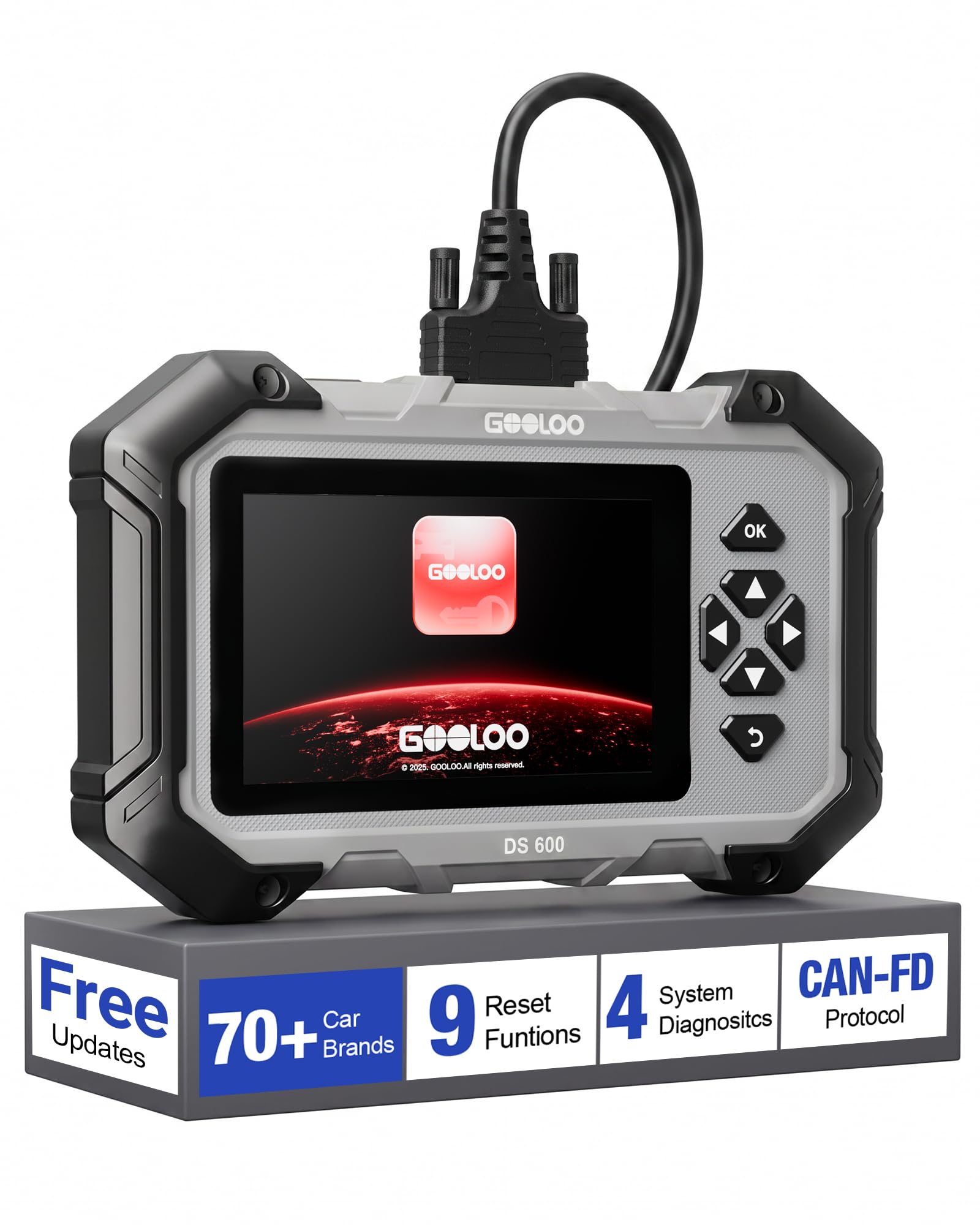
Image 1.1: The GOOLOO DS600 OBD2 Scanner, a handheld diagnostic tool with a 5-inch touchscreen and physical navigation buttons.
2. Ọja Ipariview
2.1 Key Awọn ẹya ara ẹrọ
- Ibamu Ọkọ nla: Compatible with OBDII-equipped vehicles built after 1996, supporting over 70 vehicle brands. Supports Diesel (12v only), gasoline, 12V passenger cars, pickups, light-duty trucks, SUVs, and minivans.
- Atilẹyin Ilana: Compatible with OBD2, CAN, and CAN-FD protocols.
- Eto isesise: Runs on Android 11.0.
- Ifihan: 5-inch touchscreen interface.
- Iranti: 2GB RAM and 64GB ROM.
- Asopọmọra: 2.4GHz and 5GHz Wi-Fi for updates.
- Agbara: Internal 3500mAh lithium battery, rechargeable via USB-C.
- Awọn imudojuiwọn: Lifetime free updates and use for core functions.
2.2 Package Awọn akoonu
The GOOLOO DS600 package typically includes:
- GOOLOO DS600 OBD2 Scanner Unit
- Okùn Asopọ OBD2
- USB to USB-C Ngba agbara Cable
- Ọran Gbigbe Idaabobo
- Awọn ọna Reference Itọsọna
3. Eto
3.1 Initial Power-Up and Registration
- Gba agbara si Ẹrọ naa: Connect the scanner to a power source using the provided USB-C charging cable. Ensure the device is sufficiently charged before first use.
- Agbara Tan: Press and hold the power button located on the top edge of the scanner.
- Oluṣeto Iṣeto akọkọ: Follow the on-screen prompts to complete the initial setup, including language selection and time zone.
- Sopọ si Wi-Fi: Navigate to the Wi-Fi settings and connect the device to a stable 2.4GHz or 5GHz Wi-Fi network.
- Ẹrọ iforukọsilẹ: Input your email address when prompted. A verification code will be sent to your email. Enter this code on the device to activate and register it. No personal data beyond email is typically required for basic operation.
- Ṣe igbasilẹ Awọn imudojuiwọn: After registration, the device will prompt you to download and apply available software and vehicle diagnostic profile updates. It is highly recommended to install all updates to ensure the broadest compatibility and latest features. This process may take some time depending on your internet speed.

Image 3.1: The GOOLOO DS600 displaying the one-click update feature and demonstrating automatic VIN detection.
3.2 Nsopọ si Ọkọ ayọkẹlẹ kan
- Wa ibudo OBD2: Identify the vehicle's OBD2 diagnostic port, typically located under the dashboard on the driver's side.
- Okun So pọ: Firmly connect one end of the provided OBD2 cable to the vehicle's OBD2 port and the other end to the designated port on the top edge of the GOOLOO DS600 scanner.
- Ignition On: Tan ina ọkọ si ipo 'ON' (ẹnjini kuro).
- Ṣe agbekalẹ ibaraẹnisọrọ: The scanner will automatically detect the vehicle's battery voltage and attempt to establish communication.
4. Awọn ilana Iṣiṣẹ
4.1 Main System Diagnostics
The DS600 can perform in-depth diagnostics on four primary vehicle systems:
- Eto Enjini: Reads and clears engine fault codes, views live data related to engine performance.
- Ètò Ìdènà Àfikún (SRS): Diagnoses airbag system issues, reads and clears SRS fault codes.
- Eto Atako Titiipa (ABS): Checks ABS system status, reads and clears ABS fault codes.
- Eto gbigbe: Diagnoses automatic transmission issues, reads and clears transmission fault codes.

Image 4.1: The GOOLOO DS600 interface showing options for Engine, SRS, ABS, and Transmission diagnostics.
4.2 Full OBD Functions
Access the 'Diagnostics' menu to perform standard OBD2 functions:
- Read & Clear Codes: Gba awọn koodu iṣoro ayẹwo (DTCs) pada ki o si pa wọn mọ lẹhin atunṣe.
- Data Live: View real-time sensor data, parameters, and PIDs in text or graph format.
- Igbaradi I/M: Check the readiness status of emission-related monitors.
- On-Board Monitoring: Review results of on-board diagnostic monitoring tests for specific components/systems.
- Idanwo nkan elo: Bẹ̀rẹ̀ ìdánwò jíjìn fún ètò EVAP ti ọkọ̀ náà.
- Alaye ọkọ: Retrieve vehicle identification number (VIN), calibration ID (CALID), and calibration verification number (CVN).
- Vehicle Status: Pese ohun loriview of the vehicle's current diagnostic status.

Image 4.2: The GOOLOO DS600 interface showing various full OBD functions.
4.3 Special Reset Functions
The DS600 offers 9 commonly used reset and service functions:
- Atunto epo: Tunto eto igbesi aye epo lẹhin iyipada epo.
- Iṣamubadọgba: Re-learns the throttle body position.
- Brake Reset (EPB Reset): Ṣe àtúntò ètò ìdábùú ọkọ̀ ayọ́kẹ́lẹ́ itanna lẹ́yìn tí a bá ti rọ́pò pádì ìdábùú.
- Ẹjẹ ABS: Performs brake fluid bleeding procedures for the ABS system.
- DPF isọdọtun: Initiates the regeneration process for the Diesel Particulate Filter.
- Ifaminsi Abẹrẹ: Codes new injector numbers into the ECU.
- SAS Tunto (Sensọ igun idari): Ṣe àtúnṣe sensọ igun idari.
- BMS Tunto (Eto Isakoso Batiri): Registers new battery replacement.
- TPMS Tunto (Eto Abojuto Ipa Tire): Re-learns TPMS sensors.

Image 4.3: The GOOLOO DS600 interface showing the 9 special reset functions.
4.4 To ti ni ilọsiwaju Awọn ẹya ara ẹrọ
- VIN aládàáni: Automatically identifies the vehicle's Vehicle Identification Number (VIN) for quick and accurate vehicle identification.
- CAN-FD & FCA AutoAuth: Supports the Controller Area Network Flexible Data-Rate (CAN-FD) protocol and FCA AutoAuth for enhanced coverage and direct communication with modern Fiat Chrysler Automobiles (FCA) vehicles protected by a Security Gateway Module (SGW). This allows for deeper, bidirectional diagnostics on compatible vehicles.
- Professional Battery Diagnostics: Assesses battery starting power and monitors real-time voltage trends.

Image 4.4: The GOOLOO DS600 interface highlighting CAN-FD and Gateway Ready capabilities for modern vehicles.

Image 4.5: The GOOLOO DS600 demonstrating professional battery diagnostics, including assessing starting power and monitoring voltage trends.
5. Itọju
- Awọn imudojuiwọn sọfitiwia: Regularly connect the device to Wi-Fi and check for software updates. GOOLOO provides lifetime free updates for the core OBD2 functions and 9 reset functions. Installing updates ensures optimal performance and compatibility with new vehicle models.
- Ninu: Use a soft, dry cloth to clean the screen and exterior of the device. Avoid using abrasive cleaners or solvents.
- Ibi ipamọ: When not in use, store the DS600 in its protective carrying case in a cool, dry place to prevent damage from dust, moisture, or impacts.
- Itọju Batiri: To prolong battery life, avoid fully discharging the battery frequently. Charge the device periodically if it's not used for extended periods.
6. Laasigbotitusita
- Ẹrọ ti ko ni agbara: Ensure the battery is charged. Connect the device to a power source using the USB-C cable and try again.
- Ko si ibaraẹnisọrọ pẹlu ọkọ ayọkẹlẹ:
- Verify the OBD2 cable is securely connected to both the scanner and the vehicle's OBD2 port.
- Rí i dájú pé iná ọkọ̀ náà wà ní ipò 'ON' (ẹ̀rọ náà ti pa).
- Ṣayẹwo awọn ọkọ ká batiri voltage. Iwọn kekeretage le ṣe idiwọ ibaraẹnisọrọ.
- Gbìyànjú láti so mọ́ ọkọ̀ ayọ́kẹ́lẹ́ mìíràn tó báramu láti yọ ìṣòro kan pàtó kúrò nínú ọkọ̀ náà.
- Awọn ọran Isopọ Wi-Fi:
- Ensure you are within range of a known Wi-Fi network.
- Rí i dájú pé o tẹ ọ̀rọ̀ìpamọ́ Wi-Fi náà dáadáa.
- Restart the scanner and your Wi-Fi router.
- Screen Responsiveness Issues: If the touchscreen is unresponsive or inaccurate, try restarting the device. Ensure the screen is clean and free of debris.
- Iṣẹ ṣiṣe ti o lọra: Ensure the device has the latest software updates installed. Close any unnecessary applications running in the background if applicable.
7. Awọn pato
| Nọmba awoṣe | DS600 |
| Eto isesise | Android 11.0 |
| Iwon iboju | 5 inches |
| Àgbo | 2GB |
| ROM | 64GB |
| Sipiyu | 1.8GHz 4-mojuto |
| Agbara Batiri | 3500mAh |
| Wi-Fi | 2.4GHz / 5GHz |
| Orisun agbara | Agbara Batiri |
| Awọn iwọn (Itosi.) | 22.6cm x 13.7cm x 3.5cm (8.9" x 5.4" x 1.4") |
| Ìwọ̀n (Fún.) | 998g (19.79 iwon) |
| Automotive Fit Iru | Universal Fit |
8. Atilẹyin ọja ati Support
The GOOLOO DS600 comes with lifetime free updates for its full OBD2 functions and the 9 special reset functions, ensuring the device remains current without subscription fees for these core features.
For specific warranty details, including coverage period and terms, please refer to the official GOOLOO website or contact GOOLOO customer support directly. It is recommended to retain your proof of purchase for warranty claims.
For technical assistance, troubleshooting, or any product-related inquiries, please contact GOOLOO customer support through their official channels. Contact information can typically be found on the GOOLOO webaaye tabi ni apoti ọja.