Ọrọ Iṣaaju
Welcome to the world of portable gaming with your Nintendo Game Boy Color. This manual will guide you through the essential steps to set up, operate, and maintain your system, ensuring an enjoyable gaming experience.
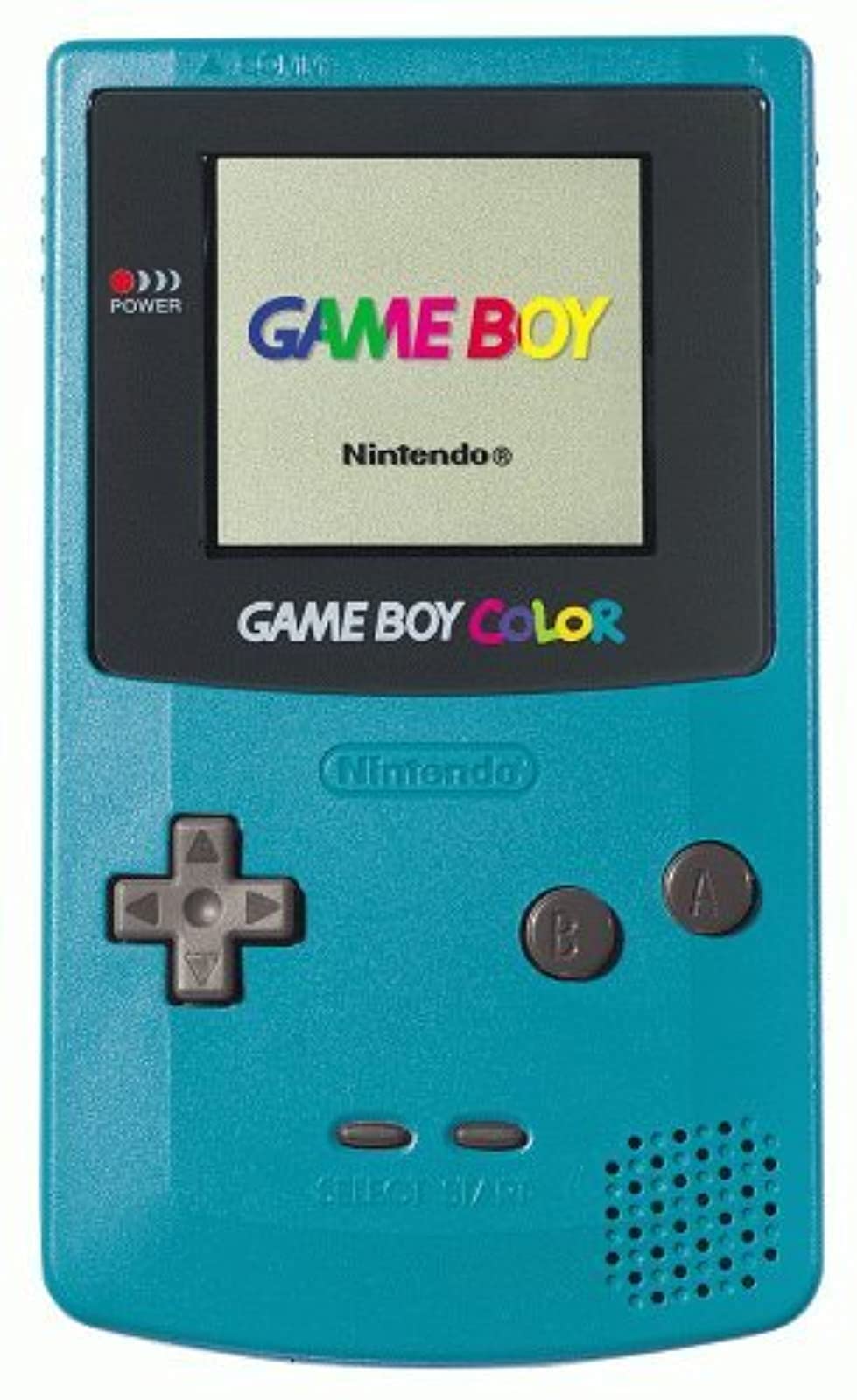
Aworan: Iwaju view of the Teal Game Boy Color console, displaying the "GAME BOY" and "Nintendo" logos on its screen, with the D-pad, A/B buttons, Start/Select buttons, and speaker visible.
Ṣeto
1. Fifi sori batiri
The Game Boy Color requires two (2) AA batteries for operation. Follow these steps to install them:
- Locate the battery compartment cover on the back of the Game Boy Color unit.
- Gbe ideri si isalẹ lati yọ kuro.
- Fi awọn batiri AA meji sii, ki o rii daju pe awọn ebute rere (+) ati odi (-) ba awọn itọkasi inu yara naa mu deede.
- Rọpo ideri iyẹwu batiri nipa gbigbe si oke titi yoo fi tẹ si aaye.

Aworan: Pada view of the Teal Game Boy Color console with the battery cover open, revealing two AA batteries correctly inserted. The model number CGB-001 is visible on the label.
2. Fífi Káàtìrì Ere sii
To play a game, insert a Game Boy or Game Boy Color cartridge into the slot at the top of the unit. Push it firmly until it clicks into place.
3. Agbara Lori
Locate the power switch on the top left side of the unit. Slide it to the "ON" position. The power indicator light (red LED) will illuminate, and the Nintendo logo will appear on the screen.
Operating Your Game Boy Color
Awọn iṣakoso ipilẹ
- Paadi itọsọna (D-paadi): Ti o wa ni apa osi, ti a lo fun gbigbe ati lilọ kiri akojọ aṣayan.
- Bọtini kan: A maa n lo o fun ṣiṣe idaniloju yiyan tabi ṣiṣe awọn iṣe akọkọ ninu awọn ere.
- B Bọtini: A maa n lo o fun piparẹ awọn yiyan tabi ṣiṣe awọn iṣe keji ninu awọn ere.
- Bọtini Ibẹrẹ: A lo lati da awọn ere duro tabi jẹrisi awọn yiyan.
- Bọtini Yan: Used for various in-game functions or menu navigation.
- Ipe Iwọn didun: Located on the right side of the unit, rotate to adjust sound output.
- Jack agbekari: Located at the bottom, for private listening with 3.5mm headphones.
Awọn ere Awọn ere
Once powered on with a game cartridge inserted, the game will automatically load. Follow the on-screen instructions and use the controls as described above to play.
Agbara Pa
To turn off the system, slide the power switch to the "OFF" position. Always power off the system before removing a game cartridge.
Itoju
Ninu Console
Use a soft, dry cloth to wipe the exterior of the Game Boy Color. Do not use liquid cleaners or solvents, as they may damage the unit. For the screen, use a soft, lint-free cloth. Avoid scratching the screen surface.
Itọju Batiri
- Yọ awọn batiri kuro ti ẹyọ naa ko ba ni lo fun akoko ti o gbooro sii lati ṣe idiwọ jijo.
- Maṣe dapọ atijọ ati awọn batiri titun, tabi awọn oriṣiriṣi awọn batiri.
- Sọ awọn batiri ti a lo ni ifojusọna ni ibamu si awọn ilana agbegbe.
Ibi ipamọ
Store your Game Boy Color in a cool, dry place away from direct sunlight and extreme temperatures. Keep it free from dust and moisture.
Laasigbotitusita
| Isoro | Owun to le Fa | Ojutu |
|---|---|---|
| System ko ni agbara lori. |
|
|
| Ere naa ko ni fifuye tabi ṣafihan awọn aworan ti o bajẹ. |
|
|
| Ko si ohun tabi kekere ohun. |
|
|
| Screen is dark or difficult to see. |
|
|
Awọn pato
- Nọmba awoṣe: CGB-001
- Awọn iwọn: 5.1 x 3 x 1.1 inches (isunmọ)
- Ìwúwo: 7.4 iwon (laisi awọn batiri)
- Orisun Agbara: 2 x AA batiri
- Ifihan: Reflective STN LCD, 160x144 pixels, 56 simultaneous colors from a palette of 32,768
- Sipiyu: 8-bit isise
- Ohun: 4-channel stereo sound (via headphones), mono speaker
- Iho Katiriji: Compatible with Game Boy and Game Boy Color cartridges
- Ojo ifisile: Oṣu kọkanla ọjọ 18, ọdun 1998
Atilẹyin ọja ati Support
Specific warranty information for this product is not provided in this manual. For details regarding warranty coverage, repairs, or additional support, please refer to the original product packaging or contact Nintendo customer support directly.
You can visit the official Nintendo store for more information: Nintendo Store.


