Ọrọ Iṣaaju
The Intermatic TN811C Programmable Lamp and Appliance Timer is designed to provide automated control over your lighting and appliances, enhancing safety, security, and convenience. This timer features two on/off settings per day and utilizes non-removable trippers for programming. It has a 15 Amp capacity, suitable for controlling various electrical devices, and includes a manual override switch for immediate control.
Alaye Aabo
- Ka gbogbo awọn ilana ṣaaju lilo.
- Do not immerse the timer in water or expose it to excessive moisture.
- Maṣe kọja iwọn ina ti o pọju ti 15 Amps tabi 1750 Wattis.
- Rii daju pe aago ti wa ni edidi ni aabo sinu iṣanjade ti ilẹ.
- Unplug the timer from the outlet before cleaning or performing any maintenance.
- This timer is intended for indoor use only. If used in a protected outdoor location, ensure it is shielded from direct weather exposure.
Ọja Pariview
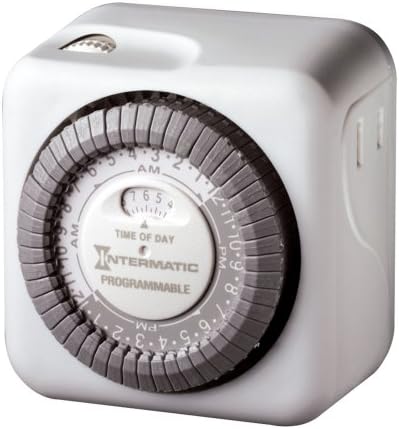
The Intermatic TN811C timer is a compact, white, cube-shaped device with a central rotating dial for time setting and programming. It features a standard two-prong plug for wall outlets and a three-prong receptacle for the appliance to be controlled.

Iwaju view of the Intermatic TN811C timer, showing the central programming dial and manual override switch.
Apa view of the Intermatic TN811C timer, illustrating the appliance receptacle.
Awọn eroja pataki:
- Ṣiṣe ipe akoko: The large central dial used to set the current time and program on/off cycles.
- Awọn oniriajo: Small, non-removable pins around the time dial that are pushed in or pulled out to set specific on/off times.
- Yipada Yipada Afọwọṣe: A small switch, typically located on the top or side, allowing you to manually turn the connected appliance on or off, overriding the programmed settings.
- Gbigba Ilaja: The socket on the timer where you plug in your lamp tabi ohun elo.
Ṣeto
- Ṣeto Akoko lọwọlọwọ: Rotate the large central dial clockwise until the current time aligns with the "TIME OF DAY" indicator arrow. The dial is marked with AM and PM hours.
- Eto TAN/PA Awọn akoko: The dial has small, non-removable trippers around its circumference. Each tripper represents a specific time interval. To set an "ON" time, push the corresponding tripper(s) inward. To set an "OFF" time, pull the corresponding tripper(s) outward. The timer allows for 48 on/off settings per day.
- Plug in Timer: Insert the timer into a standard 120V wall outlet.
- Ohun elo Sopọ: Pulọọgi lamp or appliance you wish to control into the outlet receptacle on the timer.
Ṣiṣẹ
Isẹ aladaaṣe:
Once the current time is set and the on/off trippers are programmed, the timer will automatically turn the connected appliance on and off according to your settings. The dial will continuously rotate, advancing the time.
Yiyọ afọwọṣe:
The timer is equipped with a manual override switch. This switch allows you to temporarily turn the connected appliance on or off, regardless of the programmed settings. Be aware that on some models, using the manual override switch may advance the internal time setting. If you notice the programmed times shifting, re-verify and reset the current time as needed.
Itoju
- Ninu: Unplug the timer from the wall outlet. Wipe the exterior with a soft, dry cloth. Do not use liquid cleaners or abrasive materials.
- Ibi ipamọ: If storing the timer for an extended period, unplug it and keep it in a cool, dry place away from direct sunlight.
- Ayewo: Periodically inspect the timer and its cord for any signs of damage, such as frayed wires or cracked casing. Tí a bá rí ìbàjẹ́, dáwọ́ lílò dúró kí o sì fi ẹ̀rọ náà rọ́pò rẹ̀.
Laasigbotitusita
- Appliance does not turn ON/OFF at programmed times:
- Rí i dájú pé aago náà ti so mọ́ ibi tí a lè gbé e sí.
- Verify the appliance is properly plugged into the timer and is in working order.
- Check that the current time is correctly set on the dial.
- Confirm that the ON/OFF trippers are correctly pushed in or pulled out for the desired times.
- Ensure the manual override switch is not in a position that is overriding the programmed settings.
- Timer dial is not moving:
- Rí i dájú pé aago náà ti so mọ́ ihò iná mànàmáná tó wà láàyè.
- The timer may be faulty and require replacement.
- Appliance turns ON/OFF at incorrect times:
- Re-check the current time setting and adjust if necessary.
- Re-verify the positions of the ON/OFF trippers.
- If the manual override was recently used, it might have advanced the time. Reset the current time.
Awọn pato
| Ẹya ara ẹrọ | Ẹ̀kúnrẹ́rẹ́ |
|---|---|
| Nọmba awoṣe | TN811C |
| Brand | Intermatic |
| Àwọ̀ | Funfun |
| Ohun elo | Ṣiṣu |
| Iwọn Nkan | 6.4 iwon |
| Ọja Mefa | 3 x 5 x 7 inches |
| Nọmba ti Eto | 48 on/off settings per day |
| Itanna Itanna | 15 Amps; 1750 Watts |
| UPC | 785577061424 |
Atilẹyin ọja ati Support
Alaye Atilẹyin ọja:
The Intermatic TN811C Programmable Lamp and Appliance Timer comes with a 1-odun lopin atilẹyin ọja. Atilẹyin ọja yi ni wiwa awọn abawọn ninu awọn ohun elo ati iṣẹ ṣiṣe labẹ lilo deede. Jọwọ ṣe idaduro ẹri rira rẹ fun awọn iṣeduro atilẹyin ọja.
Atilẹyin Onibara:
For technical assistance, troubleshooting beyond this manual, or warranty inquiries, please visit the official Intermatic website or contact their customer service department. You can often find contact information and additional resources on the manufacturer's webaaye tabi nipasẹ alagbata ti o ti ra ọja naa.
Ṣabẹwo si Intermatic Store on Amazon fun alaye siwaju sii.


