Awọn Aabo pataki
Nigbati o ba nlo awọn ohun elo itanna, awọn iṣọra aabo ipilẹ yẹ ki o tẹle nigbagbogbo lati dinku eewu ina, mọnamọna, ati/tabi ipalara si eniyan, pẹlu atẹle naa:
- Ka gbogbo awọn itọnisọna ṣaaju ki o to ṣiṣẹ ẹrọ isise ounjẹ.
- Láti dáàbò bo ara rẹ lọ́wọ́ ewu ìkọlù iná mànàmáná, má ṣe fi omi tàbí omi mìíràn rì mọ́lẹ̀ mọ́tò náà.
- Abojuto sunmọ jẹ pataki nigbati eyikeyi ohun elo ba lo nipasẹ tabi sunmọ awọn ọmọde.
- Yọọ pulọọgi kuro ni iṣan jade nigbati o ko ba wa ni lilo, ṣaaju fifi sii tabi mu awọn ẹya kuro, ati ṣaaju ṣiṣe mimọ.
- Yago fun olubasọrọ pẹlu gbigbe awọn ẹya ara.
- Ma ṣe ṣisẹ ohun elo eyikeyi pẹlu okun tabi plug ti o bajẹ, tabi lẹhin aiṣe ohun elo tabi ti lọ silẹ tabi bajẹ ni eyikeyi ọna.
- Lilo awọn asomọ ti ko ṣeduro tabi ta nipasẹ KitchenAid le fa ina, mọnamọna, tabi ipalara.
- Maṣe lo ni ita.
- Ma ṣe jẹ ki okun duro lori eti tabili tabi counter.
- Keep hands and utensils away from moving blades or discs while processing food to prevent the risk of severe personal injury. A scraper may be used but only when the food processor is not running.
- Awọn abẹfẹlẹ jẹ didasilẹ. Mu farabalẹ.
- Always ensure the cover is securely locked in place before operating the appliance.
- Maṣe gbiyanju lati ṣẹgun siseto interlock ideri.
Ọja Pariview
The KitchenAid KFP600 Ultra Power Food Processor is designed for efficient food preparation. It features an 11-cup work bowl, a bonus mini bowl for smaller tasks, and a powerful 600-watt motor.

Image: The KitchenAid KFP600 11-Cup Ultra Power Food Processor, showcasing apẹrẹ kekere rẹ ati awọn paati akọkọ.
Awọn eroja pataki:
- Ipilẹ mọto: Ilé ni mọ́tò àti pánẹ́ẹ̀lì ìṣàkóso 600-watt.
- 11-Cup Work Bowl: Large capacity bowl for most processing tasks.
- Ideri Awo Iṣẹ: Features a quick-lock mechanism and a feed tube.
- Titari Ounjẹ: Used to guide food through the feed tube.
- Abẹ́ Onírúurú Ète: Fún gígé, gígé, dídàpọ̀, àti sísè.
- Esufulawa Blade: Specifically designed for mixing and kneading dough.
- Reversible Thin Slicer/Shredder Disc: For thin slicing and fine shredding.
- Medium Slicer Disc: For medium slicing.
- Medium Shredder Disc: For medium shredding.
- Mini Bowl with Mini Blade: For processing small quantities.
- Accessory Storage Case: Provides organized storage for blades and discs.
- Spatula/Cleaning Tool: For scraping and cleaning the work bowl.
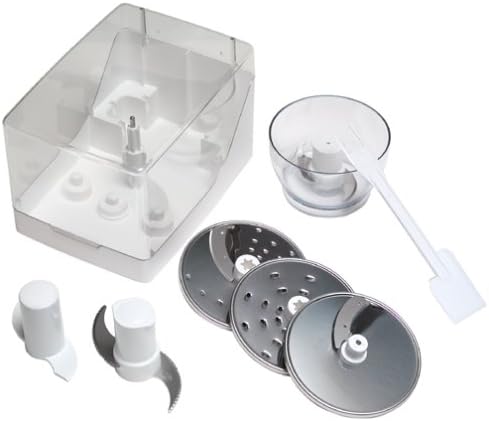
Image: Various accessories for the KitchenAid KFP600 food processor, including the storage case, multi-purpose blade, dough blade, slicing/shredding discs, mini bowl, and spatula.
Ṣeto
Ṣiṣi silẹ
Carefully remove all parts from the packaging. Wash the work bowl, work bowl cover, food pusher, and all blades/discs in warm, soapy water before first use. Rinse thoroughly and dry. The motor base can be wiped clean with a damp asọ.
Apejọ
- Gbe ipilẹ mọto naa si ori ilẹ ti o mọ, ti o gbẹ, ti o si rọ.
- Position the work bowl onto the motor base, aligning the handle with the right side of the base. Rotate clockwise until it locks into place.
- Select the desired blade or disc. For blades, carefully place it onto the center shaft in the work bowl. For discs, place the disc adapter onto the center shaft, then place the disc onto the adapter.
- Place the work bowl cover onto the work bowl, aligning the feed tube with the work bowl handle. Rotate clockwise until it locks into place. The food processor will not operate unless the cover is properly locked.
- Fi titari ounje sinu tube kikọ sii.
Awọn ilana Iṣiṣẹ
Awọn iṣakoso
The control panel features simple buttons for operation:
- LATI: Press to continuously run the food processor.
- PA: Press to stop the food processor.
- Polusi: Press and hold for short bursts of power. Release to stop. This is ideal for controlled chopping or when you need to avoid over-processing.
Lilo Awọn Abẹ ati Awọn Disiki
Always ensure the food processor is unplugged before changing blades or discs. Handle all blades and discs with extreme care as they are very sharp.
- Abẹ́ Onírúurú Ète: Use for chopping nuts, herbs, vegetables, mincing meat, mixing batters, and pureeing cooked foods.
- Esufulawa Blade: Use for kneading yeast doughs for bread or pizza, and mixing stiff batters.
- Slicing/Shredding Discs: Place the appropriate disc onto the disc adapter. Use the feed tube and food pusher to guide ingredients through. Do not force food into the feed tube; apply even, gentle pressure.
Awọn ilana ilana
- Gige: Use the multi-purpose blade. Place ingredients in the work bowl. Use the PULSE function for controlled chopping. For even results, process in small batches.
- Shredding/Slicing: Use the appropriate shredding or slicing disc. Place ingredients in the feed tube. Use the ON button for continuous operation and the food pusher to guide ingredients.
- Iyẹfun Idapọ: Use the dough blade. Add dry ingredients to the work bowl, then gradually add liquids through the feed tube while the processor is running on the ON setting. Process until a ball of dough forms.
Using the Mini Bowl
For small quantities of ingredients, such as herbs, garlic, or small amounts of nuts, the mini bowl and mini blade can be used. Place the mini bowl inside the 11-cup work bowl, then insert the mini blade. Secure the work bowl cover and process as usual.
Itọju ati Cleaning
Regular cleaning ensures optimal performance and longevity of your food processor.
Cleaning the Work Bowl and Accessories
- All parts except the motor base are dishwasher-safe. Place them on the top rack of your dishwasher.
- Alternatively, wash by hand in warm, soapy water. Use the provided spatula/cleaning tool to safely remove food residue. Rinse thoroughly and dry.
- Exercise extreme caution when handling blades and discs due to their sharpness.
Ninu awọn Motor Mimọ
- Ensure the food processor is unplugged before cleaning the motor base.
- Pa mọto mimọ pẹlu ipolowoamp asọ. Ma ṣe fi omi mimọ sinu omi tabi omi miiran.
- Avoid using abrasive cleaners or scouring pads, as they may scratch the surface.
Ibi ipamọ
Store blades and discs safely in the provided accessory storage case to prevent accidental injury and keep them organized.
Laasigbotitusita
Ti o ba pade awọn ọran pẹlu ero isise ounjẹ rẹ, tọka si tabili ni isalẹ fun awọn iṣoro ati awọn iṣoro ti o wọpọ.
| Isoro | Owun to le Fa | Ojutu |
|---|---|---|
| Food processor does not turn on. | Not plugged in; Work bowl or cover not properly locked; Safety interlock engaged. | Ensure unit is plugged into a working outlet. Check that the work bowl and cover are securely locked into place. |
| Motor ma duro nigba isẹ ti. | Overload protection activated; Work bowl or cover became unlocked. | Unplug the unit, remove some ingredients, and wait 10-15 minutes for the motor to cool before restarting. Ensure all parts are locked. |
| Awọn abajade gige aiṣedeede. | Overfilling the work bowl; Ingredients are too large; Not using PULSE function. | Process smaller batches. Cut ingredients into uniform pieces. Use the PULSE function for better control. |
| Liquid leaks from the work bowl. | Work bowl overfilled; Cover not properly sealed. | Do not fill liquids above the maximum fill line. Ensure the cover is securely locked. |
Awọn pato
Detailed specifications for the KitchenAid KFP600 Ultra Power Food Processor.

Aworan: Apa view of the KitchenAid KFP600 food processor with dimensions indicated: 14.8 inches high, 10.5 inches deep, and 8.7 inches wide.
| Ẹya ara ẹrọ | Ẹ̀kúnrẹ́rẹ́ |
|---|---|
| Brand | KitchenAid |
| Nọmba awoṣe | KFP600WH |
| Agbara | 11-Agolo |
| Wattage | 600 watt |
| Awọn iwọn Ọja (H x W x D) | 14.8" x 8.7" x 10.5" |
| Iwọn Nkan | 21 iwon |
| Blade elo | Irin ti ko njepata |
| Pataki Ẹya | Titiipa aabo |
| Fifọ Ailewu Parts | Work bowl, cover, blades, and discs (top rack) |
Atilẹyin ọja ati Support
For warranty information, product registration, or technical assistance, please contact KitchenAid customer service. You can find contact details on the official KitchenAid webaaye tabi laarin apoti ọja.
Please have your model number (KFP600WH) and purchase date available when contacting support.


