Ọrọ Iṣaaju
This manual provides detailed instructions for the proper use and care of your Audiovox CE-145G Personal CD Player. Please read this manual thoroughly before operating the device to ensure optimal performance and longevity.
Ọja Awọn ẹya ara ẹrọ
- Ààbò Ìdènà Fò-Skip 40-Ìṣẹ́jú-ẹ̀yìn: Ensures continuous audio playback even during movement, utilizing a digital buffer.
- Multi-Directional Anti-Roll Sensors: Provides additional protection against playback interruption from various movements.
- 22-Track Programmable Memory: Allows customization of CD playback order.
- Bass Boost System: Ṣe ilọsiwaju iṣelọpọ ohun-igbohunsafẹfẹ kekere.
- 3-Beam Laser Pickup: Designed for accurate CD tracking and clear sound reproduction.
- Awọn ọna Sisisẹsẹhin lọpọlọpọ: Includes random play and various repeat functions.
- Duro Yipada: Prevents accidental button presses and program changes.
- Pipa Agbara Aifọwọyi: Conserves battery life by automatically shutting down the player when not in use.
- Line-Out Jack: For connecting to external audio systems or power adapters.
- Built-in Rechargeable Circuitry: Supports the use of rechargeable Ni-Cad batteries (not included).
- Stereo Headphones: Included for immediate listening.
Ṣeto
1. Fifi sori batiri
The Audiovox CE-145G operates on two (2) AA batteries (not included) or an optional AC/car adapter (not included) connected via the line-out jack. For rechargeable Ni-Cad batteries, the unit features built-in charging circuitry.
- Locate the battery compartment on the underside of the CD player.
- Gbe ideri iyẹwu batiri naa ṣii.
- Fi awọn batiri AA meji (2) sii, ki o rii daju pe polarity (+/-) tọ gẹgẹ bi a ti fihan ninu yara naa.
- Pa ideri batiri naa ni aabo.

Image: The Audiovox CE-145G Personal CD Player in translucent green, shown with included stereo headphones. This image illustrates the overall product design and the headphones that come with the unit.
2. Nsopọ Awọn agbekọri
Insert the stereo headphone plug into the headphone jack located on the side of the CD player.

Image: A close-up of the stereo headphones included with the Audiovox CE-145G CD player, showing the earcups and the 3.5mm audio jack.
Awọn ilana Iṣiṣẹ
1. Sisisẹsẹhin CD ipilẹ
- Open the CD compartment lid by pressing the "OPEN" button or sliding the latch.
- Fi CD kan si ori spindle aarin pẹlu ẹgbẹ aami ti o kọju si oke.
- Ti ideri apoti CD naa mu ṣinṣin titi ti yoo fi tẹ.
- Tẹ awọn ERE/SINMI button to begin playback. The track number and elapsed time will display.
- Lati da ṣiṣiṣẹsẹhin duro, tẹ ERE/SINMI tún tẹ lẹ́ẹ̀kan sí i láti bẹ̀rẹ̀ iṣẹ́ náà.
- Lati da ṣiṣiṣẹsẹhin duro, tẹ awọn DURO bọtini.
- Lati fo si orin atẹle, tẹ bọtini naa FOJU IWAJU bọtini (►►|).
- To return to the beginning of the current track or go to the previous track, press the FO Sẹhin bọtini (|◄◄).
- To fast forward or rewind within a track, press and hold the FOJU IWAJU or FO Sẹhin bọtini, lẹsẹsẹ.
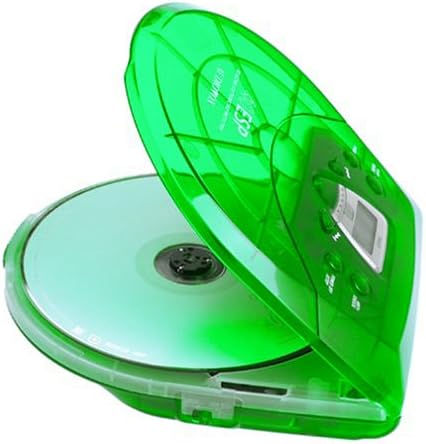
Image: The Audiovox CE-145G Personal CD Player with its translucent green lid open, revealing a compact disc placed inside the compartment.
2. Anti-Skip Protection (ESP)
The CE-145G features a 40-second Electronic Skip Protection (ESP) buffer. This system stores up to 40 seconds of audio data, allowing for uninterrupted playback even if the player experiences minor shocks or vibrations. This feature is automatically active during playback.
3. Programmable Memory (22 Tracks)
You can program up to 22 tracks to play in a specific order.
- Nínú ipò STOP, tẹ ETO button. The display will show "PROG" and "01".
- Lo awọn FOJU IWAJU or FO Sẹhin buttons to select the desired first track.
- Tẹ ETO again to confirm the track. The display will show "02".
- Repeat steps 2 and 3 to add up to 22 tracks to your program.
- After programming the last track, press ERE/SINMI to start playback of your programmed sequence.
- To clear the program, press the DURO bọtini lemeji.
4. Bass didn
To enhance the bass frequencies, locate the BASS didn switch (or button) on the unit and activate it. Deactivate it to return to standard audio output.
5. Duro Iṣẹ
Awọn DIMU switch prevents accidental button presses. Slide the DIMU switch to the "ON" position to disable all control buttons. Slide it to "OFF" to re-enable controls.
6. Auto Power-Off
To conserve battery life, the CD player will automatically power off after a period of inactivity (e.g., when a CD finishes playing and no buttons are pressed). To restart, press the ERE/SINMI bọtini.
Itoju
- Ninu Ẹka naa: Wipe the exterior of the player with a soft, damp asọ. Ma ṣe lo abrasive ose tabi epo.
- Cleaning the CD Lens: If playback issues occur due to a dirty lens, use a specialized CD lens cleaning kit. Do not touch the lens directly.
- Itọju CD: Mú àwọn CD náà ní etí wọn. Jẹ́ kí wọ́n mọ́ tónítóní, kí wọ́n má sì ní ìfọ́. Tọ́jú wọn sí àpò wọn nígbà tí wọn kò bá lò wọ́n.
- Itọju Batiri: Yọ awọn batiri kuro ti ẹyọ naa ko ba ni lo fun akoko ti o gbooro sii lati ṣe idiwọ jijo.
Laasigbotitusita
| Isoro | Owun to le Fa | Ojutu |
|---|---|---|
| Ko si agbara | Awọn batiri ti ku tabi ti fi sii ni aṣiṣe; Ohun ti nmu badọgba AC ko sopọ tabi aṣiṣe. | Replace batteries, check polarity, or ensure AC adapter is properly connected and functional. |
| CD skips or stops | CD is dirty or scratched; unit is subjected to excessive shock; lens is dirty. | Clean CD, use a different CD, avoid strong impacts, clean the CD lens. |
| Ko si ohun | Headphones not connected properly; volume too low; headphones faulty. | Ensure headphones are fully plugged in, increase volume, try different headphones. |
| Awọn bọtini ko dahun | Switi HOLD ti ṣiṣẹ. | Slide the HOLD switch to the "OFF" position. |
Awọn pato
- Awoṣe: CE-145G
- Brand: Audiovox
- Idaabobo Atako-Rekọja: 40 seconds (Electronic Skip Protection)
- Programmable Tracks: 22
- Orisun Agbara: 2 x AA batteries (not included) or optional AC/car adapter
- Ijade ohun: 3.5mm headphone jack, Line-out jack
- Awọn iwọn (Isunmọ): 11.8 x 8.3 x 2.6 inches (Awọn iwọn idii)
- Ìwọ̀n (Fún): 1.35 poun (Iwọn nkan)
- Àwọ̀: Translucent Green
Atilẹyin ọja ati Support
The Audiovox CE-145G Personal CD Player is backed by a 90-day parts-and-labor warranty lati ọjọ ti o ra. Jọwọ ṣe idaduro ẹri rira rẹ fun awọn iṣeduro atilẹyin ọja.
For technical support or warranty service, please refer to the contact information provided with your product packaging or visit the official Audiovox webojula.


