1. Ifihan
This manual provides essential instructions for the proper installation, operation, and maintenance of your Bogen Classic Series Amp C20. Please read this manual thoroughly before using the product to ensure safe and efficient performance. Retain this manual for future reference.
2. Alaye Aabo
IKILỌ: Ọja yii ni awọn kẹmika ti a mọ si Ipinle California lati fa aarun ati awọn abawọn ibimọ tabi ipalara ibisi miiran.
Always observe basic safety precautions when using electrical equipment to reduce the risk of fire, electric shock, and injury to persons.
- Ma ṣe fi ohun elo yii han si ojo tabi ọrinrin.
- Ma ṣe dina eyikeyi awọn ṣiṣi atẹgun. Fi sori ẹrọ ni ibamu pẹlu awọn ilana ti olupese.
- Maṣe fi sori ẹrọ nitosi awọn orisun ooru gẹgẹbi awọn imooru, awọn iforukọsilẹ ooru, awọn adiro, tabi awọn ohun elo miiran (pẹlu ampliifiers) ti o gbe ooru jade.
- Lo awọn asomọ/awọn ẹya ara ẹrọ ti olupese pato.
- Tọkasi gbogbo iṣẹ si awọn oṣiṣẹ iṣẹ ti o peye.
3. Ọja Ipariview
The Bogen Classic Series Amp C20 is a single-channel amplifier designed for various audio applications. It features robust construction and reliable performance.
3.1 Key Awọn ẹya ara ẹrọ
- Nikan-ikanni ampitanna
- Surface Mount design
- Iwọn titẹ siitage: 120 Folti
- Agbara Ijade: 20 Wattis
3.2 Package Awọn akoonu
Lẹhin ṣiṣi silẹ, rii daju pe awọn nkan wọnyi wa pẹlu:
- Àwọn Ẹ̀ka Àtijọ́ Bogen Amp C20
- Funnel
- Ilana Afowoyi (iwe yii)
3.3 Awọn iṣakoso Panel iwaju ati Awọn itọkasi

Image 1: Front panel of the Bogen Classic Series Amp C20. This image displays the MIC1, MIC2, AUX, and TREBLE control knobs, along with the POWER switch and the "Classic Series" branding.
- MIC1 Input Level Control: Adjusts the volume for Microphone Input 1.
- MIC2 Input Level Control: Adjusts the volume for Microphone Input 2.
- AUX Input Level Control: Adjusts the volume for the Auxiliary input.
- Iṣakoso TIREBLE: Adjusts the high-frequency response of the audio output.
- AGBARA AGBARA: Balu awọn ampagbára ìfọ́mọ́ra tí ń tan àti tí ń pa.
3.4 Ru Panel Awọn isopọ
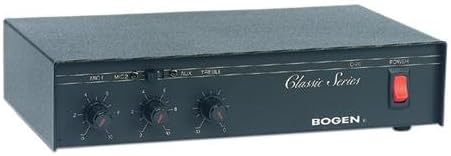
Image 2: Rear panel of the Bogen Classic Series Amp C20. This image shows the various input and output connections, including power input and speaker terminals.
The rear panel contains connections for power, microphone inputs, auxiliary inputs, and speaker outputs. Specific details on these connections are provided in the Setup section.
4. Eto ati fifi sori
4.1 Iṣagbesori
The Bogen Classic Series Amp C20 is designed for surface mounting. Ensure the mounting surface is stable and capable of supporting the unit's weight (approximately 4.5 pounds). Allow adequate ventilation around the unit to prevent overheating.
4.2 Itanna Asopọ
- Ensure the POWER switch on the front panel is in the OFF position.
- Connect the power cord to a standard 120 Volt AC outlet.
4.3 Audio Input Awọn isopọ
Connect your audio sources to the appropriate inputs on the rear panel:
- Awọn gbohungbohun: Connect microphones to the MIC1 and MIC2 input jacks.
- Àwọn Ẹ̀rọ Ìrànlọ́wọ́: Connect line-level audio sources (e.g., CD player, media player) to the AUX input jacks.
4.4 Agbọrọsọ o wu Awọn isopọ
Connect your speakers to the speaker output terminals on the rear panel. Ensure correct polarity (+ to + and - to -) for all speaker connections. Refer to your speaker's manual for impedance matching requirements.
5. Isẹ
5.1 Titan / Pa a
- Lati agbara lori awọn amplifier, press the POWER switch on the front panel to the ON position. The power indicator (if present) will illuminate.
- To power off, press the POWER switch to the OFF position.
5.2 Adjusting Input Levels
- Start with all input level controls (MIC1, MIC2, AUX) set to their minimum position.
- Begin playing audio from your desired source.
- Slowly increase the corresponding input level control until the desired volume is achieved.
- Adjust the TREBLE control to fine-tune the high-frequency response to your preference.
5.3 Gbogbogbo Awọn imọran Lilo
- Avoid setting volume levels too high, which can cause distortion and potentially damage speakers.
- Ensure all connections are secure before operating the amplifier.
6. Itọju
6.1 Ninu
Mu ese ode ti awọn amplifier with a soft, dry cloth. Do not use liquid cleaners or aerosol cleaners, as they may damage the finish or internal components.
6.2 Fentilesonu
Máa ṣàyẹ̀wò déédéé pé àwọn ihò afẹ́fẹ́ kò ní eruku àti ìdọ̀tí láti rí i dájú pé afẹ́fẹ́ afẹ́fẹ́ tó yẹ àti láti dènà ìgbóná jù.
6.3 Ṣiṣẹ
Ko si olumulo-iṣẹ awọn ẹya inu awọn amplifier. Tọkasi gbogbo iṣẹ si awọn oṣiṣẹ iṣẹ ti o peye.
7. Laasigbotitusita
If you experience issues with your Bogen Classic Series Amp C20, consult the following table before contacting support.
| Isoro | Owun to le Fa | Ojutu |
|---|---|---|
| Ko si ohun jade. |
|
|
| Ohun ti o daru. |
|
|
| Static or crackling from knobs. | Dust or oxidation on control potentiometers. | Consult qualified service personnel for cleaning or replacement of potentiometers. |
| Unit becomes excessively warm or emits odor. |
|
|
8. Awọn pato
| Ẹya ara ẹrọ | Ẹ̀kúnrẹ́rẹ́ |
|---|---|
| Brand | Bogen |
| Awoṣe | C20 |
| Nọmba Awoṣe Nkan | C20 |
| Olupese Apá Number | C20 |
| Awọn Iwọn Nkan (L x W x H) | 11.37 x 7.37 x 2.87 inches |
| Ọja Mefa | 11.37 x 7.37 x 2.87 inches |
| Iwọn Nkan | 4.5 iwon |
| Voltage | 120 Volts |
| Wattage | 50 watt |
| Agbara Ijade | 20 Wattis |
| Nọmba ti awọn ikanni | 1 |
| Iṣagbesori Iru | Oke Oke |
| Olupese | Bogen |
| UPC | 765368330250 |
| Ọjọ Akọkọ Wa | Oṣu Keje 16, Ọdun 2004 |
Akiyesi: Awọn alaye ni o wa labẹ iyipada laisi akiyesi.
9. Atilẹyin ọja ati Support
For warranty information and technical support, please refer to the official Bogen webojula tabi kan si wọn onibara iṣẹ Eka. Tọju iwe-ẹri rira rẹ bi ẹri rira fun awọn iṣeduro atilẹyin ọja.
Ibi iwifunni:
- Webojula: www.bogen.com (Placeholder, actual URL le yatọ)
- Iṣẹ onibara: Tọkasi awọn webAaye fun awọn alaye olubasọrọ agbegbe.


