1. Ifihan
The Extech EX310 is a compact, manual-ranging digital multimeter designed for a variety of electrical measurements. It features an extra-large 2000-count LCD and a built-in Non-Contact AC Voltage Detector (NCV) for enhanced safety. This device is capable of measuring AC/DC Voltage, AC/DC Current, Resistance, Diode, and Continuity, and includes a battery test function for 1.5V and 9V batteries. Its robust design, including a protective rubber holster and tilt stand, makes it suitable for field use.
2. Alaye Aabo
Máa tẹ̀lé àwọn ìlànà ààbò nígbà gbogbo nígbà tí o bá ń lo àwọn ohun èlò ìdánwò iná mànàmáná. Àìṣe bẹ́ẹ̀ lè fa ìpalára tàbí ìbàjẹ́ sí mita tàbí ohun èlò tí a ń dán wò.
- The Extech EX310 is UL listed with a CAT III – 600 Volt safety rating.
- Maṣe lo diẹ sii ju iwọn voltage, bi samisi lori mita, laarin awọn ebute tabi laarin eyikeyi ebute oko ati ilẹ.
- Always inspect test leads for damage before use. Replace if insulation is compromised.
- Ṣọra pupọ nigbati o ba n ṣiṣẹ pẹlu awọn iyika laaye.
- Use the Non-Contact Voltage (NCV) detector as a preliminary check for live AC voltage, but always verify with direct contact measurements when possible.
- Rí i dájú pé a ti ṣètò ìyípadà iṣẹ́ sí ibi tí ó yẹ kí o tó ṣe àwọn ìwọ̀n.
3. Awọn ẹya Ọja
- 9-Function Manual-Ranging DMM: Awọn iwọn AC/DC voltage, AC/DC current (up to 10 A), resistance, diode, continuity, plus 1.5 V/9 V battery tests.
- Non-Olubasọrọ Voltage (NCV) Detector: Built-in NCV with red LED and audible beeper alerts to the presence of live AC (100-600 VAC) without probes.
- Extra-Large 2000-Count Display: Clear, easy-to-read 1-inch digits on a high-count LCD ensure readability.
- Rugged, Portable Design: Compact meter (5.7 × 2.9 × 1.6 in, 9 oz) with protective rubber holster, tilt stand, and low-battery indicator.
- Reliable Safety & Accuracy: 0.5% basic accuracy. Designed to UL/CAT II-1000 V & CAT III-600 V safety standards.
4. Package Awọn akoonu
The Extech EX310 package includes the following items:
- Extech EX310 Mini Digital Multimeter
- Awọn itọsọna Idanwo
- 9 folti Batiri
- Titẹ Iduro
5. Ọja Ipariview (Controls and Display)
Familiarize yourself with the components of your EX310 multimeter:

Aworan: Iwaju view of the Extech EX310 Mini Digital Multimeter, showing the large LCD display, function dial, NCV button, and input jacks.
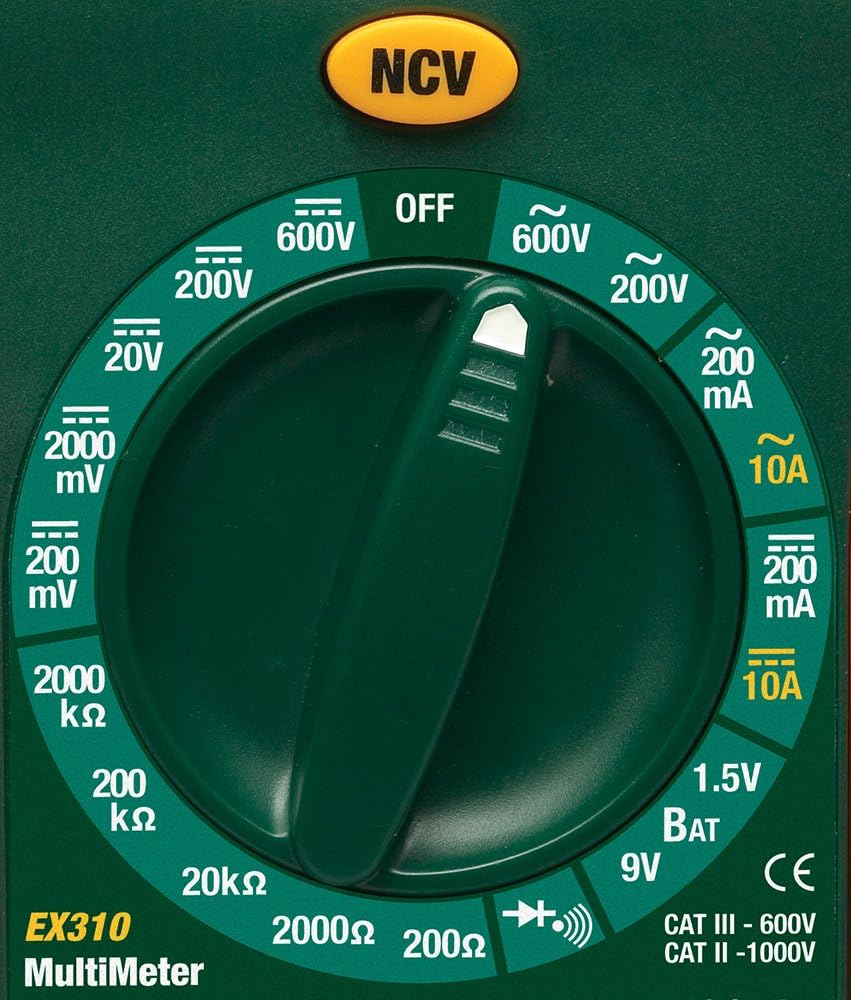
Image: Close-up of the Extech EX310's function dial, illustrating the various measurement ranges and functions such as voltage, current, resistance, diode, continuity, and battery test.
- Ifihan LCD: Ṣe afihan awọn kika wiwọn, awọn ẹya, ati awọn afihan iṣẹ.
- Yipada iṣẹ: Rotary dial to select the desired measurement function and range.
- Bọtini NCV: Activates the Non-Contact Voltage erin ẹya-ara.
- Awọn Jacks ti nwọle: Àwọn ibùdó fún sísopọ̀ àwọn ìtọ́sọ́nà ìdánwò (COM, VΩmA, 10A).
6. Eto
6.1. Fifi sori batiri
- Rii daju pe multimeter ti wa ni pipa.
- Wa ideri ibi ipamọ batiri naa ni ẹhin mita naa.
- Tú àwọn skru tí ó wà ní ìpamọ́ náà kí o sì yọ ìbòrí náà kúrò.
- Fi batiri 9V tuntun sii, ki o si kiyesi polarity ti o tọ.
- Replace the cover and secure with the screw(s).
Àmì batiri tí kò tó nǹkan yóò hàn lórí ìbòjú nígbà tí batiri náà bá nílò àyípadà.
6.2. Nsopọ Awọn itọsọna Igbeyewo
So awọn itọsọna idanwo pọ mọ awọn jacks titẹ sii ti o yẹ:
- Fi dudu igbeyewo asiwaju sinu COM (wọpọ) jack.
- Fun ọpọlọpọ awọn wiwọn (Iwọn didun)tage, Resistance, Diode, Continuity, mA Current), insert the red test lead into the VΩmA jaki.
- For high current measurements (up to 10A), insert the red test lead into the 10A jaki.
7. Awọn ilana Iṣiṣẹ
Before making any measurement, ensure the test leads are correctly connected and the function switch is set to the desired range.
7.1. AC / DC Voltage Idiwon
- Set the function switch to the desired ACV (~) or DCV (---) range (e.g., 200V, 600V).
- So okun idanwo pupa naa mọ jaketi VΩmA ati okun idanwo dudu naa mọ jaketi COM.
- Touch the test probes to the circuit points where voltage ni ki won won.
- Ka voltage iye lori LCD.
7.2. AC / DC Iwọn Iwọn lọwọlọwọ
Iṣọra: Never attempt to measure current on a circuit with voltage present across the current terminals. This can blow the fuse or damage the meter.
- Pa agbara si Circuit.
- Set the function switch to the desired ACA (~) or DCA (---) range (e.g., 200mA, 10A).
- Connect the red test lead to the appropriate current jack (VΩmA for mA, 10A for 10A) and the black test lead to the COM jack.
- Open the circuit where current is to be measured and connect the meter in series.
- Apply power to the circuit and read the current value on the LCD.
7.3. Resistance Wiwọn
- Rí i dájú pé agbára ìṣiṣẹ́ tàbí ohun èlò náà kò pọ̀.
- Set the function switch to the desired Resistance (Ω) range (e.g., 200Ω, 20kΩ).
- So okun idanwo pupa naa mọ jaketi VΩmA ati okun idanwo dudu naa mọ jaketi COM.
- Fọwọ́ kan àwọn ohun ìdánwò tí ó wà ní gbogbo ẹ̀ka tàbí àyíká tí a fẹ́ wọ̀n.
- Ka iye resistance lori LCD naa.

Image: The Extech EX310 Multimeter displaying a reading while test leads are connected to a circuit board, demonstrating a typical measurement scenario.
7.4. Diode igbeyewo
- Ensure the component is de-energized.
- Set the function switch to the Diode (→|) position.
- So okun idanwo pupa naa mọ jaketi VΩmA ati okun idanwo dudu naa mọ jaketi COM.
- Touch the red probe to the anode and the black probe to the cathode of the diode.
- Ka siwaju voltage drop on the LCD. Reverse the probes to check for an open circuit (OL).
7.5. Igbeyewo Ilọsiwaju
- Rí i dájú pé agbára ìṣiṣẹ́ tàbí ohun èlò náà kò pọ̀.
- Set the function switch to the Continuity (→))) position.
- So okun idanwo pupa naa mọ jaketi VΩmA ati okun idanwo dudu naa mọ jaketi COM.
- Fọwọ́ kan àwọn ìwádìí ìdánwò ní gbogbo àyíká tàbí ẹ̀yà ara.
- An audible tone will sound if continuity exists (resistance below approximately 30Ω).

Aworan: A sunmọ-soke view of the Extech EX310 Multimeter with its test leads connected to an internal electronic circuit, demonstrating precise measurement capabilities.
7.6. Non-olubasọrọ Voltage (NCV) erin
- Ṣeto iyipada iṣẹ si eyikeyi ipo.
- Press and hold the NCV button.
- Move the top of the meter (where the NCV sensor is located) close to the suspected AC voltage source (e.g., wire, outlet).
- A red LED will illuminate and an audible beeper will sound, increasing in intensity as the meter gets closer to the live AC voltage.

Image: A hand holding the Extech EX310 Multimeter near an electrical wall outlet, demonstrating the use of the Non-Contact Voltage (NCV) detection feature to identify live circuits.
7.7. Battery Test (1.5V/9V)
- Set the function switch to the 1.5V BAT or 9V BAT position.
- So okun idanwo pupa naa mọ jaketi VΩmA ati okun idanwo dudu naa mọ jaketi COM.
- Touch the red probe to the positive terminal and the black probe to the negative terminal of the battery.
- Ka batiri voltage lori LCD.
8. Itọju
8.1. Batiri Rirọpo
Refer to Section 6.1 for detailed instructions on replacing the 9V battery when the low battery indicator appears.
8.2. Rirọpo fiusi
If the current measurement functions cease to operate, the internal fuse(s) may need replacement. The fuses are typically located beneath the battery compartment. Refer to the full product manual for specific fuse ratings and replacement procedures. Always replace with fuses of the identical type and rating.
8.3. Ninu
Lokọọkan nu ọran naa pẹlu ipolowoamp asọ ati ìwọnba detergent. Maṣe lo awọn abrasives tabi awọn nkan ti o nfo. Rii daju pe mita naa ti gbẹ patapata ṣaaju lilo.
9. Laasigbotitusita
- Ko si Ifihan: Check the 9V battery. Ensure it is correctly installed and has sufficient charge.
- Awọn kika ti ko tọ: Verify that the function switch is set to the correct measurement type and range. Ensure test leads are properly connected and making good contact with the circuit.
- Wiwọn lọwọlọwọ Ko Ṣiṣẹ: Check the internal fuse(s). Refer to the Maintenance section for fuse replacement.
- A ko ri NCV: Ensure the NCV button is pressed and held. Confirm the presence of AC voltage (100-600 VAC) in the area being tested.
10. Awọn pato
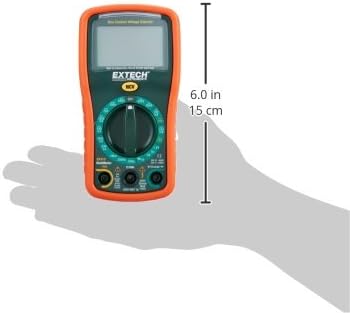
Image: Diagram illustrating the physical dimensions of the Extech EX310 Multimeter, showing a length of 6.0 inches (15 cm).
| Sipesifikesonu | Iye |
|---|---|
| Brand | Extech |
| Nọmba awoṣe | EX310 |
| Orisi wiwọn | Multimeter |
| Ara | Ilana Afowoyi |
| Ipilẹ Yiye | +/- 0.5% |
| Ifihan | 2000-Count LCD |
| Aabo Rating | UL listed CAT III - 600V, CAT II - 1000V |
| Orisun agbara | 9V batiri |
| Awọn Iwọn Nkan (L x W x H) | 5.7 x 1.6 x 2.9 inches (14.5 x 4.1 x 7.4 cm) |
| Iwọn Nkan | 0.704 iwon (0.02 kilo) |
| Awọn irinše to wa | Test leads, 9 Volt battery, tilt stand |
11. atilẹyin ọja Information
The Extech EX310 Mini Digital Multimeter is covered by a Awọn ẹya ọdun 1 ati atilẹyin ọja iṣẹ from the date of purchase. Please retain your proof of purchase for warranty claims. This warranty covers manufacturing defects and workmanship under normal use.
12. Onibara Support
For technical assistance, troubleshooting beyond this manual, or warranty service, please contact Extech customer support. Refer to the official Extech webaaye tabi apoti ọja fun alaye olubasọrọ lọwọlọwọ julọ.


