1. Ifihan
The APC Back-UPS BE550G is a 550VA battery backup power supply designed to provide guaranteed power and surge protection for electronic devices. This unit safeguards wireless networks, computers, gaming consoles, and other sensitive electronics against power outages, unsafe voltage fluctuations, and damaging power surges or spikes. It ensures data protection and continuous connectivity during electrical disturbances.

Image 1.1: The APC Back-UPS BE550G unit, a compact black device with multiple outlets on top.
2. Alaye Aabo
Please read and understand these safety instructions before installing or operating the APC Back-UPS BE550G. Failure to follow these instructions may result in electric shock, fire, or serious injury.
- Aabo Itanna: Connect the UPS to a grounded AC power outlet only. Do not remove the grounding prong. Do not use extension cords or adapters.
- Aabo Batiri: The battery contains hazardous chemicals. Do not open or mutilate the battery. Dispose of batteries properly according to local regulations. Replace the battery only with the specified APC replacement battery (APCRBC110).
- Ayika: Operate the UPS indoors in a well-ventilated area, free from excessive dust, corrosive fumes, and conductive contaminants. Avoid placing the unit near heat sources or in direct sunlight.
- Ifihan Olomi: Do not allow liquids to come into contact with the UPS.
- Ṣiṣẹ: Refer all servicing to qualified service personnel. There are no user-serviceable parts inside except for the battery.
3. Awọn ilana iṣeto
3.1 Unpacking and Initial Battery Connection
- Carefully unpack the UPS and inspect it for any shipping damage.
- Connect the internal battery. The UPS is shipped with the battery disconnected for safety. Refer to the battery compartment instructions for proper connection.
- Place the UPS in a suitable location, ensuring adequate ventilation. The unit can be wall-mounted if desired.
3.2 Ngba agbara si Batiri naa
Before connecting any loads, plug the UPS into a standard wall outlet using its 5-foot power cord (NEMA 5-15P, right-angle 3-prong plug). Allow the unit to charge for at least 24 hours to ensure full battery capacity. The UPS will be ready for use after this initial charge period.

Aworan 3.1: Apa view of the APC Back-UPS BE550G showing the integrated power cord.
3.3 Ohun elo Nsopọ
The UPS features 8 NEMA 5-15R outlets. These are divided into two types:
- 4 Battery Backup & Surge Protector Outlets: Connect critical equipment such as your computer, monitor, external hard drives, and network router to these outlets. These devices will receive power from the battery during an outage.
- 4 Surge Protection Only Outlets: Connect non-critical equipment like printers, scanners, or speakers to these outlets. These devices will be protected from surges but will not receive battery power during an outage.
Ensure that the total power draw of connected devices does not exceed the UPS's capacity (550VA / 330W).
3.4 Dataline Protection
The UPS includes surge protection for Ethernet dataline ports (RJ45 10/100 ports). Connect your network cable from the wall outlet to the "Network In" port on the UPS, and then connect a second network cable from the "Network Out" port to your computer or network device. This protects your network connection from surges.
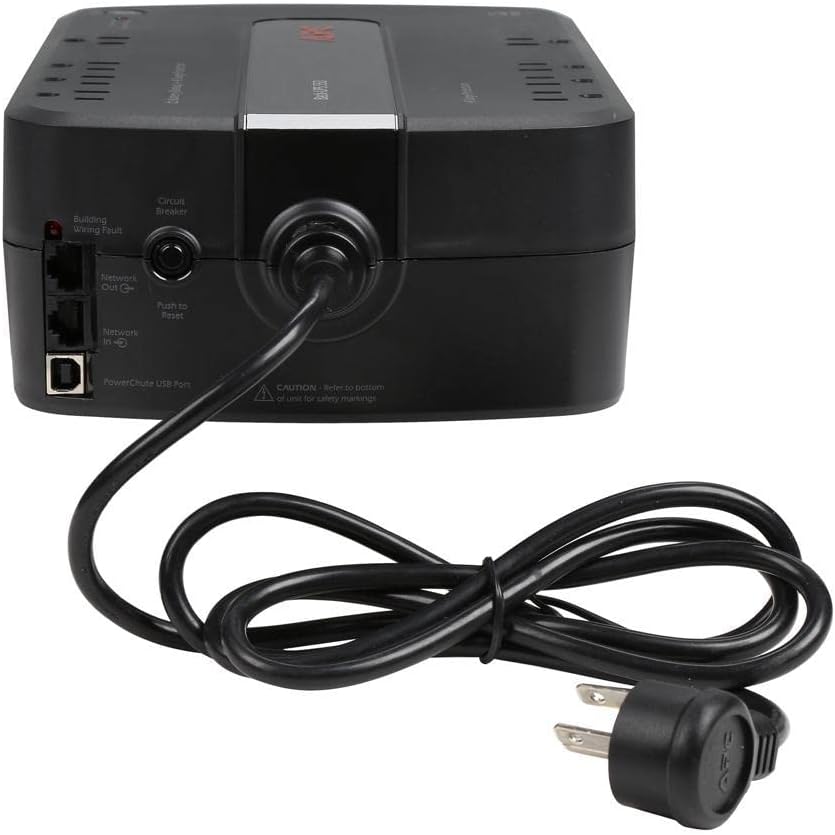
Image 3.2: Rear panel of the APC Back-UPS BE550G, highlighting the PowerChute USB Port, Network In/Out ports, and Circuit Breaker.
3.5 PowerChute Software Installation
For advanced management and automatic shutdown features, install the PowerChute UPS management software. Connect the UPS to your computer using the provided USB cable via the dedicated data port. PowerChute is compatible with Windows 10 (22H2 Pro), Windows 11 Pro, and other supported operating systems. For Mac OS, utilize the native "Energy Saver" settings for UPS management.
4. Awọn ilana Iṣiṣẹ
4.1 Titan-an / Pa Soke
- Lati Tan: Press the power button located on the top of the unit. The power indicator will illuminate.
- Lati Pa: Press and hold the power button until the power indicator turns off.
4.2 Understanding Indicators and Alarms
The UPS provides visual and audible indicators to communicate its status:
- Agbara Lori Atọka: A green LED indicates the unit is powered on and operating.
- Lórí Àmì Bátírì: A flashing green LED typically indicates the UPS is operating on battery power.
- Àmì Àṣìṣe Wáyà Ilé: A red LED on the rear panel indicates a wiring problem in the building's electrical system (e.g., missing ground).
- Awọn itaniji Ngbohun: The UPS emits various beeping patterns to signal events such as on-battery operation, low battery, or overload. Refer to the full manual for specific alarm patterns. These alarms can often be configured or muted via the PowerChute software.
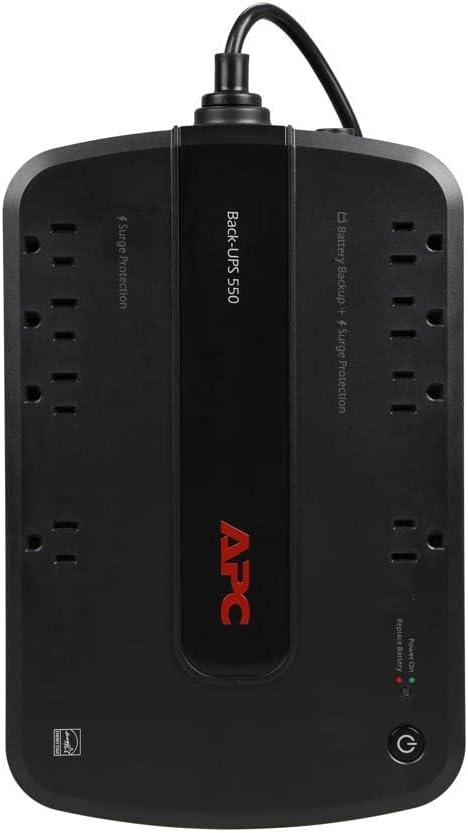
Aworan 4.1: Oke view of the APC Back-UPS BE550G, showing the power button, status indicators, and the arrangement of battery backup and surge-only outlets.
4.3 Okun gbigba agbara USB
The UPS includes a USB-A charging port that can provide power to charge mobile devices. This port functions whether the UPS is operating on utility power or battery power.
5. Itọju
5.1 Batiri Rirọpo
The internal battery is a user-replaceable component. When the battery reaches the end of its service life, the UPS will typically indicate this through an alarm or indicator light. The replacement battery model is APCRBC110 (sold separately). Follow the instructions provided with the replacement battery for safe and proper installation. Battery replacement is a tool-less process.
Battery lifespan can vary, but typically ranges from 3-5 years under normal operating conditions. Factors such as frequent power outages and high load can affect battery longevity.
5.2 Ninu
Periodically clean the exterior of the UPS with a dry cloth. Ensure ventilation openings are free from dust and debris to maintain proper airflow.
6. Laasigbotitusita
This section addresses common issues you might encounter with your APC Back-UPS BE550G.
- UPS does not turn on: Ensure the power cord is securely plugged into a wall outlet and the UPS. Verify the internal battery is properly connected.
- UPS beeps continuously or frequently: This often indicates the UPS is operating on battery power, the battery is low, or an overload condition. Check the power source and reduce the load if necessary.
- Building Wiring Fault indicator is lit: This indicates a problem with your building's electrical wiring, such as a missing ground. Consult a qualified electrician to resolve this issue. The UPS will still provide surge protection and battery backup, but optimal protection requires proper grounding.
- Connected equipment does not receive power: Ensure equipment is plugged into the correct outlets (battery backup outlets for continuous power). Check the circuit breaker on the rear of the UPS and press to reset if tripped.
- Short battery runtime: The battery may not be fully charged (allow 24 hours for initial charge). The battery may be nearing the end of its service life and require replacement. The connected load might exceed the UPS's capacity.
- Compatibility with specific devices (e.g., pellet stoves, medical equipment): This unit provides a stepped approximation to a sine wave output when on battery power. Some sensitive electronics, particularly those with active power factor correction or certain motor-driven devices, may require a pure sine wave UPS. Verify compatibility with your device manufacturer if issues arise.
6.1 Circuit Breaker Reset
If the UPS experiences an overload, the circuit breaker on the rear panel may trip. To reset, disconnect some non-essential equipment, then press the "Push to Reset" button on the circuit breaker.
7. Awọn pato
| Ẹya ara ẹrọ | Sipesifikesonu |
|---|---|
| Nọmba awoṣe | BE550G |
| Agbara | 550VA / 330W |
| Iṣagbewọle Voltage | 120 Volts |
| Awọn iÿë | 8 NEMA 5-15R (4 Battery Backup & Surge, 4 Surge Only) |
| Dataline Protection | RJ45 10/100 Ethernet ports |
| Okun agbara | 5' (NEMA 5-15P, right-angle) |
| Batiri Iru | Sealed Lead Acid (1 required, included) |
| Batiri Rirọpo | APCRBC110 (sold separately) |
| Awọn iwọn Ọja (D x W x H) | 7" x 12" x 3.3" (17.78 cm x 30.48 cm x 8.38 cm) |
| Iwọn Nkan | 13 poun (5.9 kg) |

Image 7.1: Diagram illustrating the dimensions of the APC Back-UPS BE550G unit.
8. Atilẹyin ọja ati Support
APC products are backed by a limited warranty. For specific warranty terms and conditions applicable to your region, please refer to the warranty card included with your product or visit the official APC webojula. Jeki ẹri rira rẹ fun awọn iṣeduro atilẹyin ọja.
For technical support, troubleshooting assistance, or to inquire about replacement parts, please visit the official APC support website or contact APC customer service. Contact information can typically be found on the APC webaaye tabi ni apoti ọja.


