Ọrọ Iṣaaju
This manual provides detailed instructions for the proper use and maintenance of your Royal DM2070 Electronic Organizer. Please read this manual thoroughly before operating the device to ensure safe and efficient use. Keep this manual for future reference.
Alaye Aabo
- Ma ṣe fi ẹrọ naa han si awọn iwọn otutu to gaju, imọlẹ orun taara, tabi ọriniinitutu giga.
- Yago fun sisọ ẹrọ naa silẹ tabi fifisilẹ si awọn ipa to lagbara.
- Ma ṣe gbiyanju lati tunto tabi tun ẹrọ naa funrararẹ. Tọkasi gbogbo iṣẹ si oṣiṣẹ oṣiṣẹ.
- Jeki ẹrọ naa kuro ninu omi ati awọn olomi miiran.
- Use only the specified battery type for replacement.
Package Awọn akoonu
Daju pe gbogbo awọn nkan wa ninu apo rẹ:
- Royal DM2070 Electronic Organizer
- Stylus (if applicable)
- Quick Bẹrẹ Itọsọna
- Kaadi atilẹyin ọja
Ṣeto
1. Fifi sori batiri
The Royal DM2070 requires batteries for operation. Follow these steps to install them:
- Wa ideri iyẹwu batiri ni ẹhin ẹrọ naa.
- Gbe tabi gbe ideri soke lati ṣii yara naa.
- Insert the required batteries, ensuring correct polarity (+ and -) as indicated inside the compartment.
- Rọpo ideri iyẹwu batiri ni aabo.
2. Ibẹrẹ Agbara-On ati Eto
After installing batteries, power on your device and configure basic settings:
- Tẹ mọlẹ AGBARA bọtini titi iboju illuminates.
- The device may prompt you to set the date and time. Use the navigation buttons or stylus to enter the correct information.
- Jẹrisi awọn eto rẹ lati pari iṣeto akọkọ.
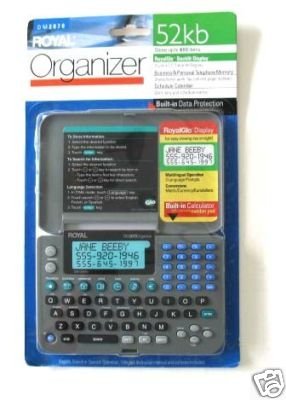
Image: Royal DM2070 Electronic Organizer. This image displays the device's front view, highlighting its screen and keypad, essential for navigation and data entry.
Awọn ilana Iṣiṣẹ
1. Lilọ kiri
The DM2070 features a keypad and potentially a stylus for navigation. Use the arrow keys to move between menu options and press WOLE or a designated selection button to confirm.
2. Entering Data
To enter information such as contacts, appointments, or notes:
- Navigate to the desired application (e.g., 'Contacts', 'Calendar', 'Notes').
- Select 'New Entry' or a similar option.
- Use the alphanumeric keypad to input text. Some models may offer an on-screen keyboard via stylus.
- Save your entry before exiting the application.
3. Using Applications
The DM2070 includes various applications:
- Kalẹnda: View daily, weekly, or monthly schedules. Add and edit appointments.
- Awọn olubasọrọ: Store names, phone numbers, addresses, and email information.
- Awọn akọsilẹ: Create and manage text notes or memos.
- Ẹrọ iṣiro: Ṣe awọn iṣiro iṣiro ipilẹ.
- Iyipada owo: Convert between different currencies (requires manual update of exchange rates on some models).
Itoju
1. Ninu ẹrọ
To keep your DM2070 in optimal condition:
- Pa iboju ati casing pẹ̀lú aṣọ rírọ̀, gbígbẹ, tí kò ní àwọ̀.
- Fun awọn ami alagidi, die-die dampfi omi bo aṣọ náà; yẹra fún àwọn kẹ́míkà líle tàbí àwọn ohun ìfọmọ́ tí ó ń pa aṣọ náà.
- Ensure no moisture enters openings.
2. Itọju batiri
- Rọpo awọn batiri ni kiakia nigbati atọka batiri kekere ba han.
- Yọ awọn batiri kuro ti ẹrọ naa ko ba ni lo fun igba pipẹ lati ṣe idiwọ jijo.
Laasigbotitusita
If you encounter issues with your Royal DM2070, refer to the following common solutions:
| Isoro | Owun to le Fa | Ojutu |
|---|---|---|
| Ẹrọ naa ko ṣiṣẹ. | Awọn batiri ti o ku tabi ti ko tọ ti fi sori ẹrọ. | Rọpo awọn batiri pẹlu awọn tuntun, ni idaniloju polarity ti o pe. |
| Iboju ti ṣofo tabi aotoju. | glitch software tabi kekere batiri. | Try a soft reset (refer to Quick Start Guide for specific button combination) or replace batteries. |
| Data loss. | Battery depletion or improper shutdown. | Ensure batteries are fresh. Always save data before powering off. |
| Bọ́ọ́pù kò dáhùn. | Dust/debris under keys or internal issue. | Clean keypad gently. If problem persists, contact support. |
Awọn pato
Key technical specifications for the Royal DM2070 Electronic Organizer:
| Ẹya ara ẹrọ | Ẹ̀kúnrẹ́rẹ́ |
|---|---|
| Brand | ROYAL |
| Nọmba awoṣe | DM2070 |
| Ohun elo Ideri | Alawọ |
| Ọna kika | Ọganaisa |
| Iwọn Nkan | 181 g |
| Awọn iwọn Nkan (LxWxH) | 24.4 x 14.5 x 1 centimeters |
| Awọn olugbo afojusun | Agbalagba |
Atilẹyin ọja ati Support
The Royal DM2070 Electronic Organizer comes with a standard manufacturer's warranty. Please refer to the warranty card included in your package for specific terms and conditions. For technical support, service, or inquiries, please contact Royal customer service through the contact information provided on the warranty card or the official Royal webojula.