Ọrọ Iṣaaju
Thank you for choosing the Cherub WST-550G Guitar Mate Clip-On Tuner. This device is designed to provide accurate and easy tuning for your guitar. Its compact size and clip-on design make it convenient for use in various environments, including noisy settings.
Ọja Awọn ẹya ara ẹrọ
- Sensọ gbigbọn: Allows for accurate tuning even in noisy environments by detecting vibrations directly from the instrument.
- Auto-Detect Function: Automatically identifies the note name being played.
- Easy-to-Read LEDs: Clear LED indicators show whether the note is flat, sharp, or in tune.
- Ẹya-pipa Aifọwọyi: Extends battery life by automatically turning off the tuner after 5 minutes of inactivity.
- 180-Degree Clip-On Design: The tuner can be rotated for optimal viewlati eyikeyi igun.
Package Awọn akoonu
The Cherub WST-550G package includes:
- Cherub WST-550G Clip-On Tuner
- Batiri Litiumu CR2032 (ti a ti fi sori ẹrọ tẹlẹ)
- Afowoyi Olumulo (iwe-ipamọ yii)

Image: The Cherub WST-550G tuner shown with its original packaging, highlighting the product's presentation.
Ṣeto
1. Síso Atunṣe náà pọ̀ mọ́ra
- Gently open the clip of the WST-550G tuner.
- Attach the tuner securely to the headstock of your guitar. Ensure the clip has a firm grip without damaging the instrument's finish.
- Adjust the tuner's display angle for optimal visibility. The 180-degree rotatable clip allows for flexible positioning.

Image: The Cherub WST-550G tuner attached to the headstock of a guitar, demonstrating its clip-on functionality.
2. Agbara lori / Paa
- Locate the power switch on the side of the tuner.
- Slide the switch to the "ON" position to power on the device.
- To power off, slide the switch to the "OFF" position. The tuner will also automatically power off after 5 minutes of no input to conserve battery life.
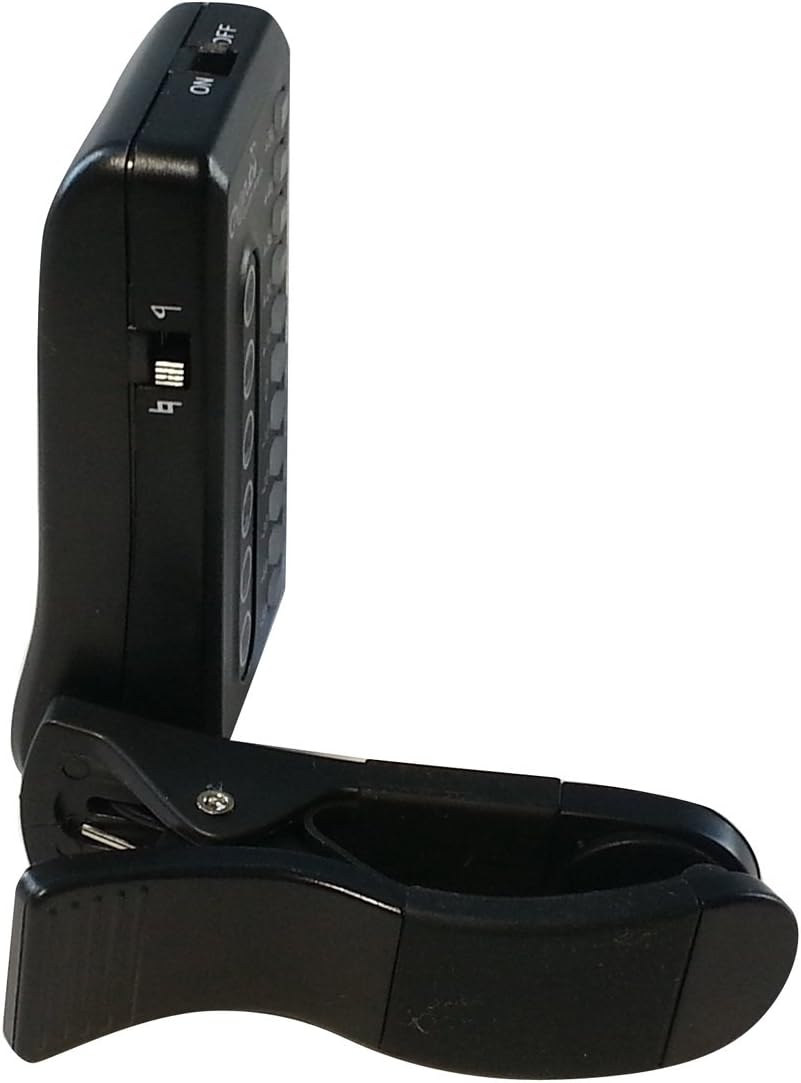
Aworan: A ẹgbẹ view of the Cherub WST-550G tuner, clearly showing the power ON/OFF switch for operation.
Awọn ilana Iṣiṣẹ
Ṣiṣatunṣe gita rẹ
The WST-550G uses a vibration sensor to detect the pitch of your guitar strings. This ensures accurate tuning even in noisy environments.
- Ensure the tuner is securely clipped to the headstock and powered on.
- Pluck a single string on your guitar. The tuner's display will show the detected note name (e.g., E, A, D, G, B, E for standard guitar tuning).
- Akiyesi awọn ifihan LED:
- If the LED is to the osi of the center (e.g., -10, -20), the note is alapin. Tighten the string until the LED moves towards the center.
- If the LED is to the ọtun of the center (e.g., +10, +20), the note is didasilẹ. Loosen the string until the LED moves towards the center.
- When the LED is at the aarin (0) and turns alawọ ewe, the string is in tune.
- Repeat this process for all strings until your guitar is perfectly in tune.

Image: The Cherub WST-550G tuner's display with a red LED illuminated, indicating that the current note is out of tune and requires adjustment.

Aworan: A ko o iwaju view of the Cherub WST-550G tuner, showing its LED display and the clip mechanism.
Itoju
- Ninu: Use a soft, dry cloth to clean the tuner. Avoid using abrasive cleaners or solvents.
- Ibi ipamọ: When not in use for extended periods, store the tuner in a cool, dry place. Remove the battery if storing for several months to prevent leakage.
- Mimu: Avoid dropping the tuner or exposing it to extreme temperatures or moisture.
Batiri Rirọpo
The WST-550G tuner is powered by one CR2032 Lithium battery. When the display becomes dim or the tuner does not respond, it's time to replace the battery.
- Wa ibi ipamọ batiri naa ni ẹhin atunto naa.
- Gently slide open the battery tray.
- Yọ batiri CR2032 atijọ kuro.
- Fi batiri CR2032 tuntun sii pẹlu apa rere (+) ti o kọju si oke.
- Slide the battery tray back into the compartment until it clicks securely into place.

Aworan: The ru view of the Cherub WST-550G tuner with the battery compartment open, revealing a CR2032 coin cell battery being inserted or removed.
Laasigbotitusita
| Isoro | Owun to le Fa | Ojutu |
|---|---|---|
| Tuner ko ni agbara lori. | Battery is depleted or incorrectly installed. | Replace the CR2032 battery or ensure it is installed with the correct polarity (+ side up). |
| Tuner does not detect vibrations or notes. | Tuner is not securely clipped to the headstock; instrument is not vibrating sufficiently; tuner malfunction. | Ensure the tuner is firmly clipped to the headstock. Pluck the string more assertively. If the issue persists after checking the battery and attachment, contact support. |
| Awọn kika kika ti ko pe. | External noise interference; loose tuner clip; faulty unit. | Ensure the tuner is securely attached. The vibration sensor is designed for noisy environments, but extreme noise might still affect it. Try tuning in a quieter area. If the problem continues, consider contacting support. |
Awọn pato
| Nọmba awoṣe | WST-550G |
| Tuning Range | A0 (27.5Hz) - C8 (4186Hz) |
| Ipo Atunse | Gbigbọn (Agekuru) |
| Yiyi Yiyi | Cent 1 senti |
| Agbara | 1 x CR2032 Lithium Battery (3V) |
| Awọn iwọn | 10.16 x 2.79 x 15.24 cm (Ọja) |
| Iwọn | 45.3 g |
| Idojukọ Aifọwọyi | After 5 minutes of no signal detection |
| Olupese | Kerubu |
| Ilu isenbale | China |
Atilẹyin ọja ati Support
For warranty information or technical support regarding your Cherub WST-550G tuner, please refer to the warranty card included with your purchase or visit the official Cherub webAaye ayelujara. Awọn alaye olubasọrọ fun iṣẹ alabara maa n wa lori apoti ọja tabi ti olupese webojula.


