Ọrọ Iṣaaju
Thank you for choosing the Rhythm Clocks Nostalgia Legend Model 4MH832WB06. This unique wall clock combines elegant design with musical features and animated elements to enhance your living space. This manual provides essential information for the proper setup, operation, maintenance, and troubleshooting of your clock.
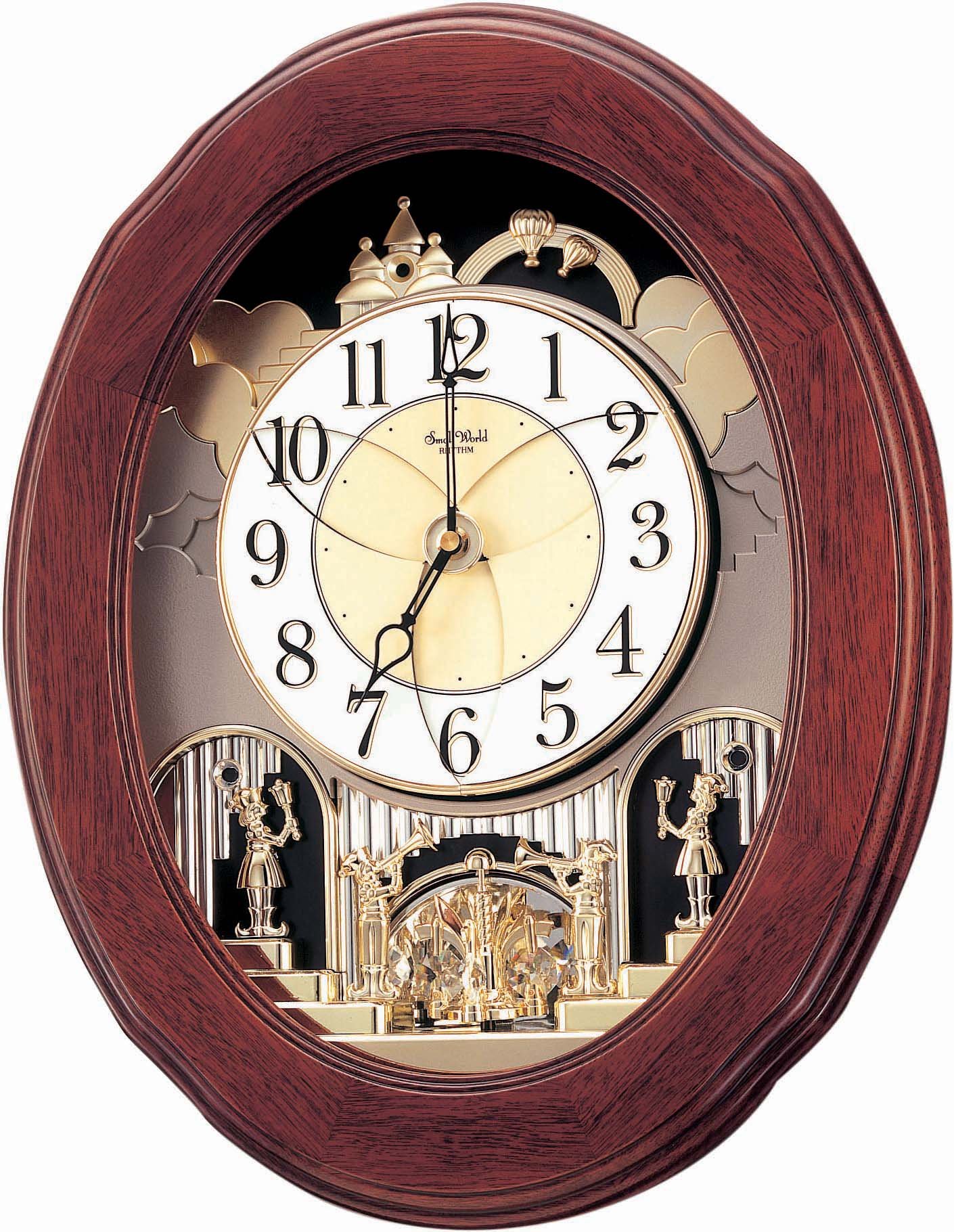
Image: The Rhythm Clocks Nostalgia Legend Model 4MH832WB06. This oval-shaped wall clock features a rich walnut-colored wooden frame. The clock face reveals an intricate mechanism with golden bells arranged in a star pattern at the center, surrounded by rotating elements displaying musical notes and numbers. Below the main clock face, a decorative scene with figures and a Swarovski crystal pendulum is visible.
Ṣeto
- Ṣii silẹ: Carefully remove the clock from its packaging. Retain all packaging materials for future transport or storage.
- Fifi sori batiri:
Locate the battery compartment on the back of the clock. Insert two (2) 'D' size batteries, ensuring correct polarity (+/-). Use new, high-quality alkaline batteries for optimal performance.
- Eto akoko:
Turn the time setting knob, usually located on the back or side of the clock, to set the correct time. Do not move the clock hands manually.
- Ibi:
Hang the clock securely on a wall using a sturdy hook or screw. Ensure the clock is level to allow the pendulum and internal mechanisms to function correctly. Avoid direct sunlight or areas with extreme temperature fluctuations.
Awọn ilana Iṣiṣẹ
Orin Awọn ẹya ara ẹrọ
- Aṣayan Aladun: The clock plays 18 melodies, divided into 3 groups of six songs each. A switch on the side of the clock allows you to select the desired song group.
- Magic Motion: On the hour, the clock face will open to reveal musical notes and the internal mechanism will animate while a melody plays.
- Iṣakoso iwọn didun: Adjust the volume of the melodies using the volume control knob, typically located on the side or back of the clock.
- Tan/Pa Yipada: Use the On/Off switch to enable or disable the musical and motion features.
- Sensọ Alẹ Aifọwọyi: The clock is equipped with an automatic night sensor. It will automatically stop playing melodies and performing its motion sequence in the dark to ensure quiet during nighttime hours.
- "Play Now" Demonstration Button: Press this button to hear a demonstration of the current melody selection and observe the magic motion feature.
Itoju
- Ninu: Wipe the clock's wooden case and plastic face with a soft, dry cloth. Do not use abrasive cleaners, solvents, or chemical sprays, as these can damage the finish and internal components.
- Rirọpo Batiri: Replace batteries annually or when the clock's performance (e.g., melody volume, motion) diminishes. Remove old batteries promptly to prevent leakage.
- Ayika: Keep the clock away from extreme temperatures, high humidity, and direct sunlight to prevent damage to the wood and internal mechanisms.
Laasigbotitusita
- Clock Not Functioning:
Ensure batteries are inserted correctly with the proper polarity. Replace old batteries with new ones. Check if the On/Off switch is in the "On" position.
- Melodies Not Playing:
Verify the On/Off switch is "On". Check the volume control. Ensure the room is not dark, as the night sensor will prevent melodies from playing. Replace batteries if they are low.
- Motion Feature Not Working:
Similar to melodies, check the On/Off switch, battery level, and ensure the room is not dark. The motion is linked to the musical function.
- Incorrect Time Keeping:
Replace batteries. If the issue persists, the clock may require professional servicing.
Awọn pato
| Brand | RHYTHM |
| Nọmba awoṣe | 4MH832WB06 |
| Awọn iwọn (H x W x D) | 20.7 ni x 16.5 ni x 4.05 ninu (52.58 cm x 41.91 cm x 10.29 cm) |
| Iwọn Nkan | 5.56 kg (12.26 lbs) |
| Ifihan Iru | Analog |
| Orisun agbara | 2 x 'D' Batteries (not included) |
| Pataki Awọn ẹya ara ẹrọ | Musical, Magic Motion, Automatic Night Sensor, Volume Control, Demonstration Button, Swarovski Crystal Accents |
Alaye atilẹyin ọja
Rhythm Clocks products are manufactured to high-quality standards. For specific warranty details, please refer to the warranty card included with your purchase or contact Rhythm Clocks customer support. Keep your proof of purchase for any warranty claims.
Onibara Support
Should you require further assistance, have questions about your clock, or need to report an issue, please contact Rhythm Clocks customer support. Contact information can typically be found on the product packaging or the manufacturer's official webojula.


