Ọrọ Iṣaaju
This manual provides detailed instructions for the safe and effective use of your Sony Cyber-shot DSC-HX5V digital camera. Please read this manual thoroughly before operating the camera and retain it for future reference. The DSC-HX5V is a 10.2 MP CMOS digital camera featuring a 10x wide-angle zoom lens, Optical SteadyShot image stabilization, and a 3.0-inch LCD.
1. Eto
1.1 Unpacking ati Ibẹrẹ ayewo
Carefully unpack all items and ensure the following accessories are present:
- Battery charger (BC-CSGD/BC-CSGE)
- Power cord (mains lead) (may not be supplied in USA and Canada)
- Rechargeable battery pack (NP-BG1) / Battery case
- USB, A/V cable for multi-use terminal
- HDMI adaptor
- Okun ọwọ
- CD-ROM (Cyber-shot application software, Cyber-shot Handbook)
- Ilana Afowoyi (iwe yii)
1.2 Batiri sori ati gbigba agbara
Insert the NP-BG1 rechargeable battery pack into the camera with the correct orientation. To charge the battery, connect the battery charger (BC-CSGD/BC-CSGE) to a power outlet and insert the battery. The charging indicator will illuminate during charging and turn off when complete. A full charge typically takes approximately 2-3 hours.
1.3 Ifi kaadi iranti
The camera supports Memory Stick Duo/Memory Stick PRO Duo/Memory Stick PRO-HG Duo media and SD/SDHC media. Open the memory card slot cover, insert the memory card firmly until it clicks into place, ensuring the correct orientation. Close the cover securely.
1.4 Agbara Ibẹrẹ Lori ati Awọn Eto Ipilẹ
Press the ON/OFF button to power on the camera. Upon first use, you may be prompted to set the date, time, and language. Follow the on-screen instructions to configure these basic settings.
2. Ṣiṣẹ kamẹra
2.1 Awọn iṣakoso kamẹra Pariview
Familiarize yourself with the camera's buttons and dials for efficient operation.

olusin 1: Ẹyìn view of the DSC-HX5V, highlighting the LCD screen and control buttons.
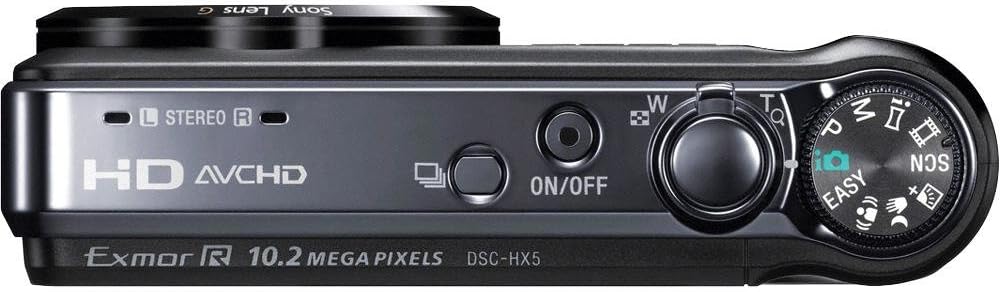
olusin 2: Top view of the DSC-HX5V, illustrating the mode dial, power button, and shutter/zoom controls.

Figure 3: Ergonomic grip of the DSC-HX5V, showing how the camera fits in hand.
2.2 Ipilẹ Photography igbe
Turn the mode dial to select your desired shooting mode.
- Ipo Aifọwọyi Aifọwọyi (iAuto): The camera automatically detects the scene and adjusts settings for optimal results. This mode is recommended for beginners.
- Program Auto Mode: Allows for more control over settings like ISO sensitivity while the camera sets exposure.
- Awọn ipo Iwoye: Select from various scene-specific presets such as High Sensitivity, Twilight, Portrait, Landscape, Beach, Snow, Fireworks, Advanced Sports Shooting, Gourmet, and Pet to optimize settings for specific conditions.
2.3 Advanced Photography Features
- "Exmor R" CMOS Sensor: Enhances low-light performance, reducing noise and improving image clarity.
- 10x Optical Zoom G-Lens: Provides a versatile 25mm wide-angle to 250mm telephoto focal range for capturing various subjects from landscapes to distant objects.
- Iduro Aworan SteadyShot Optical: Minimizes blur caused by camera shake, especially useful at longer zoom settings or in low light.
- Intelligent Sweep Panorama Mode: Capture wide panoramic images by sweeping the camera horizontally or vertically. The camera stitches multiple images automatically.
- Handheld Twilight: Captures multiple images and combines them to create a single, clear, low-noise image in low-light conditions without a tripod.
- Anti-Motion Blur Mode: Reduces blur in low-light shots by combining multiple images taken at high shutter speeds.
- High Speed Shooting (10fps): Capture fast-moving subjects with up to 10 frames per second at full 10.2-megapixel resolution.
- Backlight Correction HDR: Takes two exposures and combines them to preserve detail in both bright highlights and dark shadows in high-contrast scenes.
- Imọ-ẹrọ Ṣiṣawari Oju: Automatically detects and optimizes focus, exposure, and white balance for up to eight faces.
- Imọ-ẹrọ Shutter Smile: Ó máa ń ya fọ́tò láìfọwọ́sí nígbà tí a bá rí ẹ̀rín músẹ́.
- Iṣe Atako afọju: Captures two images and saves the one with less blinking.
- Aago Aworan ara-ẹni: Uses Face Detection to trigger a 2-second timer when your face enters the frame.
- GPS and Compass: Records location and direction data for your photos, allowing you to view them on a map with compatible software.
2.4 Gbigbasilẹ fidio
The DSC-HX5V offers high-definition video recording capabilities.
- 1080i AVCHD Movie Mode: Records high-quality Full HD video at 60i, suitable for playback on Blu-ray Disc players and compatible HDTVs.
- Ipo Fíìmù HD MP4: Records video in a web-friendly MP4 format, ideal for easy transfer to PCs and sharing on social media platforms.
- Optical SteadyShot with Active Mode: Provides enhanced image stabilization during video recording, ensuring smoother footage even while moving.
2.5 Sisisẹsẹhin ati Viewing
- 3.0-inch Clear Photo LCD: View your photos and videos on the bright, anti-reflective LCD screen.
- ViewAwọn ọna kika: Organize and find your photos using folder or calendar viewing awọn ipo.
- Àwọn Irinṣẹ́ Àtúnṣe Nínú Kámẹ́rà: Perform basic edits like trimming, red-eye correction, and unsharp masking directly on the camera.
- FỌ́TÓ ORIN: Create slideshows with music and visual effects using pre-loaded tracks or your own.
- Fọ́tòTífíìmù HD: Connect to compatible Sony BRAVIA HDTVs for optimized high-definition photo viewing.
2.6 Nsopọ mọ Awọn Ẹrọ miiran
- Ijade HDMI: Connect the camera to an HDTV using the HDMI adaptor and cable (supplied) for high-definition playback.
- Asopọ USB: Use the supplied USB cable to connect the camera to a computer for transferring photos and videos.
- TransferJet Technology: Allows for wireless transfer of files between two TransferJet enabled devices by touching them together (requires compatible devices).
- DVDirect DVD Recorder Compatibility: For easy burning of AVCHD footage to DVD (recorder and media sold separately).
- Picture Motion Browser (PMB) Software: Use the included software for managing, editing, and sharing your media on a compatible PC.
3. Itọju
3.1 Ninu kamẹra
- Lẹnsi: Use a soft, dry cloth or a lens brush to gently remove dust. For stubborn smudges, use a lens cleaning solution specifically designed for camera lenses.
- Ara: Wipe the camera body with a soft, dry cloth. Do not use organic solvents such as alcohol or thinner.
- Iboju LCD: Gently wipe with a soft, lint-free cloth. Avoid pressing hard on the screen.
3.2 batiri Itọju
- Always use the genuine Sony NP-BG1 battery pack.
- Charge the battery fully before first use and after extended periods of non-use.
- Tọju batiri naa ni itura, aye gbigbẹ nigbati ko si ni lilo.
- Yago fun ṣiṣafihan batiri si awọn iwọn otutu to gaju.
3.3 Ibi ipamọ
Nigbati o ba tọju kamẹra fun igba pipẹ, yọ batiri ati kaadi iranti kuro. Tọju kamẹra naa ni agbegbe gbigbẹ, agbegbe ti o ni afẹfẹ daradara, kuro lati oorun taara ati awọn iwọn otutu to gaju.
4. Laasigbotitusita
Ti o ba pade awọn ọran pẹlu kamẹra rẹ, tọka si awọn iṣoro ti o wọpọ ati awọn ojutu wọnyi.
| Isoro | Owun to le Fa / Solusan |
|---|---|
| Kamẹra ko ṣiṣẹ. | Batiri ti tán. Gba agbara batiri naa. A fi batiri sii ni ọna ti ko tọ. Tun fi batiri naa sinu pẹlu itọsọna ti o tọ. |
| Awọn aworan jẹ blurry. | Camera shake. Use Optical SteadyShot or a tripod. Subject is moving. Use a faster shutter speed or Advanced Sports Shooting mode. Lẹ́ńsì náà dọ̀tí. Nu lẹ́ńsì náà. |
| Aṣiṣe kaadi iranti. | Memory card is full. Delete unnecessary files or use a new card. Memory card is corrupted. Format the card (this will erase all data). Memory card is incompatible. Use a supported Memory Stick or SD card. |
| GPS signal acquisition is slow. | Camera is indoors or in an area with poor satellite reception. Move to an open outdoor area. GPS Assist Data is outdated. Update GPS Assist Data using the Picture Motion Browser software. |
| Filaṣi ko ina. | Flash mode is set to 'Flash Off'. Change the flash mode. Flash is covered. Ensure nothing is obstructing the flash unit. |
5. Awọn pato
| Ẹya ara ẹrọ | Sipesifikesonu |
|---|---|
| Orukọ awoṣe | DSC-HX5V |
| Sensọ Aworan | 10.2 MP "Exmor R" CMOS Sensor |
| Lẹnsi | Sony G-Lens, 10x Optical Zoom (25mm-250mm equivalent) |
| Iduroṣinṣin Aworan | Optical SteadyShot (with Active Mode for video) |
| Iboju LCD | 3.0-inch Clear Photo LCD (230k pixels) |
| Gbigbasilẹ fidio | 1080i AVCHD (60i), HD MP4 |
| ISO ifamọ | Laifọwọyi, 100, 200, 400, 800, 1600, 3200 |
| High Speed Shooting | Titi di 10 fps ni ipinnu kikun |
| Pataki Awọn ẹya ara ẹrọ | Intelligent Sweep Panorama, Handheld Twilight, Anti-Motion Blur, Backlight Correction HDR, GPS, Compass, Face Detection, Smile Shutter, TransferJet |
| Media Ibi ipamọ | Memory Stick Duo/PRO Duo/PRO-HG Duo, SD/SDHC |
| Batiri Iru | NP-BG1 Lithium-ion |
| Awọn iwọn (W x H x D) | 4.13 x 2.38 x 1.2 inches (isunmọ.) |
| Iwọn | 7.1 iwon (isunmọ.) |
6. Atilẹyin ọja ati Support
6.1 atilẹyin ọja Alaye
Your Sony Cyber-shot DSC-HX5V camera is covered by a limited warranty. Please refer to the warranty card included in your product packaging for specific terms and conditions, including warranty period and coverage details. Keep your proof of purchase for warranty claims.
6.2 Onibara Support
For technical assistance, troubleshooting not covered in this manual, or service inquiries, please contact Sony customer support. Visit the official Sony webaaye fun alaye olubasọrọ, FAQs, ati afikun oro.
Awọn orisun ori ayelujara le pẹlu:


