1. Ifihan
Thank you for choosing the Ground Zero GZNA 2800XII 2-Channel Amplifier. Iwe afọwọkọ yii n pese alaye pataki fun fifi sori ẹrọ to dara, iṣẹ ṣiṣe, ati itọju rẹ amplifier. To ensure optimal performance and safety, please read these instructions thoroughly before attempting to install or operate the unit. Keep this manual for future reference.
2. Awọn ilana aabo
- A ṣe iṣeduro fifi sori Ọjọgbọn: Nítorí ìṣòro àwọn ètò ohùn ọkọ̀ ayọ́kẹ́lẹ́ àti agbára gíga tí èyí ń mú jáde amplifier, professional installation by a qualified technician is strongly recommended.
- Ibi ti ina elekitiriki ti nwa: Ensure the vehicle's electrical system can support the amplifier's power requirements. Incorrect wiring can lead to fire, injury, or damage to the amplifier ati ọkọ.
- Ilẹ: Always connect the ground terminal securely to a clean, unpainted metal surface of the vehicle chassis. A poor ground connection can cause noise or malfunction.
- Idaabobo fiusi: Install an appropriate fuse (not supplied) on the power cable as close to the vehicle battery as possible. Refer to the specifications for recommended fuse ratings.
- Yago fun Ọrinrin ati Ooru: Maṣe fi han awọn amplifier to moisture, water, or extreme temperatures. Install it in a dry, well-ventilated area.
- Iṣagbesori to ni aabo: Gbe awọn amplifia lailewu lati dena rẹ lati jade lakoko awọn idaduro lojiji tabi awọn ijamba.
- Itọnisọna USB: Route all cables carefully to avoid pinching, chafing, or interference with vehicle controls. Keep power cables separate from signal cables to minimize noise.
- Awọn ipele Iwọn: Ifarahan gigun si awọn ipele iwọn didun giga le fa ibajẹ igbọran. Satunṣe iwọn didun responsibly.
3. Ọja Ipariview
The Ground Zero GZNA 2800XII is a high-performance 2-channel amplifier designed for car audio applications, capable of delivering up to 2800 Watts of maximum power. Its robust design ensures reliable operation and excellent sound reproduction.

Nọmba 1: Oke view of the Ground Zero GZNA 2800XII 2-Channel Amplifier. Awọn amplifier features a dark blue top panel with the 'GROUND ZERO NUCLEAR HIGH POWER AMPLIFIER' logo, and silver-colored heatsink fins on the sides. A small, separate black power module is visible in the upper left corner, indicating a robust power supply design.
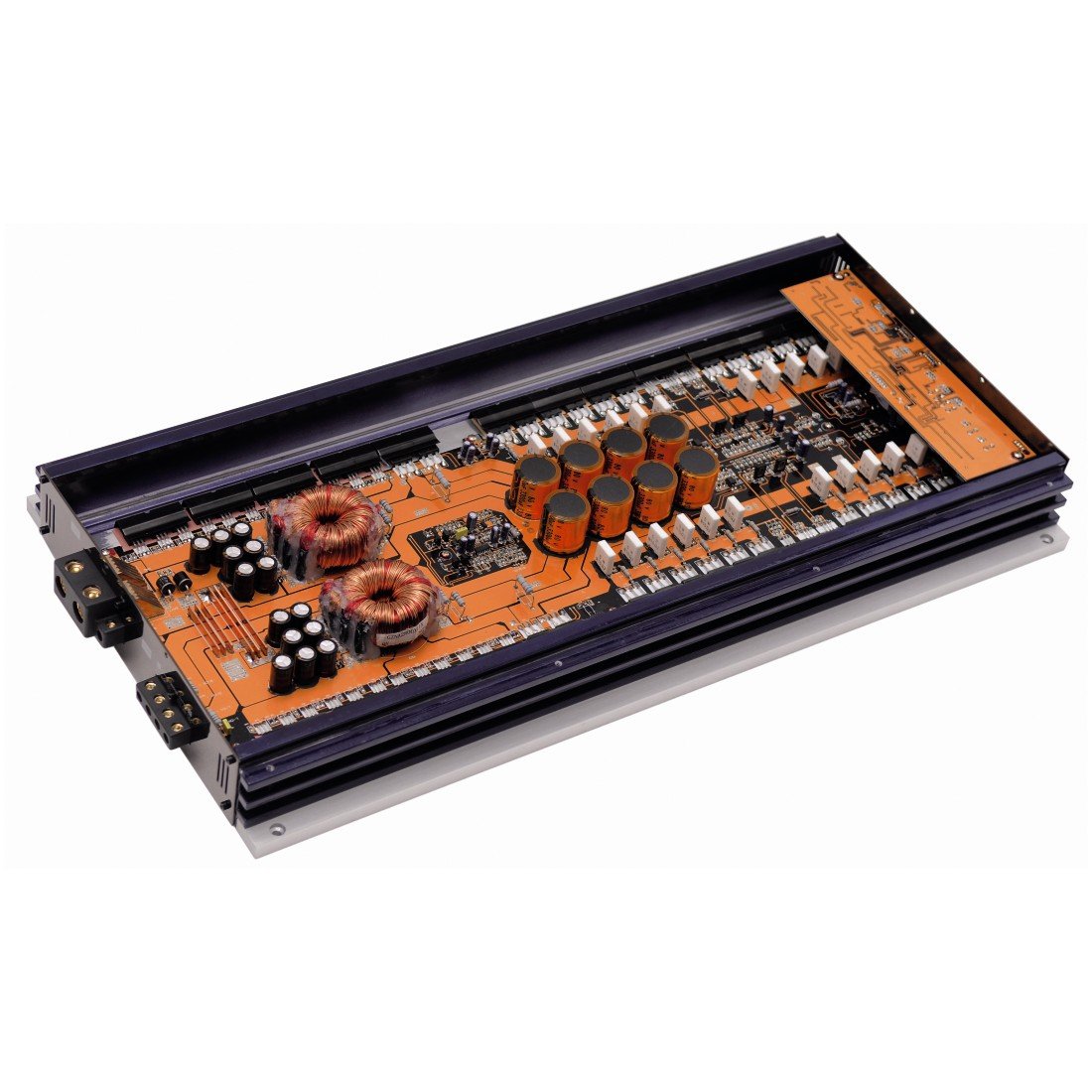
Nọmba 2: Ti abẹnu view of the Ground Zero GZNA 2800XII amplifier with the top cover removed, revealing the circuit board. The orange PCB is densely populated with high-quality components, including large toroidal transformers, numerous capacitors, and power transistors, indicating a high-current, high-power design for stable and efficient operation.
4. Eto ati fifi sori
Dara fifi sori jẹ pataki fun awọn iṣẹ ati longevity ti rẹ amplifier. Always disconnect the vehicle's battery negative terminal before starting any electrical work.
4.1. Iṣagbesori Location
- Yan ibi gbigbẹ, ti afẹfẹ si dara, kuro ni oorun taara ati awọn orisun ooru.
- Rí i dájú pé afẹ́fẹ́ tó pọ̀ tó ní àyíká amplifier's heatsink fins for proper cooling.
- Gbe awọn amplifier securely to a solid surface using appropriate hardware.
4.2. Awọn isopọ Agbara
- Power Cable (B+): Run a heavy-gauge power cable directly from the positive terminal of the vehicle's battery to the amplifier's B+ terminal. Install an in-line fuse holder with an appropriate fuse (refer to specifications) within 18 inches (45 cm) of the battery.
- Okùn ilẹ̀ (GND): So a eru-won ilẹ USB lati awọn amplifier's GND terminal to a clean, unpainted metal point on the vehicle chassis. The ground cable should be as short as possible, ideally less than 3 feet (1 meter).
- Remote Turn-On Cable (REM): Connect a smaller gauge wire from the amplifier's REM terminal to the remote turn-on output of your head unit. This signal turns the amplifier tan ati pipa pẹlu eto ohun afetigbọ ọkọ ayọkẹlẹ rẹ.
4.3. Input ifihan agbara
- So awọn kebulu RCA pọ lati awọn abajade iṣaaju-jade ori rẹ si awọn amplifier ká RCA input jacks.
- Ensure proper channel matching (Left to Left, Right to Right).
4.4. Ṣiṣejade Agbọrọsọ
- So awọn agbohunsoke rẹ pọ si amplifier's speaker output terminals. Observe correct polarity (+ to + and - to -).
- Ensure the speaker impedance matches the amplifier's recommended load.
5. Awọn ilana Iṣiṣẹ
Ni kete ti awọn amplifier is correctly installed, follow these steps for initial setup and operation:
- Agbara Ibẹrẹ: Reconnect the vehicle's battery. Turn on your head unit. The amplifier yẹ kí ó tan, tí a fi àmì LED hàn.
- Eto Ere: Bẹrẹ pẹlu awọn amplifier's gain control set to minimum. Play a familiar piece of music at a moderate volume on your head unit. Slowly increase the amplifier's gain until you hear distortion, then back off slightly. The gain control is not a volume control; it matches the amplifier's input sensitivity to the head unit's output.
- Awọn eto adakoja: Ṣatunṣe awọn amplifier's crossover filters (if available) according to your speaker type and system configuration. For subwoofers, use a Low-Pass Filter (LPF). For full-range speakers, use a High-Pass Filter (HPF).
- Iṣatunṣe Ti o dara: Make small adjustments to the gain and crossover settings to achieve balanced and clear sound.
6. Itọju
The Ground Zero GZNA 2800XII amplifier nilo itọju kekere lati rii daju pe iṣẹ ṣiṣe igba pipẹ.
- Ninu: Lẹ́ẹ̀kọ̀ọ̀kan, nu ìta ti òde ti òde náà. amplifier pẹlu asọ, gbẹ asọ lati yọ eruku. Maṣe lo awọn kẹmika ti o lewu tabi awọn afọmọ abrasive.
- Ayewo: Regularly check all wiring connections for tightness and signs of corrosion. Ensure proper ventilation around the amplifier.
- Yago fun Awọn Idilọwọ: Ma ṣe gbe awọn nkan sori oke amplifier that could block airflow to the heatsink.
7. Laasigbotitusita
Ti o ba ni iriri awọn iṣoro pẹlu rẹ amplifier, tọka si awọn iṣoro ti o wọpọ ati awọn ojutu wọnyi:
| Isoro | Owun to le Fa | Ojutu |
|---|---|---|
| Amplifier ko ni tan | No power, blown fuse, faulty ground, no remote signal | Check power cable connection, replace fuse, verify ground connection, check remote turn-on wire. |
| Ko si ohun jade | No input signal, speaker wires disconnected, gain too low, amplifier ni aabo mode | Check RCA connections, verify speaker wiring, adjust gain, check for protect light (if lit, refer to manual or contact support). |
| Ohun ti o daru | Gain set too high, poor ground, damaged speakers, incorrect crossover settings | Reduce gain, improve ground connection, inspect speakers, adjust crossover settings. |
| Excessive noise (hiss, whine) | Poor grounding, signal cable interference, faulty RCA cables | Ensure solid ground connection, route signal cables away from power cables, try different RCA cables. |
If the problem persists after attempting these solutions, please contact Ground Zero customer support or a qualified car audio technician.
8. Awọn pato
The following are the technical specifications for the Ground Zero GZNA 2800XII 2-Channel Ampolutọpa:
| Ẹya ara ẹrọ | Sipesifikesonu |
|---|---|
| Nọmba awoṣe | 00113441 |
| ASIN | B003TSD3VI |
| International Ìwé Code | 04037072004311 |
| Nọmba ti awọn ikanni | 2 |
| O pọju o wu Power | 2800 Wattis |
| Awọn ọna Voltage | 14.4 Volts (Orúkọ) |
| Iṣagbesori Iru | Sisun |
| Package Mefa | 70 x 36 x 12 cm (27.5 x 14.2 x 4.7 inches) |
| Package iwuwo | 5.44 kg (12 lbs) |
9. Atilẹyin ọja ati Support
Ground Zero products are manufactured to high-quality standards. For specific warranty information, please refer to the warranty card included with your product or visit the official Ground Zero website. In case of technical issues or questions not covered in this manual, please contact your authorized Ground Zero dealer or customer support for assistance.


