1. Ifihan
The APC SMT2200RM2U Smart-UPS is a 2200VA/1980W line-interactive uninterruptible power supply designed to provide reliable power protection for servers, storage, routers, and switches in network wiring closets and cabinets. This unit features a sine wave output, high-efficiency green mode, and includes serial and USB connectivity with a SmartSlot for accessory cards. It is designed for 2U rackmount installations.
Awọn ẹya pataki:
- 2U Rackmount Design
- Sine Wave Output for sensitive electronics
- High-Efficiency Green Mode to save energy
- Serial & USB with SmartSlot for accessory cards
- Aifọwọyi VoltagIlana (AVR)
- Hot-swappable batteries for easy maintenance
2. Alaye Aabo
Please read and understand all safety instructions before installing, operating, or maintaining the UPS. Failure to follow these instructions may result in serious injury or equipment damage.
Aabo gbogbogbo:
- UPS yii jẹ ipinnu fun lilo inu ile nikan.
- Do not operate the UPS in direct sunlight, in contact with fluids, or where there is excessive dust or humidity.
- Ensure proper ventilation around the UPS.
- Do not open the UPS enclosure. There are no user-serviceable parts inside except for the battery.
Aabo Itanna:
- Connect the UPS power cable directly to a grounded wall outlet. Do not use extension cords or adapters.
- Rii daju igbewọle voltage of the UPS matches the local utility voltage (120V).
- Always disconnect the UPS from the utility power before performing any maintenance or service.
- Batteries can present a risk of electrical shock and high short-circuit current. Observe proper precautions.
3. Ti ara Loriview
Igbimo iwaju:
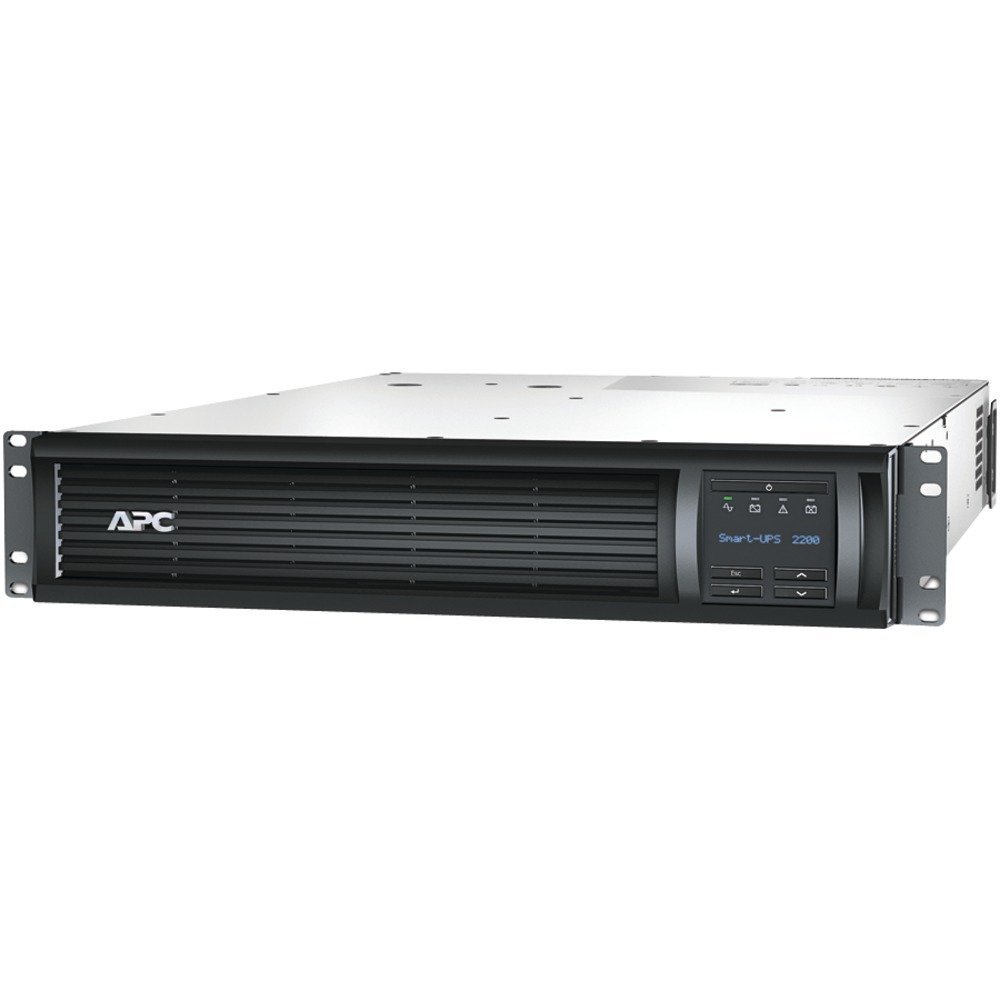
olusin 1: Iwaju view of the APC SMT2200RM2U Smart-UPS. This image shows the front of the rackmount UPS unit, featuring the APC logo on the left, a ventilated grille across the center, and an LCD display panel with control buttons on the right. The display shows 'Smart-UPS 2200'.
The front panel features an LCD display that provides real-time status information and allows for configuration. Control buttons are located next to the display for navigation and selection.
Iṣakoso yii:

olusin 2: Ẹyìn view of the APC SMT2200RM2U Smart-UPS. This image displays the back of the UPS, showing various power outlets (NEMA 5-15R and NEMA 5-20R), an input power cord, communication ports (USB, Serial), and a SmartSlot for expansion cards. Overload protectors are also visible.
The rear panel includes the main power input, multiple NEMA 5-15R and NEMA 5-20R receptacles for connecting protected equipment, communication ports (USB and Serial), and a SmartSlot for network management cards or other accessories.
4. Eto
Igbesoke agbeko:
The SMT2200RM2U is designed for installation in a standard 19-inch equipment rack, occupying 2U of rack space. Ensure the rack is stable and capable of supporting the UPS's weight (approximately 110.7 pounds). Follow the rack manufacturer's instructions for proper mounting.
Awọn isopọ:
- So Agbara Agbewọle pọ: Plug the UPS's input power cord into a dedicated, grounded 120V AC outlet.
- Ohun elo Sopọ: Plug your critical equipment into the NEMA 5-15R and NEMA 5-20R outlets on the rear panel of the UPS. Distribute the load evenly across the available outlets.
- Awọn isopọ ibaraẹnisọrọ: Connect the provided USB or serial cable from the UPS to your server for power management software communication. Install an optional network management card into the SmartSlot for remote monitoring and control.
- Gbigba agbara Batiri akọkọ: Allow the UPS to charge for at least 24 hours before connecting critical loads to ensure full battery capacity.
5. Isẹ
Titan/Apapa:
- Lati Fi agbara: Press and hold the power button on the front panel until the LCD display illuminates.
- Lati Paarẹ: Press and hold the power button until the UPS powers down. For a graceful shutdown of connected equipment, use the power management software.
Ifihan LCD ati Awọn iṣakoso:
The interactive LCD display provides comprehensive information about the UPS status and allows for various settings adjustments. Use the navigation buttons (up, down, enter, escape) to scroll through menus and select options.
Ifihan naa maa n fihan:
- Input/Ojade Voltage ati Igbohunsafẹfẹ
- Battery Capacity and Charge State
- fifuye Ogoruntage and Power (Watts/VA)
- Estimated Runtime on Battery
- Operating Mode (On Utility, On Battery, Green Mode)
- Iṣẹ ṣiṣe
- Self-Test Results
Aifọwọyi Voltage Ilana (AVR):
The UPS features Automatic Voltage Regulation (AVR) to correct minor voltage fluctuations (sags and surges) without switching to battery power. This preserves battery life and ensures a stable power supply to your connected equipment.
6. Itọju
Rirọpo Batiri:
The SMT2200RM2U is equipped with hot-swappable batteries, allowing for replacement without powering down connected equipment. Refer to the specific battery replacement instructions provided with your replacement battery kit (e.g., RBC133). Always use genuine APC replacement batteries.
Ninu:
Lokọọkan nu ode ti UPS pẹlu asọ gbigbẹ. Rii daju pe awọn ṣiṣi atẹgun ko ni eruku ati idoti lati ṣetọju ṣiṣan afẹfẹ to dara ati itutu agbaiye.
7. Laasigbotitusita
If you encounter issues with your UPS, consult the LCD display for error messages or status indicators. Common issues and basic troubleshooting steps include:
- UPS not turning on: Check the input power connection and ensure the battery is properly connected and charged.
- Short runtime on battery: The battery may be old or not fully charged. Perform a battery self-test or consider battery replacement.
- Itaniji apọju: Reduce the load connected to the UPS. Ensure the total power consumption of connected devices does not exceed the UPS's capacity (1980W).
- No communication with software: Verify USB/serial cable connections and ensure the network management card (if installed) is properly configured and connected to the network.
For more detailed troubleshooting, refer to the comprehensive user manual available on the APC website or contact APC technical support.
8. Awọn pato
| Ẹya ara ẹrọ | Sipesifikesonu |
|---|---|
| Nọmba awoṣe | SMT2200RM2U |
| Agbara Agbára Ìjáde | 2200VA / 1980W |
| Iṣagbewọle Voltage | 120 Volts |
| Iwajade Waveform | Igbi ese |
| Fọọmù ifosiwewe | 2U Rackmount |
| Batiri Iru | Acid Lead ti a ti di |
| Iwọn Nkan | 110.7 iwon |
| Àwọ̀ | Dudu |
| Ohun elo | Irin |
9. Ọja Video Loriview
Video 1: Smart-UPS X Video. This video provides a general overview of the Smart-UPS X series, highlighting its features and benefits for power protection.
10. Atilẹyin ọja ati Support
For warranty information, technical support, or service inquiries, please visit the official APC by Schneider Electric website or contact their customer service department. Keep your product's model number (SMT2200RM2U) and serial number readily available when seeking support.


