Ọrọ Iṣaaju
This manual provides comprehensive instructions for the setup, operation, maintenance, and troubleshooting of your RODE Videomic Pro on-camera microphone. Please read this manual thoroughly before using the product to ensure optimal performance and longevity.
The RODE Videomic Pro is a compact, lightweight shotgun microphone designed for use with camcorders, DSLR cameras, and portable audio recorders. Its integrated Rycote Lyre shock mounting system isolates the microphone capsule from external vibrations, providing clear audio capture.
Package Awọn akoonu
Ni ṣiṣi package, jọwọ rii daju pe gbogbo awọn paati wa:
- RODE Videomic Pro Microphone
- Foam Windshield
- Integrated Rycote Lyre Shock Mount
- 3.5mm Stereo Mini-Jack Output Cable (attached)
- Furry Wind Cover (Dead Cat)
Ṣeto
Follow these steps to set up your RODE Videomic Pro:
- Fi Batiri sii: The Videomic Pro requires a 9V battery (not included). Open the battery compartment located on the underside of the microphone body and insert the battery, observing the correct polarity.
- Iṣagbesori:
The microphone features an integrated cold shoe mount. Slide the mount into your camera's hot shoe or a compatible cold shoe adapter. Tighten the locking wheel securely to prevent accidental detachment.
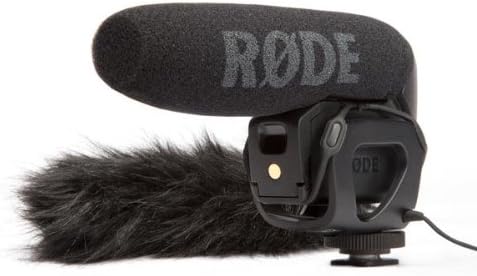
Image: The RODE Videomic Pro, a black shotgun microphone with a foam windshield, shown with an optional furry wind cover (dead cat) and its integrated shock mount. The RODE logo is visible on the foam windshield.
- Sopọ̀ mọ́ Kámẹ́rà: Plug the attached 3.5mm stereo mini-jack cable into your camera's microphone input port. Ensure the connection is firm.
- Attach Windshield: Place the foam windshield over the microphone capsule. For outdoor use or windy conditions, the included furry wind cover (dead cat) can be used over the foam windshield for superior wind noise reduction.
Awọn ilana Iṣiṣẹ
Understanding the controls and settings will help you achieve the best audio quality.
Titan / Pipa agbara
Locate the power switch on the rear of the microphone. Slide it to the 'ON' position to power on the microphone. Slide it to 'OFF' when not in use to conserve battery life.
Level Control (dB)
The Videomic Pro features a three-position level control switch on the rear:
- 0dB: Standard gain setting, suitable for most recording situations.
- +20 dB: Boosts the output level by 20dB. Useful for cameras with noisy preamps or when recording quiet sources.
- -10dB: Attenuates the output level by 10dB. Ideal for recording loud sound sources to prevent distortion.
Ajọ-Pass giga (HPF)
A three-position high-pass filter switch is also located on the rear of the microphone:
- Alapin: No filter applied. Captures the full frequency range.
- 75Hz: Engages a 75Hz high-pass filter. This helps to reduce low-frequency noise such as air conditioner hum or traffic rumble.
- 150Hz: Engages a 150Hz high-pass filter. This provides a stronger cut-off for more aggressive low-frequency noise reduction, useful in very noisy environments.
Akiyesi pataki:
Always monitor your audio using headphones connected to your camera's headphone output (if available) to ensure proper levels and prevent clipping. Adjust the microphone's level control and your camera's audio input levels accordingly.
Itoju
Proper care will extend the life of your RODE Videomic Pro:
- Ninu: Lo aṣọ rírọrùn tí ó gbẹ láti nu ara gbohungbohun náà. Má ṣe lo àwọn ohun ìfọmọ́ omi tàbí àwọn ohun èlò ìfọ́mọ́.
- Windshield Care: The foam windshield can be gently hand-washed with mild soap and water if it becomes dirty. Allow it to air dry completely before reattaching.
- Rirọpo Batiri: Replace the 9V battery when the low battery indicator light (if present) illuminates, or if you notice a decrease in audio quality. Always remove the battery if the microphone will not be used for an extended period to prevent leakage.
- Ibi ipamọ: Tọju gbohungbohun ni itura, aaye gbigbẹ, kuro lati orun taara ati awọn iwọn otutu to gaju.
- Oke Shock: The Rycote Lyre shock mount is durable, but avoid excessive force or bending to prevent damage.
Laasigbotitusita
If you encounter issues with your Videomic Pro, refer to the following common problems and solutions:
| Isoro | Owun to le Fa | Ojutu |
|---|---|---|
| No audio or very low audio level. |
|
|
| Ohùn tí ó yípadà tàbí tí a gé kúrú. |
|
|
| Excessive wind noise or low-frequency rumble. |
|
|
| Vibrations or handling noise in audio. |
|
|
Awọn pato
| Ẹya ara ẹrọ | Ẹ̀kúnrẹ́rẹ́ |
|---|---|
| Gbohungbo Fọọmù ifosiwewe | Ibọn ibọn |
| Pola Àpẹẹrẹ | Super Cardioid |
| Iwọn Igbohunsafẹfẹ | 20Hz - 20kHz (selected HPF @75Hz/150Hz) |
| Ifihan Ibuwọlu-si-Noise | 70 dB |
| Ariwo Ipele | 14 dB |
| Ifamọ Audio | 12 dB |
| Ipalara | 200 ohm |
| Asopọmọra Iru | 3.5 mm Jack |
| Orisun agbara | Battery Powered (9V battery) |
| Awọn ẹrọ ibaramu | Kamẹra |
| Iwọn Nkan | 4.3 iwon (122 Giramu) |
| Awọn iwọn Ọja (L x W x H) | 1.69 x 5.91 x 3.74 inches |
| Awọn irinše to wa | Microphone, Foam Windshield, Integrated Rycote Lyre Shock Mount, 3.5mm Cable, Furry Wind Cover |
Akiyesi: Awọn alaye ni o wa labẹ iyipada laisi akiyesi.
Atilẹyin ọja ati Support
RODE Microphones offers a comprehensive warranty for its products. For detailed warranty information, product registration, and technical support, please visit the official RODE webojula tabi kan si wọn onibara iṣẹ taara.
Awọn orisun Ayelujara:
- Official RODE Webojula: www.rode.com
- Product Support: Refer to the support section on the RODE website for FAQs, firmware updates, and service requests.
Jọwọ ṣe idaduro ẹri rira rẹ fun awọn iṣeduro atilẹyin ọja.


