1. Ifihan
This manual provides detailed instructions for the Stabila 36548 48-inch Electronic Tech Level. Designed for precision and durability, this electronic level offers fast and accurate measurements for various applications. It is built to withstand challenging job site conditions, being both dust and waterproof with an IP65 rating. This product is manufactured in Germany, ensuring high standards of quality and craftsmanship.

Figure 1: Stabila 36548 48-inch Electronic Tech Level with its protective yellow carrying case.
2. Key Awọn ẹya ara ẹrọ
- Lighted Digital Display: Features dual screens (front & top) that illuminate for easy viewing in low-light conditions and from any angle.
- Awọn ọna Ifihan pupọ: Easily switch between degrees (1 or 2 decimal points), percent, feet & inches (rise/run in decimal), feet & inches in fractions, and mm/m.
- Auto-Flipping Display: The display automatically adjusts to read correctly when the level is positioned upside down.
- Audible Tones: Provides audible signals for sight-free use, indicating when the level is perfectly horizontal or vertical.
- Simple One-Button Calibration: Allows for quick and easy calibration to maintain accuracy.
- Temporary Hold Readings: Ability to temporarily hold measurements for future reference.
- Reference Angle Setting: Set any angle as a 0-degree starting point for relative measurements.
- Ikole ti o tọ: Made from aluminum with protective shock-absorbing end caps, ensuring robustness and longevity.
- Dust and Waterproof (IP65): Designed to withstand dust and water exposure, making it suitable for various job site environments.
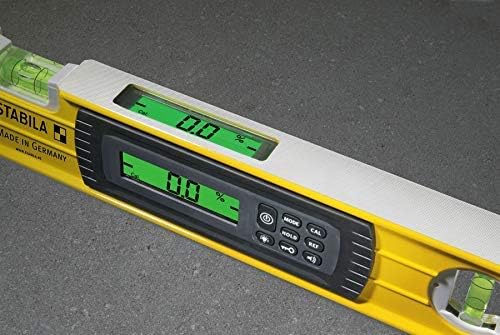
olusin 2: Isunmọ view of the lighted digital display on the Stabila 36548, showing a 0.0% reading.
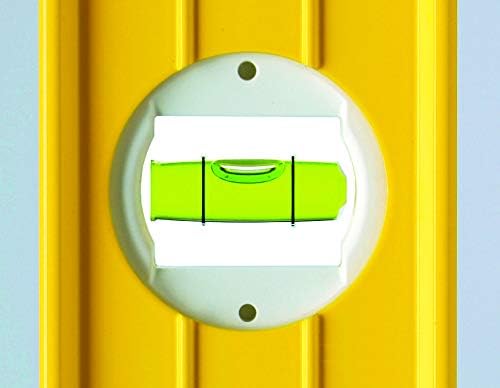
Figure 3: Detail of the top-mounted bubble vial, providing an additional visual reference for leveling.
3. Eto
3.1 Fifi sori batiri
The Stabila 36548 requires 2 AA batteries, which are included with the product. To install or replace batteries:
- Locate the battery compartment cover, typically on the side or back of the digital display unit.
- Ṣii ideri.
- Fi awọn batiri AA meji sii, ni idaniloju polarity ti o pe (+/-).
- Ni aabo pa ideri kompaktimenti batiri ni aabo.
The level is now ready for use.
4. Awọn ilana Iṣiṣẹ
4.1 Agbara Tan / Pa
Tẹ awọn Agbara button (usually marked with a circle and a vertical line) to turn the device on or off. The digital display will light up upon activation.
4.2 Selecting Measurement Modes
Tẹ awọn MODE button to cycle through the available measurement units:
- Degrees (e.g., 0.0°, 0.00°)
- Percent (e.g., 0.0%)
- Feet & Inches (rise/run in decimal or fractions)
- Millimeters per Meter (mm/m)
This versatility allows for precise slope measurements, such as those required for ADA 4.8.2 handicap ramp ibamu.
4.3 Auto-Flipping Display
The digital display automatically adjusts its orientation when the level is turned upside down, ensuring readings are always upright and easy to interpret.
4.4 Audible Tones
The level can emit audible tones to indicate when it is perfectly level or plumb, allowing for hands-free operation or use in situations where the display is not directly visible. Consult the device's interface for activating/deactivating this feature.
4.5 Idiwọn
For optimal accuracy, periodic calibration is recommended. The Stabila 36548 features a simple one-button calibration process. Refer to the on-screen prompts or the manufacturer's website for specific calibration steps.
4.6 Hold Function and Reference Angle
Lo awọn DIMU button to temporarily freeze the current measurement on the display. The REF button allows you to set the current angle as a new 0-degree reference point for relative measurements.
Fidio 1: Ọja Pariview of the Stabila Electronic Level, demonstrating its features and ease of use.
Video 2: Demonstration of using the Stabila 48-inch Digital Level for precise stair work, highlighting its utility in carpentry.
Video 3: A finifini loriview ifihanasing the consistent accuracy of the Stabila 48-inch Tech Level for various tasks.
Video 4: User review demonstrating the digital level's dual-screen visibility from both top and side perspectives.
5. Itọju
5.1 Ninu
Due to its IP65 rating, the Stabila 36548 is dust and waterproof. To clean the level, wipe it with a damp cloth. Avoid using harsh chemicals or abrasive materials that could damage the display or the level's finish.
5.2 Ibi ipamọ
Store the level in its included carrying case when not in use to protect it from physical damage and prolong its lifespan. Avoid storing it in extreme temperatures or direct sunlight for extended periods.

Figure 5: Ergonomic handle design for comfortable and secure grip during use.
6. Laasigbotitusita
6.1 Awọn kika ti ko pe
- Ṣe atunṣe: Perform a one-button calibration as described in Section 4.5.
- Ṣayẹwo Ilẹ: Ensure the surface the level is resting on is clean and free of debris.
- Ipele Batiri: Low batteries can affect performance. Replace batteries if necessary.
6.2 Ifihan Ko Ṣiṣẹ
- Agbara Tan: Ensure the level is powered on.
- Awọn batiri: Check battery installation and replace if depleted.
- Awọn ipo Ayika: Extreme temperatures can temporarily affect the display. Allow the device to return to normal operating temperature.
6.3 No Audible Tone
- Eto iwọn didun: Check if the audible tone feature is activated and the volume is set appropriately.
- Awọn idilọwọ: Rii daju pe agbọrọsọ ko ni idinamọ.
7. Awọn pato
| Iwa | Iye |
|---|---|
| Brand | Stabila |
| Nọmba awoṣe | 36548 |
| Iwọn | 48 inch |
| Ohun elo | Aluminiomu |
| Àwọ̀ | Dudu |
| Ọja Mefa | 4.7"L x 48.2"W |
| Iwọn Nkan | 3 iwon |
| Ipo Isẹ | Laifọwọyi |
| Orisun agbara | AA Batteries, Battery Powered |
| Awọn batiri ti a beere | Awọn batiri AA 2 (pẹlu) |
| Pataki Awọn ẹya ara ẹrọ | Digital, Dust & Waterproof (IP65) |
| Olupese | Stabila |
| Ọjọ Akọkọ Wa | Oṣu Kẹta Ọjọ 28, Ọdun 2011 |

Figure 6: Cross-section illustrating the robust aluminum profile of the Stabila 36548.
8. Atilẹyin ọja ati Support
8.1 atilẹyin ọja Alaye
Stabila offers a warranty that covers defects due to faulty materials or workmanship for 2 years from the date of purchase. Stabila will repair such defects without charge.
8.2 Onibara Support
For further assistance, technical support, or warranty claims, please refer to the contact information provided on the official Stabila webaaye tabi apoti ọja rẹ.


