1. Ifihan
O ṣeun fun riraasing the Supersonic SC31 5.1 Channel DVD Player with Karaoke. This manual provides essential information for the safe and efficient operation of your device. Please read it thoroughly before use and retain it for future reference.
Alaye Aabo
- Ma ṣe fi ẹrọ naa han si ojo tabi ọrinrin lati yago fun ina tabi mọnamọna.
- Maṣe ṣii minisita. Tọkasi iṣẹ si oṣiṣẹ ti o peye nikan.
- Rii daju pe fentilesonu to dara ni ayika ẹyọ naa.
- Disconnect the power cord from the wall outlet if the unit is not to be used for a long period.
- Yẹra fún gbígbé ohun èlò náà sí orí àwọn ibi tí kò dúró dáadáa.
2. Package Awọn akoonu
Daju pe gbogbo awọn nkan ti a ṣe akojọ rẹ si isalẹ wa ninu package rẹ:
- Supersonic SC31 5.1 Channel DVD Player
- Isakoṣo latọna jijin
- Awọn okun AV
- Karaoke Microphone (1 included)
- Afowoyi Olumulo (iwe-ipamọ yii)
3. Ọja Ipariview
The Supersonic SC31 is a versatile 5.1 channel DVD player featuring karaoke functionality and multiple media inputs. Familiarize yourself with the front panel controls and connections.
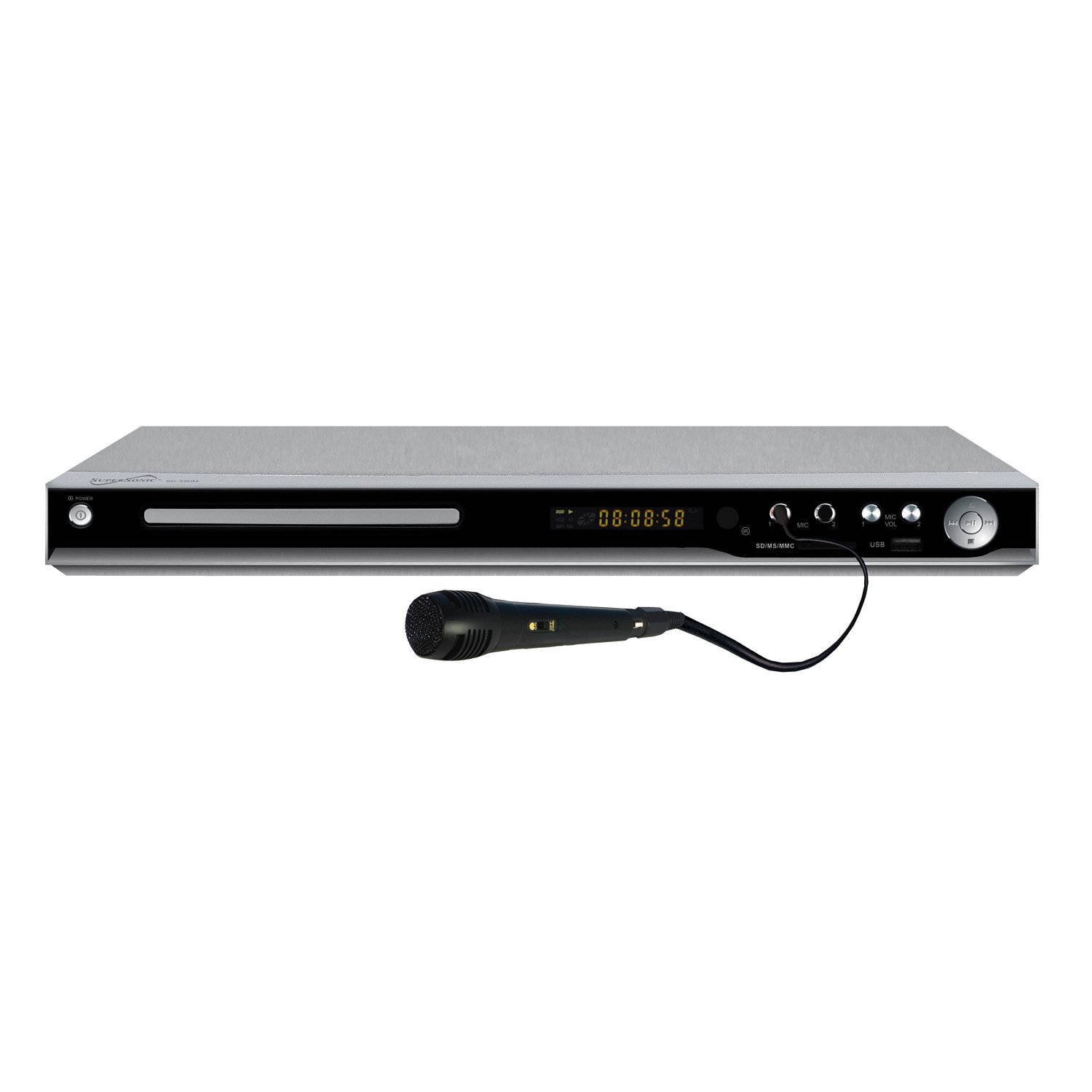
Figure 1: Front Panel of Supersonic SC31 DVD Player with Microphone. This image displays the front of the Supersonic SC31 DVD player, showing the power button, disc tray, digital display, SD/MS/MMC card slot, two microphone inputs (MIC 1 and MIC 2), microphone volume controls, USB port, and playback control buttons. A black wired microphone is plugged into the MIC 1 input.
Awọn ẹya ara Panel Iwaju:
- Bọtini AGBARA: Yipada ẹyọ naa tan tabi pa.
- Atẹtẹ Disiki: For inserting DVDs or CDs.
- Iboju ifihan: Shows playback information, track number, time, etc.
- SD/MS/MMC Card Slot: For playing media from memory cards.
- Àwọn ohun tí a fi MIC 1 / MIC 2 sí: Awọn asopọ 3.5mm fun sisopọ awọn gbohungbohun.
- MIC VOL 1 / MIC VOL 2: Rotary knobs to adjust microphone volume.
- Ibudo USB: Fun sisopọ awọn ẹrọ ipamọ USB.
- Awọn idari Sisisẹsẹhin: Play/Pause, Stop, Skip Forward/Backward buttons.
Awọn ẹya ara Panel Panel:
(Note: A detailed image of the rear panel is not available.) The rear panel typically includes:
- Audio Output (5.1 Channel): RCA jacks for connecting to a 5.1 surround sound system.
- Ohùn Sitẹrio: Left and Right RCA jacks for standard stereo connection.
- Ijade fidio: RCA (Composite Video) output for connecting to a TV.
- S-Video Ijade: For improved video quality connection.
- Ìjáde Fídíò Àwọn Ẹ̀yà Ara (YPbPr): For high-quality video connection.
- Coaxial/Optical Digital Audio Output: For digital audio connection to compatible receivers.
- Input Agbara AC: Fun asopọ okun agbara.
4. Eto
4.1 Nsopọ si Telifisonu kan
Use the supplied AV cables to connect the DVD player to your television.
- Connect the yellow video cable from the DVD player's "VIDEO OUT" port to the yellow "VIDEO IN" port on your TV.
- Connect the red and white audio cables from the DVD player's "AUDIO OUT (L/R)" ports to the corresponding red and white "AUDIO IN (L/R)" ports on your TV.
- Alternatively, for better video quality, use an S-Video or Component Video (YPbPr) connection if your TV supports it.
4.2 Connecting to an Audio System (5.1 Channel)
For a full surround sound experience, connect the DVD player to a 5.1 channel audio receiver.
- Connect the 5.1 channel audio output jacks (Front Left, Front Right, Center, Subwoofer, Surround Left, Surround Right) from the DVD player to the corresponding 5.1 channel input jacks on your audio receiver.
- Ensure all connections are secure and correctly matched (color-coded).
- Alternatively, use the Coaxial or Optical Digital Audio Output for a digital connection to a compatible receiver.
4.3 Asopọ agbara
- Plug the AC power cord into the AC power input on the rear of the DVD player.
- Pulọọgi awọn miiran opin ti awọn agbara okun sinu kan boṣewa iṣan iṣan.
4.4 Microphone Connection for Karaoke
- Connect the supplied microphone to either the "MIC 1" or "MIC 2" input jack on the front panel of the DVD player.
- If using a second microphone (sold separately), connect it to the remaining microphone input.
5. Awọn ilana Iṣiṣẹ
5.1 Basic DVD/CD Playback
- Tẹ awọn AGBARA bọtini lati tan DVD player.
- Tẹ awọn ŠI / PADE button (usually on the remote or front panel) to open the disc tray.
- Place a DVD or CD disc gently into the tray with the label side facing up.
- Tẹ awọn ŠI / PADE bọtini lẹẹkansi lati pa atẹ naa.
- The player will automatically begin playback or display the disc menu.
- Use the remote control's navigation buttons (UP, DOWN, LEFT, RIGHT, ENTER) to select menu options.
- Lo awọn ERE/SINMI, DURO, SILE awọn bọtini lori latọna jijin tabi iwaju nronu lati ṣakoso ṣiṣiṣẹsẹhin.
5.2 USB/SD/MMC/MS Input Playback
The player supports media playback from USB drives and various memory cards (SD, MS, MMC).
- Insert your USB drive into the USB port or your memory card into the SD/MS/MMC slot on the front panel.
- The player should automatically detect the device and display a media browser. If not, use the ORISUN or USB/Kaadi button on the remote to switch input.
- Lilö kiri nipasẹ rẹ files (MP3, JPEG, etc.) using the remote control and press WOLE to play or view.
5.3 Karaoke Išė
Enjoy karaoke with compatible discs or media files.
- Ensure microphones are connected to the front panel MIC inputs.
- Play a karaoke-compatible DVD or CD.
- Ṣatunṣe iwọn gbohungbohun nipa lilo awọn MIC VOL 1 ati MIC VOL 2 knobs on the front panel.
- Some karaoke discs may have options to turn vocal tracks on/off or adjust key/echo via the disc menu or remote control functions (refer to disc instructions).
5.4 Latọna Iṣakoso Lilo
The remote control provides full functionality for the DVD player. Insert two AAA batteries (not included) into the remote control, observing correct polarity.
- AGBARA: Tan/Pa a.
- ŠI/PADE: Opens/closes disc tray.
- ṢETO: Accesses system settings menu.
- MENU/TITLE: Accesses disc menu or title menu.
- NAVIGATIONAL BUTTONS (UP/DOWN/LEFT/RIGHT/ENTER): Fun lilọ kiri akojọ aṣayan.
- PLAY/PAUSE, STOP, FAST FORWARD/REWIND, SKIP: Playback controls.
- Iwọn +/-: Adjusts main audio volume.
- DÁKÚN: Mu ohun jade silẹ.
- OHUN: Selects audio track/language.
- AKỌKỌ: Selects subtitle language.
- Angle: Changes camera angle on compatible DVDs.
- Ikun: Ó fẹ̀ sí àwòrán náà.
- Tun: Repeats current track/chapter/disc.
6. Itọju
6.1 Ninu Unit
- Mu ese ita kuro pẹlu asọ ti o gbẹ.
- Ma ṣe lo awọn afọmọ abrasive, waxes, tabi awọn nkanmimu.
- Rii daju pe ẹyọ kuro ti yọọ kuro ṣaaju ṣiṣe mimọ.
6.2 Àwọn Díìsì Mímú
- Mu awọn disiki mu nipasẹ awọn egbegbe wọn lati yago fun awọn ika ọwọ.
- Wipe discs with a soft, lint-free cloth from the center outwards.
- Ma ṣe lo awọn kẹmika lile tabi awọn ohun elo abrasive lori awọn disiki.
7. Laasigbotitusita
If you encounter problems with your DVD player, refer to the following common issues and solutions:
| Isoro | Owun to le Fa | Ojutu |
|---|---|---|
| Ko si agbara | Okun agbara ko sopọ; agbara iṣan aṣiṣe. | Ṣayẹwo asopọ okun agbara; gbiyanju kan ti o yatọ iṣan. |
| Ko si aworan | Video cables incorrectly connected; incorrect TV input selected. | Ensure video cables are securely connected; select the correct AV input on your TV. |
| Ko si ohun | Audio cables incorrectly connected; TV/receiver volume too low or muted. | Check audio cable connections; increase volume on TV/receiver; check mute status. |
| Disiki ko dun | Dísìkì tí a fi sínú rẹ̀ ní ọ̀nà tí kò tọ́; dísìkì náà dọ̀tí tàbí ó ti gé; ìrísí dísìkì tí kò ní àtìlẹ́yìn. | Reinsert disc correctly; clean disc; ensure disc format (DVD/CD/SVCD/VCD/MP3/JPEG/CD-R/CD-RW) is supported. |
| Gbohungbohun ko ṣiṣẹ | Microphone not connected; MIC VOL knob too low. | Ensure microphone is securely plugged into MIC 1 or MIC 2; increase the corresponding MIC VOL knob. |
| Isakoṣo latọna jijin ko ṣiṣẹ | Awọn batiri ti ku tabi fi sii lọna ti ko tọ; idiwo laarin latọna jijin ati ẹrọ orin. | Replace batteries; ensure correct polarity; remove any obstructions; point remote directly at the player's sensor. |
8. Awọn pato
Technical specifications for the Supersonic SC31 DVD Player:
- Awoṣe: SC31
- Brand: Supersonic
- Media Iru: CD, DVD
- Awọn ọna kika ibaramu: DVD/CD/SVCD/VCD/MP3/JPEG/CD-R/CD-RW
- Ipo Ijade Ohun: 5.1 ikanni Yika Ohun
- Imọ-ẹrọ Asopọmọra: USB
- Input Video Compatibility: NTSC
- Nọmba awọn ikanni: 5.1
- Awọn igbewọle: USB, SD/MS/MMC, 2x Microphone Jack
- Awọn abajade: 5.1 Channel Audio, Stereo Audio (L/R), Composite Video, S-Video, Component Video (YPbPr), Coaxial/Optical Digital Audio
- Awọn iwọn ọja: Isunmọ 10 x 8.7 x 1.5 inches
- Ìwọ̀n Nkan: Ni isunmọ 1.5 poun
- UPC: 639131000339
9. Atilẹyin ọja ati Support
For warranty information or technical support, please refer to the warranty card included with your product or contact Supersonic customer service directly. Contact details are typically available on the manufacturer's official webojula.
Please note: Warranty terms and conditions may vary and are subject to change without prior notice.


