Ọrọ Iṣaaju
This instruction manual provides comprehensive guidance for the installation, operation, maintenance, and troubleshooting of your Intel Classic DH61CR Desktop Motherboard. Please read this manual thoroughly before proceeding with installation or operation to ensure proper functionality and to prevent damage to the product or other components.
The Intel DH61CR motherboard is designed to support Intel LGA 1155 socket processors and DDR3 memory, offering a reliable foundation for personal computer systems.
Eto ati fifi sori
1. Unpacking and Component Overview
Carefully remove the motherboard from its packaging. Inspect all components for any signs of damage. Ensure all accessories listed in the product documentation are present.
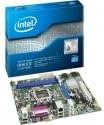
Image: The Intel DH61CR Desktop Motherboard shown alongside its retail packaging. This image provides a visual reference for the product and its initial presentation.
Familiarize yourself with the layout of the motherboard, including the CPU socket, RAM slots, expansion slots, and various connectors.
2. Fifi sori ẹrọ CPU (Socket LGA 1155)
- Wa iho LGA 1155 Sipiyu lori modaboudu.
- Rọra Titari lefa fifuye si isalẹ ki o fa si ẹgbẹ lati ṣii fireemu idaduro iho Sipiyu.
- Mu aami onigun mẹta pọ si lori Sipiyu pẹlu aami ti o baamu lori iho. Farabalẹ gbe Sipiyu sinu iho lai fi agbara mu.
- Pa fireemu idaduro naa duro ki o ni aabo nipasẹ titari lefa fifuye pada si ipo titiipa rẹ.
- Apply a thin, even layer of thermal paste to the top of the CPU (if not pre-applied to the cooler).
- Install the CPU cooler according to its manufacturer's instructions, ensuring it is securely fastened and making good contact with the CPU.
3. Fifi sori ẹrọ Ramu (DDR3)
- Identify the DDR3 memory slots. The Intel DH61CR supports DDR3 RAM.
- Ṣii awọn agekuru ni opin mejeji ti iho iranti.
- Parapọ ogbontarigi lori DDR3 iranti module pẹlu awọn bọtini ni iranti iho.
- Press down firmly on both ends of the memory module until the clips snap into place, securing the module.
4. Fifi sori ẹrọ ẹrọ ipamọ
Connect your SATA hard drives or solid-state drives to the SATA ports on the motherboard using SATA data cables. Ensure the power cables from your power supply are also connected to these devices.
5. Awọn isopọ Ipese Agbara
- So asopo agbara ATX 24-pin lati ipese agbara rẹ si iho agbara akọkọ lori modaboudu.
- Connect the 4-pin (or 8-pin, if applicable) ATX 12V power connector to the CPU power socket.
- Rii daju pe gbogbo awọn asopọ agbara wa ni aabo.
6. Iwaju Panel Awọn isopọ
Connect the front panel cables from your computer case (power button, reset button, HDD LED, power LED, USB ports, audio jacks) to the corresponding headers on the motherboard. Refer to the motherboard's silkscreen labels for correct pin assignments.
7. Àwọn Káàdì Ìfẹ̀síwájú
Install any necessary expansion cards (e.g., graphics card, network card) into the appropriate PCIe x16 or PCIe x1 slots. Secure them with the case's retention mechanism.
Awọn ilana Iṣiṣẹ
1. Bata akọkọ
After all components are installed and connected, connect your monitor, keyboard, and mouse. Power on the system. The system should display the BIOS POST screen. If not, refer to the Troubleshooting section.
2. BIOS/UEFI Access
Lati wọle si ohun elo BIOS/UEFI, tẹ bọtini ti a yan (ni deede Del, F2, tabi F10) during the initial boot sequence. The exact key is usually displayed on the screen during POST.
Within the BIOS/UEFI, you can configure boot order, system time, hardware settings, and other advanced options. Save changes before exiting.
Itoju
1. Ninu
Regularly clean the interior of your computer case to prevent dust buildup, which can lead to overheating. Use compressed air to remove dust from fans, heatsinks, and motherboard components. Ensure the system is powered off and unplugged before cleaning.
2. Awọn imudojuiwọn BIOS
Lojoojumọ ṣayẹwo atilẹyin Intel website for BIOS updates for your DH61CR motherboard. BIOS updates can improve system stability, add support for new hardware, or fix bugs. Follow the instructions provided by Intel carefully when performing a BIOS update to avoid system damage.
Laasigbotitusita
Ti o ba ni awọn iṣoro, tunview awọn igbesẹ ti o wọpọ lati yanju awọn iṣoro wọnyi:
- Ko si Agbara: Ensure all power cables (24-pin ATX, 4-pin CPU) are securely connected. Check the power supply unit (PSU) switch and wall outlet.
- Ko si Ifihan: Verify the monitor is connected and powered on. Ensure the graphics card (if dedicated) is properly seated and powered. If using integrated graphics, confirm the monitor is connected to the motherboard's video output.
- System Beeps: A series of beeps during startup usually indicates a hardware issue. Consult the motherboard's beep code guide (often found on the manufacturer's support website) to diagnose the specific problem (e.g., RAM error, graphics card issue).
- Aisedeede/iparun eto: Check for proper CPU cooler installation and thermal paste application. Ensure RAM modules are correctly seated. Test memory with diagnostic tools. Update drivers and BIOS.
- Operating System Not Loading: Verify the boot order in BIOS/UEFI. Check SATA cable connections to storage devices. Ensure the operating system is correctly installed on a bootable drive.
For persistent issues, consult the Intel support webaaye tabi kan si atilẹyin imọ-ẹrọ wọn.
Imọ ni pato
| Ẹya ara ẹrọ | Sipesifikesonu |
|---|---|
| Brand | Intel |
| Orukọ awoṣe | DH61CRB3 |
| Sipiyu Socket | LGA 1155 |
| Awọn isise ibaramu | Intel Core i3-2100, Intel Core i5-2400, Intel Core i7-2600, Pentium |
| Chipset Iru | Intel H61 Express |
| Ramu Memory Technology | DDR3 |
| O pọju Ramu | 8 GB |
| Iyara aago iranti | 1333 MHz |
| Awọn ẹrọ ibaramu | Kọmputa ti ara ẹni |
| Ibi Interface | Serial ATA/300 |
| Imugboroosi Iho | 1 x PCIe x16 Iho |
| Ijade fidio | CPU Dependent Video |
| Platform | Windows 7, Windows Vista Ultimate |
| Ọja Mefa | 10.5 x 8.5 x 2 inches |
| Iwọn Nkan | 1.9 iwon |
| Olupese | Intel |
| Ọjọ Akọkọ Wa | Oṣu Kẹrin Ọjọ 30, Ọdun 2012 |
Atilẹyin ọja ati Support
Warranty information for the Intel Classic DH61CR Desktop Motherboard is typically provided with the product at the time of purchase or can be found on the official Intel webojula. Jọwọ ṣe idaduro ẹri rira rẹ fun awọn iṣeduro atilẹyin ọja.
For technical support, driver downloads, and additional documentation, please visit the official Intel support website. You can often find detailed FAQs and community forums there to assist with common issues.
Note: Intel's official support channels are the primary resource for product-specific assistance.


