1. Ifihan
Thank you for choosing the FILCO Majestouch 2 TKL Keyboard. This ten-keyless mechanical keyboard is engineered for superior typing experience, featuring durable Cherry MX Brown tactile switches. Its robust construction and compact design make it an ideal choice for both professional and personal use. This manual provides essential information for setting up, operating, maintaining, and troubleshooting your new keyboard.
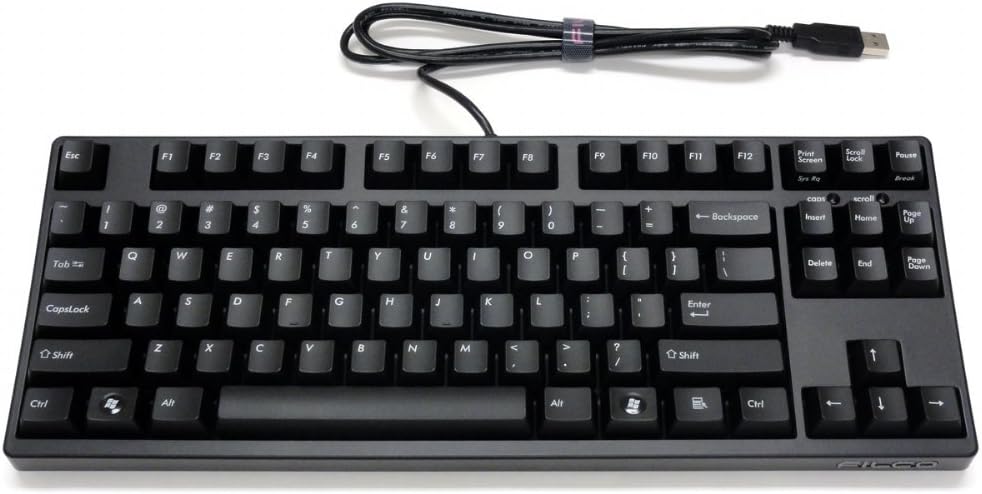
olusin 1.1: Top-isalẹ view of the FILCO Majestouch 2 TKL Keyboard.
2. Eto
The FILCO Majestouch 2 TKL Keyboard is designed for simple plug-and-play operation.
2.1 Package Awọn akoonu
- FILCO Majestouch 2 TKL Keyboard (Cherry MX Brown)
- Okùn USB (ti a so mọ)
- Afowoyi Olumulo (iwe-ipamọ yii)
2.2 Nsopọ Keyboard
- Wa ibudo USB ti o wa lori kọnputa rẹ.
- Insert the USB connector of the keyboard cable into the USB port.
- Eto ẹrọ yoo rii laifọwọyi ati fi awọn awakọ pataki sii. Ko si fifi sori software ni afikun ni igbagbogbo nilo.
- Once installed, the keyboard is ready for use.

Figure 2.1: The FILCO Majestouch 2 TKL Keyboard with its integrated USB cable.
3. Key Awọn ẹya ara ẹrọ
- Ten-Keyless Design: A compact layout without the numeric keypad, saving desk space and improving ergonomics for mouse usage.
- Àwọn Ìyípadà Ṣẹ́rí MX Brown: Provides a tactile bump without an audible click, offering a balanced typing experience suitable for both typing and gaming.
- True N-Key Rollover (NKRO): Allows for simultaneous pressing of multiple keys without ghosting or missed inputs, ensuring every keystroke is registered accurately. This feature is crucial for fast typists and gamers.
- Solid and Stylish Construction: Built with high-quality materials for durability and a premium feel.
- Asopọmọra USB: Standard USB interface for broad compatibility.
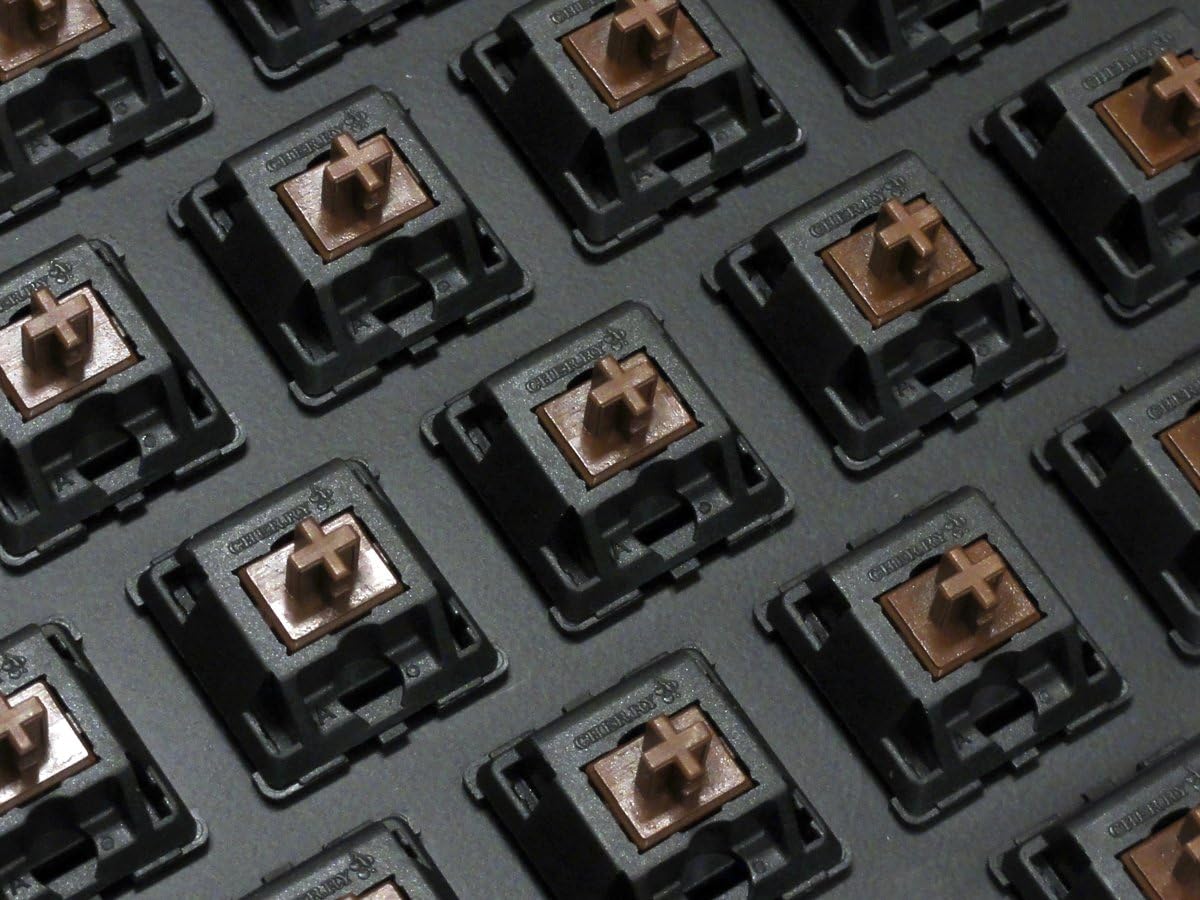
olusin 3.1: Isunmọ view of the Cherry MX Brown mechanical switches.
4. Isẹ
The FILCO Majestouch 2 TKL operates as a standard USB keyboard.
4.1 Ipilẹ Lilo
Simply type as you would on any standard keyboard. The tactile feedback of the Cherry MX Brown switches provides a distinct feel for each key press, enhancing typing accuracy and comfort.
4.2 N-Key Rollover (NKRO)
The keyboard supports True N-Key Rollover via USB. This means that every key pressed simultaneously will be registered by the computer, preventing "ghosting" or "key jamming" issues common with standard keyboards. This feature is automatically active and does not require any special configuration.
4.3 Awọn imọlẹ Atọka
The keyboard features standard indicator lights for Caps Lock, Scroll Lock, and Num Lock (though Num Lock functionality is typically managed by the operating system on TKL keyboards). These lights illuminate when the respective function is active.

Figure 4.1: Right side of the keyboard, highlighting navigation keys and indicator lights.
5. Itọju
Proper care will extend the life and maintain the performance of your FILCO Majestouch 2 TKL Keyboard.
5.1 Ninu
- Ge asopọ keyboard kuro lati kọnputa rẹ ṣaaju ṣiṣe mimọ.
- Lo asọ asọ, ti ko ni lint die-die dampti a fi omi kun tabi ojutu mimọ kekere lati nu awọn bọtini bọtini ati casing.
- Fun eruku ati idoti laarin awọn bọtini, lo afẹfẹ fisinuirindigbindigbin tabi fẹlẹ kekere kan.
- Yẹra fun lilo awọn kẹmika lile, awọn olutọpa abrasive, tabi ọrinrin pupọ, nitori iwọnyi le ba keyboard jẹ.
5.2 Ibi ipamọ
Nigbati o ko ba wa ni lilo fun awọn akoko ti o gbooro sii, tọju bọtini itẹwe si ibi ti o tutu, ibi gbigbẹ kuro lati orun taara ati awọn iwọn otutu to gaju.

olusin 5.1: Underside view of the keyboard, illustrating its robust internal construction.
6. Laasigbotitusita
If you encounter issues with your keyboard, please refer to the following common solutions.
6.1 Keyboard Ko fesi
- Rii daju pe okun USB ti sopọ ni aabo si bọtini itẹwe mejeeji ati ibudo USB ti kọnputa naa.
- Gbiyanju lati so keyboard pọ mọ ibudo USB ti o yatọ lori kọnputa rẹ.
- Ṣe ìdánwò keyboard lórí kọ̀ǹpútà mìíràn láti mọ̀ bóyá ìṣòro náà wà pẹ̀lú keyboard tàbí kọ̀ǹpútà àtilẹ̀wá.
- Tun kọmputa rẹ bẹrẹ.
6.2 Awọn bọtini Ko Iforukọsilẹ tabi Titẹ-meji
- Ensure the keyboard is clean and free of debris that might obstruct key movement. Refer to the Maintenance section for cleaning instructions.
- If the issue persists, it may indicate a hardware problem. Contact customer support for assistance.
6.3 Indicator Lights Not Working
- Verify that the corresponding function (Caps Lock, Scroll Lock) is active.
- Rii daju pe keyboard ti sopọ daradara ati gbigba agbara.
7. Awọn pato
| Ẹya ara ẹrọ | Ẹ̀kúnrẹ́rẹ́ |
|---|---|
| Nọmba awoṣe | FKBN87M/EB2 |
| Keyboard Iru | Mechanical, Ten-Keyless (TKL) |
| Yipada Iru | Cherry MX Brown (Tactile) |
| Asopọmọra | USB |
| Nọmba ti Awọn bọtini | 87 |
| N-Kọtini Rollover | True N-Key Rollover (NKRO) |
| Awọn iwọn (L x W x H) | 13.98 x 5.43 x 1.42 inches (35.5 x 13.8 x 3.6 cm) |
| Iwọn | 2.2 poun (1 kg) |
| Ohun elo | Acrylonitrile Butadiene Styrene (ABS) |
8. Atilẹyin ọja ati Support
8.1 atilẹyin ọja Alaye
FILCO products are manufactured to high quality standards. For specific warranty terms and conditions, please refer to the warranty card included with your product or visit the official FILCO webojula. Jeki ẹri rira rẹ fun awọn iṣeduro atilẹyin ọja.
8.2 Onibara Support
If you require further assistance or have questions not covered in this manual, please contact FILCO customer support. Contact information can typically be found on the official FILCO webaaye tabi lori apoti ọja rẹ.
Official FILCO Webojula: www.filco.co.jp (Jọwọ ṣakiyesi: Website content may vary by region.)


