1. Ifihan
The Onkyo SBX-300 iOnly BASS Dock Music System is designed to provide high-quality audio playback for your iPod, iPhone, or iPad devices. This system features digital amplifier circuitry, full-range bass-reflex speakers, and advanced bass control functions to enhance your listening experience. This manual provides essential information for the proper setup, operation, and maintenance of your SBX-300 unit.
Video 1: Onkyo Brand Overview. Yi fidio pese kan gbogboogbo loriview of the Onkyo brand's commitment to sound quality for home and life. While not specific to the SBX-300, it illustrates the brand's focus on audio excellence.
2. Alaye Aabo pataki
- Read all instructions carefully before operating the unit.
- Jeki iwe afọwọkọ yii fun itọkasi ọjọ iwaju.
- Ma ṣe fi ẹrọ naa han si ojo tabi ọrinrin lati yago fun ina tabi mọnamọna.
- Rii daju pe fentilesonu to dara. Ma ṣe dina awọn ṣiṣi atẹgun.
- Lo awọn asomọ/awọn ẹya ara ẹrọ ti a sọ pato nipasẹ olupese.
- Yọọ kuro lakoko iji manamana tabi nigbati a ko lo fun igba pipẹ.
- Tọkasi gbogbo iṣẹ si awọn oṣiṣẹ iṣẹ ti o peye.
3. Eto Itọsọna
3.1 Package Awọn akoonu
Jẹrisi pe package rẹ ni awọn nkan wọnyi ninu:
- Onkyo SBX-300 iOnly BASS Dock Music System
- Adaparọ Agbara AC
- Remote Control (RC-832S)
- Ilana Afowoyi (iwe yii)
3.2 Nsopọ Agbara
- Connect the AC power adapter cable to the DC IN jack on the rear of the SBX-300 unit.
- Pulọọgi ohun ti nmu badọgba agbara AC sinu iṣan ogiri boṣewa kan.
- Ẹyọ naa yoo wọ ipo imurasilẹ.
3.3 Gbigbe Unit
Place the SBX-300 on a stable, flat surface. Ensure there is adequate space around the unit for proper ventilation, especially at the rear where the reflex woofer ducts are located.
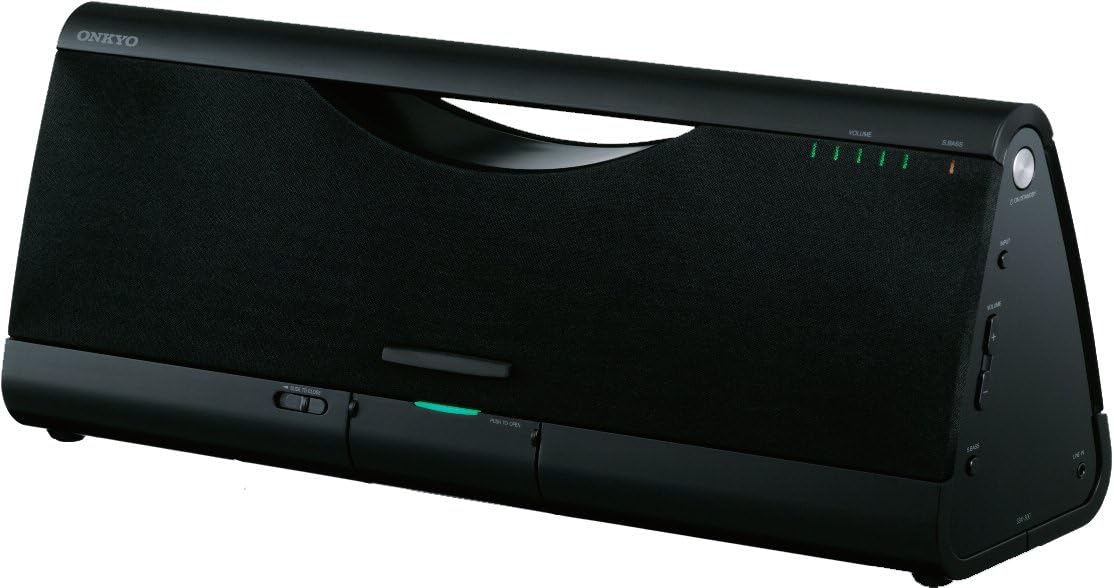
Aworan 1: Iwaju view of the Onkyo SBX-300. This image displays the front of the SBX-300 unit, showing the speaker grille, volume indicators, and the dock area.
3.4 Docking an iPod/iPhone/iPad
The SBX-300 features a dust-free digital dock for compatible Apple devices. To dock your device:
- Gently press the "PUSH TO OPEN" button located on the front panel to reveal the dock connector.
- Carefully align your iPod, iPhone, or iPad with the 30-pin connector in the dock.
- Gently push your device down onto the connector until it is securely seated.
- The device will begin charging and can be used for audio playback.
Awọn awoṣe ibaramu: iPod touch (1st, 2nd, 3rd, and 4th Generation), iPod classic, iPod nano (2nd, 3rd, 4th, 5th, and 6th Generation), iPhone 4, iPhone 3GS, iPhone 3G, iPhone, iPad 2, iPad.
3.5 Connecting External Audio Devices (AUX Input)
To connect other audio devices:
- Locate the AUX IN jack on the rear of the SBX-300 unit.
- Connect an audio cable (not supplied) from your external audio device's headphone output or line output to the AUX IN jack.
- Select the AUX input source on the SBX-300 (refer to Section 4.3).
4. Awọn ilana Iṣiṣẹ
4.1 Titan / Pa a
- To turn on the unit: Press the AGBARA bọtini lori kuro tabi isakoṣo latọna jijin.
- To turn off the unit (standby): Press the AGBARA bọtini lẹẹkansi.
4.2 Iṣakoso iwọn didun
- On the unit: Rotate the Iwọn didun tẹ bọtini ni apa aago lati mu iwọn didun pọ si, ni ọna lodi si aago lati dinku.
- Lori isakoṣo latọna jijin: Tẹ awọn Idibo + or ÌWỌN - awọn bọtini.
- To mute: Press the MUTU button on the remote control. Press again to unmute.
4.3 Orisun Aṣayan
Tẹ awọn ÀWỌN Ọ̀RỌ̀ button on the remote control to cycle through available input sources (Dock, AUX).
4.4 Super Bass Function
The Super Bass function enhances low-frequency sound. Press the S.BASS bọtini lori iṣakoso latọna jijin lati mu iṣẹ yii ṣiṣẹ tabi mu ṣiṣẹ.
4.5 Active Bass Control
Active Bass Control ensures perfectly balanced bass at low volume levels. This feature is automatically managed by the unit to optimize bass response.
4.6 Lilo isakoṣo latọna jijin
The supplied remote control (RC-832S) allows convenient operation of the SBX-300 from a distance. Ensure the remote control has a working battery and is pointed towards the unit's front panel.

Image 2: Onkyo RC-832S Remote Control. This image shows the layout of the remote control, including buttons for power, input selection, menu navigation, volume, and bass control.
Refer to the button labels on the remote for specific functions such as Play/Pause, Skip Track, Menu, and Enter, which control your docked Apple device.
5. Itọju
5.1 Ninu Unit
- Before cleaning, unplug the power cord from the wall outlet.
- Use a soft, dry cloth to wipe the exterior surfaces of the unit.
- Do not use abrasive cloths, waxes, polishes, or chemical cleaning agents, as these may damage the finish.
5.2 Dust-Free Digital Dock Care
The dock connector is designed to be dust-free when closed. If dust or debris accumulates around the connector when open, use a soft, dry brush or compressed air to gently clean the area. Avoid touching the connector pins directly.
6. Laasigbotitusita
If you experience issues with your SBX-300, refer to the following common problems and solutions:
| Isoro | Owun to le Fa | Ojutu |
|---|---|---|
| Ko si agbara | Okun agbara ko sopọ; Odi iṣan ko ṣiṣẹ | Ensure power cord is securely connected. Test the wall outlet with another device. |
| Ko si ohun | Volume too low; Mute activated; Incorrect input source; Device not docked properly | Increase volume. Deactivate mute. Select correct input source (Dock/AUX). Re-dock your Apple device. |
| Ohun ti o daru | Volume too high; Audio source issue; Device not seated correctly | Lower the volume. Check the audio source for distortion. Re-dock your Apple device. |
| iPod/iPhone/iPad not charging or recognized | Device not properly docked; Incompatible device; Dock connector dirty | Ensure device is firmly seated in the dock. Verify device compatibility. Clean the dock connector if necessary. |
| Isakoṣo latọna jijin ko ṣiṣẹ | Battery depleted; Obstruction between remote and unit; Remote not pointed correctly | Replace the remote control battery. Remove any obstructions. Point the remote directly at the unit's front panel. |
7. Awọn pato
- Awoṣe: SBX-300
- Awọn agbọrọsọ: 4 1/8" (10.5 cm) Full-Range Bass-Reflex Speakers
- Ampolutọpa: Oni-nọmba Amplifier Circuitry
- Imudara Bass: Super Bass Function, Active Bass Control
- Iṣawọle: iPod/iPhone/iPad Digital Audio Connection, AUX IN (3.5mm stereo mini-jack)
- Ibi ti ina elekitiriki ti nwa: AC 100-240V, 50/60Hz (via AC adapter)
- Awọn iwọn (W x H x D): 17.69 x 5.19 x 6.94 inches (44.9 x 13.2 x 17.6 cm)
- Ìwúwo: 7.7 poun (3.5 kg)
- Awọn ẹrọ ibaramu: iPod touch (1st, 2nd, 3rd, 4th Gen), iPod classic, iPod nano (2nd, 3rd, 4th, 5th, 6th Gen), iPhone, iPhone 3G, iPhone 3GS, iPhone 4, iPad, iPad 2.
8. Atilẹyin ọja ati Support
8.1 Atilẹyin ọja to lopin
Onkyo products are manufactured to high quality standards and are backed by a limited warranty. The specific terms and duration of your warranty may vary by region and purchase date. Please retain your proof of purchase for warranty claims. For detailed warranty information, refer to the warranty card included with your product or visit the official Onkyo webojula.
8.2 Onibara Support
For technical assistance, service, or inquiries regarding your Onkyo SBX-300, please contact Onkyo customer support. Contact information can typically be found on the official Onkyo webaaye tabi ninu iwe ti a pese pẹlu ọja rẹ.
Atilẹyin Ayelujara: Visit the official Onkyo webAaye fun awọn FAQ, awọn nkan atilẹyin, ati awọn fọọmu olubasọrọ.
Atilẹyin foonu: Refer to your regional Onkyo website for local customer service telephone numbers.


